

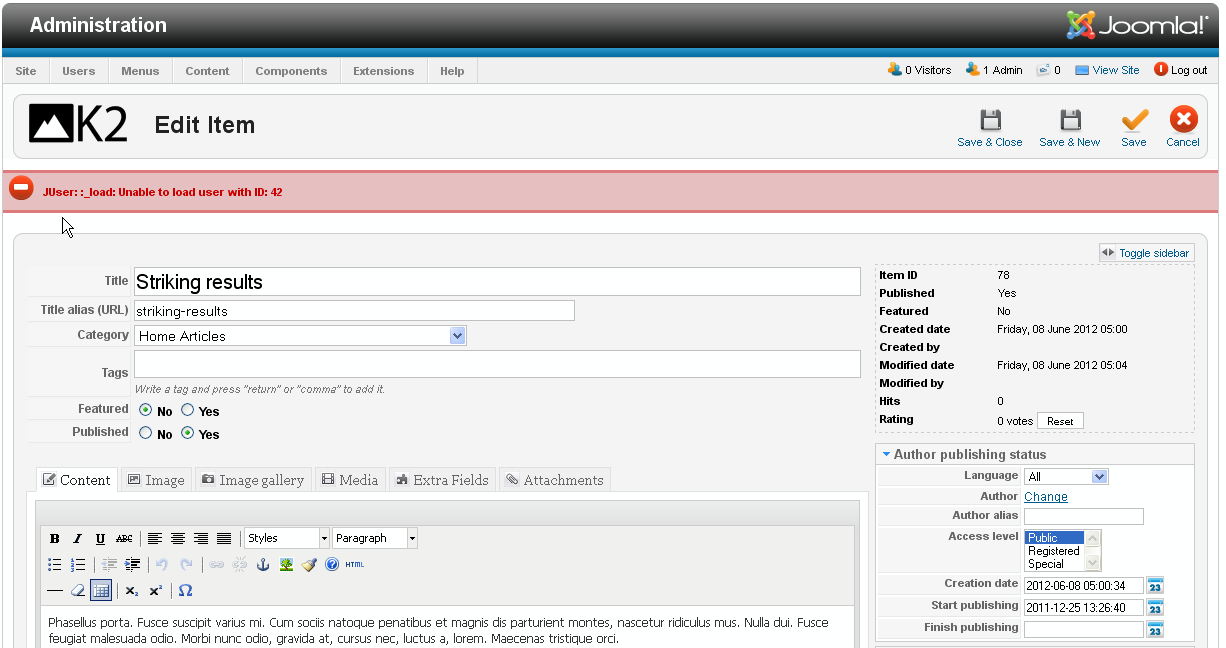
حل مشكلة JUser: :_load: Unable to load user with ID: 62” Error on Joomla
سبب المشكلة ان التمبلت الذى تم رفعه بعض الاضافات مربوطة بحساب superuser له رقم فى جدول قاعدة البيانات
هنا هو 62 و الحل هو انشاء عضوية جديدة و تغيير رقمها من 72 مثلا الى 62 وسنتهى المشكلة تماما , تم اقتباس ملخص الحل .
The issue may occur in case you use Joomla 2.5.5 or higher version of engine and the template version is up to Joomla 2.5.4, and you installed template sample data (dump.sql). The issue is related to “Default admin user created with id 42” fix in Joomla 2.5.5 release: Default admin user created with id 42You can’t choose which ID a user will have before it’s created. But, once that user is created, you can change its ID. Here’s how you can do that:
- Create a super administrator through Joomla’s User Manager.
- Change that user’s ID to 62 in the #__users table through phpMyAdmin.
- Change the ID of that user in the table #__user_usergroup_map to 62.
The above is, in our opinion, the best way to address this issue, but you will need to have access to phpMyAdmin (or you need to have programming skills) to do it
In order to fix the issue, you need to perform the following actions:
First of all, please make sure to backup your database before any modifications!
1) Open your Joomla database using PHPMyadmin tool.
2) Find and open (click “Browse” icon) “jos_users” table:
3) Find and open (click “Edit” icon) the record with “Super User” name:
4) Change Super User id value to 42 and click “Go” button:
5) Find and open (click “Browse” icon) “jos_user_usergroup_map” table.
6) Find and open (click “Edit” icon) the record with “group_id” value 8, change “user_id” value to 42, then click “Go” button:
7) Logout from Joomla admin section and login back
That’s all, the issue should be fixed.
Feel free to check the detailed video tutorial below:
-----------------------------------------------------------------
Some of the very old websites that we migrate to Joomla 2.5 may show the following error on K2 or VirtueMart pages:
JUser: :_load: Unable to load user with ID: 62 (Note that 62 might be another number, such as 42)
The reason for the error is that the component is trying to load a user (such as the user that created the article in K2) but is not able to find it (which is very normal in a Joomla 2.5 migration, since the main super administrator, who typically has an ID of 62 in Joomla 1.5, has a different ID in Joomla 2.5).
There are multiple fixes for this issue
- Suppress the error by changing a core file Although we really don’t like changing core files, we have to say that this an extremely easy fix that is guaranteed to work. Here’s how to do it:
- Open the file user.php (through FTP) located under the libraries/joomla/user directory.
- Remove the following line (which is line 886):
JError::raiseWarning('SOME_ERROR_CODE', JText::sprintf('JLIB_USER_ERROR_UNABLE_TO_LOAD_USE R', $id));- Save the file and upload it back.
- That’s it!
Note that even if the user.php is overwritten in a future Joomla update, all you need to do is to apply the above again and you should be OK!- Set the JLIB_USER_ERROR_UNABLE_TO_LOAD_USER string to empty
This is another change to a core file, but this change is less likely to be overridden by future Joomla updates, this is because you are changing a language file. Here’s how to do it:
- Open the file en-GB.lib_joomla.ini located under the language/en-GB directory.
- Change the following line (which is typically line 624):
JLIB_USER_ERROR_UNABLE_TO_LOAD_USER="JUser: :_load: Unable to load user with ID: %s"
to:
JLIB_USER_ERROR_UNABLE_TO_LOAD_USER=""
…and that should work!- Fix the data
Fixing the data consists of going into the database and changing all references to the user ID 62 with another user (typically the first super admin created on your Joomla website).
This can be done either manually or through a script. If done manually, then this can take many hours (if not days) and is definitely error prone. If done through a script, then it can be done quickly but you might risk breaking the whole website if your script goes berserk. Beware!- Set the ID of a newly created super administrator to 62
You can’t choose which ID a user will have before it’s created. But, once that user is created, you can change its ID. Here’s how you can do that:
- Create a super administrator through Joomla’s User Manager.
- Change that user’s ID to 62 in the #__users table through phpMyAdmin.
- Change the ID of that user in the table #__user_usergroup_map to 62.
The above is, in our opinion, the best way to address this issue, but you will need to have access to phpMyAdmin (or you need to have programming skills) to do it.- Fix the script that tries to load the ID
While this might sound like the best idea, it can turn into a horrible nightmare. This is because K2 and VirtueMart are both extremely complicated and delicate extensions and trying to change their core is much worse than changing Joomla’s own core. Keep clear if you’re not a programming expert, and consider the much easier options listed above!
+ إنشاء موضوع جديد
النتائج 1 إلى 1 من 1
-
21-02-2017, 00:30 #1Status
- Offline

- تاريخ التسجيل
- Apr 2014
- الدولة
- Egypt
- المشاركات
- 4,703
 Engineering and Technology
- معدل تقييم المستوى
- 10
 حل مشكلة JUser: :_load: Unable to load user with ID: 62” Error on Joomla
------------------------------------------------------------------------
حل مشكلة JUser: :_load: Unable to load user with ID: 62” Error on Joomla
------------------------------------------------------------------------
شركة رايز للهندسة و التكنولوجيا Rise Company for Engineering & Technology
------------------------------------------------------------------------
Web Hosting | Web Designing | E-Marketing
رقم # 1 فى خدمات الشركات Business Services
استضافة مواقع Web Hosting - عمل ايميل شركة Business Emails
تصميم موقع شركة Web Design - تسويق الكترونى على جوجل Google Adwords
www.rise.company | www.rise.company/emails
ملحوظة : جميع خدماتنا مخصصة للشركات فقط وغير متاحة للافراد
وليس لنا اى منتجات او صيانة نهائيا! يرجى الانتباه الى ذلك.

 رد مع اقتباس
المواضيع المتشابهه
-
حل مشكلة We were unable to charge your ad account - Unsettled Ad Account
بواسطة Rise Company في المنتدى قسم فيسبوك Facebookمشاركات: 0آخر مشاركة: 02-05-2016, 07:01 -
حل مشكلة error PHP Strict Standards
بواسطة Rise Company في المنتدى رايز للاستضافة Rise Hostمشاركات: 0آخر مشاركة: 05-12-2015, 04:22 -
حل مشكلة The package could not be installed. PCLZIP_ERR_BAD_FORMAT (-10) : Unable to
بواسطة Rise Company في المنتدى قسم ووردبريس WordPressمشاركات: 0آخر مشاركة: 01-06-2015, 15:52 -
حل مشكلة (فشل تسجيل دخول الخدمة) user profile service
بواسطة Eng Amr Adel في المنتدى قسم الاي تي IT مشاكل و حلولمشاركات: 0آخر مشاركة: 20-10-2013, 01:03 -
حل مشكلة : [SOLVED] (Error code: ssl_error_rx_record_too_long)
بواسطة Eng Amr Adel في المنتدى رايز للويب Rise Webمشاركات: 2آخر مشاركة: 12-03-2011, 16:01

المفضلات