


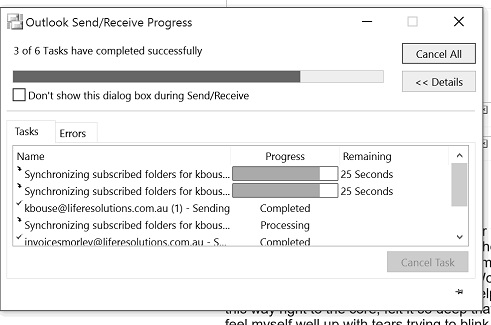
حل مشكلة و الغاء السينك Synchronizing Subscribed Folders فى الاوت لوك Outlook
هذه المشكلة تحدث مع ايميلات SMTP ولا تحدث مع POP3 و جميع الاعدادات ستظهر اذا كان الايميل SMTP
يظل معلق فترة طويله على السينك دون الانتهاء
قم بفتح الاوت لوك ثم ادخل على File ثم على Options ثم اختر تصنيف Advanced ثم Send/Receive
سيظهر All accounts اضغط Edit ستجدها على اليمين ثم اختر الايميل الذى به SYnc
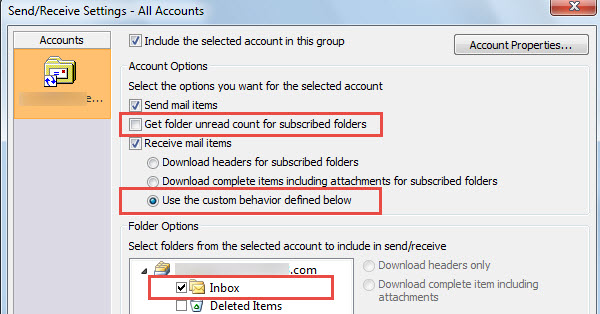
قم بازالة علامة الصح من Get folder unread count for subscribed folders
وفى الاسفل ستجد under Received mail items قم بعمل علامة صح على User the custom behavior defined below
واختار فقط Inbox و ستجد ان مشكلة Sync اختفت تماما.
1) Navigate to File >> Options >> Advanced >> scroll down to the send/receive heading >> click on the send/receive button on the right
2) On the right hand side of the send/receive groups window that opens click on the Edit button
3) Un-check the "Get folder unread count for subscribed folders"
4) under Received mail items, check the option "User the custom behavior defined below"
5) In the window below that displays your Gmail folders just select inbox and leave the others unchecked
6) click ok and then exit out of options and perform a send/receive to test if it is now working
+ إنشاء موضوع جديد
النتائج 1 إلى 1 من 1
مشاهدة المواضيع
-
31-07-2017, 12:52 #1Status
- Offline

- تاريخ التسجيل
- Apr 2014
- الدولة
- Egypt
- المشاركات
- 4,703
 Engineering and Technology
- معدل تقييم المستوى
- 10
 حل مشكلة و الغاء السينك Disable Synchronizing Subscribed Folder فى الاوت لوك Outlook
------------------------------------------------------------------------
حل مشكلة و الغاء السينك Disable Synchronizing Subscribed Folder فى الاوت لوك Outlook
------------------------------------------------------------------------
شركة رايز للهندسة و التكنولوجيا Rise Company for Engineering & Technology
------------------------------------------------------------------------
Web Hosting | Web Designing | E-Marketing
رقم # 1 فى خدمات الشركات Business Services
استضافة مواقع Web Hosting - عمل ايميل شركة Business Emails
تصميم موقع شركة Web Design - تسويق الكترونى على جوجل Google Adwords
www.rise.company | www.rise.company/emails
ملحوظة : جميع خدماتنا مخصصة للشركات فقط وغير متاحة للافراد
وليس لنا اى منتجات او صيانة نهائيا! يرجى الانتباه الى ذلك.

 رد مع اقتباس
المواضيع المتشابهه
-
شرح إعداد بريد اوت لوك على الاوت لوك setup Outlook on Outlook
بواسطة Rise Company في المنتدى قسم الايميلات Emailsمشاركات: 0آخر مشاركة: 22-11-2016, 17:39 -
شرح إعداد بريد جى ميل على الاوت لوك setup Gmail on Outlook
بواسطة Rise Company في المنتدى قسم الايميلات Emailsمشاركات: 0آخر مشاركة: 11-10-2016, 14:07 -
شرح إعداد بريد هوتميل على الاوت لوك setup Hotmail on Outlook
بواسطة Rise Company في المنتدى قسم الايميلات Emailsمشاركات: 0آخر مشاركة: 11-10-2016, 14:07 -
شرح إعداد بريد ياهو على الاوت لوك setup Yahoo mail on Outlook
بواسطة Rise Company في المنتدى قسم الايميلات Emailsمشاركات: 0آخر مشاركة: 11-10-2016, 14:06 -
طلب فك الحظر عن الاي بي المحظور على الهوت ميل او outlook
بواسطة Eng Amr Adel في المنتدى قسم الايميلات Emailsمشاركات: 0آخر مشاركة: 30-10-2014, 14:39

المفضلات