

فتح و مشاركة وتعديل ملف وورد / اكسيل على اكثر من جهاز فى نفس الوقت Real Time Editing
Collaborate - Real-time co-authoring
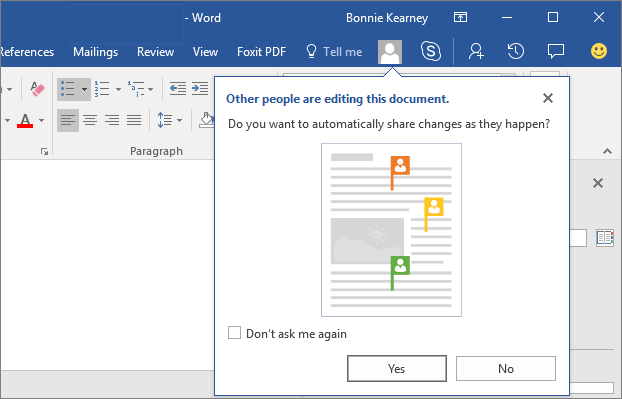
Enables Real-Time Collaberation Editing
Simultaneously edit a document with other authors
share your document and work together
وهي ميزة العمل علي نفس الوثيقة في نفس الوقت مع الزملاء، فمثلا عند العمل علي مستند Word أو شريحة PowerPoint
يمكن للزملاء التعديل على نفس الوثيقة إذا كانت محفوظة في SharePoint في نفس الوقت، وهي ميزة للكتابة الجماعية والتشارك في إخراج المستندات.
اصدارات البرنامج التى تدعم التعديل الفورى على الملف من خلال اكثر من شخص فى الحال هى
Word 2013, Word 2016, and Word Online
مع العلم ان اصدار 2016 يظهر التعديل Live فى الحال وهو الافضل
You can simultaneously edit a document with other authors in all 3. But Word 2013 won’t be as real-time as the others. The co-authoring notifications are useful but slightly less informative, edits lag a bit behind, and the number of authors editing is buried in the lower left of the status bar; no share button.Word Online is great for general editing, and it’s great for real-time collaboration, but it doesn’t have advanced formatting features that you might need for more sophisticated document composition. If you have to choose between Word 2013 and Word Online for co-authoring, you might lean toward Word Online if you can forego fancy stuff like fiddling with the TOC and advanced table layouts.
Word 2016 has the ideal tools for co-authoring, with the share button in the upper right, the share panel giving easy access to co-authors and real-time editing, all in the full-featured version of the software.هذا الزر فى اعلى البرنامج على اليسار هو المسئول عن مشاركة الملف مع شخص اخر فى التحرير
باضافة ايميل الشخص الذى تريده ان يحرر معك الملف
شرح تفصيلى للخطوات هنا
المرجع :
http://www.knowledgewave.com/blog/of...-other-authors
https://word.tips.net/T000534_Multip...ent_Users.html
https://support.office.com/en-us/art...D0EAABAAA=2016
+ إنشاء موضوع جديد
النتائج 1 إلى 1 من 1
-
08-11-2017, 03:50 #1Status
- Offline

- تاريخ التسجيل
- Apr 2014
- الدولة
- Egypt
- المشاركات
- 4,703
 Engineering and Technology
- معدل تقييم المستوى
- 10
 فتح و مشاركة وتعديل ملف وورد / اكسيل على اكثر من جهاز فى نفس الوقت Live
------------------------------------------------------------------------
فتح و مشاركة وتعديل ملف وورد / اكسيل على اكثر من جهاز فى نفس الوقت Live
------------------------------------------------------------------------
شركة رايز للهندسة و التكنولوجيا Rise Company for Engineering & Technology
------------------------------------------------------------------------
Web Hosting | Web Designing | E-Marketing
رقم # 1 فى خدمات الشركات Business Services
استضافة مواقع Web Hosting - عمل ايميل شركة Business Emails
تصميم موقع شركة Web Design - تسويق الكترونى على جوجل Google Adwords
www.rise.company | www.rise.company/emails
ملحوظة : جميع خدماتنا مخصصة للشركات فقط وغير متاحة للافراد
وليس لنا اى منتجات او صيانة نهائيا! يرجى الانتباه الى ذلك.


 رد مع اقتباس
المواضيع المتشابهه
-
فتح ملف على اكثر من جهاز فى نفس الوقت - وورد Word او اكسيل Excel
بواسطة Rise Company في المنتدى رايز للكمبيوتر Rise Computerمشاركات: 0آخر مشاركة: 08-11-2017, 03:04 -
نسخة جديدة WordPress 3.8.3 وورد 3.8.3 متوفر الآن
بواسطة Mouhammedmoustafa في المنتدى رايز للويب Rise Webمشاركات: 0آخر مشاركة: 16-04-2014, 19:42 -
كل مايتعلق بالقوالب من تركيب وتصميم وتعديل اتجاه- اوبن كارت opencart
بواسطة Eng Amr Adel في المنتدى رايز للويب Rise Webمشاركات: 0آخر مشاركة: 13-09-2013, 21:46 -
شرح تنزيل php Live Installation
بواسطة Eng Amr Adel في المنتدى رايز للاستضافة Rise Hostمشاركات: 0آخر مشاركة: 22-10-2012, 14:17 -
Windows Live Messenger 2010
بواسطة Eng Amr Adel في المنتدى رايز للكمبيوتر Rise Computerمشاركات: 0آخر مشاركة: 19-04-2010, 04:31

المفضلات