

شرح تفعيل calendar and contact applications فى Cpanel
الفرق بين CalDAV و CardDAV داحل cpanel
تسهيل مزامنة جهات الاتصال مع جهاز iOS عبر CardDAV
في حال كنت أحد مستخدمي نظام iOS أصبح الآن من السهل مزامنة بيانات حسابكتفعيل calendars and contacts يعتمد على CalDAV و CardDAV
الموجودة فى هواتف الاى فون Iphone بدأ من الاصدار 10
مع جهاز Apple iOS (iPhone وiPad وiPod touch)، نوصي باستخدام CardDAV وهو أحد معايير الإنترنت المفتوحة.
ستتمكن من تعديل الأسماء وإضافتها إلى الجهاز وإزالتها منه، فضلاً عن الاحتفاظ بمزامنتها في أي مكان تستخدمها فيه.
synchronize cPanel calendars and contacts using CardDAV and CalDAV using iOS devices
Apple clients provide native support for CalDAV and CardDAV. CalDAV and CardDAV plugins are available for Microsoft Outlook and Thunderbird. Installable CalDAV and CardDAV apps are availble for Android phones.
Calendar and contacts synchronization used common internet standards called CalDAV and CardDAV. These standards are natively supported on some operating systems (such as iOS and Mac OS) while configuration on other operating systems, such as Android and Windows, require assistance from third-party applications.
اعدادات السى بنل :الاي فون مبنى بداخله تقنية CalDAV و CardDAV اما الاندرويد لا يوجد تلك التقنية به
ولكن ينفع تنزيل من متجر جوجل بلاى اضافة تعمل نفس الوظيفة.
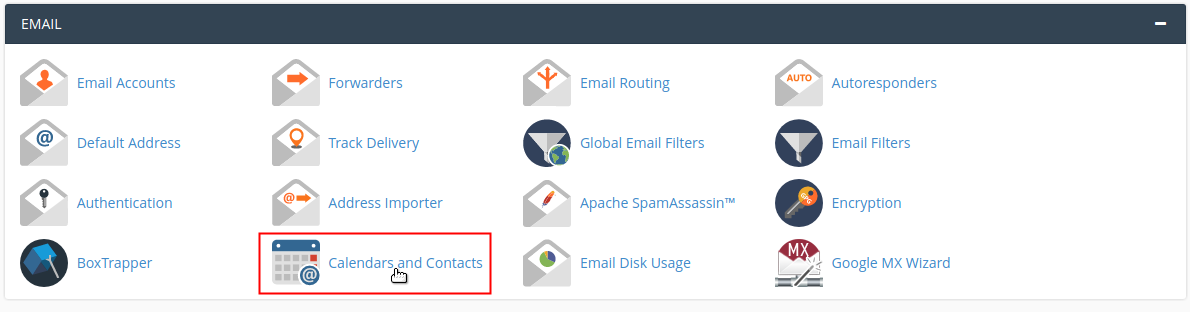
cPanel >> Home >> Email >> Calendars and Contacts
----------------------------------------------------------------------------
اعدادات الاى فون :
Access the account configuration menu.
----------------------------------------------------------------------------
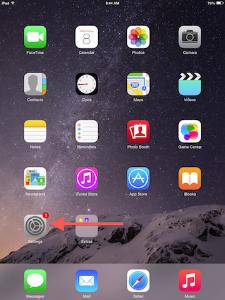
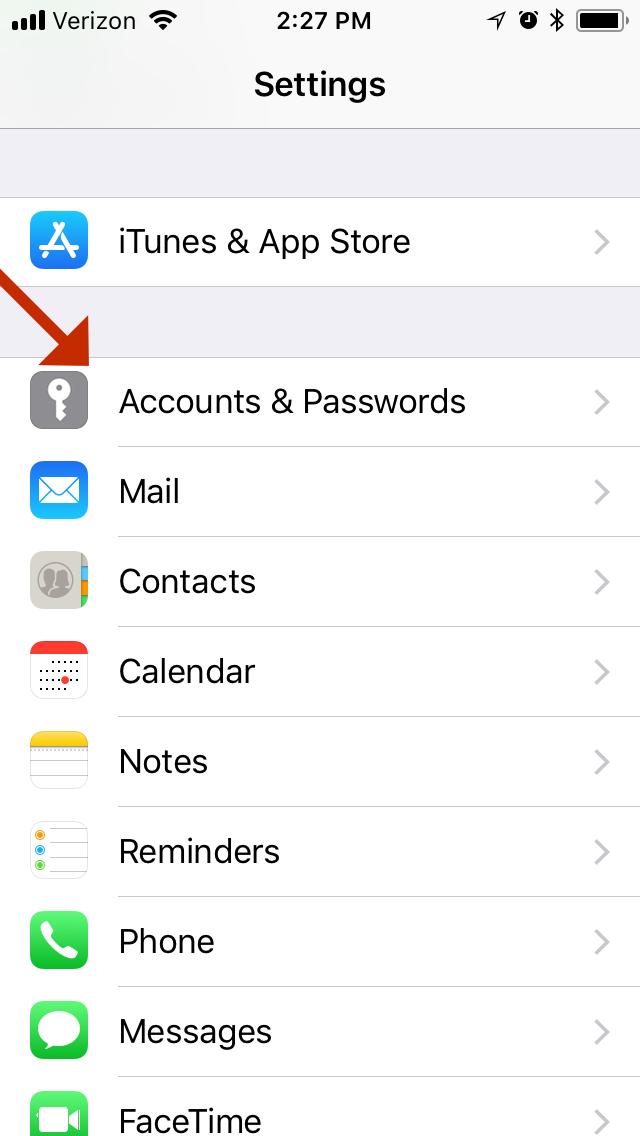
Perform the following steps to access the calendars (CalDav) and contacts (CardDav) account configuration menu on your iOS device:
Tap Settings.
Tap Accounts & Passwords.
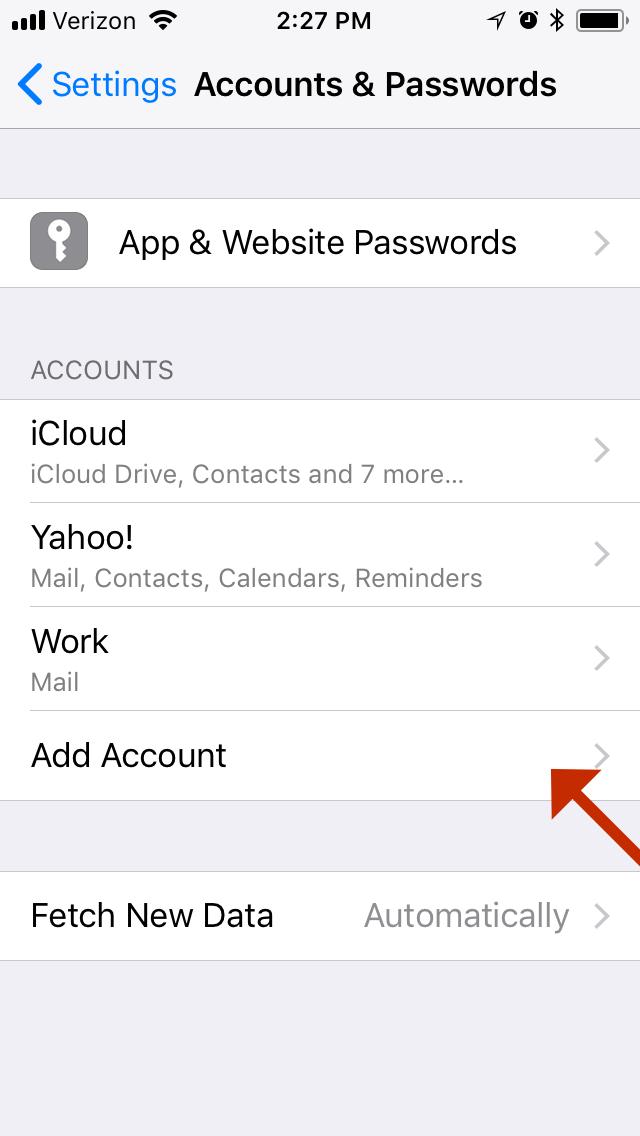
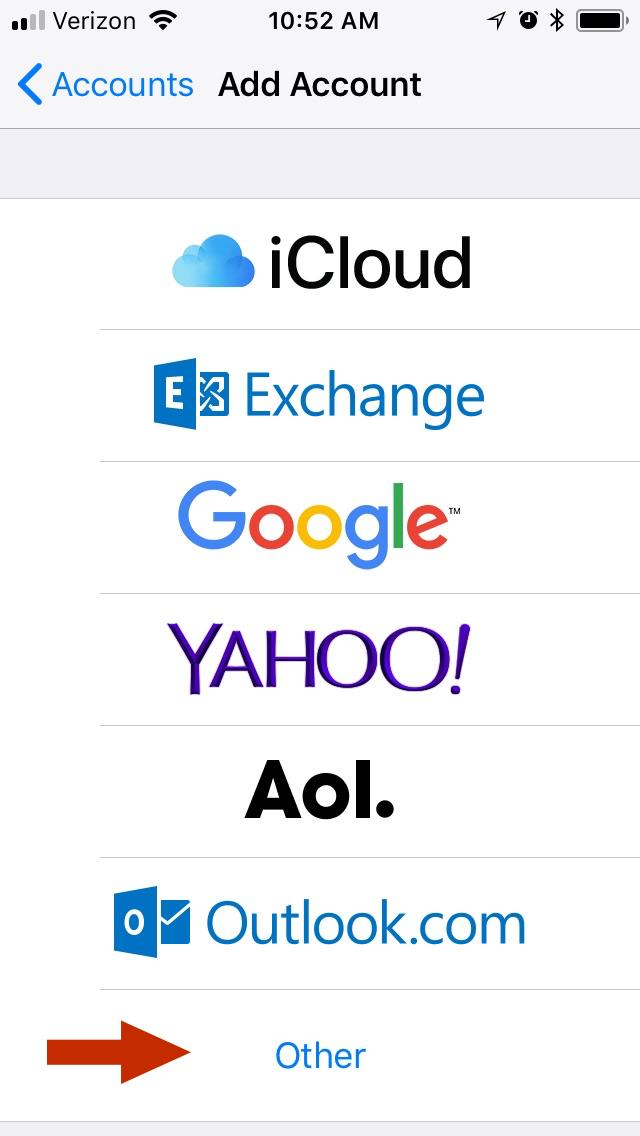
- Under ACCOUNTS, tap Add Account.
- Tap Other.
----------------------------------------------------------------------------
----------------------------------------------------------------------------
Add the appropriate account type.
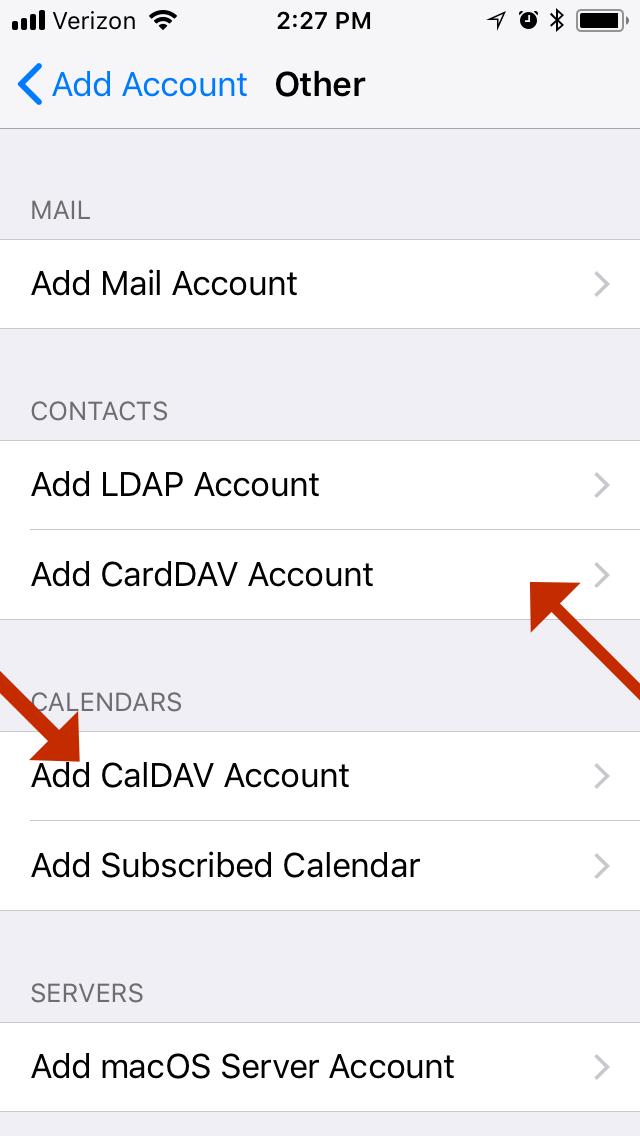
Perform either of the following actions:
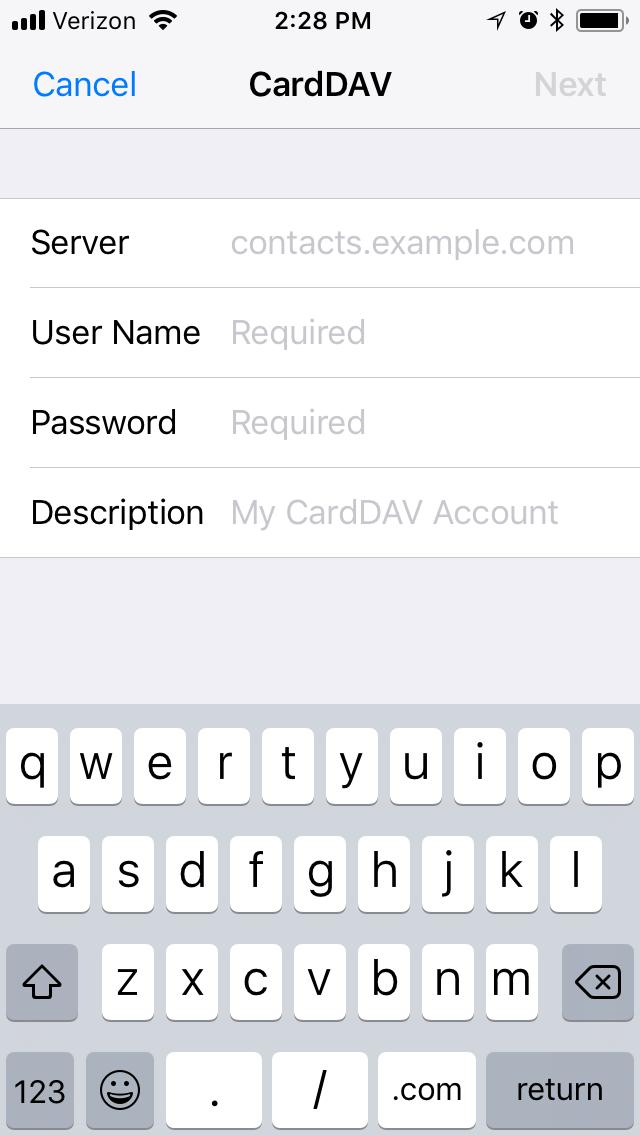
- Under CONTACTS, tap Add CardDav Account to add a calendar account.
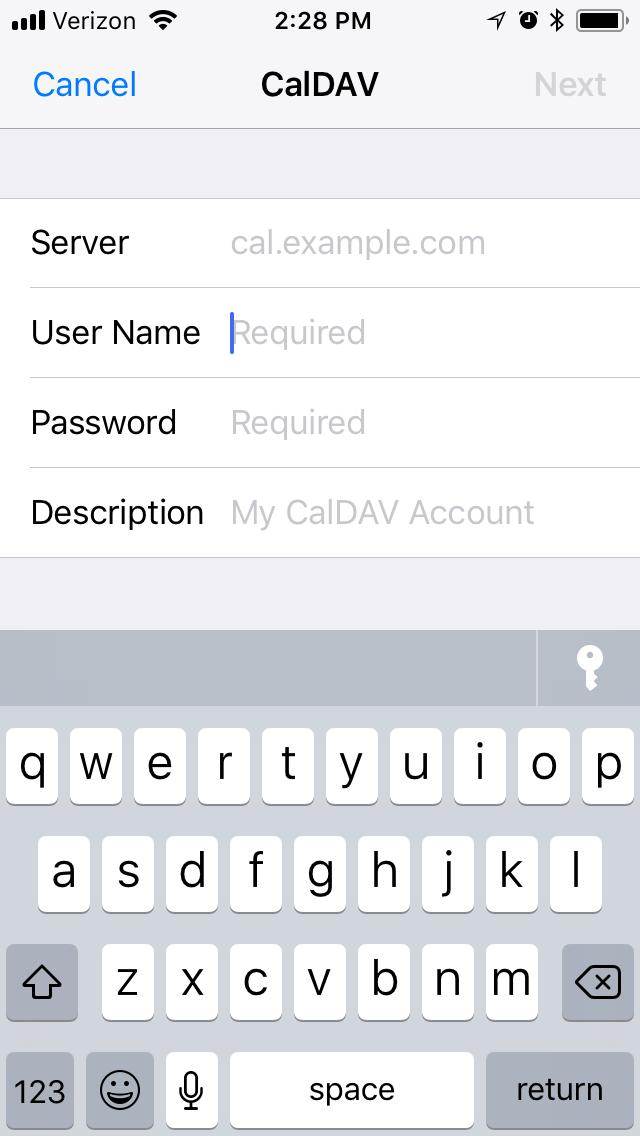
- Under CALENDARS, tap Add CalDav Account to add a contacts account.
----------------------------------------------------------------------------Enter your account information.
----------------------------------------------------------------------------
To complete the setup of your account, enter your information in the appropriate text boxes.
Note:
You must add port 2080 at the end of the server's hostname for the setup to work correctly. For example, example.com:2080.
شاهد ايضا
الاندرويد ANDROID / الاي فون IPHONE مزامنة CALDAV/CARDDAV - CALENDAR & CONTACTS
المرجع :
https://documentation.cpanel.net/dis...s+and+Contacts
+ إنشاء موضوع جديد
النتائج 1 إلى 2 من 2
-
07-04-2018, 15:50 #1Status
- Offline

- تاريخ التسجيل
- Apr 2014
- الدولة
- Egypt
- المشاركات
- 4,703
 Engineering and Technology
- معدل تقييم المستوى
- 10
 شرح تفعيل calendar and contact applications فى Cpanel
------------------------------------------------------------------------
شرح تفعيل calendar and contact applications فى Cpanel
------------------------------------------------------------------------
شركة رايز للهندسة و التكنولوجيا Rise Company for Engineering & Technology
------------------------------------------------------------------------
Web Hosting | Web Designing | E-Marketing
رقم # 1 فى خدمات الشركات Business Services
استضافة مواقع Web Hosting - عمل ايميل شركة Business Emails
تصميم موقع شركة Web Design - تسويق الكترونى على جوجل Google Adwords
www.rise.company | www.rise.company/emails
ملحوظة : جميع خدماتنا مخصصة للشركات فقط وغير متاحة للافراد
وليس لنا اى منتجات او صيانة نهائيا! يرجى الانتباه الى ذلك.
-
29-03-2021, 21:39 #2Status
- Offline
- تاريخ التسجيل
- Apr 2014
- الدولة
- Egypt
- المشاركات
- 4,703
Engineering and Technology
- معدل تقييم المستوى
- 10
رد: شرح تفعيل calendar and contact applications فى Cpanel
Microsoft Outlook does not support CardDav natively so another piece of software is required. You can use any CardDav utility that connects to your Outlook, but we've tested OpenProtocols Connector and have documented it below.------------------------------------------------------------------------
شركة رايز للهندسة و التكنولوجيا Rise Company for Engineering & Technology
------------------------------------------------------------------------
Web Hosting | Web Designing | E-Marketing
رقم # 1 فى خدمات الشركات Business Services
استضافة مواقع Web Hosting - عمل ايميل شركة Business Emails
تصميم موقع شركة Web Design - تسويق الكترونى على جوجل Google Adwords
www.rise.company | www.rise.company/emails
ملحوظة : جميع خدماتنا مخصصة للشركات فقط وغير متاحة للافراد
وليس لنا اى منتجات او صيانة نهائيا! يرجى الانتباه الى ذلك.




 رد مع اقتباس
المواضيع المتشابهه
-
شرح تفعيل cPAddons من WHM وتنزيل اضافة WordPress من Cpanel
بواسطة Rise Company في المنتدى رايز للاستضافة Rise Hostمشاركات: 0آخر مشاركة: 07-04-2018, 11:29 -
شرج تفعيل DMARC فى السى بنل cPanel
بواسطة Rise Company في المنتدى قسم الايميلات Emailsمشاركات: 0آخر مشاركة: 04-04-2018, 22:21 -
شرح تفعيل SFP و DKIM فى Whm و Cpanel مع التحقق من عملها Pass
بواسطة Rise Company في المنتدى قسم الايميلات Emailsمشاركات: 0آخر مشاركة: 04-04-2018, 20:51 -
صفحة الاتصال contact page Form من خلال ربط Html مع php مع JS - الكوردوفا و الفون جاب
بواسطة Rise Company في المنتدى قسم الكوردوفا Ionic/Cordovaمشاركات: 0آخر مشاركة: 26-07-2017, 18:42 -
برنامج جميل Desktop.Calendar.v7.88.091217
بواسطة Eng Amr Adel في المنتدى رايز للكمبيوتر Rise Computerمشاركات: 0آخر مشاركة: 19-12-2009, 16:03

المفضلات