


شرح كيفية عمل و ضبط التاريخ و الساعة فى سمارتي Smarty Date and Time zone
شرح عمل الساعة و التاريخ الان , شرح عمل الساعة الان طبقا للمنطقة Timezone
شرح كود سمارتى لعمل ساعة و تاريخ محددة مع الرموز
Designers can then use date_format to have complete control of the formatting of the date. If the date passed to date_format is empty and a second parameter is passed, that will be used as the date to format.
{$smarty.now}
{$smarty.now}The current timestamp can be accessed with {$smarty.now}. The value reflects the number of seconds passed since the so-called Epoch on January 1, 1970, and can be passed directly to the date_format modifier for display. Note that time() is called on each invocation; eg a script that takes three seconds to execute with a call to $smarty.now at start and end will show the three second difference.
{* use the date_format modifier to show current date and time *}
{$smarty.now|date_format:'%Y-%m-%d %H:%M:%S'}
*************************************************
مثال: مطلوب عمل الشكل التالى بنظام سمارتى
*************************************************
###############################Jan 1, 2022
01/01/22
02:33 pm
Dec 31, 2021
Monday, December 1, 2021
14:33:00
الخطوات :
###############################
1- الكود داخل PHP :
2- الكود داخل TPL :كود:<?php $config['date'] = '%I:%M %p'; $config['time'] = '%H:%M:%S'; $smarty->assign('config', $config); $smarty->assign('yesterday', strtotime('-1 day')); ?>
###############################كود:{$smarty.now|date_format} {$smarty.now|date_format:"%D"} {$smarty.now|date_format:$config.date} {$yesterday|date_format} {$yesterday|date_format:"%A, %B %e, %Y"} {$yesterday|date_format:$config.time}
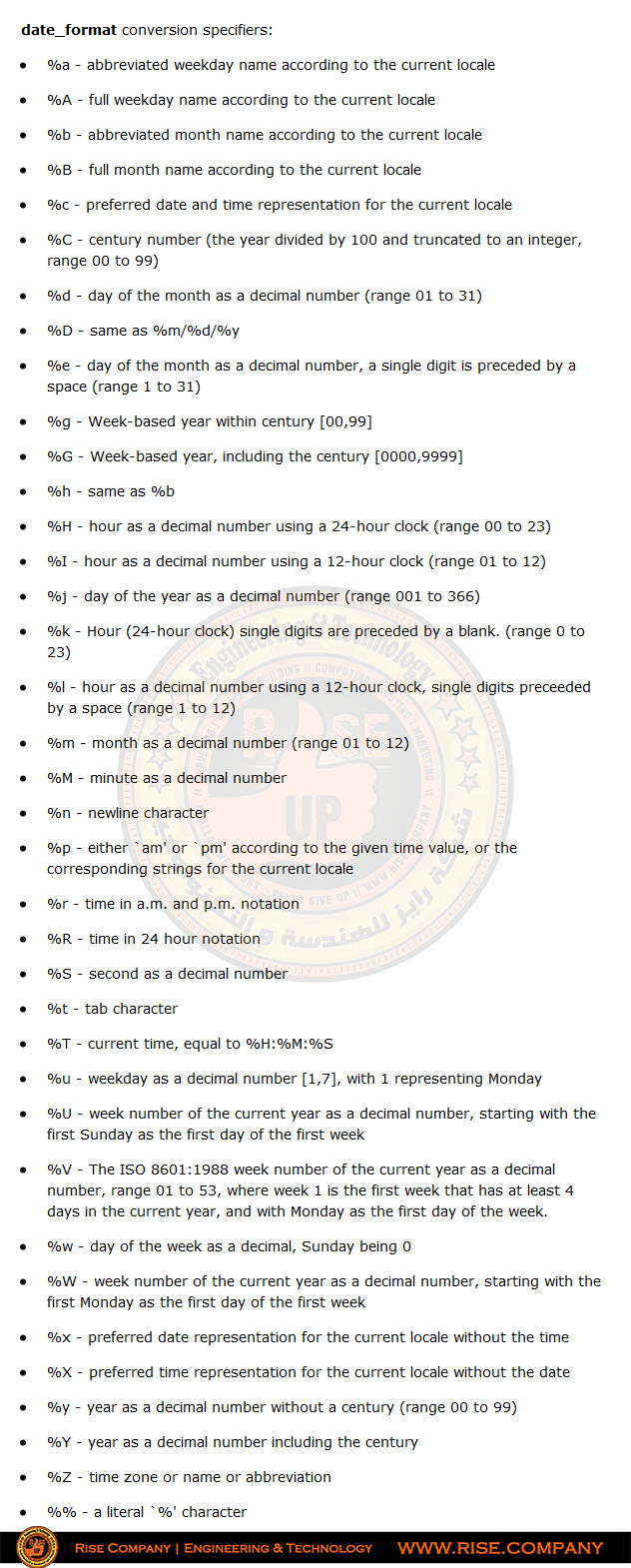
مدلولات الرموز :
###############################
تحديد Timezone فى Smarty
يتم وضع الرمز " z% " فى كود TPL موضع المنطقة فى Php
المرجع :كود:ini_set('date.timezone', 'Egypt');
https://www.smarty.net/docsv2/en/lan...ate.format.tpl
https://www.smarty.net/docsv2/en/lan...les.smarty.now
+ إنشاء موضوع جديد
النتائج 1 إلى 1 من 1
مشاهدة المواضيع
-
17-05-2018, 15:25 #1Status
- Offline

- تاريخ التسجيل
- Apr 2014
- الدولة
- Egypt
- المشاركات
- 4,703
 Engineering and Technology
- معدل تقييم المستوى
- 10
 انشاء و ضبط التاريخ و الساعة فى سمارتي Smarty Date and Time zone
------------------------------------------------------------------------
انشاء و ضبط التاريخ و الساعة فى سمارتي Smarty Date and Time zone
------------------------------------------------------------------------
شركة رايز للهندسة و التكنولوجيا Rise Company for Engineering & Technology
------------------------------------------------------------------------
Web Hosting | Web Designing | E-Marketing
رقم # 1 فى خدمات الشركات Business Services
استضافة مواقع Web Hosting - عمل ايميل شركة Business Emails
تصميم موقع شركة Web Design - تسويق الكترونى على جوجل Google Adwords
www.rise.company | www.rise.company/emails
ملحوظة : جميع خدماتنا مخصصة للشركات فقط وغير متاحة للافراد
وليس لنا اى منتجات او صيانة نهائيا! يرجى الانتباه الى ذلك.


 رد مع اقتباس
المواضيع المتشابهه
-
نظام محرك سمارتى Smarty للقوالب لفصل البرمجة و التصميم PHP Template Engine
بواسطة Rise Company في المنتدى رايز للويب Rise Webمشاركات: 0آخر مشاركة: 17-05-2018, 14:28 -
اقلام تك | اخبار التقنية على مدار الساعة
بواسطة ضياء في المنتدى رايز الإعلانات التجارية Rise Advertiseمشاركات: 0آخر مشاركة: 17-03-2018, 18:29 -
حل مشكلة all hosts have been failing for a long time (and retry time not reached)
بواسطة Rise Company في المنتدى قسم الايميلات Emailsمشاركات: 0آخر مشاركة: 22-01-2018, 13:50 -
ازالة التاريخ من رابط جملة Remove article date in URL?
بواسطة Eng Amr Adel في المنتدى رايز للويب Rise Webمشاركات: 0آخر مشاركة: 25-09-2015, 03:41 -
برنامج ايزون i-zone
بواسطة Eng Amr Adel في المنتدى رايز للكمبيوتر Rise Computerمشاركات: 0آخر مشاركة: 23-12-2009, 10:45

المفضلات