

حل مشكلة Lfd/CSF وظهور excessive resource usage alert نهائيا 100 %
LFD Excessive Resource Usage - Normal for PHP-FPM?
How to disable LFD excessive resource usage alert?
How to disable Lfd/CSF excessive resource usage alert without disabling any option
Getting tons of Excessive resource usage emails | ...
الحل الاول :
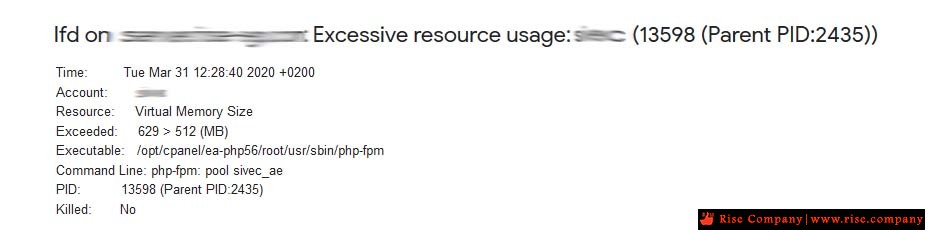
المشكلة هى وصول ايميلات تنبيه لديك بان CSF يستهلك الرام المخصص لك وهو غير كافى و تعدى المسموح
ولكن يجب العلم ان هذه الرسالة قد تظهر نتيجة تفعيل PHP-FPM والتى تقوم بعمل Pool
وبالتالى قد يكون كافى فالحل اما تكبير Pool او الغاء خاصية PHP-FPM
لكى تتمتع بكامل موارد السيرفر دون تحديد و بالتالى لن تظهر لك مشكلة
تم التجربة و هو حل سليم يعمل 100 %
الحال الاخر :
هو وقف التنبيهات فى CSF من خلال احدى الطرق التالية
Method 1
This method will permanently disable the LFD excessive resource usage alert. Performing this method will pose a security issue.
1) Login to your WHM
2) Open the CSF Firewall configuration
3) Modify the value of directives PT_USERMEM and PT_USERTIME to 0.4) Save the settings.كود:PT_USERMEM = 0 PT_USERTIME = 0
Method 2
In this method, we will increase the values of both memory and time to disable the LFD alerts. This method is a temporary one. If any process/service uses more resources than defined, you will continue to receive the LFD alerts.
1) Login to your WHM
2) Open the CSF Firewall configuration
3) Modify the value of directives PT_USERMEM and PT_USERTIME to desired.
4) Save the settingsكود:PT_USERMEM = 500 PT_USERTIME = 150000
Method 3
This method is a standard technique to disable the LFD alerts. In this method, we will include the particular process/service in pignore of CSF. The pignore of CSF will ignore the particular process/service included in it and hence disables the LFD alerts.
1) Login to your server as root user.
2) Using your favorite editor open pignore of CSF. The common location of pignore is /etc/csf/csf.pignore.
3) Add the command line path specified in the alert to the pignore of CSF.
4) Save changes.
المرجع:
https://forums.cpanel.net/threads/lf...hp-fpm.592583/
https://www.interserver.net/tips/kb/...e-usage-alert/
+ إنشاء موضوع جديد
النتائج 1 إلى 1 من 1
-
03-12-2018, 22:23 #1Status
- Offline

- تاريخ التسجيل
- Apr 2014
- الدولة
- Egypt
- المشاركات
- 4,703
 Engineering and Technology
- معدل تقييم المستوى
- 10
 فايروول السي بانل Whm / Cpanel CSF Firewall مشكلة excessive resource usage alert
------------------------------------------------------------------------
فايروول السي بانل Whm / Cpanel CSF Firewall مشكلة excessive resource usage alert
------------------------------------------------------------------------
شركة رايز للهندسة و التكنولوجيا Rise Company for Engineering & Technology
------------------------------------------------------------------------
Web Hosting | Web Designing | E-Marketing
رقم # 1 فى خدمات الشركات Business Services
استضافة مواقع Web Hosting - عمل ايميل شركة Business Emails
تصميم موقع شركة Web Design - تسويق الكترونى على جوجل Google Adwords
www.rise.company | www.rise.company/emails
ملحوظة : جميع خدماتنا مخصصة للشركات فقط وغير متاحة للافراد
وليس لنا اى منتجات او صيانة نهائيا! يرجى الانتباه الى ذلك.

 رد مع اقتباس
المواضيع المتشابهه
-
فايروول السي بانل Whm / Cpanel CSF Firewall شرح الحذف Uninstall
بواسطة Rise Company في المنتدى قسم فايروول CSFمشاركات: 0آخر مشاركة: 25-12-2018, 06:55 -
فايروول السي بانل Whm / Cpanel CSF Firewall حل مشكلة Status: Enabled but Stopped
بواسطة Rise Company في المنتدى قسم فايروول CSFمشاركات: 0آخر مشاركة: 08-12-2018, 01:08 -
فايروول السي بانل Whm / Cpanel CSF Firewall المميزات Features
بواسطة Rise Company في المنتدى قسم فايروول CSFمشاركات: 0آخر مشاركة: 03-12-2018, 08:14 -
فايروول السي بانل Whm / Cpanel CSF Firewall عمل whitelist الايبيهات
بواسطة Rise Company في المنتدى قسم فايروول CSFمشاركات: 0آخر مشاركة: 19-06-2018, 11:35 -
فايروول السي بانل Whm / Cpanel CSF Firewall شرح فتح FTP
بواسطة Rise Company في المنتدى قسم فايروول CSFمشاركات: 0آخر مشاركة: 13-06-2018, 12:04

المفضلات