

حل مشكلة الايميلات على Outlook لا تعمل مع 995 / 465 فى SSL
cpanel 995/465 not working - Problem on enable port 465, 993, 995 in exim | cPanel ...
Unable to use mail client with ssl or tls
Your server does not support the connection encryption type
cpanel emails not working with windows 7
رسائل المشكلة :
Log onto incoming mail server (POP3): Your server does not support the connection encryption type you have specified. Try changing the encryption method. Contact your mail server administrator or Internet service provider (ISP) for additional assistance.Send test e-mail message: The server responded: 421 Cannot connect to SMTالمشكلة :Send test e-mail message: Outlook cannot connect to your outgoing (SMTP) e-mail server. If you continue to receive this message, contact your server administrator or Internet service provider (ISP).
هو بمجرد ادخال ايميل جديد او فتح ايميل على برنامج الاوت لوك فى الحال يحدث Failed
وكان هناك حظر من Firewall ولكن الحقيقة هو غير ذلك حيث ان Web mail يعمل بشكل سليم تماما
ولكن المشكلة تظهر مع Ports الخاصة بـ SSL وليس شهادات SSL هى التى بها المشكلة
ولكن مقصود به Ports الايميلات وهى 995 / 465 لا تعمل ولكن يعمل 110 / 587 مع تفعيل TLS
سبب المشكلة :
هو ان cpanel قام بعمل تحديث وجعل نظام تشفير الايميلات الذى يعمل هو tls وليس ssl
حل المشكلة :
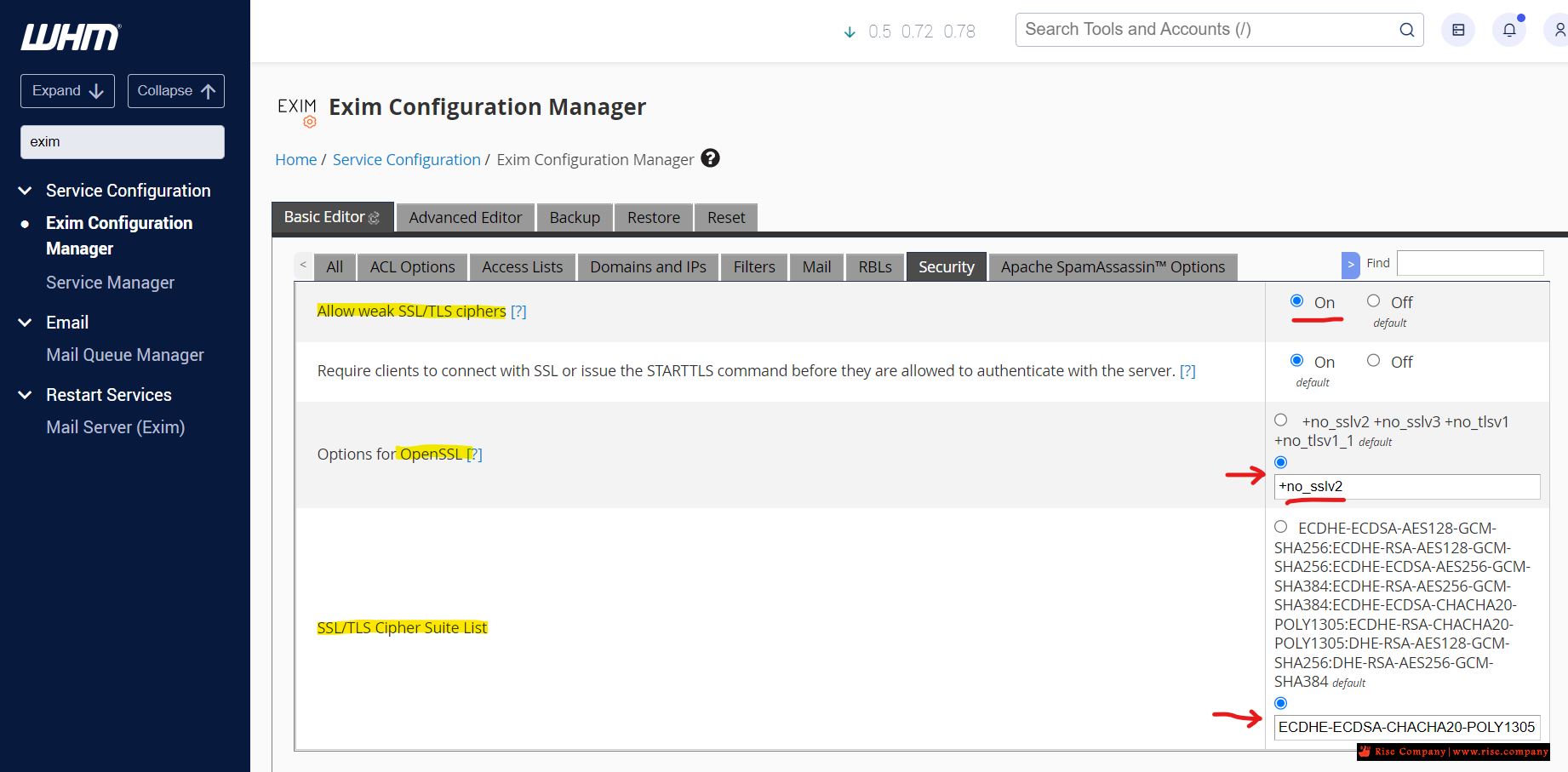
داخل Exim Configuration Manager
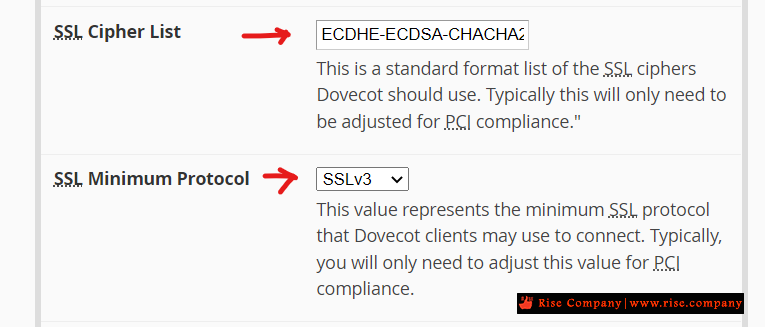
داخل Mailserver Configuration
فقط
----------------------------------------------------
الخطوات :
If you must enable TLS 1.0 on the WHM/cPanel server for compatibility, do the following in WHM >> Home >> Service Configuration >> Exim Configuration Manager > Basic Settings:
- Ensure that "Allow weak SSL/TLS ciphers" is "On".
- Change "SSL/TLS Cipher Suite List" to (this is one long line):
هنا
https://support.cpanel.net/hc/en-us/...755.1655140328
Change "Options for OpenSSL" to the following:
Click "Save" at the bottom of the page.كود:no_sslv2
These changes will enable TLS 1.0, 1.1, and 1.2 and should provide compatibility with older mail servers and clients that only support TLS 1.0.
To make these changes for Dovecot,
go to WHM >> Home >> Service Configuration >> Mailserver Configuration, and do the
هنا
https://support.cpanel.net/hc/en-us/...755.1655140328
ثم الذهاب الى Home »Service Configuration »Mailserver Configuration
ثم البحث عن SSL Minimum Protocol واجعله بدلا من TLSv1.2 اختار مكانه SSLv3
وفى الحال هتجد المشكلة تم حلها .
Change "SSL Cipher List" to this (in one long line):
ملحوظة :كود PHP:ECDHE-ECDSA-CHACHA20-POLY1305:ECDHE-RSA-CHACHA20-POLY1305:ECDHE-ECDSA-AES128-GCM-SHA256:ECDHE-RSA-AES128-GCM-SHA256:ECDHE-ECDSA-AES256-GCM-SHA384:ECDHE-RSA-AES256-GCM-SHA384:DHE-RSA-AES128-GCM-SHA256:DHE-RSA-AES256-GCM-SHA384:ECDHE-ECDSA-AES128-SHA256:ECDHE-RSA-AES128-SHA256:ECDHE-ECDSA-AES128-SHA:ECDHE-RSA-AES256-SHA384:ECDHE-RSA-AES128-SHA:ECDHE-ECDSA-AES256-SHA384:ECDHE-ECDSA-AES256-SHA:ECDHE-RSA-AES256-SHA:DHE-RSA-AES128-SHA256:DHE-RSA-AES128-SHA:DHE-RSA-AES256-SHA256:DHE-RSA-AES256-SHA:ECDHE-ECDSA-DES-CBC3-SHA:ECDHE-RSA-DES-CBC3-SHA:EDH-RSA-DES-CBC3-SHA:AES128-GCM-SHA256:AES256-GCM-SHA384:AES128-SHA256:AES256-SHA256:AES128-SHA:AES256-SHA:DES-CBC3-SHA:!DSS
Windows 7: Cannot send from Office 2007/2010 but can send from Office 2013,
Windows 10 working fine for all office versions
يمكنك ايضا عمل تحديث ويندوز 7 الى اخر اصدار اذا لم تريد التراجع فى السيرفر
حل المشكلة
داخل Exim Configuration Manager
داخل Mailserver Configuration
فقط
حل اخر
Try using the server hostname as the mail server address in Outlook.
server.yourserver.com
المرجع:
https://support.cpanel.net/hc/en-us/...755.1655140328
https://forums.cpanel.net/threads/ma...issues.646685/
+ إنشاء موضوع جديد
النتائج 1 إلى 1 من 1
-
23-06-2019, 15:29 #1Status
- Offline

- تاريخ التسجيل
- Apr 2014
- الدولة
- Egypt
- المشاركات
- 4,703
 Engineering and Technology
- معدل تقييم المستوى
- 10
 حل مشكلة الايميلات على Outlook لا تعمل مع 995 / 465 فى SSL
------------------------------------------------------------------------
حل مشكلة الايميلات على Outlook لا تعمل مع 995 / 465 فى SSL
------------------------------------------------------------------------
شركة رايز للهندسة و التكنولوجيا Rise Company for Engineering & Technology
------------------------------------------------------------------------
Web Hosting | Web Designing | E-Marketing
رقم # 1 فى خدمات الشركات Business Services
استضافة مواقع Web Hosting - عمل ايميل شركة Business Emails
تصميم موقع شركة Web Design - تسويق الكترونى على جوجل Google Adwords
www.rise.company | www.rise.company/emails
ملحوظة : جميع خدماتنا مخصصة للشركات فقط وغير متاحة للافراد
وليس لنا اى منتجات او صيانة نهائيا! يرجى الانتباه الى ذلك.

 رد مع اقتباس
المواضيع المتشابهه
-
حل مشكلة Outlook cannot connect to your incoming (POP3) email server
بواسطة Rise Company في المنتدى قسم الايميلات Emailsمشاركات: 0آخر مشاركة: 29-05-2019, 11:52 -
حل مشكلة الاوت لوك يرسل ايميلات متكررة outlook send email many times
بواسطة Rise Company في المنتدى قسم الايميلات Emailsمشاركات: 0آخر مشاركة: 25-05-2019, 02:24 -
حل مشكلة الاكسل فى الاوت لوك FIX: Cannot Preview EXCEL Files in Outlook 2016
بواسطة Rise Company في المنتدى قسم الايميلات Emailsمشاركات: 0آخر مشاركة: 18-03-2019, 06:56 -
حل مشكلة و الغاء السينك Disable Synchronizing Subscribed Folder فى الاوت لوك Outlook
بواسطة Rise Company في المنتدى قسم الايميلات Emailsمشاركات: 0آخر مشاركة: 31-07-2017, 12:52 -
شرح إعداد بريد اوت لوك على الاوت لوك setup Outlook on Outlook
بواسطة Rise Company في المنتدى قسم الايميلات Emailsمشاركات: 0آخر مشاركة: 22-11-2016, 17:39

المفضلات