

فايروول فورتي جيت FortiGate Firewall قواعد دمح خطوط النت SD-WAN rules
SD-WAN rules - maximize bandwidth (SLA) vs lowest cost (SLA) vs best quality
SD-WAN rules - maximize bandwidth (SLA)
SD-WAN rules are used to control how sessions are distributed to SD-WAN members. Rules can be configured in one of five modes:
- auto: Interfaces are assigned a priority based on quality.
- Manual (manual): Interfaces are manually assigned a priority.
- Best Quality (priority): Interface are assigned a priority based on the link-cost-factor of the interface. See SD-WAN rules - best quality.
- Lowest Cost (SLA) (sla): Interfaces are assigned a priority based on selected SLA settings. See SD-WAN rules - lowest cost (SLA).
- Maximize Bandwidth (SLA) (load-balance): Traffic is distributed among all available links based on the selected load balancing algorithm.
When using Maximize Bandwidth mode (load-balance in the CLI), SD-WAN will all of the links that satisfies SLA to forward traffic based on a round‑robin load balancing algorithm.
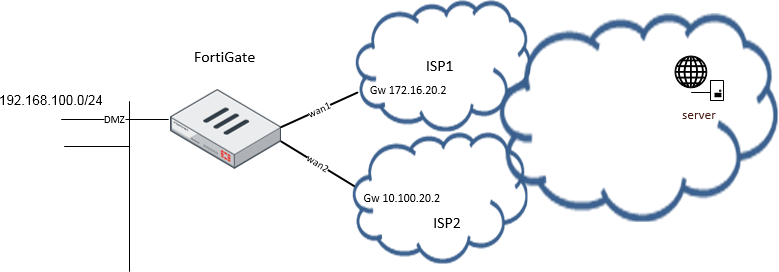
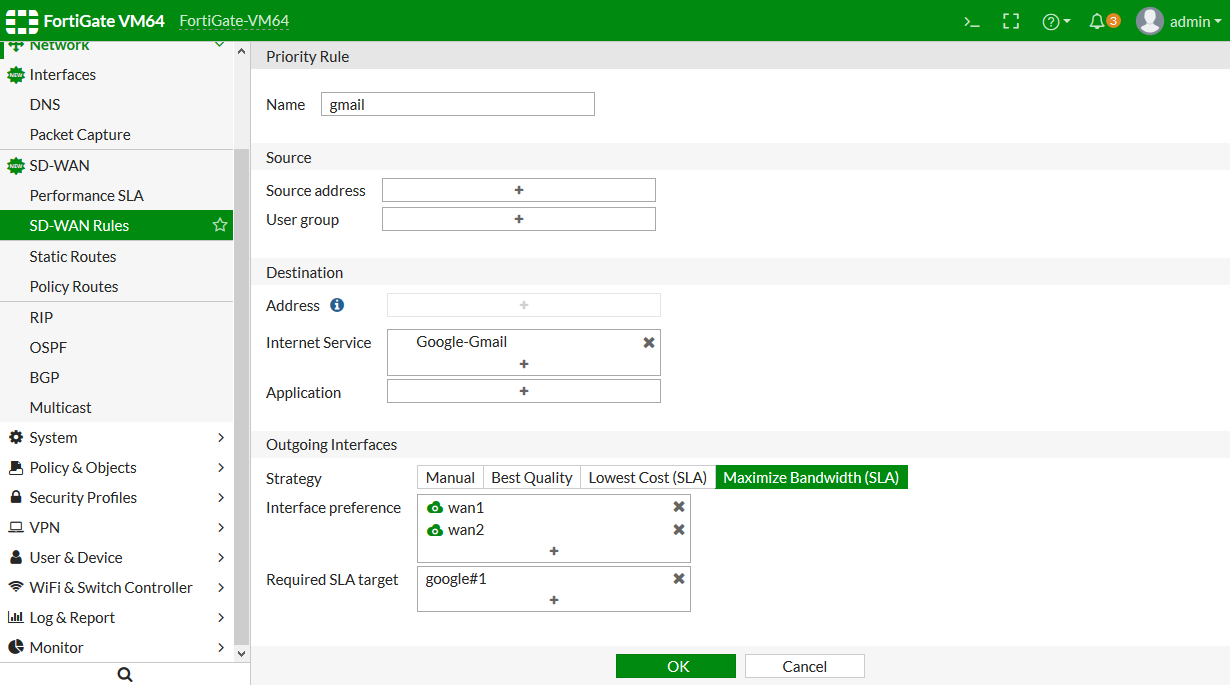
In this example, your wan1 and wan2 SD-WAN interfaces connect to two ISPs that both go to the public internet. You want to configure Gmail services to use both of the interface, but the link quality must meet a standard of latency: 10ms, and jitter: 5ms. This can maximize the bandwidth usage.
To configure an SD-WAN rule to use Maximize Bandwidth (SLA):
- On the FortiGate, enable SD-WAN and add wan1 and wan2 as SD-WAN members, then add a policy and static route. See Creating the SD-WAN interface for details.
- Create a new Performance SLA named google that includes an SLA Target 1 with Latency threshold = 10ms and Jitter threshold = 5ms. See Performace SLA - link monitoring.
- Go to Network > SD-WAN Rules.
- Click Create New. The Priority Rule page opens.
- Enter a name for the rule, such as gmail.
- Configure the following settings:
Field Setting Internet Service Google-Gmail Strategy Maximize Bandwidth (SLA) Interface preference wan1 and wan2 Required SLA target google#1 (created in step 2). - Click OK to create the rule.
To configure an SD-WAN rule to use SLA:
To diagnose the performance SLA status:كود:config system virtual-wan-link config health-check edit "google" set server "google.com" set members 1 2 config sla edit 1 set latency-threshold 10 set jitter-threshold 5 next end next end config service edit 1 set name "gmail" set mode load-balance set internet-service enable set internet-service-id 65646 config sla edit "google" set id 1 next end set priority-members 1 2 next end end
Internet Service: Google.Gmail(65646) When both wan1 and wan2 meet the SLA requirements, Gmail traffic will use both wan1 and wan2. If only one of the interfaces meets the SLA requirements, Gmail traffic will only use that interface.كود:FGT # diagnose sys virtual-wan-link health-check google Health Check(google): Seq(1): state(alive), packet-loss(0.000%) latency(14.563), jitter(4.334) sla_map=0x0 Seq(2): state(alive), packet-loss(0.000%) latency(12.633), jitter(6.265) sla_map=0x0 FGT # diagnose sys virtual-wan-link service 1 Service(1): Address Mode(IPV4) flags=0x0 TOS(0x0/0x0), Protocol(0: 1->65535), Mode(load-balance) Members:<<BR>> 1: Seq_num(1), alive, sla(0x1), num of pass(1), selected 2: Seq_num(2), alive, sla(0x1), num of pass(1), selected
If neither interface meets the requirements but health-check is still alive, then wan1 and wan2 tie. The traffic will try to balance between wan1 and wan2, using both interfaces to forward traffic.
المرجع :
https://docs.fortinet.com/document/f...-bandwidth-sla
+ إنشاء موضوع جديد
النتائج 1 إلى 2 من 2
-
16-07-2019, 23:57 #1Status
- Offline

- تاريخ التسجيل
- Apr 2014
- الدولة
- Egypt
- المشاركات
- 4,703
 Engineering and Technology
- معدل تقييم المستوى
- 10
 فايروول فورتي جيت FortiGate Firewall انظمة دمح خطوط النت SD-WAN rules
------------------------------------------------------------------------
فايروول فورتي جيت FortiGate Firewall انظمة دمح خطوط النت SD-WAN rules
------------------------------------------------------------------------
شركة رايز للهندسة و التكنولوجيا Rise Company for Engineering & Technology
------------------------------------------------------------------------
Web Hosting | Web Designing | E-Marketing
رقم # 1 فى خدمات الشركات Business Services
استضافة مواقع Web Hosting - عمل ايميل شركة Business Emails
تصميم موقع شركة Web Design - تسويق الكترونى على جوجل Google Adwords
www.rise.company | www.rise.company/emails
ملحوظة : جميع خدماتنا مخصصة للشركات فقط وغير متاحة للافراد
وليس لنا اى منتجات او صيانة نهائيا! يرجى الانتباه الى ذلك.
-
17-07-2019, 00:05 #2Status
- Offline
- تاريخ التسجيل
- Apr 2014
- الدولة
- Egypt
- المشاركات
- 4,703
Engineering and Technology
- معدل تقييم المستوى
- 10
رد: فايروول فورتي جيت FortiGate Firewall انظمة دمح خطوط النت SD-WAN rules
latency وقت الاستجابة
jitter تقطع
threshold بداية / عتبة------------------------------------------------------------------------
شركة رايز للهندسة و التكنولوجيا Rise Company for Engineering & Technology
------------------------------------------------------------------------
Web Hosting | Web Designing | E-Marketing
رقم # 1 فى خدمات الشركات Business Services
استضافة مواقع Web Hosting - عمل ايميل شركة Business Emails
تصميم موقع شركة Web Design - تسويق الكترونى على جوجل Google Adwords
www.rise.company | www.rise.company/emails
ملحوظة : جميع خدماتنا مخصصة للشركات فقط وغير متاحة للافراد
وليس لنا اى منتجات او صيانة نهائيا! يرجى الانتباه الى ذلك.

 رد مع اقتباس
المواضيع المتشابهه
-
فايروول فورتي جيت FortiGate Firewall المحاكى add fortigate on GNS3
بواسطة Rise Company في المنتدى قسم فايروول Fortigateمشاركات: 0آخر مشاركة: 16-07-2019, 13:37 -
كورس فايروول فورتي جيت FortiGate Firewall حلقة 9 عن FortiGate First View
بواسطة Rise Company في المنتدى قسم فايروول Fortigateمشاركات: 0آخر مشاركة: 26-05-2019, 02:27 -
كورس فايروول فورتي جيت FortiGate Firewall حلقة 8 عن How to access FortiGate
بواسطة Rise Company في المنتدى قسم فايروول Fortigateمشاركات: 0آخر مشاركة: 26-05-2019, 02:26 -
كورس فايروول فورتي جيت FortiGate Firewall حلقة 7 عن Fortigate Home Lab Design
بواسطة Rise Company في المنتدى قسم فايروول Fortigateمشاركات: 0آخر مشاركة: 26-05-2019, 02:25 -
كورس فايروول فورتي جيت Fortigate Firewall حلقة 2 عن The History of Firewall Security
بواسطة Rise Company في المنتدى قسم فايروول Fortigateمشاركات: 0آخر مشاركة: 26-05-2019, 02:17

المفضلات