

مميزات / فائدة php fpm pool مواقع اسرع | حماية اعلي | لود اقل advantages
advantages to increases website speed - How Fast is WordPress with PHP-FPM 7
What is PHP-FPM and what are the benefits?
PHP-FPM: The Future of PHP Handling
هناك أوقات يكون فيها عدد الزيارات كبيرًا على موقع الويب المحدد ، وحيث قد يتعذر على معالجات PHP مثل mod_PHP معالجة طلبات المستخدمين بكفاءة. هنا ، دور PHP-FastCGI Process Manager (PHP-FPM) أساسي. إنه معالج متقدم وفعال للغاية. في الواقع ، PHP FPM أكثر فعالية بـ 350 مرة من معالجات PHP الأخرى لأنه يستخدم نهجًا حديثًا موجهًا نحو العملية.
نحصل عادةً على طلبات من عملائنا لزيادة سرعة الموقع باستخدام PHP FPM كجزء من خدمات إدارة الخادم الخاصة بنا. اليوم ، سنرى كيف يناقش مهندسو الدعم لدينا فوائد PHP FPM وكيف يعززون أداء الموقع. لماذا PHP FPM, دعونا أولاً نلقي نظرة سريعة على ميزات PHP FPM.
PHP FPM (مدير عمليات FastCGI) هو بديل لتنفيذ PHP التقليدي.
في الأساس ، فإنه يعتمد على مفهوم إدارة تجمع. كل مجموعة من مجموعات PHP-FPM تعمل كنسخة كاملة من PHP ، لها تكوين وحدود وقيود خاصة بها. تقدم مجموعة عمليات PHP ، والتي تسمى أيضًا العمال workers ، طلبات لتنفيذ ملفات PHP من ملفات الويب. مرة أخرى ، يمكن تشغيل FPM تجمعات منفصلة متعددة ، كل منها له هويته الخاصة. بشكل افتراضي ، يقوم mod_PHP بإغلاق العمليات وتعطيل أداء موقع الويب. هذا هو العيب الرئيسي لمواقع PHP التقليدية. ولكن ، يمكن PHP FPM بسهولة التغلب على هذه المشكلة.
فوائد PHP FPM
هنا ، نلقي نظرة على فوائد PHP FPM وكيف يساعد ذلك في تحسين أداء الموقع.
بعض الفوائد التي يراها مهندسو الدعم لدينا في PHP FPM مدرجة أدناه.
1. طريقة جديدة لمعالجة العملية new way of process handling
يوفر PHP-FPM طريقة جديدة لمعالجة الطلبات. يفعل ذلك عن طريق الحفاظ على حمامات السباحة pools ، يسمى ايضا العمال workers ، التي يمكنها الاستجابة لطلبات PHP. عندما يكون لدى خادم الويب طلب ، يقوم اتصال FastCGI بإعادة توجيهه إلى خدمة PHP-FPM. يقوم PHP-FPM بعد ذلك بتجميع وتنفيذ برنامج PHP السركبت ، وإرسال الإخراج مرة أخرى إلى خادم الويب وينتظر الطلبات الجديدة. لذلك ، تسمح معالجة السركبت لـ PHP بهذه الطريقة بأداء معالجة أعلى بكثير. في الواقع ، فإنه يعجل ويسرع تحميل الموقع.
2. شفرة التشغيل التخزين المؤقت Opcode caching
PHP FPM لديه أيضًا القدرة على استخدام تخزين شفرة التشغيل المؤقت للبرامج النصية لـ PHP. يمكن أن تخدم حركة مرور أعلى عن طريق تمكين التخزين المؤقت caching شفرة التشغيل. عندما يتم تقديم طلب سكربت PHP ، يتحقق PHP-FPM بسرعة من النسخ المخزنة مؤقتًا ويعالج الطلب.هذه الطريقة توفر الوقت وتحسن كفاءة الموارد.
3. لا تفرط فى اللود Do not overload
PHP-FPM أسرع من الأساليب التقليدية القائمة على CGI ، مثل SUPHP ، في بيئات PHP متعددة المستخدمين. لا يؤدي إلى زيادة تحميل ذاكرة نظام مع PHP من عمليات Apache مثل ruid2 + php-dso. هذه الطريقة مفيدة عندما يتلقى المستخدم حركة مرور إضافية overload تتطلب موارد لمعالجتها. هذه الميزة هي نعمة عندما يتلقى موقع الويب الخاص بك زيادة في حركة المرور extra traffic بعد حملة تسويقية معينة. تذكر أن المواقع الشائعة تستفيد من هذه الميزة خلال أي من المناسبات الخاصة بها.
4. أمن / حماية إضافية Additional security
وبالمثل ، يوفر PHP-FPM أمانًا إضافيًا. لتحقيق ذلك ، يجب أن يحتوي ملف تهيئة PHP الرئيسي للخادم على القيم التالية مضبوطة على true:
توفر هذه الإعدادات طبقة إضافية من القيود التي يمكن أن تمنع المستخدمين من الوصول إلى ذاكرة التخزين المؤقت لشفرات opcode caches المستخدمين الآخرين. تنطبق هذه المخاوف في المقام الأول على بيئات استضافة متعددة المستأجرين تم تكوينها لتوفير منصة آمنة مع PHP-FPM.كود:opcache.validate_root = true opcache.validate_permission = true
5. اقصى تحكم فى الاعدادات للغاية Highly configurable
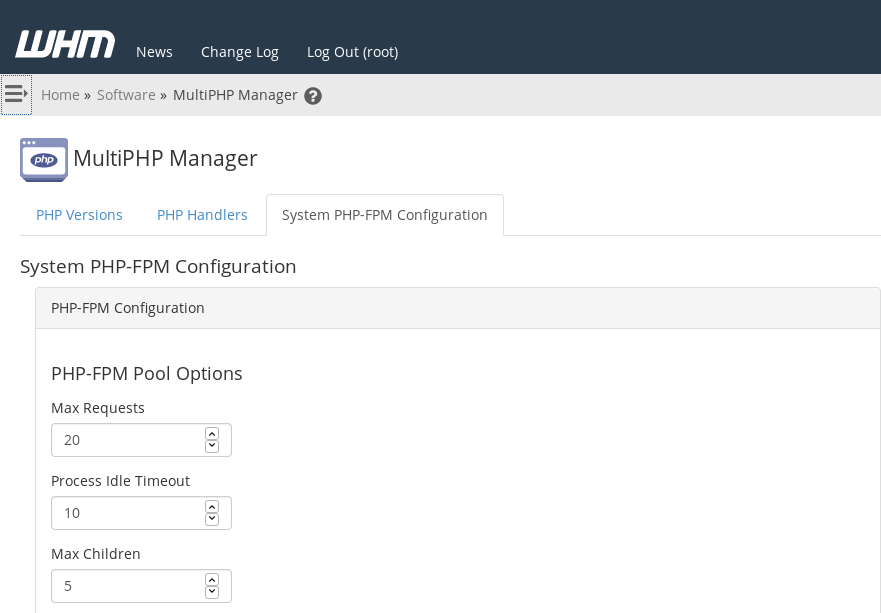
علاوة على ذلك ، يوفر PHP-FPM خيارات تكوين أكثر من معالجات PHP الأخرى. يمكن ضبط خيارات التكوين هذه لكل موقع على الخادم. يوفر التكوين الصحيح لـ PHP-FPM أفضل أداء لزوار الموقع ، كما يضمن بيئة آمنة ومأمونة. على سبيل المثال ، يمكننا ضبط إعدادات PHP-FPM في واجهة إدارة MultiPHP من WHM بالانتقال إلى WHM> الصفحة الرئيسية> البرمجيات> MultiPHP Manager. هكذا تبدو.
Here’s an example of PHP FPM status on one of the servers that we manage:
--------------------------------------كود:[root@xx ~]# service ea-php70-php-fpm.service status Redirecting to /bin/systemctl status ea-php70-php-fpm.service â—ڈ ea-php70-php-fpm.service - The PHP FastCGI Process Manager Loaded: loaded (/usr/lib/systemd/system/ea-php70-php-fpm.service; enabled; vendor preset: disabled) Active: active (running) since Wed 2019-01-09 13:59:50 xxx; 2h 40min ago Main PID: 203156 (php-fpm) Status: "Processes active: 0, idle: 0, Requests: 16, slow: 0, Traffic: 0req/sec" CGroup: /system.slice/ea-php70-php-fpm.service └─203156 php-fpm: master process (/opt/cpanel/ea-php70/root/etc/php-fpm.conf)
How to Use PHP-FPM with cPanel
PHP performance is an enduring issue for web hosts. PHP is the most widely used server programming language on the web by a big margin. The most popular content management systems and ecommerce applications are written in PHP, including WordPress®, Joomla, Drupal, Magento®, and dozens more.
The ultra-fast PHP-FPM accelerates PHP execution on busy web servers, making it a valuable tool in the fight against slow sites and resource-constrained servers.
This article takes a deep dive into how PHP-FPM works and explains how to deploy and configure it with cPanel & WHM.
What is PHP-FPM?
PHP-FPM is an alternative PHP implementation that makes busy web applications faster while helping system administrators to control resource consumption on their server.
A PHP implementation, also known as the runtime, interprets and executes code. Traditional runtimes such as Apache’s mod_PHP do their work within the web server. That approach has advantages, but each connection consumes a chunk of the server’s resources for as long as it lasts. If there are too many concurrent connections, the server may run out of resources like memory altogether, impacting the performance of every site it hosts.
PHP-FPM does things differently: it operates outside of the web server and uses a pool of worker processes to execute code. The workers are ready and waiting when a request comes in, and you can control how many workers are in the pool so they can’t multiply until they consume all the server’s RAM and processor time.
It works like this:
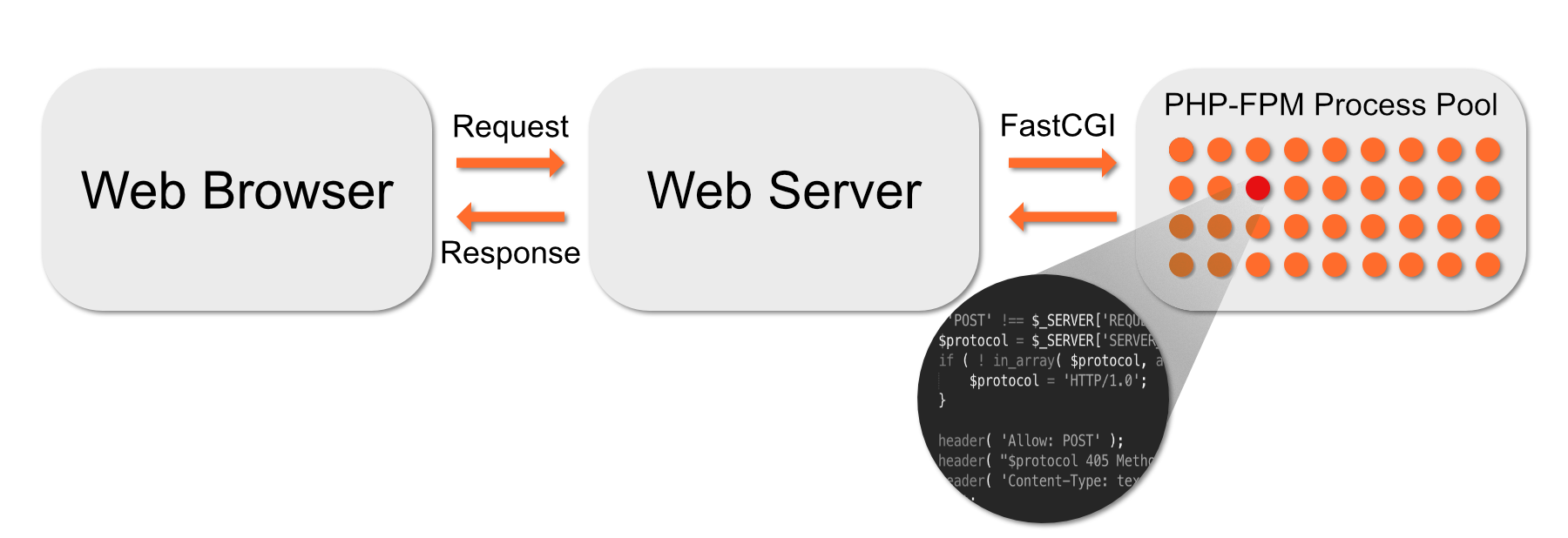
- Apache sends code to PHP-FPM over a high-speed binary interface called FastCGI.
- A supervisor process chooses a worker process from the pool and gives it the code.
- The worker executes the code, and the result is sent back to Apache, which sends it to the web browser.
- Once the worker is done, it returns to the pool to await another chunk of code to execute.
If there are too many concurrent connections, some might have to wait for a free worker, but they will never consume all of the server’s resources. On a busy web server, worker pools are faster and more efficient than other strategies.
Getting Started with PHP-FPM in CentOS and EasyApache
It is straightforward to activate and configure PHP-FPM in cPanel & WHM. You can choose which domains use it and set configuration variables that influence its behavior.
The first step is to turn it on in the System PHP-FPM settings in WHM’s MutliPHP Manager.
When you click Turn On, WHM makes PHP-FPM available, but it doesn’t activate it for all domains automatically. You can force all accounts on the server to use PHP-FPM by clicking Convert All Accounts to PHP-FPM.
Alternatively, you can activate PHP-FPM for individual domains in the table at the bottom of this page. To turn it on for several domains at once, select them in the table and choose On in the drop-down menu.
Configuring PHP-FPM in cPanel
Once you have activated PHP-FPM, you can configure both the system defaults and the settings for individual domains in MultiPHP Manager.
Click the System PHP-FPM Configuration tab.
In this section, there are three pool settings you can change. These are the default values that are applied to domain pools.
- Max Requests: The number of requests each worker process should execute before it restarts itself. This setting is useful for working around memory leaks. The default of 20 is acceptable for most web hosting scenarios, but you may want to increase it to between 40 and 60 on servers with heavy traffic.
- Process Idle Timeout: How long an idle worker process will wait before shutting down. Idle processes consume resources, so we don’t want too many hanging around, but we don’t want to kill them too soon because it takes a while to start new ones. The default of 10 (seconds) may be too low for a busy server.
- Max Children: The maximum number of worker processes in each pool. The default is 5.
Many factors affect the optimal values for these settings, including the code your server runs and the amount of RAM it has. We wrote PHP-FPM Performance Tuning Basicsto help you decide on the correct values for your server.
Underneath the pool options are PHP INI directives. We surface several of the most useful in the interface, and you can find more information about them in PHP’s Runtime Configuration documentation. We’ll show you how to add other directives in the next section.
In addition to system-wide configuration, you can also configure individual domains in the WHM interface.
In the table at the bottom of MutliPHP Manager, click Edit PHP-FPM at the end of the domain’s row. The options that appear are identical to those in the system-wide configuration interface.
How the cPanel PHP-FPM Module Works
Although the WHM interface contains the most useful configuration options, there are many more in the documentation. To add or modify them, you will need to edit configuration files on the server’s command line or in the cPanel & WHM File Manager.
The two most important system-wide configuration files are:
- /var/cpanel/ApachePHPFPM/system.yaml
- /var/cpanel/ApachePHPFPM/system_pool_defaults.yaml
WHM doesn’t create these files because the system doesn’t need them, but you can create them yourself and add directives to override the defaults.
touch /var/cpanel/ApachePHPFPM/system.yaml
touch /var/cpanel/ApachePHPFPM/system_pool_defaults.yaml You may also have to create the directory with:
mkdir -p /var/cpanel/ApachePHPFPM/ In these files, enter only directives that differ from and override the system directives. For example, if you wanted to change the emergency_restart_threshold directive from the default of 0, the system_pool_defaults.yaml file would look like this:
The three dashes at the top of the file (———) are part of the YAML markup language and must be present. The configuration file won’t work without them.
In the PHP documentation, you will find directives formatted with periods (.) and other symbols; syslog.facility,for example. When adding directives to configuration files, these symbols must be replaced with an underscore (_). For example, instead of syslog.facility, use syslog_facility.
You can learn more about configuring the cPanel PHP-FPM module in Configuration Values of PHP-FPM and PHP-FPM Code and FileSystem Layout for EasyApache 4.
Creating User Pools in PHP-FPM
Finally, we’ll look at manually creating and configuring domain-specific user pools in PHP-FPM. These are the worker pools used by sites hosted on your server’s domains.
The PHP-FPM module creates a worker pool for a domain if it finds a configuration file in:
/var/cpanel/userdata/[user]/[domain].php_fpm.yaml Replace [user] and [domain] with the relevant values for your server. You can create this file or activate PHP-FPM for a domain in WHM and it will be created automatically.
At a minimum, the file must contain the following information:
As with the system files, you can add directives to configure the user pools. After creating or editing the .yaml file, run the following command:
/scripts/php_fpm_config – rebuild
The script adds directives to Apache’s config file and restarts PHP-FPM, after which the new pool will be up and running. You can find more information about creating user pools in PHP-FPM User Pools.
Easy PHP-FPM Configuration with cPanel & WHM
PHP-FPM gives busy web servers a huge performance boost. Just as important, it helps web hosts to make the most of limited server resources, reducing the cost of providing an excellent hosting experience to clients and their users.
With cPanel & WHM, PHP-FPM can be activated in seconds and configured in an intuitive interface. If you need to dig deeper into PHP directives, our module makes building custom configurations for the runtime and worker pools straightforward.
الخلاصة :
PHP-FPM is an efficient method on how to minimize the memory consumption and rise the performance for the websites with heavy traffic. It is significantly faster than traditional CGI-based methods in multi-user PHP environments.
اداء اعلى واستهلاك رام اقل ولكن قد يتطلب الغائها اذا كان لديك تطبيق يحتاج رام عالى.
+ إنشاء موضوع جديد
النتائج 1 إلى 1 من 1
-
19-09-2019, 03:01 #1Status
- Offline

- تاريخ التسجيل
- Apr 2014
- الدولة
- Egypt
- المشاركات
- 4,703
 Engineering and Technology
- معدل تقييم المستوى
- 10
 مميزات / فائدة php fpm pool مواقع اسرع | حماية اعلي | لود اقل advantages
------------------------------------------------------------------------
مميزات / فائدة php fpm pool مواقع اسرع | حماية اعلي | لود اقل advantages
------------------------------------------------------------------------
شركة رايز للهندسة و التكنولوجيا Rise Company for Engineering & Technology
------------------------------------------------------------------------
Web Hosting | Web Designing | E-Marketing
رقم # 1 فى خدمات الشركات Business Services
استضافة مواقع Web Hosting - عمل ايميل شركة Business Emails
تصميم موقع شركة Web Design - تسويق الكترونى على جوجل Google Adwords
www.rise.company | www.rise.company/emails
ملحوظة : جميع خدماتنا مخصصة للشركات فقط وغير متاحة للافراد
وليس لنا اى منتجات او صيانة نهائيا! يرجى الانتباه الى ذلك.

 رد مع اقتباس
المواضيع المتشابهه
-
استضافة مواقع | خوادم وسيرفرات | شهادات حماية
بواسطة Rise Team في المنتدى خدمات شركة رايز Rise Companyمشاركات: 0آخر مشاركة: 12-05-2019, 09:23 -
استضافة مواقع - حجز دومين - شهادات حماية
بواسطة Rise Team في المنتدى خدمات شركة رايز Rise Companyمشاركات: 0آخر مشاركة: 02-05-2019, 09:07 -
مميزات / فائدة php fpm pool لعزل كل موقع عن الاخر داخل السيرفر
بواسطة Rise Company في المنتدى رايز للاستضافة Rise Hostمشاركات: 0آخر مشاركة: 23-06-2018, 23:14 -
×,,× وينهـ اغلى النآس×,,×
بواسطة Eng Amr Adel في المنتدى رايز للمواضيع العام Rise Generalمشاركات: 0آخر مشاركة: 23-12-2009, 13:41

المفضلات