


مميزات / فائدة php fpm pool لمواقع ويب / ووردبريس اسرع 300%
PHP-FPM (FastCGI Process Manager) dramatically speeds up the performance
من العمليات الأبطأ (mod_PHP) إلى العمليات الأسرع بكثير باستخدام PHP-FPM
ما هو PHP-FPM؟
من وجهة نظر زائر الموقع ، قد لا يكون التحويل من mod_PHP إلى PHP-FPM صفقة كبيرة. ومع ذلك ، من وجهة نظر مهندس النظام ، كلاهما أمران مختلفان تمامًا. يدرك جميع مهندسو النظام أن PHP يعمل مع جميع خوادم الويب الرئيسية ويمكن تشغيله بطرق مختلفة على الخادم الخاص بك. واحدة من أكثر الطرق المعروفة لتشغيل PHP هي وحدة mod_php. هذا لأنه يأتي افتراضيًا على خوادم Apache HTTP. ولكن هناك مشكلة بسيطة. بخلاف PHP-FPM، يقوم mod_PHP بإغلاق العمليات وتعطيل أداء موقع الويب. إذا كان هدفك الأساسي لاستضافة تطبيق الويب الخاص بك هو تحقيق الأداء الأمثل والأمان ، فإن PHP-FPM هي الطريق إلى الأمام.
مقارنة بين PHP-FPM vs. mod_PHP Performance BenchmarksPHP-FPM (مدير عمليات FastCGI) يسرع بشكل كبير من أداء بيئة PHP الخاصة بك.
باستخدام بيئة محكومة ، قمنا باختبار موقع ويب ووردبريس WordPress باستخدام PHP-FPM و mod_PHP في كل مرة ، لاحظنا زيادة الأداء والاستقرار مع المكدس الذي يحتوي على PHP-FPM.
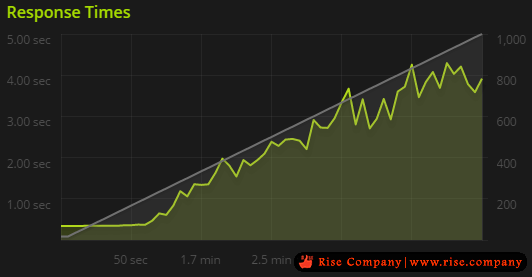
الأداء مع Performance with mod_PHP
استخدمنا خادم 4 جيجابايت. التطبيق لهذا الاختبار كان موقع ووردبريس.
حقق الاختبار 38.046 زيارة ناجحة في 295.0 ثانية مع نقل البيانات من 7،399.11 كيلوبايت في و 206،219.42 كيلوبايت من التطبيق. متوسط ​​معدل الدخول البالغ 128.0 / ثانية يترجم إلى حوالي 11059200 زيارة / يوم.
كان متوسط زمن الاستجابة 2150 مللي ثانية.
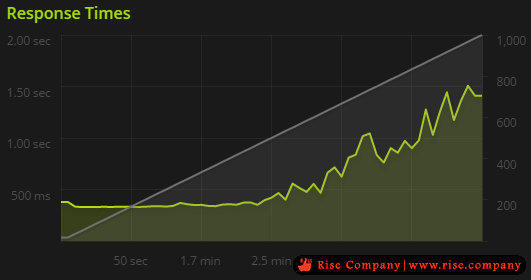
الأداء مع Performance with PHP-FPM
الشيء الوحيد المختلف في هذا الاختبار هو إضافة PHP-FPM.
حقق الاختبار 85،829 زيارة ناجحة في 295.0 ثانية بنقل 16،465.18 كيلوبايت في و 465،728.74 كيلوبايت من البيانات الخارجة من التطبيق. معدل ضرب متوسط ​​290.0 / ثانية يترجم إلى حوالي 2556000 زيارة / يوم.
النتائجكان متوسط زمن الاستجابة 628 مللي ثانية.
يمكنك ملاحظة أن PHP-FPM جعل موقع الاختبار الخاص بنا أسرع بنحو 350% عندما يتعلق الأمر بأوقات التحميل loading times. بالإضافة إلى ذلك ، جعل الموقع ضعف الكفاءة للموارد كما كان مع mod_php هنا نستطيع قول ان PHP-FPM ، واحدة من أحدث الطرق لاستخدام PHP مع خادم الويب ، هو PHP FastCGI بديل. يمكن استخدام وحدة PHP هذه مع أي خادم ويب متوافق مع بروتوكول FastCGI.
الميزة الرئيسية لـ PHP-FPM هي أنها تعتمد على مفهوم إدارة pool يمكن عرض كل مجموعة من مجموعات PHP-FPM على أنها نسخة كاملة من PHP ، لها تكوين وحدود وقيود خاصة بها. هذه القيود والقيود والتكوينات تتعلق بالعمليات الفرعية والوحدات ومتغيرات البيئة والمجلدات والسجلات التابعة.
كيفية تمكين PHP-FPM؟
للخوادم التي تم إطلاقها بعد هذا الإعلان بتاريخ 23 أغسطس 2016 ، تم تمكين PHP-FPM افتراضيًا. بالنسبة لمثيلات الخادم الجديدة ، تم سحب mod_PHP بشكل افتراضي. بالنسبة للخوادم التي يتم تشغيلها قبل 23 أغسطس ، يمكنك تمكين PHP-FPM من خلال الانتقال إلى هذا الدليل التدريجي.
PHP-FPM مقابل mod_PHP: أيهما أفضل؟
نحن نعتقد أنه في الحقيقة ليست مسألة PHP-FPM مقابل mod_PHP. من خلال هذه الخطوة ، نستهدف الجوانب الرئيسية: الموثوقية والأمان وقابلية التوسع والسرعة. يوفر PHP-FPM كل ذلك جنبًا إلى جنب مع الكثير من فرص التخصيص وضبط الأداء. لذلك ، من الممكن فقط الانتقال من العمليات الأبطأ (mod_PHP) إلى العمليات الأسرع بكثير باستخدام PHP-FPM.
-------------------------------------------------
How to Use PHP-FPM with cPanel
PHP performance is an enduring issue for web hosts. PHP is the most widely used server programming language on the web by a big margin. The most popular content management systems and ecommerce applications are written in PHP, including WordPress®, Joomla, Drupal, Magento®, and dozens more.
The ultra-fast PHP-FPM accelerates PHP execution on busy web servers, making it a valuable tool in the fight against slow sites and resource-constrained servers.
This article takes a deep dive into how PHP-FPM works and explains how to deploy and configure it with cPanel & WHM.
What is PHP-FPM?
PHP-FPM is an alternative PHP implementation that makes busy web applications faster while helping system administrators to control resource consumption on their server.
A PHP implementation, also known as the runtime, interprets and executes code. Traditional runtimes such as Apache’s mod_PHP do their work within the web server. That approach has advantages, but each connection consumes a chunk of the server’s resources for as long as it lasts. If there are too many concurrent connections, the server may run out of resources like memory altogether, impacting the performance of every site it hosts.
PHP-FPM does things differently: it operates outside of the web server and uses a pool of worker processes to execute code. The workers are ready and waiting when a request comes in, and you can control how many workers are in the pool so they can’t multiply until they consume all the server’s RAM and processor time.
It works like this:
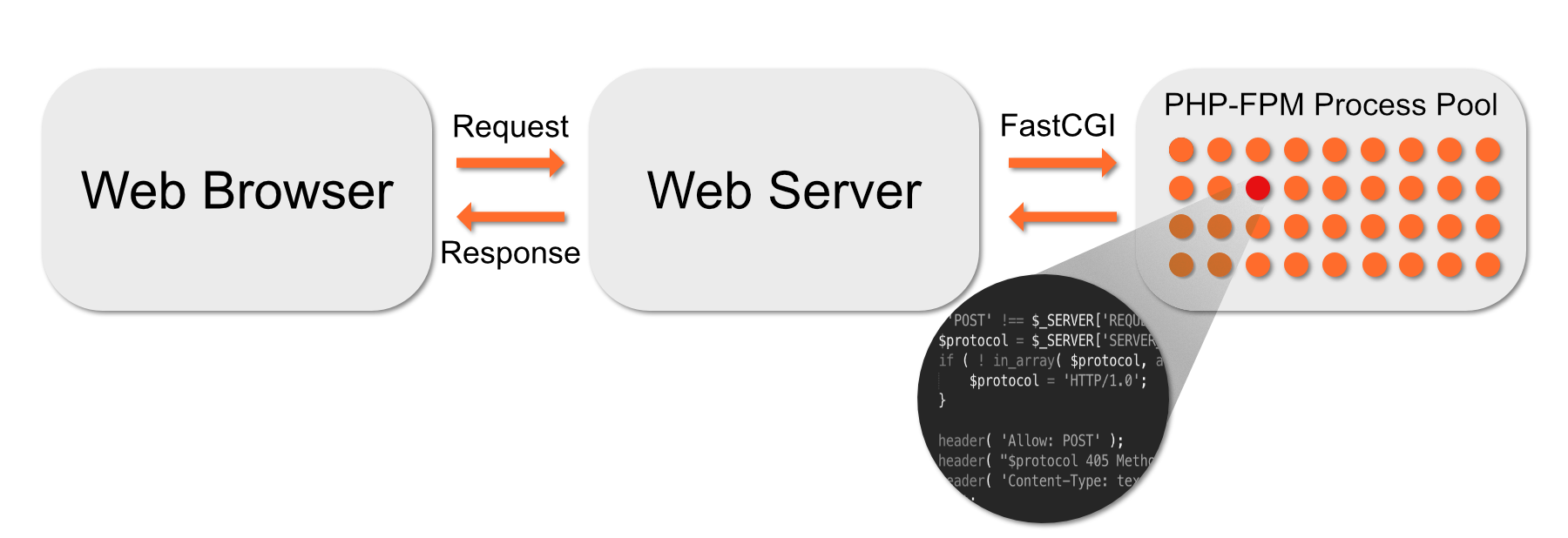
- Apache sends code to PHP-FPM over a high-speed binary interface called FastCGI.
- A supervisor process chooses a worker process from the pool and gives it the code.
- The worker executes the code, and the result is sent back to Apache, which sends it to the web browser.
- Once the worker is done, it returns to the pool to await another chunk of code to execute.
If there are too many concurrent connections, some might have to wait for a free worker, but they will never consume all of the server’s resources. On a busy web server, worker pools are faster and more efficient than other strategies.
Getting Started with PHP-FPM in CentOS and EasyApache
It is straightforward to activate and configure PHP-FPM in cPanel & WHM. You can choose which domains use it and set configuration variables that influence its behavior.
The first step is to turn it on in the System PHP-FPM settings in WHM’s MutliPHP Manager.
When you click Turn On, WHM makes PHP-FPM available, but it doesn’t activate it for all domains automatically. You can force all accounts on the server to use PHP-FPM by clicking Convert All Accounts to PHP-FPM.
Alternatively, you can activate PHP-FPM for individual domains in the table at the bottom of this page. To turn it on for several domains at once, select them in the table and choose On in the drop-down menu.
Configuring PHP-FPM in cPanel
Once you have activated PHP-FPM, you can configure both the system defaults and the settings for individual domains in MultiPHP Manager.
Click the System PHP-FPM Configuration tab.
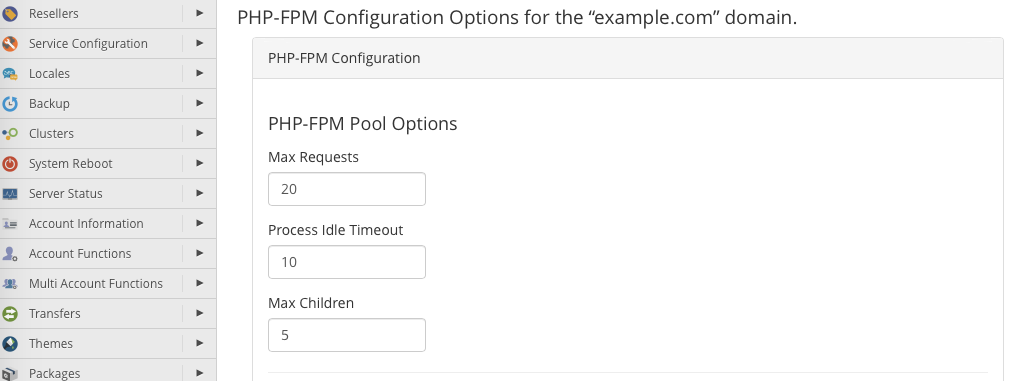
In this section, there are three pool settings you can change. These are the default values that are applied to domain pools.
- Max Requests: The number of requests each worker process should execute before it restarts itself. This setting is useful for working around memory leaks. The default of 20 is acceptable for most web hosting scenarios, but you may want to increase it to between 40 and 60 on servers with heavy traffic.
- Process Idle Timeout: How long an idle worker process will wait before shutting down. Idle processes consume resources, so we don’t want too many hanging around, but we don’t want to kill them too soon because it takes a while to start new ones. The default of 10 (seconds) may be too low for a busy server.
- Max Children: The maximum number of worker processes in each pool. The default is 5.
Many factors affect the optimal values for these settings, including the code your server runs and the amount of RAM it has. We wrote PHP-FPM Performance Tuning Basicsto help you decide on the correct values for your server.
Underneath the pool options are PHP INI directives. We surface several of the most useful in the interface, and you can find more information about them in PHP’s Runtime Configuration documentation. We’ll show you how to add other directives in the next section.
In addition to system-wide configuration, you can also configure individual domains in the WHM interface.
In the table at the bottom of MutliPHP Manager, click Edit PHP-FPM at the end of the domain’s row. The options that appear are identical to those in the system-wide configuration interface.
+ إنشاء موضوع جديد
النتائج 1 إلى 1 من 1
مشاهدة المواضيع
-
19-09-2019, 03:53 #1Status
- Offline

- تاريخ التسجيل
- Apr 2014
- الدولة
- Egypt
- المشاركات
- 4,703
 Engineering and Technology
- معدل تقييم المستوى
- 10
 مميزات / فائدة php fpm pool لمواقع ويب / ووردبريس اسرع 300% Speed
------------------------------------------------------------------------
مميزات / فائدة php fpm pool لمواقع ويب / ووردبريس اسرع 300% Speed
------------------------------------------------------------------------
شركة رايز للهندسة و التكنولوجيا Rise Company for Engineering & Technology
------------------------------------------------------------------------
Web Hosting | Web Designing | E-Marketing
رقم # 1 فى خدمات الشركات Business Services
استضافة مواقع Web Hosting - عمل ايميل شركة Business Emails
تصميم موقع شركة Web Design - تسويق الكترونى على جوجل Google Adwords
www.rise.company | www.rise.company/emails
ملحوظة : جميع خدماتنا مخصصة للشركات فقط وغير متاحة للافراد
وليس لنا اى منتجات او صيانة نهائيا! يرجى الانتباه الى ذلك.


 رد مع اقتباس
المواضيع المتشابهه
-
مميزات / فائدة php fpm pool مواقع اسرع | حماية اعلي | لود اقل advantages
بواسطة Rise Company في المنتدى رايز للاستضافة Rise Hostمشاركات: 0آخر مشاركة: 19-09-2019, 03:01 -
نظارة البلاى ستيشن Play station للواقع الافتراضى 3d / vr / 360
بواسطة Rise Company في المنتدى قسم الواقع الافتراضى 3D-VR-360مشاركات: 0آخر مشاركة: 22-12-2018, 00:44 -
مميزات / فائدة php fpm pool لعزل كل موقع عن الاخر داخل السيرفر
بواسطة Rise Company في المنتدى رايز للاستضافة Rise Hostمشاركات: 0آخر مشاركة: 23-06-2018, 23:14 -
اجعل جهازك اسرع من البرق مع برنامج 2011 PC Speed Maximizer
بواسطة nunu1977 في المنتدى رايز للكمبيوتر Rise Computerمشاركات: 0آخر مشاركة: 20-04-2011, 04:11 -
اجدد اصدار ل need for speed لعبه need for speed nmornt
بواسطة Eng Amr Adel في المنتدى قسم جيمرز Gamersمشاركات: 0آخر مشاركة: 04-12-2009, 21:11

المفضلات