


فايروول السي بانل Whm / Cpanel CSF Firewall الفرق بين CSF vs LFD و Allow vs Ignore
فايروول السي بانل Whm / Cpanel CSF Firewall الفرق بين csf.allow و csf.deny و csf.igno
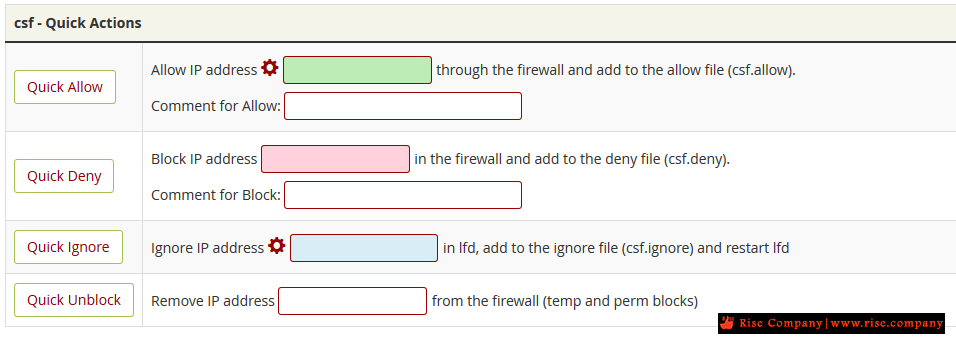
ما هو csf.conf الموجود فى Cpanel CSF Firewall , ما هو csf.allow الموجود فى Cpanel CSF Firewall
ما هو csf.deny الموجود فى Cpanel CSF Firewall , ما هو csf.ignore الموجود فى Cpanel CSF Firewall
ما هو csf.conf الموجود فى Cpanel CSF Firewallكود:These options allow you to easily and quickly control and view csf. All the configuration files for csf are in /etc/csf and include: csf.conf - the main configuration file, it has helpful comments explaining what each option does csf.allow - a list of IP's and CIDR addresses that should always be allowed through the firewall csf.deny - a list of IP's and CIDR addresses that should never be allowed through the firewall csf.ignore - a list of IP's and CIDR addresses that lfd should ignore and not not block if detected csf.*ignore - various ignore files that list files, users, IP's that lfd should ignore. See each file for their specific purpose and tax
هو ملف بداخله جميع اعدادات الفايروول
الامر الخاص به
ما هو csf.allow الموجود فى Cpanel CSF Firewallكود:nano /etc/csf/csf.conf
هو ملف يخزن بداخله الاي بيهات المراد السماح بها داخل الفايروول الخاصة بـ csf
الامر الخاص به
ما هو csf.deny الموجود فى Cpanel CSF Firewallكود:nano /etc/csf/csf.allow
هو ملف يخزن بداخله الاي بيهات المراد حظرها داخل الفايروول
الامر الخاص به
ما هو csf.ignore الموجود فى Cpanel CSF Firewallكود:nano /etc/csf/csf.deny
هو ملف يخزن بداخله الاي بيهات المراد السماح بها داخل الفايروول الخاصة بـ lfd
الامر الخاص به
-------------------------------------------------------------------------كود:nano /etc/csf/csf.ignore
ما الفرق بين csf.allow و csf.ingnore الموجود فى Cpanel CSF Firewall
-------------------------------------------------------------------------
هناك ملف whitelist خاص بـ csf و اخر خاص بـ lfd
- عمل csf.allow خاص بـ csf هو فتح جميع ports للاي بي المسجل بداخله فقط
- عمل csf.ignore خاص بـ lfd هو لا يفتح اي ports للاي بي المسجل بداخله
ولكن يسمح بمحاولات الدخول الفاشلة دون حظر, اي اذا كان لديك عملاء لهم Static IP
ولا تريد حدوث حظر لهم يتم وضعهم هنا وكذلك الاي بي الخاص بك.
اى انت كصاحب سيرفر ضع الاي بي الخاص بك اذا كنت تمتلك اي بي ثابت
فى كل من csf.allow و csf.ignore حتى لا يحدث لك حظر نهائيا
Adding an IP to csf.allow normally opens all ports to that IP address.
Adding an IP to csf.ignore simply allows the IP to be ignored from brute force detection (LFD) without opening up the extra ports.
csf and lfd use different files for whitelisting.
csf.allow is used by csf to construct the iptables rules.
csf.ignore is used by lfd to ignore specified IP addresses if they were to be banned for triggering watched events.
So, you need to list an IP address in both files if you never want it blocked for any reason.
If you always want to whitelist IP's in csf.allow in lfd, then you can enable the option IGNORE_ALLOW in csf.conf and then restart lfd:
-------------------------------------------------------------------------
ما الفرق بين CSF و LFD الموجود فى Cpanel CSF Firewall
-------------------------------------------------------------------------
#################
csf Principles
#################
The idea with csf, as with most iptables firewall configurations, is to block
everything and then allow through only those connections that you want. This is
done in iptables by DROPPING all connections in and out of the server on all
protocols. Then allow traffic in and out from existing connections. Then open
ports up in and outgoing for both TCP and UDP individually.
This way we can control exactly what traffic is allowed in and out of the
server and helps protect the server from malicious attack.
In particular it prevents unauthorised access to network daemons that we want
to restrict access by IP address, and also should a service suffer a
compromise, it can help prevent access to compromise networks daemons, a
typical example being a hackers sshd daemon running on a random open port.
Perhaps the greatest of reasons is to help mitigate the effects of suffering a
root compromise where often they only way to take advantage of such a failure
is to open a daemon for the hacker to access the server on. While this won't
prevent root compromises, it can help slow them down enough for you to notice
and react.
Another way that a port filtering firewall can help is when a user level
compromise occurs and a hacker installs DOS tools to effect other servers. A
firewall configured to block outgoing connections except on specific ports can
help prevent DOS attacks from working and make it immediately apparent to you
from the system logs.
csf has been designed to keep this configuration simple, but still flexible
enough to give you options to suit your server environment. Often firewall
scripts can become cumbersome of complex making it impossible to identify where
problems lie and to easily fix them.
To take advantage of kernel logging of iptables dropped connections you should
ensure that kernel logging daemon (klogd) is enabled. Typically, VPS servers
have this disabled and you should check /etc/init.d/syslog and make sure that
any klogd lines are not commented out. If you change the file, remember to
restart syslog.
#################
lfd Principles
#################
One of the best ways to protect the server from inbound attack against network
daemons is to monitor their authentication logs. Invalid login attempts which
happen in a short space of time from the same source can often mean someone is
attempting to brute-force their way into the server, usually by guessing
usernames and passwords and therefore generating authentication and login
failures.
lfd can monitor the most commonly abused protocols, SSHD, POP3, IMAP, FTP and
HTTP password protection. Unlike other applications, lfd is a daemon process
that monitors logs continuously and so can react within seconds of detecting
such attempts. It also monitors across protocols, so if attempts are made on
different protocols in a short space of time, all those attempts will be
counted against the threshold.
Once the number of failed login attempts is reached, lfd immediately forks a
sub-process and uses csf to block the offending IP address from both in and
outgoing connections. Stopping the attack in its tracks in a quick and timely
manner. Other applications that use cron job timings to run usually completely
miss brute force attacks as they run usually every 5 minutes or by which time
the attack could be over, or simply biding its time. In the meantime lfd will
have block the offenders IP address.
By running the block and alert email actions in a sub-process, the main daemon
can continue monitoring the logs without delay.
If you want to know when lfd blocks an IP address you can enable the email
alert (which is on by default) and you should watch the log file in
/var/log/lfd.log.
المرجع:
https://download.configserver.com/csf/readme.txt
https://support.configserver.com/en/...blocked-by-lfd
+ إنشاء موضوع جديد
النتائج 1 إلى 1 من 1
العرض المتطور
-
04-04-2020, 11:41 #1Status
- Offline

- تاريخ التسجيل
- Apr 2014
- الدولة
- Egypt
- المشاركات
- 4,703
 Engineering and Technology
- معدل تقييم المستوى
- 10
 فايروول السي بانل Whm / Cpanel CSF Firewall الفرق بين CSF vs LFD و Allow vs Ignore
------------------------------------------------------------------------
فايروول السي بانل Whm / Cpanel CSF Firewall الفرق بين CSF vs LFD و Allow vs Ignore
------------------------------------------------------------------------
شركة رايز للهندسة و التكنولوجيا Rise Company for Engineering & Technology
------------------------------------------------------------------------
Web Hosting | Web Designing | E-Marketing
رقم # 1 فى خدمات الشركات Business Services
استضافة مواقع Web Hosting - عمل ايميل شركة Business Emails
تصميم موقع شركة Web Design - تسويق الكترونى على جوجل Google Adwords
www.rise.company | www.rise.company/emails
ملحوظة : جميع خدماتنا مخصصة للشركات فقط وغير متاحة للافراد
وليس لنا اى منتجات او صيانة نهائيا! يرجى الانتباه الى ذلك.

 رد مع اقتباس
المواضيع المتشابهه
-
فايروول السي بانل Whm / Cpanel APF Firewall شرح Advanced Policy Firewall
بواسطة Rise Company في المنتدى قسم حماية Whm / Cpanelمشاركات: 0آخر مشاركة: 31-03-2020, 23:12 -
فهرس : كل شىء عن فايروول السي بانل Whm / Cpanel CSF Firewall
بواسطة Rise Company في المنتدى قسم فايروول CSFمشاركات: 0آخر مشاركة: 19-08-2019, 00:27 -
فايروول السي بانل Whm / Cpanel CSF Firewall عمل whitelist الايبيهات
بواسطة Rise Company في المنتدى قسم فايروول CSFمشاركات: 0آخر مشاركة: 19-06-2018, 11:35 -
فايروول السي بانل Whm / Cpanel CSF Firewall شرح فتح FTP
بواسطة Rise Company في المنتدى قسم فايروول CSFمشاركات: 0آخر مشاركة: 13-06-2018, 12:04 -
فايروول السي بانل Whm / Cpanel CSF Firewall شرح التثبيت
بواسطة Rise Company في المنتدى قسم فايروول CSFمشاركات: 0آخر مشاركة: 02-06-2018, 15:16

المفضلات