

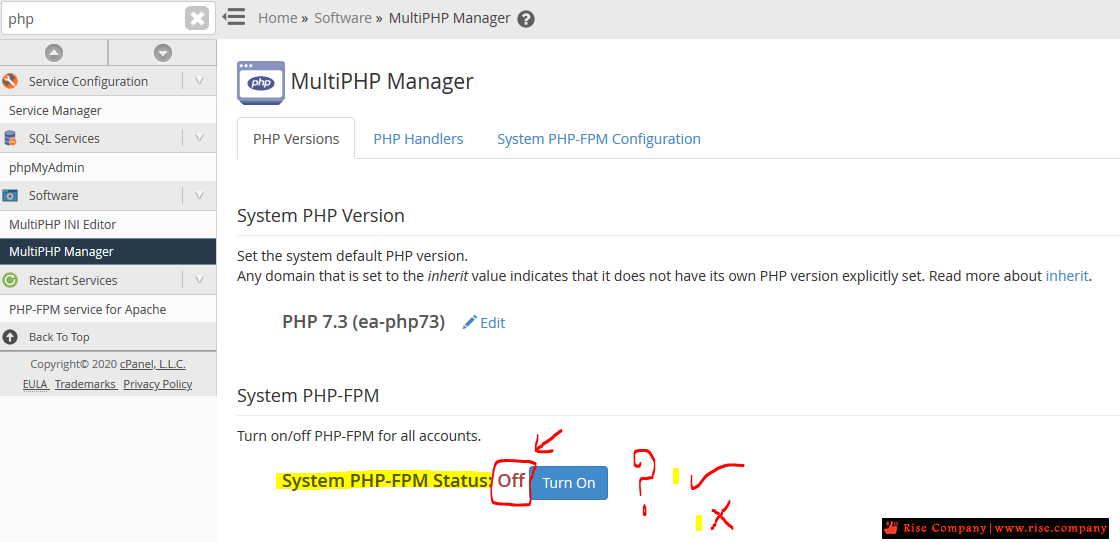
شرح مميزات PHP-FPM وما الافضل ؟ PHP-FPM Status: Off ام PHP-FPM Status: on
يعنى اى كلمة pool فى PHP-FPM - شرح معنى بول pool داخل PHP-FPM
اعمل pool واحد فقط ام اعمل Multi pool فى PHP-FPM
------------------------------------------------
شرح مميزات PHP-FPM
------------------------------------------------
الفكرة :
اذا كان لديك حمام سباحة Pool واحد كبير وبسلم واحد ولديك الكثير من العملاء هيقفوا طابور على السلم
اما اذا كان لديك اكثر من حمام سباحة Pool صغير و كل حمام له سلمه الخاص هيتوزع على جميع العملاء
النتيجة :
حمام السباحة الكبير : هناك بطىء فى الدخول و الخروج من سلم واحد
ولكن لا يوجد استنذاف لبعض الموارد فى انشاء حمام واحد فقط
فمهما زاد عدد العملاء لديك حمام سباحة واحد ولكن كبير ويسع الجميع
ولكن يفقد الخصوصية و الحماية !
حمام السباحة الصغير : هناك سرعة لان لكل عميل حمام خاص به
ولكن يوجد استنفاذ لبعض الموارد فى انشاء لكل عميل حمام خاص به
اذن كم لديك من عميل لكى تعمل له حمام سباحة خاص به فقط
ولكن يتمتع بميزة الخصوصة و الحماية !
شاهد ايضا :
مميزات / فائدة php fpm pool لعزل كل موقع عن الاخر داخل السيرفر
------------------------------------------------
فى حالة PHP-FPM Status: Off
------------------------------------------------
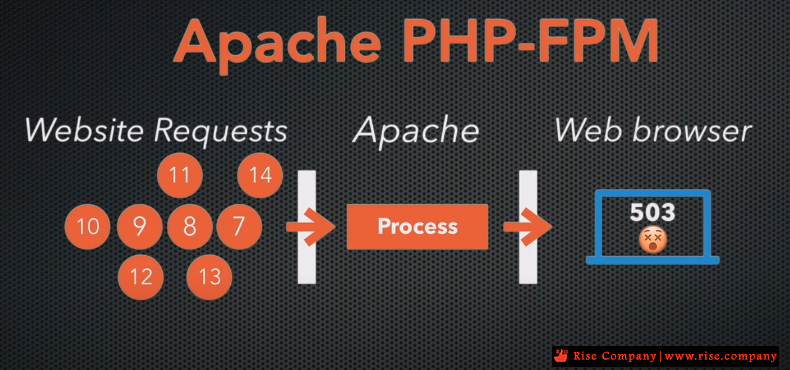
فى حالة PHP-FPM Status: Off تكون الطلبات على السيرفر طلب طلب اى طابور واحد طويل و بالدور
الميزة : لود قليل على موارد السيرفر | العيب : الطلبات تاخذ طابور واحد وبطىء فى تنفيذ الكثير من الطلبات
------------------------------------------------
فى حالة PHP-FPM Status: on
------------------------------------------------
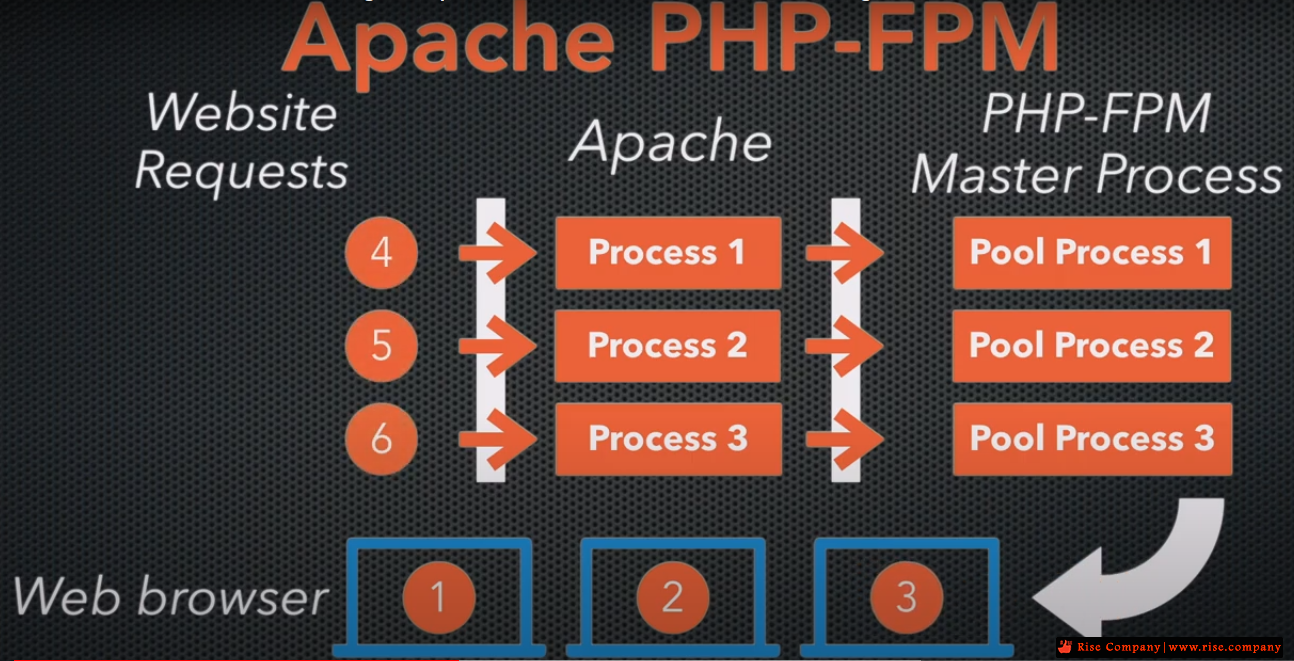
فى حالة PHP-FPM Status: on تكون الطلبات على السيرفر اكثر من طلب فى المرة الواحدة بدون حدوث طابور طويل
الميزة : كل طلب له pool خاص به و بالتالي تنفيذ الكثير من الطلبات | العيب : لود عالى لوجود لكل دومين pool خاص به بدل واحد مشترك
------------------------------------------------
ما الافضل ؟ PHP-FPM Status: Off ام PHP-FPM Status: on
------------------------------------------------
فى حالة PHP-FPM Status: on
هى الافضل و الاسرع ولكن هناك لود عالية اى ضغط عمل
فاذا كانت امكانيات السيرفر عالية نسبة و تناسب بين عدد العملاء و امكانيات السيرفر
وبالتالى كل عميل يكون له حمام سباحة خاص به اى pool خاص به , كل عميل له طابور خاص به
فى حالة PHP-FPM Status: on المواصفات هي :
اقل شىء لعمل السيرفر للـ PHP-FPM هو 2 GB رام وهذا لا يوجد مشكلة منه
ولكن ماذا عن Domain Ram اى لكل عميل pool هياخذ 30 MB من الرام
فاذا لديك 100 عميل فيتم اخذ الحد الادني من الرام 3000 MB اى 3 جيجا
وهو مقبول وخاصة اذا كان لديك سيرفر خاص 16 جيجا رام مثلا
فى حالة PHP-FPM Status: off
لن تجد ارتفاع فى اللود ولن تشعر ببطىء حقيقى وينصح بها فى حالة كان لديك الكثير من العملاء مثلا: 1000 عميل
ولكن يفضل دائما ان تجعلها on لان الحماية هى رقم 1 دائما مع العلم انه تم التجربة على 100 عميل فقط
فى حالة PHP-FPM Status: on كانت النتيجة لا يوجد زيادة ملحوظة فى البروسيسور / الرام
فى حالة PHP-FPM Status: off كانت النتيجة لا يوجد نقص ملحوظ فى البروسيسور / الرام
الفرق بيسط جدا على سيرفر معتدل فى الامكانيات و عدد العملاء عليه
ملحوظة : هذا الموضوع هو اجتهاد نتمنى من الجميع المشاركة ايضا للمزيد من التوضيح و التجارب
شرح الفرق و مميزات ؟ PHP-FPM Status: Off ام PHP-FPM Status: on
------------------------------------
How to Use PHP-FPM with cPanel
PHP performance is an enduring issue for web hosts. PHP is the most widely used server programming language on the web by a big margin. The most popular content management systems and ecommerce applications are written in PHP, including WordPress®, Joomla, Drupal, Magento®, and dozens more.
The ultra-fast PHP-FPM accelerates PHP execution on busy web servers, making it a valuable tool in the fight against slow sites and resource-constrained servers.
This article takes a deep dive into how PHP-FPM works and explains how to deploy and configure it with cPanel & WHM.
What is PHP-FPM?
PHP-FPM is an alternative PHP implementation that makes busy web applications faster while helping system administrators to control resource consumption on their server.
A PHP implementation, also known as the runtime, interprets and executes code. Traditional runtimes such as Apache’s mod_PHP do their work within the web server. That approach has advantages, but each connection consumes a chunk of the server’s resources for as long as it lasts. If there are too many concurrent connections, the server may run out of resources like memory altogether, impacting the performance of every site it hosts.
PHP-FPM does things differently: it operates outside of the web server and uses a pool of worker processes to execute code. The workers are ready and waiting when a request comes in, and you can control how many workers are in the pool so they can’t multiply until they consume all the server’s RAM and processor time.
It works like this:
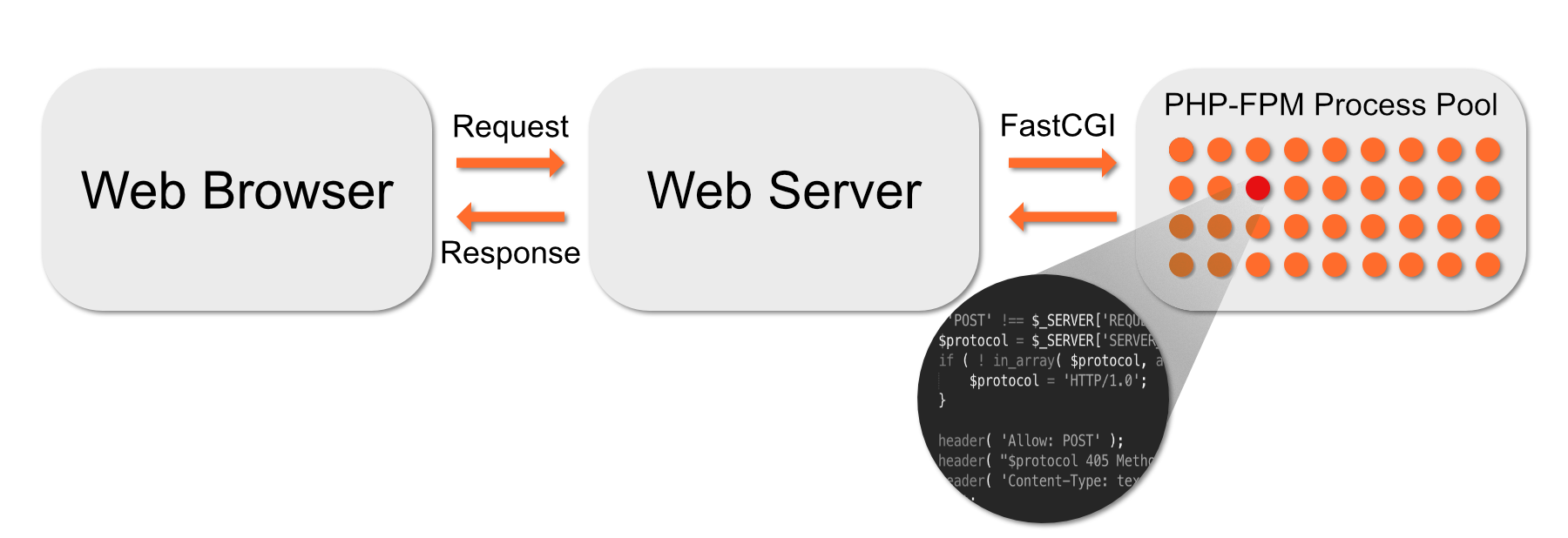
- Apache sends code to PHP-FPM over a high-speed binary interface called FastCGI.
- A supervisor process chooses a worker process from the pool and gives it the code.
- The worker executes the code, and the result is sent back to Apache, which sends it to the web browser.
- Once the worker is done, it returns to the pool to await another chunk of code to execute.
If there are too many concurrent connections, some might have to wait for a free worker, but they will never consume all of the server’s resources. On a busy web server, worker pools are faster and more efficient than other strategies.
Getting Started with PHP-FPM in CentOS and EasyApache
It is straightforward to activate and configure PHP-FPM in cPanel & WHM. You can choose which domains use it and set configuration variables that influence its behavior.
The first step is to turn it on in the System PHP-FPM settings in WHM’s MutliPHP Manager.
When you click Turn On, WHM makes PHP-FPM available, but it doesn’t activate it for all domains automatically. You can force all accounts on the server to use PHP-FPM by clicking Convert All Accounts to PHP-FPM.
Alternatively, you can activate PHP-FPM for individual domains in the table at the bottom of this page. To turn it on for several domains at once, select them in the table and choose On in the drop-down menu.
Configuring PHP-FPM in cPanel
Once you have activated PHP-FPM, you can configure both the system defaults and the settings for individual domains in MultiPHP Manager.
Click the System PHP-FPM Configuration tab.
In this section, there are three pool settings you can change. These are the default values that are applied to domain pools.
- Max Requests: The number of requests each worker process should execute before it restarts itself. This setting is useful for working around memory leaks. The default of 20 is acceptable for most web hosting scenarios, but you may want to increase it to between 40 and 60 on servers with heavy traffic.
- Process Idle Timeout: How long an idle worker process will wait before shutting down. Idle processes consume resources, so we don’t want too many hanging around, but we don’t want to kill them too soon because it takes a while to start new ones. The default of 10 (seconds) may be too low for a busy server.
- Max Children: The maximum number of worker processes in each pool. The default is 5.
Many factors affect the optimal values for these settings, including the code your server runs and the amount of RAM it has. We wrote PHP-FPM Performance Tuning Basicsto help you decide on the correct values for your server.
Underneath the pool options are PHP INI directives. We surface several of the most useful in the interface, and you can find more information about them in PHP’s Runtime Configuration documentation. We’ll show you how to add other directives in the next section.
In addition to system-wide configuration, you can also configure individual domains in the WHM interface.
In the table at the bottom of MutliPHP Manager, click Edit PHP-FPM at the end of the domain’s row. The options that appear are identical to those in the system-wide configuration interface.
How the cPanel PHP-FPM Module Works
Although the WHM interface contains the most useful configuration options, there are many more in the documentation. To add or modify them, you will need to edit configuration files on the server’s command line or in the cPanel & WHM File Manager.
The two most important system-wide configuration files are:
- /var/cpanel/ApachePHPFPM/system.yaml
- /var/cpanel/ApachePHPFPM/system_pool_defaults.yaml
WHM doesn’t create these files because the system doesn’t need them, but you can create them yourself and add directives to override the defaults.
touch /var/cpanel/ApachePHPFPM/system.yaml
touch /var/cpanel/ApachePHPFPM/system_pool_defaults.yaml You may also have to create the directory with:
mkdir -p /var/cpanel/ApachePHPFPM/ In these files, enter only directives that differ from and override the system directives. For example, if you wanted to change the emergency_restart_threshold directive from the default of 0, the system_pool_defaults.yaml file would look like this:
The three dashes at the top of the file (———) are part of the YAML markup language and must be present. The configuration file won’t work without them.
In the PHP documentation, you will find directives formatted with periods (.) and other symbols; syslog.facility,for example. When adding directives to configuration files, these symbols must be replaced with an underscore (_). For example, instead of syslog.facility, use syslog_facility.
You can learn more about configuring the cPanel PHP-FPM module in Configuration Values of PHP-FPM and PHP-FPM Code and FileSystem Layout for EasyApache 4.
Creating User Pools in PHP-FPM
Finally, we’ll look at manually creating and configuring domain-specific user pools in PHP-FPM. These are the worker pools used by sites hosted on your server’s domains.
The PHP-FPM module creates a worker pool for a domain if it finds a configuration file in:
/var/cpanel/userdata/[user]/[domain].php_fpm.yaml Replace [user] and [domain] with the relevant values for your server. You can create this file or activate PHP-FPM for a domain in WHM and it will be created automatically.
At a minimum, the file must contain the following information:
As with the system files, you can add directives to configure the user pools. After creating or editing the .yaml file, run the following command:
/scripts/php_fpm_config – rebuild
The script adds directives to Apache’s config file and restarts PHP-FPM, after which the new pool will be up and running. You can find more information about creating user pools in PHP-FPM User Pools.
Easy PHP-FPM Configuration with cPanel & WHM
PHP-FPM gives busy web servers a huge performance boost. Just as important, it helps web hosts to make the most of limited server resources, reducing the cost of providing an excellent hosting experience to clients and their users.
With cPanel & WHM, PHP-FPM can be activated in seconds and configured in an intuitive interface. If you need to dig deeper into PHP directives, our module makes building custom configurations for the runtime and worker pools straightforward.
المرجع:
https://blog.cpanel.com/how-to-use-php-fpm-with-cpanel/
+ إنشاء موضوع جديد
النتائج 1 إلى 1 من 1
-
10-04-2020, 07:40 #1Status
- Offline

- تاريخ التسجيل
- Apr 2014
- الدولة
- Egypt
- المشاركات
- 4,703
 Engineering and Technology
- معدل تقييم المستوى
- 10
 شرح مميزات PHP-FPM وما الافضل ؟ PHP-FPM Status: Off ام PHP-FPM Status: on
------------------------------------------------------------------------
شرح مميزات PHP-FPM وما الافضل ؟ PHP-FPM Status: Off ام PHP-FPM Status: on
------------------------------------------------------------------------
شركة رايز للهندسة و التكنولوجيا Rise Company for Engineering & Technology
------------------------------------------------------------------------
Web Hosting | Web Designing | E-Marketing
رقم # 1 فى خدمات الشركات Business Services
استضافة مواقع Web Hosting - عمل ايميل شركة Business Emails
تصميم موقع شركة Web Design - تسويق الكترونى على جوجل Google Adwords
www.rise.company | www.rise.company/emails
ملحوظة : جميع خدماتنا مخصصة للشركات فقط وغير متاحة للافراد
وليس لنا اى منتجات او صيانة نهائيا! يرجى الانتباه الى ذلك.


 رد مع اقتباس
المواضيع المتشابهه
-
مشكلة الهارد فى اللاب توب ديل dell error code 0151 incorrect status 5e
بواسطة Rise Company في المنتدى قسم الاي تي IT مشاكل و حلولمشاركات: 0آخر مشاركة: 16-02-2020, 22:57 -
الخصم الافضل فى عام 2018
بواسطة كمال رامي في المنتدى رايز الإعلانات التجارية Rise Advertiseمشاركات: 46آخر مشاركة: 22-12-2018, 22:14 -
فايروول السي بانل Whm / Cpanel CSF Firewall حل مشكلة Status: Enabled but Stopped
بواسطة Rise Company في المنتدى قسم فايروول CSFمشاركات: 0آخر مشاركة: 08-12-2018, 01:08 -
حل مشكلة عدم عمل Network Status فى whmcs
بواسطة Rise Company في المنتدى قسم ادارة الاستضافة Whmcsمشاركات: 0آخر مشاركة: 21-07-2018, 13:03 -
اخفاء / تغيير لون شريط ستاتس Status and Navigation Bar - الكوردوفا و الفون جاب
بواسطة Rise Company في المنتدى قسم الكوردوفا Ionic/Cordovaمشاركات: 0آخر مشاركة: 25-07-2017, 02:27

المفضلات