

فورتي جيت FortiGate الدي ان اس المشفر DNS over TLS و الفرق بين DOT vs DOH
Disappearing DNS: DoT and DoH - DNS over TLS (DoT) on the Fortigate
DNS over TLS
A new option is added to DNS Profile, forcing DNS over TLS for added security.
DNS over TLS (DoT) is a security protocol for encrypting and wrapping Domain Name System (DNS) queries and answers via the Transport Layer Security (TLS) protocol. The goal of the method is to increase user privacy and security by preventing eavesdropping and manipulation of DNS data via man-in-the-middle attacks.
Below is a typical topology.
FortiGate (client/server)<-----(DNS over TLS)<-----------------> DNS server/client
To configure DNS over TLS using the GUI:
Go to Network > DNS.
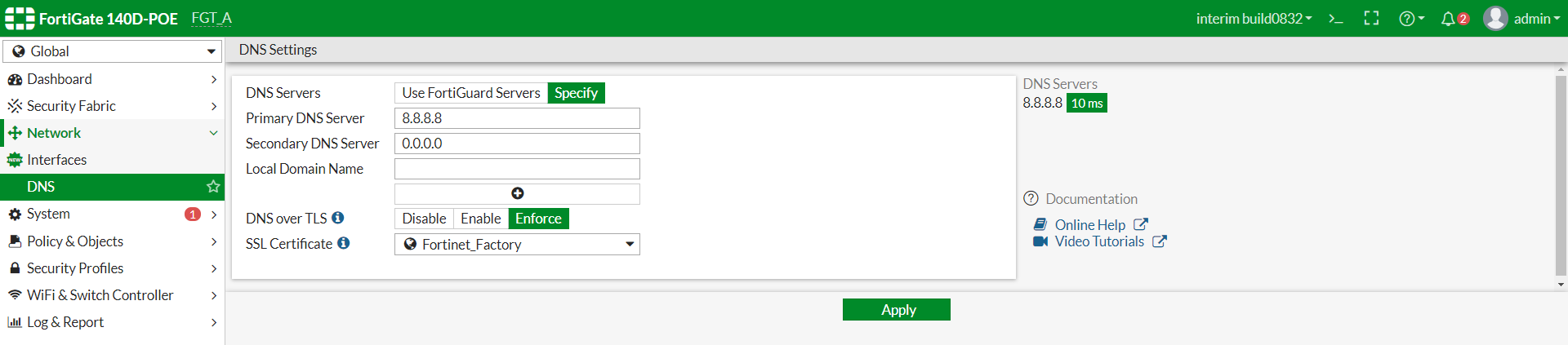
In DNS over TLS, select Enforce.
بالطبع يمكنك الاستفادة من تلك الخاصية فى حالة شرائك لشهادة ssl
التى من ضمن الاستفادة فى تشفير لوحة التحكم هيكون ايضا الدي ان اس
شاهد ايضا :
فورتي جيت FortiGate شراء شهادة purchase SSL certificate - PositiveSSL
----------------------------------------------------------
الفرق بين DNS vs DoT vs DoH
----------------------------------------------------------
Why does DNS need additional layers of security?
DNS is the phonebook of the Internet; DNS resolvers translate human-readable domain names into machine-readable IP addresses. By default, DNS queries and responses are sent in plaintext (via UDP), which means they can be read by networks, ISPs, or anybody able to monitor transmissions. Even if a website uses HTTPS, the DNS query required to navigate to that website is exposed.
This lack of privacy has a huge impact on security and, in some cases, human rights; if DNS queries are not private, then it becomes easier for governments to censor the Internet and for bad actors to stalk users' online behavior.
Think of a normal, unencrypted DNS query as being like a postcard sent through the mail: anyone handling the mail may happen to catch a glimpse of the text written on the back side, so it's not wise to mail a postcard that contains sensitive or private information.
DNS over TLS and DNS over HTTPS are two standards developed for encrypting plaintext DNS traffic in order to prevent malicious parties, advertisers, ISPs, and others from being able to interpret the data. Continuing the analogy, these standards aim to put an envelope around all postcards going through the mail, so that anyone can send a postcard without worrying that someone is snooping on what they're up to.
DNS over TLS, or DoT, is a standard for encrypting DNS queries to keep them secure and private. DoT uses the same security protocol, TLS, that HTTPS websites use to encrypt and authenticate communications. (TLS is also known as "SSL.") DoT adds TLS encryption on top of the user datagram protocol (UDP), which is used for DNS queries. Additionally, it ensures that DNS requests and responses are not tampered with or forged via man-in-the-middle attacks.
What is DNS over HTTPS?
DNS over HTTPS, or DoH, is an alternative to DoT. With DoH, DNS queries and responses are encrypted, but they are sent via the HTTP or HTTP/2 protocols instead of directly over UDP. Like DoT, DoH ensures that attackers can't forge or alter DNS traffic. DoH traffic looks like other HTTPS traffic – e.g. normal user-driven interactions with websites and web apps – from a network administrator's perspective.
Wait, doesn't HTTPS use TLS for encryption too? How are DNS over TLS and DNS over HTTPS different?
Each standard was developed separately and has its own RFC* documentation, but the most important difference between DoT and DoH is what port they use. DoT only uses port 853, while DoH uses port 443, which is the port that all other HTTPS traffic uses as well.
Because DoT has a dedicated port, anyone with network visibility can see DoT traffic coming and going, even though the requests and responses themselves are encrypted. In contrast, with DoH, DNS queries and responses are somewhat camouflaged within other HTTPS traffic, since it all comes and goes from the same port.
*RFC stands for "Request for Comments", and an RFC is a collective attempt by developers, networking experts, and thought leaders to standardize an Internet technology or protocol.
What is a port?
In networking, a port is a virtual place on a machine that is open to connections from other machines. Every networked computer has a standard number of ports, and each port is reserved for certain types of communication.
Think of ports for ships in a harbor: each shipping port is numbered, and different kinds of ships are supposed to go to specific shipping ports to unload cargo or passengers. Networking is the same way: certain types of communications are supposed to go to certain network ports. The difference is that the network ports are virtual; they are places for digital connections rather than physical connections.
Which is better, DoT or DoH?
This is up for debate. From a network security standpoint, DoT is arguably better. It gives network administrators the ability to monitor and block DNS queries, which is important for identifying and stopping malicious traffic. DoH queries, meanwhile, are hidden in regular HTTPS traffic, meaning they can't easily be blocked without blocking all other HTTPS traffic as well.
However, from a privacy perspective, DoH is arguably preferable. With DoH, DNS queries are hidden within the larger flow of HTTPS traffic. This gives network administrators less visibility but provides users with more privacy.
1.1.1.1, the free DNS resolver from Cloudflare, supports both DoT and DoH.
What is the difference between DNS over TLS/HTTPS and DNSSEC?
DNSSEC is a set of security extensions for verifying the identity of DNS root servers and authoritative nameservers in communications with DNS resolvers. It is designed to prevent DNS cache poisoning, among other attacks. It doesn't encrypt communications. DNS over TLS or HTTPS, on the other hand, does encrypt DNS queries. 1.1.1.1 supports DNSSEC as well.
المرجع:
https://docs.fortinet.com/document/f...4/dns-over-tls
https://www.cloudflare.com/learning/dns/dns-over-tls/
https://www.infoblox.com/glossary/dns-over-tls-dot/
https://www.netmeister.org/blog/doh-dot-dnssec.html
+ إنشاء موضوع جديد
النتائج 1 إلى 2 من 2
-
07-05-2020, 04:51 #1Status
- Offline

- تاريخ التسجيل
- Apr 2014
- الدولة
- Egypt
- المشاركات
- 4,703
 Engineering and Technology
- معدل تقييم المستوى
- 10
 فورتي جيت FortiGate الدي ان اس المشفر DNS over TLS و الفرق بين DOT vs DOH
------------------------------------------------------------------------
فورتي جيت FortiGate الدي ان اس المشفر DNS over TLS و الفرق بين DOT vs DOH
------------------------------------------------------------------------
شركة رايز للهندسة و التكنولوجيا Rise Company for Engineering & Technology
------------------------------------------------------------------------
Web Hosting | Web Designing | E-Marketing
رقم # 1 فى خدمات الشركات Business Services
استضافة مواقع Web Hosting - عمل ايميل شركة Business Emails
تصميم موقع شركة Web Design - تسويق الكترونى على جوجل Google Adwords
www.rise.company | www.rise.company/emails
ملحوظة : جميع خدماتنا مخصصة للشركات فقط وغير متاحة للافراد
وليس لنا اى منتجات او صيانة نهائيا! يرجى الانتباه الى ذلك.
-
07-05-2020, 04:59 #2Status
- Offline
- تاريخ التسجيل
- Apr 2014
- الدولة
- Egypt
- المشاركات
- 4,703
Engineering and Technology
- معدل تقييم المستوى
- 10
رد: فورتي جيت FortiGate الدي ان اس المشفر DNS over TLS و الفرق بين DOT vs DOH
you require 6.2x to configure this feature.
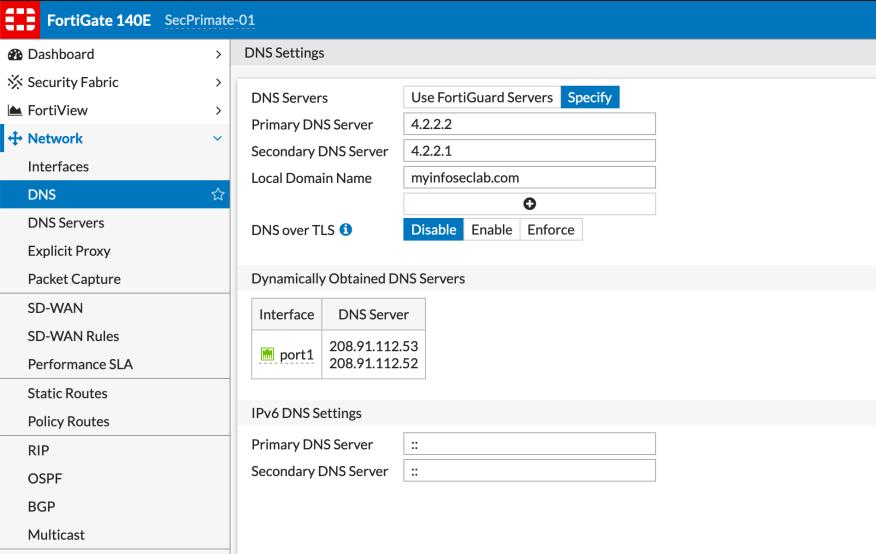
Here we can see the DNS over TLS is disabled, which is the default.
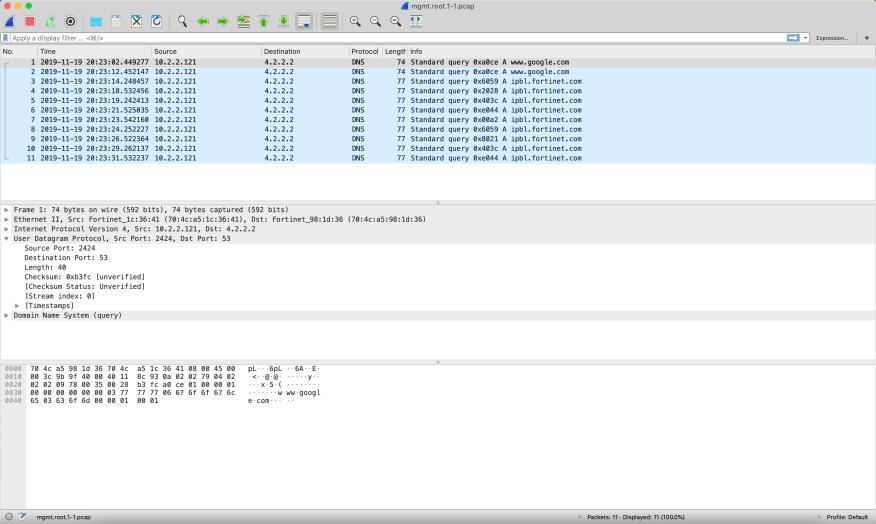
Here we can see a packet capture showing a standard DNS query. As you see this traffic is UDP 53.
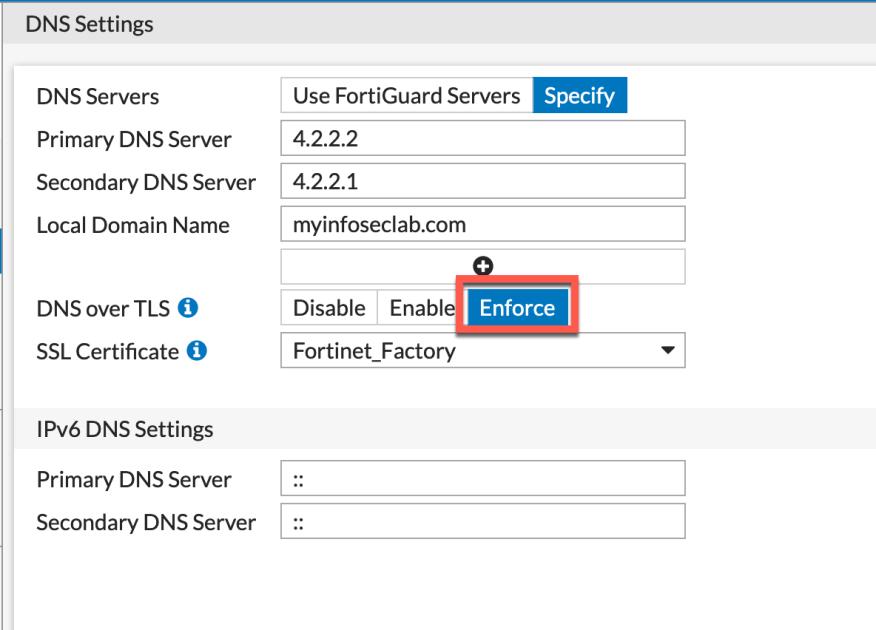
In the screenshot above, we can see that this is set up in Enforce mode which is Strict mode. You will need to choose the certificate you want to use from the drop down.
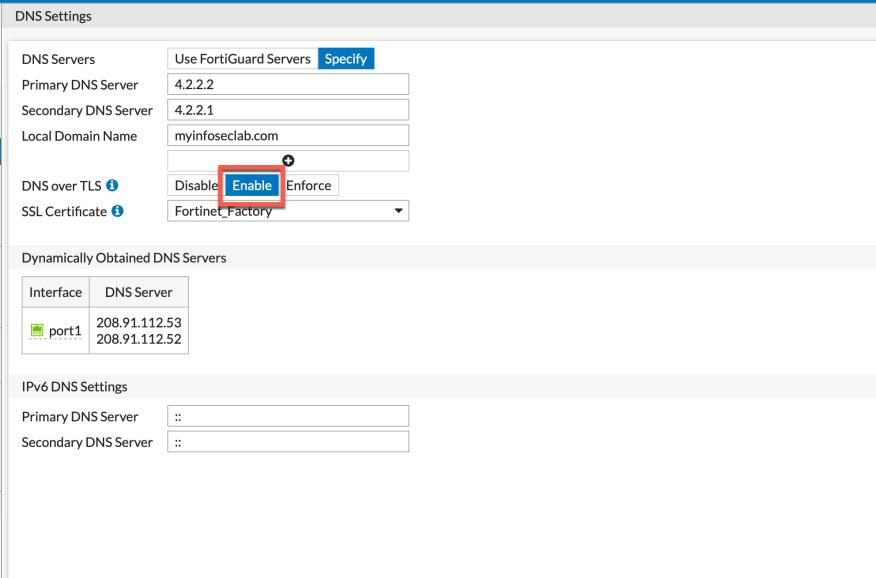
With the Enable option here, this is actually opportunistic mode. In this mode, the client will attempt to make a TLS connection on port 853 and if it fails, it will fall back to the standard UDP 53.
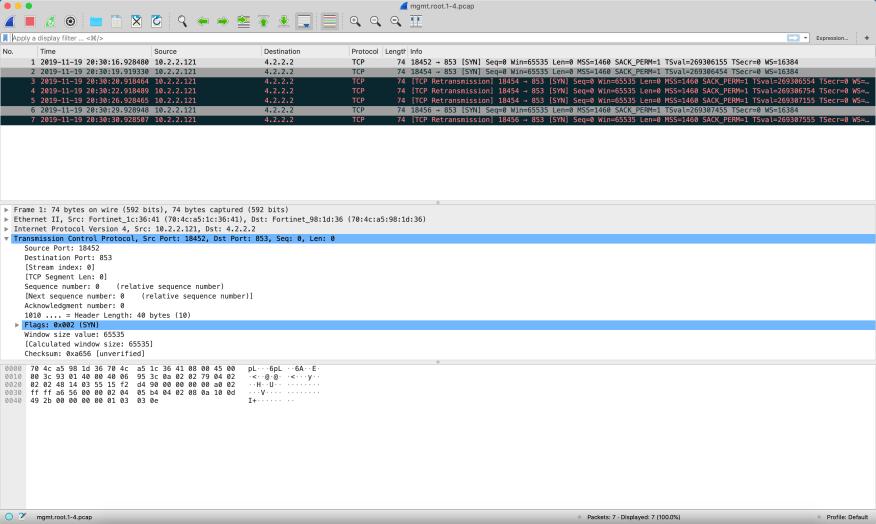
Here you can see the packet capture after turning on DoT. Notice it is using TCP and is using port 853.
DoH Blocking
If you want to block DNS over HTTPS, Fortinet has a application signature for it.

------------------------------------------------------------------------
شركة رايز للهندسة و التكنولوجيا Rise Company for Engineering & Technology
------------------------------------------------------------------------
Web Hosting | Web Designing | E-Marketing
رقم # 1 فى خدمات الشركات Business Services
استضافة مواقع Web Hosting - عمل ايميل شركة Business Emails
تصميم موقع شركة Web Design - تسويق الكترونى على جوجل Google Adwords
www.rise.company | www.rise.company/emails
ملحوظة : جميع خدماتنا مخصصة للشركات فقط وغير متاحة للافراد
وليس لنا اى منتجات او صيانة نهائيا! يرجى الانتباه الى ذلك.

 رد مع اقتباس
المواضيع المتشابهه
-
تجميع كل شىء عن الدي ام زي DMZ للفايروول فورتي جيت FortiGate Firewall
بواسطة Rise Company في المنتدى قسم فايروول Fortigateمشاركات: 0آخر مشاركة: 01-05-2020, 21:08 -
فورتي جيت FortiGate شرح Inspection Mode الفرق بين Proxy Vs Flow Modes
بواسطة Rise Company في المنتدى قسم فايروول Fortigateمشاركات: 0آخر مشاركة: 29-04-2020, 01:32 -
فورتي جيت FortiGate الدي ان اس DNS Forwarder & Server
بواسطة Rise Company في المنتدى قسم فايروول Fortigateمشاركات: 0آخر مشاركة: 26-04-2020, 23:34 -
فايروول فورتي جيت | الفرق بين FortiGate 30E, 50E, 60E, 80E, 100E
بواسطة Rise Company في المنتدى قسم فايروول Fortigateمشاركات: 0آخر مشاركة: 22-04-2020, 00:13 -
فايروول فورتي جيت FortiGate Firewall الفرق بين IPSec VPN vs SSL VPN
بواسطة Rise Company في المنتدى قسم فايروول Fortigateمشاركات: 0آخر مشاركة: 19-04-2020, 01:51

المفضلات