


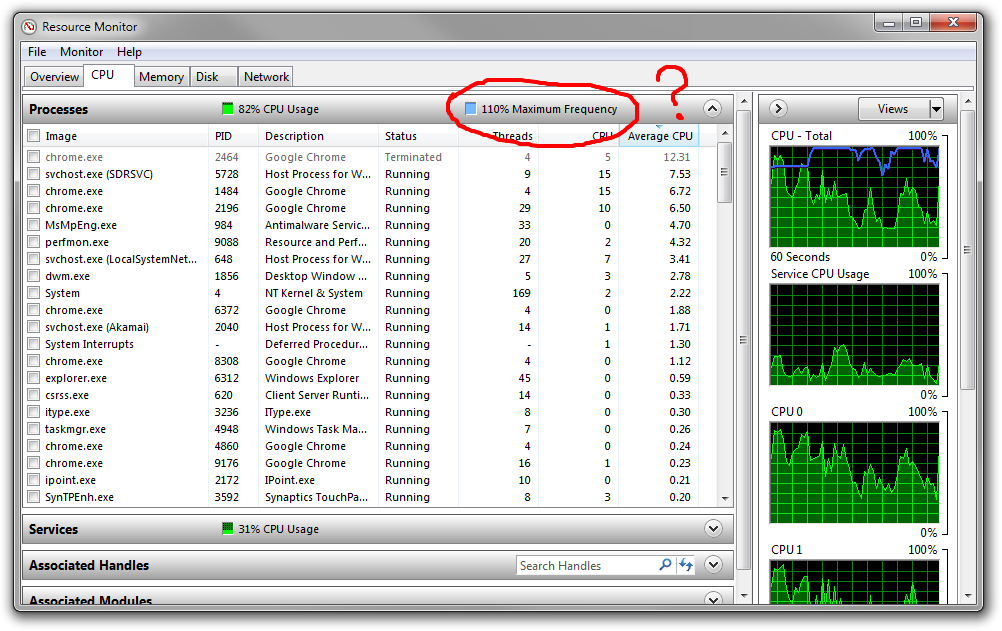
حل مشكلة cpu maximum frequency over 100 فى Windows Resource Monitor
What does the “Maximum Frequency” number mean in the Windows Resource Monitor?
حل المشكلة :
هى ليست مشكلة ولكن هى دليل على استهلاك كامل الطاقة للعديد من العمليات
وقد يكون بسبب ارتفاع درجة حرارة البروسيسور ولكن وصوله 100 % هو امر طبيعي وبالتالى ليست مشكلة
وتجد دائما انه يصل 100 % فى حالة عمل البروسيسور بكامل طقاته وهو امر طبيعى
ولكن فى البروسيسورات القديمة قد تجده دائما 100 % فى core 2 duo
ولكن فى البروسيسورات الحديثة I3 هتجد انه بستخدم الى بيحتاجه ويوقف ما لا يحتاجه من cores
لذلك تجد الرقم ينخفض و يرتفع وغير ثابت.
It simply means of the total maximum of your processors normal speed.
With speed step, power saving and everything else disabled, this should always read 100%.
If you have power saving on your laptop that under clocks your CPU compared to the stock speed, it will report a lower percentage.
If you have turbo boost or similar, it will report a higher percentage.
So, again, this is the current maximum percentage your processor can currently run when compared against its reported normal speed.
I am not 100% sure, but my guess is that if you overclock, the overclocked amount would be the "base" speed to Windows and overclocking by 20% would not show a 120% maximum frequency - this is just guessing, I have no way to test.
المرجع :
https://superuser.com/questions/2569...source-monitor
+ إنشاء موضوع جديد
النتائج 1 إلى 1 من 1
مشاهدة المواضيع
-
13-08-2020, 13:17 #1Status
- Offline

- تاريخ التسجيل
- Apr 2014
- الدولة
- Egypt
- المشاركات
- 4,703
 Engineering and Technology
- معدل تقييم المستوى
- 10
 حل مشكلة cpu maximum frequency over 100 فى Windows Resource Monitor
------------------------------------------------------------------------
حل مشكلة cpu maximum frequency over 100 فى Windows Resource Monitor
------------------------------------------------------------------------
شركة رايز للهندسة و التكنولوجيا Rise Company for Engineering & Technology
------------------------------------------------------------------------
Web Hosting | Web Designing | E-Marketing
رقم # 1 فى خدمات الشركات Business Services
استضافة مواقع Web Hosting - عمل ايميل شركة Business Emails
تصميم موقع شركة Web Design - تسويق الكترونى على جوجل Google Adwords
www.rise.company | www.rise.company/emails
ملحوظة : جميع خدماتنا مخصصة للشركات فقط وغير متاحة للافراد
وليس لنا اى منتجات او صيانة نهائيا! يرجى الانتباه الى ذلك.

 رد مع اقتباس
المواضيع المتشابهه
-
حل مشكلة المنتدي you don't have permission to access the resource .server unable
بواسطة Rise Company في المنتدى قسم منتدي vbمشاركات: 0آخر مشاركة: 18-09-2019, 12:07 -
حل مشكلة الشاشة How to resolve Out Of Range on monitor
بواسطة Rise Company في المنتدى قسم الاي تي IT مشاكل و حلولمشاركات: 0آخر مشاركة: 08-04-2019, 05:38 -
فايروول السي بانل Whm / Cpanel CSF Firewall مشكلة excessive resource usage alert
بواسطة Rise Company في المنتدى قسم فايروول CSFمشاركات: 0آخر مشاركة: 03-12-2018, 22:23 -
اعدادات File Server Resource Manager ويندوز سيرفر windows server 2016
بواسطة Rise Company في المنتدى قسم الويندوز سيرفر Windows Serverمشاركات: 0آخر مشاركة: 04-08-2018, 00:01 -
حل مشكلة جملة Maximum PHP file upload size is too small: This is set in php.ini
بواسطة Rise Company في المنتدى رايز للويب Rise Webمشاركات: 0آخر مشاركة: 25-04-2017, 17:49

المفضلات