


ويندوز سيرفر Windows Server باتش / كراك Remote Desktop للسماح بتعدد users
How To crack Remote Desktop Service on Windows Server 2008 / 2012 / 2016 / 2019
how to remove concurrent sessions on Windows Server - Allow Multiple Remote Desktop Sessions
rdp termsrv.dll - How To crack Remote Desktop Service on Windows Server 2008 R2 / WIndows 7
How To crack Remote Desktop Service on Windows Server 2012 R2
How To crack Remote Desktop Service on Windows Server 2016 / Windows 10
windows server there are too many users signed in - How to Get Unlimited Remote Desktop Connections
RUNNING MULTIPLE REMOTE DESKTOP USERS WITHOUT LOG OFF
How to allow more than two Remote Windows sessions - Simultaneous
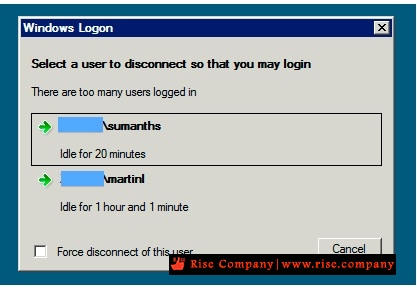
windows logon select a user to disconnect so that you may login
Select a user to disconnect so that you can sign in. There are too many users logged in.
المشكلة :
Normally, by default, 2008 R2 server allows two RDP sessions. If a third remote session tries to connect, it gets a message stating "Select a user to disconnect so that you may login" and it shows you the two current users, and allows you to disconnect one of their sessions. But It returns an error message, "This computer cannot connect to the remote computer" instead of the usual "who do you want to disconnect" message. Kindly Help me out from This.
Normally Server 2008 r2 will accept 2 active connections and one console connection. If 2 users already login in to the server and 3 rd user trying to login then it should return message which user you want to disconnect means it will give chance to us to disconnect current user. But I am getting message ''This computer cannot connect to remote computer try reconnecting again.
The two connections are for administrative use only. If you have people using it for something other than managing the server, you need to install the Terminal Services role and purchase the appropriate licenses.
حل المشكلة :
قم بتفعيل الباتش فهو الذى سيسمح لك بتعدد المستخدمين users ولا تذهب لتفعيل ترخيص من اعدادات السيرفر
فهى مخصصة للتراخيص المدفوعة فحل المشكلة ليس من خلالها لان لا تمتلك ترخيص, الباتش هو
ملف termsrv.dll هيتم استبداله بالملف الاصلى الموجود داخل ملفات الويندوز
ولكن لان RDP يعمل و هناك security فلن تستطيع استبدال الملف
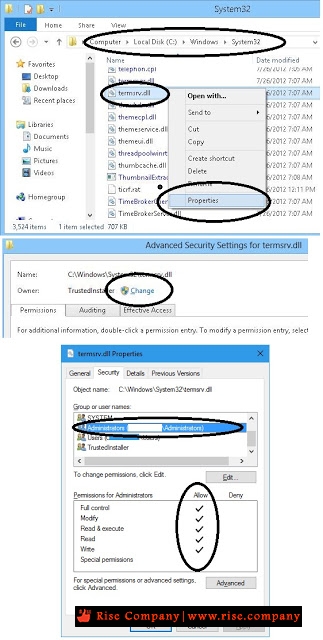
لذلك هيتم وقف RDP من services ثم جعل ملف termsrv.dll الاصلى له صلاحيات كاملة للادمن
او اجعله everyone لكى تستطيع استبداله بالباتش المرفق ثم اعد تشغيل RDP
* ملحوظة : قبل استبدال termsrv.dll خذ نسخة لان الباتش قد لا يعمل و قد يتعطل RDP
لذلك هيتطلب الرجوع الى الباك اب, حيث اختلاف اصدار الباتش قد يرفض RDP عمل Start
او قد يفتح RDP للمستخدم و يخرج فى الحال
* ملحوظة : اذا كان السيرفر مفعل به الباتش مسبقا وتم حذفه نتيجة windows update
او sfc/scannow كل ما عليك فعله هو فتح shadow واسترجاع الملف termsrv.dll
او اذا كان لديك باك اب استجرع الملف الذى كنت تعمل به termsrv.dll بدون مشاكل
الخطوات :
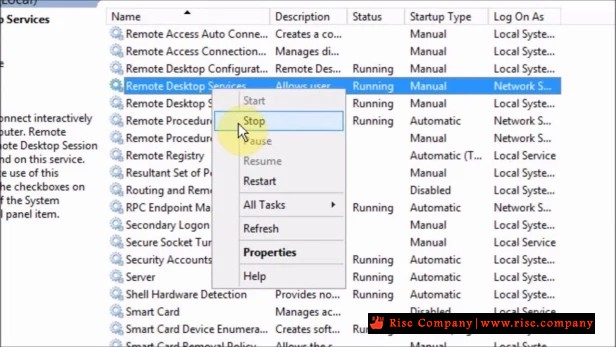
1. Stop services Remote Desktop
من داخل Services
2. Change owner and add administrator to file c:/window/system32/termsrv.dll
لكى تستطيع استبدال الملف دون ظهور عدم وجود صلاحيات لك
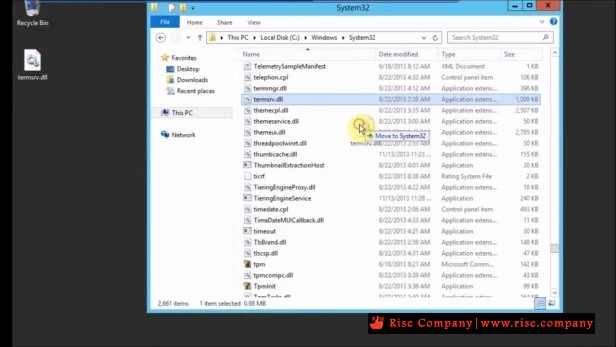
3. Copy paste termsrv.dll
خذ الباتش واستبدله بالاصلى ولا تنسى اخذ باك من الاصلى
5. Start services Remote Desktop
من داخل Services
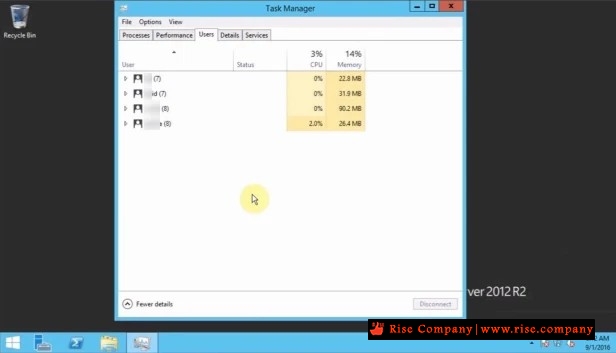
النتيجة : اكثر من user يدخل على RDP بدل من Limit الذى كان لعدد 2 فقط
-------------------.Download patched dll------------------------
you can download "termsrv.dll" on following link:
Windows Server 2019
https://github.com/stascorp/rdpwrap/releases
Windows Server 2016
https://drive.google.com/drive/folde...EE?usp=sharing
Windows Server 2012 R2
https://drive.google.com/file/d/0B9v...ew?usp=sharing
Windows Server 2008 R2
https://cloud.mail.ru/public/EK8u/DggA1qCY4
شاهد ايضا
ويندوز سيرفر 2019 Windows Server باتش RDPWrap لـ Remote Desktop لتعدد users
المرجع :
https://serverfault.com/questions/49...er-2012-standa
https://mohamedhassaneg.wordpress.co...erver-2012-r2/
+ إنشاء موضوع جديد
النتائج 1 إلى 7 من 7
مشاهدة المواضيع
-
14-08-2020, 02:07 #1Status
- Offline

- تاريخ التسجيل
- Apr 2014
- الدولة
- Egypt
- المشاركات
- 4,703
 Engineering and Technology
- معدل تقييم المستوى
- 10
 ويندوز سيرفر Windows Server باتش / كراك termsrv.dll لـ Remote Desktop لتعدد users
------------------------------------------------------------------------
ويندوز سيرفر Windows Server باتش / كراك termsrv.dll لـ Remote Desktop لتعدد users
------------------------------------------------------------------------
شركة رايز للهندسة و التكنولوجيا Rise Company for Engineering & Technology
------------------------------------------------------------------------
Web Hosting | Web Designing | E-Marketing
رقم # 1 فى خدمات الشركات Business Services
استضافة مواقع Web Hosting - عمل ايميل شركة Business Emails
تصميم موقع شركة Web Design - تسويق الكترونى على جوجل Google Adwords
www.rise.company | www.rise.company/emails
ملحوظة : جميع خدماتنا مخصصة للشركات فقط وغير متاحة للافراد
وليس لنا اى منتجات او صيانة نهائيا! يرجى الانتباه الى ذلك.


 رد مع اقتباس
المواضيع المتشابهه
-
ويندوز سيرفر Windows Server تغيير بورت remote desktop من 3389 الى رقم اخر
بواسطة Rise Company في المنتدى قسم الويندوز سيرفر Windows Serverمشاركات: 0آخر مشاركة: 04-05-2020, 07:37 -
ويندوز سيرفر Windows Server شرح Windows server 2016 Installation
بواسطة Rise Company في المنتدى قسم الويندوز سيرفر Windows Serverمشاركات: 0آخر مشاركة: 23-05-2019, 01:37 -
ويندوز سيرفر Windows Server نقل جميع اجهزة Users من دومين الى اخر
بواسطة Rise Company في المنتدى قسم الويندوز سيرفر Windows Serverمشاركات: 0آخر مشاركة: 20-05-2019, 12:15 -
تنزيل سيكول سيرفر SQL Server 2017 ويندوز سيرفر windows server 2016
بواسطة Rise Company في المنتدى قسم الويندوز سيرفر Windows Serverمشاركات: 0آخر مشاركة: 04-08-2018, 23:54 -
تنزيل Feature الباك اب Windows Server Backup ويندوز سيرفر windows server 2016
بواسطة Rise Company في المنتدى قسم الويندوز سيرفر Windows Serverمشاركات: 0آخر مشاركة: 04-08-2018, 02:26


المفضلات