

ويندوز سيرفر Windows Server الفرق بين VSS fullbackup and VSS copy backup
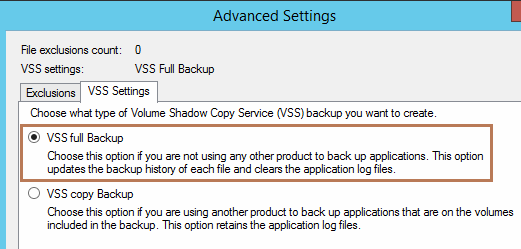
الفرق الاساسى فى الاول اذا كان الباك اب بيتم من الخلال الويندوز فقط
اما الثانى اذا كان لديك اكثر من برنامج بياخذ باك اب يعمل بدون مشاكل
حيث الاول بعد عمل باك اب للملفات المتغيرة بيمسح علامة ان هناك ملفا تتم تغييرها
وبالتالى ياتى برنامج الباك اب الاخر لا يجد اى اثر للتغيير لان الاول حذفه.
كلاهما ياخذ فى الاول نسخة كاملة ثم النسخة التالية تكون للتغييرات مع الاختلاف فى
ان VSS fullbackup يضيف التغييرات التى تمت مدمج فوق الاصلى ليكون الناتج باك اب يوم واحد فقط
اما VSS copy backup يضيف التغييرات التى تمت مفرط بجانب الاصلي ليكون الناتج باك اب تغير كل يوم منفصل
الخلاصة : الاول يعطى لك باك اب واحد فقط , الاخير يعطى لك باك اب كل يوم فى ملف منفصل
بحث اذا اردت ان ترجع بالزمن الى التغييرات التى تمت فى يوم محدد تستطيع الرجوع لها
عكس الاول فكل يوم يحل مكان اليوم الذى يسبقه.
-------------------------------------------------------------
-> Each and every application we installed, creates a transaction log file, If we are using third party tools to take the backup,
it will delete the log files at the end of the backup.
-> When we do VSS copy backup, it will backed up and you preserve the all the applications files including log files on the live system.
-> VSS Copy backup cannot be used while taking incremental, differential backup since it will not preserve the sequence of incremental and differential backups
-----------------------------------------------------
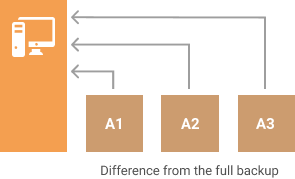
Differential backups
were the next step in the evolution of backup strategies. A differential backup backs up only the files that changed since the last full back. For example, suppose you do a full backup on Sunday. On Monday you back up only the files that changed since Sunday, on Tuesday you back up only the files that changed since Sunday, and so on until the next full backup. Differential backups are quicker than full backups because so much less data is being backed up. But the amount of data being backed up grows with each differential backup until the next full back up. Differential backups are more flexible than full backups, but still unwieldy to do more than about once a day, especially as the next full backup approaches.
Differential backup uploads all changed files since the first full backup was done. Differential backup might not seem very effective in the long run. It gets larger after each backup and eventually, it will outgrow the entire dataset. That means you need to perform a full backup from time to time. On the other hand, a differential backup is more reliable and faster than an incremental backup when it comes to recovery.
Further reading Differential Backup
It might seem that an incremental backup is always a more preferable way of transfer, however, in some specific types of data that is not so. For example, a differential backup is used extensively in Microsoft SQL Server backups. Check out our article to learn more about the use cases of the differential backup.
+ إنشاء موضوع جديد
النتائج 1 إلى 2 من 2
-
15-10-2020, 00:51 #1Status
- Offline

- تاريخ التسجيل
- Apr 2014
- الدولة
- Egypt
- المشاركات
- 4,703
 Engineering and Technology
- معدل تقييم المستوى
- 10
 ويندوز سيرفر Windows Server الفرق بين VSS fullbackup and VSS copy backup
------------------------------------------------------------------------
ويندوز سيرفر Windows Server الفرق بين VSS fullbackup and VSS copy backup
------------------------------------------------------------------------
شركة رايز للهندسة و التكنولوجيا Rise Company for Engineering & Technology
------------------------------------------------------------------------
Web Hosting | Web Designing | E-Marketing
رقم # 1 فى خدمات الشركات Business Services
استضافة مواقع Web Hosting - عمل ايميل شركة Business Emails
تصميم موقع شركة Web Design - تسويق الكترونى على جوجل Google Adwords
www.rise.company | www.rise.company/emails
ملحوظة : جميع خدماتنا مخصصة للشركات فقط وغير متاحة للافراد
وليس لنا اى منتجات او صيانة نهائيا! يرجى الانتباه الى ذلك.
-
15-10-2020, 01:51 #2Status
- Offline
- تاريخ التسجيل
- Apr 2014
- الدولة
- Egypt
- المشاركات
- 4,703
Engineering and Technology
- معدل تقييم المستوى
- 10
رد: ويندوز سيرفر Windows Server الفرق بين VSS fullbackup and VSS copy backup
------------------------------------------------------------------------
شركة رايز للهندسة و التكنولوجيا Rise Company for Engineering & Technology
------------------------------------------------------------------------
Web Hosting | Web Designing | E-Marketing
رقم # 1 فى خدمات الشركات Business Services
استضافة مواقع Web Hosting - عمل ايميل شركة Business Emails
تصميم موقع شركة Web Design - تسويق الكترونى على جوجل Google Adwords
www.rise.company | www.rise.company/emails
ملحوظة : جميع خدماتنا مخصصة للشركات فقط وغير متاحة للافراد
وليس لنا اى منتجات او صيانة نهائيا! يرجى الانتباه الى ذلك.

 رد مع اقتباس
المواضيع المتشابهه
-
ويندوز سيرفر Window Server الترقية الى upgrade windows server to 2019
بواسطة Rise Company في المنتدى قسم الويندوز سيرفر Windows Serverمشاركات: 0آخر مشاركة: 20-03-2020, 01:43 -
ويندوز سيرفر Windows Server شرح Windows server 2016 Installation
بواسطة Rise Company في المنتدى قسم الويندوز سيرفر Windows Serverمشاركات: 0آخر مشاركة: 23-05-2019, 01:37 -
ويندوز سيرفر 2008 windows server واضافة DHCP على Server manager
بواسطة Rise Company في المنتدى قسم الويندوز سيرفر Windows Serverمشاركات: 0آخر مشاركة: 23-10-2018, 21:33 -
تنزيل سيكول سيرفر SQL Server 2017 ويندوز سيرفر windows server 2016
بواسطة Rise Company في المنتدى قسم الويندوز سيرفر Windows Serverمشاركات: 0آخر مشاركة: 04-08-2018, 23:54 -
تنزيل Feature الباك اب Windows Server Backup ويندوز سيرفر windows server 2016
بواسطة Rise Company في المنتدى قسم الويندوز سيرفر Windows Serverمشاركات: 0آخر مشاركة: 04-08-2018, 02:26

المفضلات