


ويندوز 10 Windows تفعيل SMBv1 حل مشكلة عدم ظهور السكانر
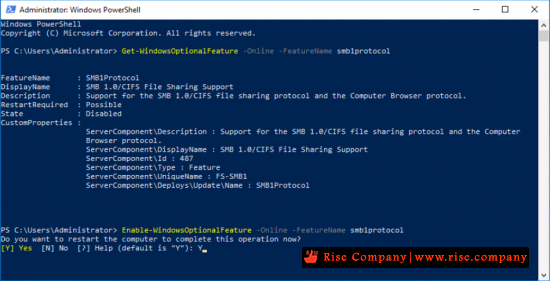
ننصح باستخدام الشل ... ماذا اذا لم يكن يعمل !!!كود:Get-WindowsOptionalFeature -Online –FeatureName smb1protocol Enable-WindowsOptionalFeature -Online –FeatureName smb1protocol
الحل بسيط هنا
ويندوز 10 Windows حل مشكلة باورشل لا يفتح powershell not opening
الشل ضرورى حيث اذا لم يعمل هذا يعنى انك حسابك الادمن به خلل فى الصلاحيات
والشل اذا كان يعمل هيضمن لك ان تفعيل smb 1 هيتم بشكل صحيح
------------------------------------------------------
طريقة اخري
Open registry key
Once you’ve opened the editor, the next step is to access the correct registry key. To do so,
enter the following path in the address bar or click through the folder structure until you reach the right location:
كود:Computer\HKEY_LOCAL_MACHINE\SYSTEM\CurrentControlSet\Services\LanmanServer\ParametersThe abbreviation “Lanman” stands for LAN Manager, which is used to manage important network applications and protocols in Windows 10.
Change value for “SMB1”
Double click on “SMB1” in the opened key and enter the value “0” to disable SMB1 in Windows 10. Next, confirm the new value with “OK”:
If the SMB1 entry shown is missing, you can also add it first: “New”-> “DWORD-value (32-Bit)”.
Close the editor and then restart Windows 10 to apply the changes regarding Server Message Block.
أفضل حل ؟ استخدم جهاز تخزين خارجي مثل WD MyCloud لتخزين السكان عليه
او عرف السكان على ويندوز 7 واعمل له share لباقى الاجهزة
+ إنشاء موضوع جديد
النتائج 1 إلى 2 من 2
مشاهدة المواضيع
-
18-10-2020, 04:19 #1Status
- Offline

- تاريخ التسجيل
- Apr 2014
- الدولة
- Egypt
- المشاركات
- 4,703
 Engineering and Technology
- معدل تقييم المستوى
- 10
 ويندوز 10 Windows تفعيل SMBv1 وحل مشكلة عدم ظهور السكانر
------------------------------------------------------------------------
ويندوز 10 Windows تفعيل SMBv1 وحل مشكلة عدم ظهور السكانر
------------------------------------------------------------------------
شركة رايز للهندسة و التكنولوجيا Rise Company for Engineering & Technology
------------------------------------------------------------------------
Web Hosting | Web Designing | E-Marketing
رقم # 1 فى خدمات الشركات Business Services
استضافة مواقع Web Hosting - عمل ايميل شركة Business Emails
تصميم موقع شركة Web Design - تسويق الكترونى على جوجل Google Adwords
www.rise.company | www.rise.company/emails
ملحوظة : جميع خدماتنا مخصصة للشركات فقط وغير متاحة للافراد
وليس لنا اى منتجات او صيانة نهائيا! يرجى الانتباه الى ذلك.

 رد مع اقتباس
المواضيع المتشابهه
-
ويندوز سيرفر Windows Server حل مشكلة السكانر لا تظهر Ricoh Copier
بواسطة Rise Company في المنتدى قسم الطابعات وماكينات التصويرمشاركات: 1آخر مشاركة: 18-10-2020, 11:55 -
ويندوز سيرفر Windows Server الطباعة من خلال RDP redirected printer
بواسطة Rise Company في المنتدى قسم الويندوز سيرفر Windows Serverمشاركات: 1آخر مشاركة: 04-09-2020, 18:13 -
ويندوز سيرفر Windows Server الطباعة و الاسكنر Printer Management and Document
بواسطة Rise Company في المنتدى قسم الويندوز سيرفر Windows Serverمشاركات: 0آخر مشاركة: 24-05-2019, 22:44 -
حل مشكلة تفعيل ويندوز 7 مع ويندوز 10 وظهور رسالة Windows is not Genuine
بواسطة Rise Company في المنتدى قسم الاي تي IT مشاكل و حلولمشاركات: 0آخر مشاركة: 22-10-2018, 09:55 -
حل مشكلة عدم ظهور الشبكات و الشير في ويندوز Windows 10
بواسطة Rise Company في المنتدى قسم الاي تي IT مشاكل و حلولمشاركات: 1آخر مشاركة: 04-10-2018, 22:04

المفضلات