


I have an Officejet Pro 6830 printer.
Lately, when I scan a document from the automatic document feeder, I get a thin black line from the top to the bottom in the middle of the scanned document (see the attached photo)
I raised the cover and tried to clean the parts the move the document, but that didn't help.
The problem does NOT occur when I put the document on the glass
Any idea?
Cleaning scan glass strip of vertical lines:
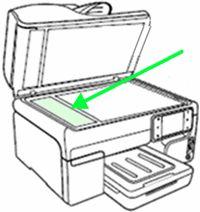
The issue may be caused by a small spec on the ADF scanner glass, (the thin glass to the left of Flatbed scan glass)
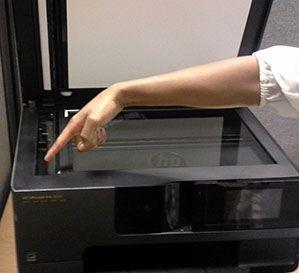
This sensor is used for both the flatbed scan and the automatic document feeder (ADF), the difference is where the sensor is moved to for scanning. When scanning from the flatbed the sensor moves across the bed, a spot in this area will result in a spot on the page. When using the ADF the sensor is moved to the thin glass to the left of the main bed, and the paper is moved past the sensor by the ADF. A spot in the wrong place here will result in a line down the length of the long side of the page. Clean this areas as shown below.
Figure : Locate any debris on the ADF scanner glass strip
If the initial cleaning does not resolve the issue it may help to shine a bright flashlight nearly parallel to the glass. For a line on the left side of the printed page the spot will be toward the front of the printer, if the line is on the right of the paper it will correspond to a spec toward the rear of the printer.
Figure : Clean the ADF scanner glass strip
This resource will be useful:
HP AiO Printers : Resolving Vertical lines or bands on copied or scanned document
+ إنشاء موضوع جديد
النتائج 1 إلى 2 من 2
مشاهدة المواضيع
-
17-12-2020, 14:12 #2Status
- Offline

- تاريخ التسجيل
- Apr 2014
- الدولة
- Egypt
- المشاركات
- 4,703
 Engineering and Technology
- معدل تقييم المستوى
- 10
 رد: سكانر scanner مشكلة ظهور خط اسود hp scanjet pro 3500 f1 flatbed scanner black lin
------------------------------------------------------------------------
رد: سكانر scanner مشكلة ظهور خط اسود hp scanjet pro 3500 f1 flatbed scanner black lin
------------------------------------------------------------------------
شركة رايز للهندسة و التكنولوجيا Rise Company for Engineering & Technology
------------------------------------------------------------------------
Web Hosting | Web Designing | E-Marketing
رقم # 1 فى خدمات الشركات Business Services
استضافة مواقع Web Hosting - عمل ايميل شركة Business Emails
تصميم موقع شركة Web Design - تسويق الكترونى على جوجل Google Adwords
www.rise.company | www.rise.company/emails
ملحوظة : جميع خدماتنا مخصصة للشركات فقط وغير متاحة للافراد
وليس لنا اى منتجات او صيانة نهائيا! يرجى الانتباه الى ذلك.


 رد مع اقتباس
المواضيع المتشابهه
-
ريكو Ricoh تعريف السكانر على الشبكة Network TWAIN Scanner Driver
بواسطة Rise Company في المنتدى قسم الطابعات وماكينات التصويرمشاركات: 0آخر مشاركة: 18-10-2020, 11:49 -
حماية whm / cpanel من خلال ClamAV virus scanner للايميلات و الملفات antivirus
بواسطة Rise Company في المنتدى قسم حماية Whm / Cpanelمشاركات: 0آخر مشاركة: 09-04-2020, 20:19 -
افضل برنامج الاسكانر Scanner لماكينات تصوير ريكو Ricoh وغيرها
بواسطة Rise Company في المنتدى قسم الطابعات وماكينات التصويرمشاركات: 0آخر مشاركة: 07-10-2019, 01:11 -
كتابة ملفات مسحوبة Scanner أو PDF إلى ملفات نصية ( 20 صفحة) Word
بواسطة اسامة الاحمر في المنتدى رايز الإعلانات التجارية Rise Advertiseمشاركات: 0آخر مشاركة: 19-10-2018, 13:05 -
Portable Kaspersky Anti-Virus Scanner 8.0.0.523 لفحص وازالة العدوى من الكمبيوتر
بواسطة Eng Amr Adel في المنتدى رايز للكمبيوتر Rise Computerمشاركات: 0آخر مشاركة: 22-12-2009, 23:52

المفضلات