

سكريبت Whmcs حل مشكلة AUTO LOGOUT عند تفعيل CloudFlare
HOW TO FIX AUTO LOGOUT ISSUE IN WHMCS - Can't stay logged into admin area
After activating Cloudflare WHMCS login not working - whmcs logout issue with cloudflare
Session drop / kick out / logout problem - Cloudflare - Cloudflare causing logout
WHMCS PHP Sessions Not working
المشكلة :
بعد تفعيل كلاود فلير cloud flare ظهرت مشكلة داخل لوحة تحكم whmcs
وهى انه يحدث تسجيل خروج log out بشكل متكرر ولا يجعلك تكمل عملك
وعند التصفح داخل clients او تسجيل خدمة مرة واحدة يرجع الى home
كان هناك خلل فى الاي بي او الانترنت والسبب هنا هو الكلاود فلير
حيث يعتمد على نظام البروكسي, ويقوم بتغيير ip زائر الموقع بشكل متكرر
لذلك يجب السماح لهذه الايبيهات وعمل لها allow
After checking the WHMCS admin log i noticed i was logging in from Cloudflare ips
and every time the ip changed, i got logout.
حل المشكلة " log out " فى حالة تغيير ip :
Being logged out is an indication of the IP address changing
which would cause you to be logged out due to the Session IP Check
اذهب الى المسار التالى
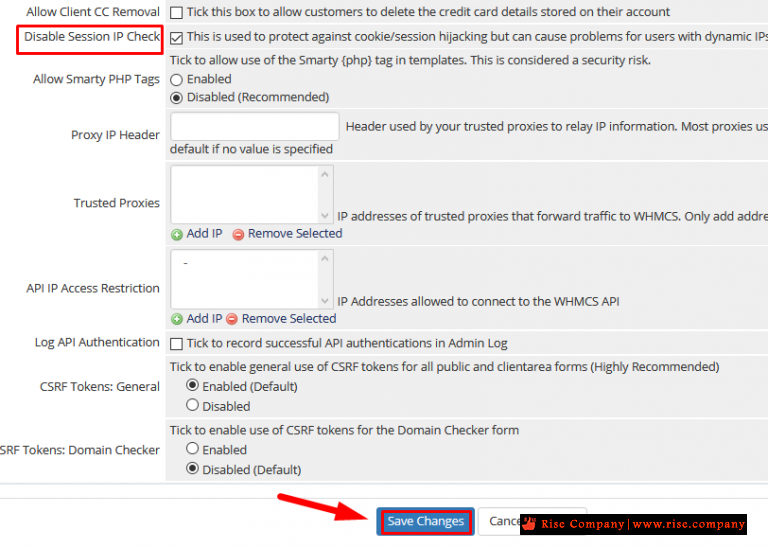
Setup -> General settings -> Security tab -> disable IP session
ثم قم بتفعيل Disable Session IP Check
وهذا افادك اذا انقطع الانترنت او تغير الراوتر او الاي بي هيفضل login
,وهى مريحة جدا وخاصة اذا كنت مفعل 2factor
حل المشكلة " log out " فى حالة cloudflare وجود بروكسي ip :
كلاود فلير لها ايبيهات كثيرة وكل session لك يتغير ip معها وبالتالى هو غير مستقر
ولوحة تحكم whmcs لها نظام حماية بمجرد تغيير الاي بي يعمل logout ولحل هذه المشكلة
الخطوة فى الاعلى قد تكون كافية لك واذا لم تحل المشكلة اعمل التالي
when clients are using Cloudflare, which is easy identifiable by reviewing the System Admin Login Log,
where you will see Cloudflare IP address listed. If that is the case,
you will want to add Cloudflare IP addresses to your Trusted Proxies inside WHMCS.
+
The Proxy Header field allows you to configure the HTTP header WHMCS will use to figure out which IP address is the authoritative IP address for the request, in other words, your connecting IP address
اعدادات Proxy IP Header
The Proxy Header field allows you to configure the HTTP header WHMCS will use to figure out which IP address is the authoritative IP address for the request.Most proxies use "X_FORWARDED_FOR" and so the field can be left blank. Only change this value if you are sure your proxy uses a different header, as putting the wrong header into this field can cause improper recording of IP addresses.
اذهب الى المسار التالى
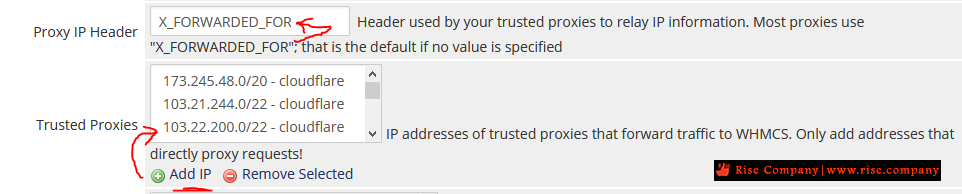
Setup -> General settings -> Security tab -> Proxy IP Header
ثم ضع القمية التالية X_FORWARDED_FOR
اعدادات Trusted Proxies
Use this field to add and remove IP Addresses and IP Address CIDR ranges of trusted proxies.
WHMCS will check the header configured to discover the actual canonical request IP address.
اذهب الى المسار التالى
Setup -> General settings -> Security tab ->Trusted Proxies
ثم ضع جميع ip الخاصة بكلاود فلير من هنا
كود:173.245.48.0/20 103.21.244.0/22 103.22.200.0/22 103.31.4.0/22 141.101.64.0/18 108.162.192.0/18 190.93.240.0/20 188.114.96.0/20 197.234.240.0/22 198.41.128.0/17 162.158.0.0/15 104.16.0.0/12 172.64.0.0/13 131.0.72.0/22.ملحوظة :
Cloudflare Users
Some of Cloudflare's features are not compatible with WHMCS. Please ensure that both
Script Minimisation and Rocket Loader are be disabled for the domain on which WHMCS is installed
المرجع:
https://docs.whmcs.com/Trusted_Proxy_Settings
https://whmcs.community/topic/290988...to-admin-area/
https://whmcs.community/topic/301522-logout-issue/
https://stackoverflow.com/questions/...ns-not-working
https://docs.whmcs.com/Security_Tab#...ssion_IP_Check
https://www.cloudflare.com/ips-v4
+ إنشاء موضوع جديد
النتائج 1 إلى 1 من 1
-
21-12-2020, 02:03 #1Status
- Offline

- تاريخ التسجيل
- Apr 2014
- الدولة
- Egypt
- المشاركات
- 4,703
 Engineering and Technology
- معدل تقييم المستوى
- 10
 سكريبت Whmcs حل مشكلة AUTO LOGOUT عند تفعيل كلاود فلير CloudFlare
------------------------------------------------------------------------
سكريبت Whmcs حل مشكلة AUTO LOGOUT عند تفعيل كلاود فلير CloudFlare
------------------------------------------------------------------------
شركة رايز للهندسة و التكنولوجيا Rise Company for Engineering & Technology
------------------------------------------------------------------------
Web Hosting | Web Designing | E-Marketing
رقم # 1 فى خدمات الشركات Business Services
استضافة مواقع Web Hosting - عمل ايميل شركة Business Emails
تصميم موقع شركة Web Design - تسويق الكترونى على جوجل Google Adwords
www.rise.company | www.rise.company/emails
ملحوظة : جميع خدماتنا مخصصة للشركات فقط وغير متاحة للافراد
وليس لنا اى منتجات او صيانة نهائيا! يرجى الانتباه الى ذلك.

 رد مع اقتباس
المواضيع المتشابهه
-
كلاود فلير CloudFlare توقف الايميل عن العمل email stopped working
بواسطة Rise Company في المنتدى قسم الكلاود فلير CloudFlareمشاركات: 0آخر مشاركة: 16-12-2020, 06:25 -
كلاود فلير CloudFlare يتعارض مع فايروول CSF ويتوقف بسبب اختفاء visitor’s original IP
بواسطة Rise Company في المنتدى قسم الكلاود فلير CloudFlareمشاركات: 0آخر مشاركة: 16-12-2020, 01:33 -
كلاود فلير CloudFlare تثبيت بديل mod_cloudflare وهو mod_remoteip لاظهار ip الحقيقي
بواسطة Rise Company في المنتدى قسم الكلاود فلير CloudFlareمشاركات: 0آخر مشاركة: 16-12-2020, 00:46 -
كلاود فلير CloudFlare طريقة إعداد و تركيب CDN على موقعك مع ربط الدومين
بواسطة Rise Company في المنتدى قسم الكلاود فلير CloudFlareمشاركات: 0آخر مشاركة: 14-12-2020, 16:21 -
سكريبت Whmcs حل مشكلة whmcs bridge error code of 302 / 200
بواسطة Rise Company في المنتدى قسم ادارة الاستضافة Whmcsمشاركات: 0آخر مشاركة: 02-11-2020, 01:34

المفضلات