

حل مشكلة Fix Google Chrome Not Working With Symantec Endpoint
End point protection is blocking my chrome
How can I fix Chrome’s incompatibility with Symantec Endpoint?
How to Repair Google Chrome not Working with Symantec Endpoint
المشكلة :
متصفح فايرفوكس يعمل ولكن جوجل كروم و انترنت اكسبلورر لا يعمل
حل المشكلة :
اعمل update للبرنامج ولكن ليس update العادى الموجود داخل البرنامج
بل يجب تحميل نسخة جديدة بالاصدار يحث لا يعمل تحديث من تلقاء نفسه
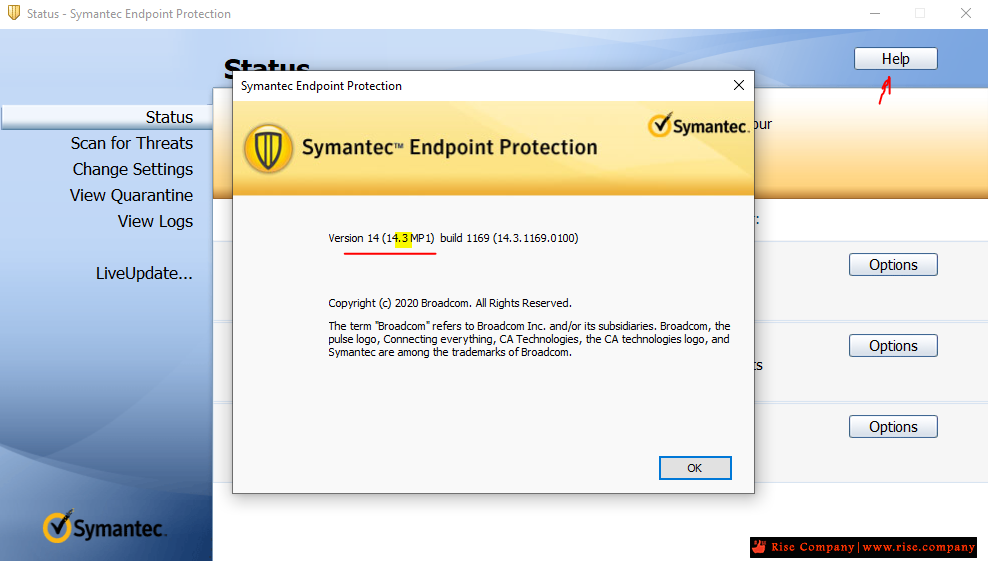
الاصدار الحديث بشهر 3-2021 هو اصدار v14.3
---------------------------------------------
حلول الاصدارات القديمة v14.0 من البرنامج :
In the Client GUI, go to Status > Network Threat Protection > View Application Settings. There should be an entry for Chrome. Click on it and allow it. Alternatively, go to Status > Network Threat Protection > View Network Activity > Right-click on Chrome > Allow
------------------------------------------
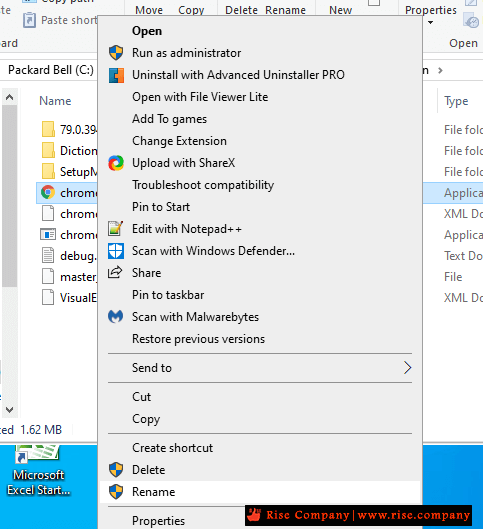
Edit Chrome’s exe file title
------------------------------------------
- Launch File Explorer with the Windows key + E keyboard shortcut.
- Open the folder that includes Chrome’s EXE file.
- Right-click Chrome’s EXE and select Rename.
Enter Chrome as the new file title, but don’t change the EXE format at the end.
\Those are a few of the resolutions confirmed to fix Google Chrome’s Aw Snap incompatibility error with Symantec Endpoint.
Remember, however, that you can always switch to browsers that don’t have any compatibility issues with Endpoint Protection, such as Firefox or Opera.
------------------------------------------
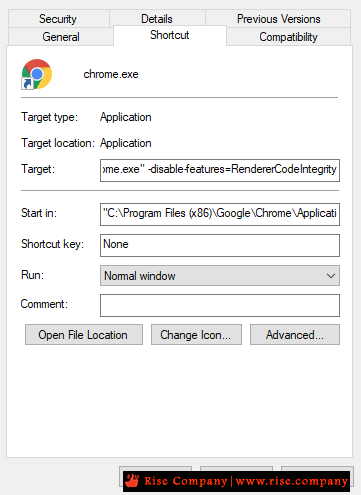
Deactivate Chrome’s renderer code
------------------------------------------
- Right-click Google Chrome’s desktop shortcut and select Properties.
- Select the Shortcut tab.
- Then enter the following line in the Target text box as shown directly below:
- -disable-features=RendererCodeIntegrity
Select the Apply option.
Click the OK button.
------------------------------------------
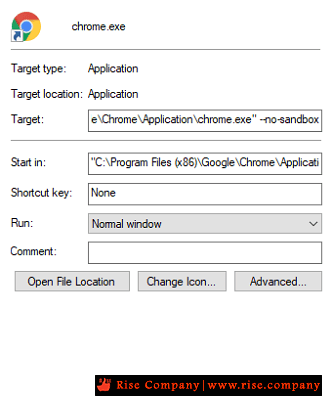
Launch Chrome with no sandbox
------------------------------------------
- Right-click a shortcut icon for Chrome on the desktop and select Properties.
- Click the Shortcut tab on the window that opens.
- Then add –no-sandbox to end of the Target box as below
Select the Apply option.
Click the OK button.
المرجع:
https://windowsreport.com/chrome-sym...compatibility/
http://windowsbulletin.com/how-to-re...ntec-endpoint/
+ إنشاء موضوع جديد
النتائج 1 إلى 3 من 3
-
11-03-2021, 00:50 #1Status
- Offline

- تاريخ التسجيل
- Apr 2014
- الدولة
- Egypt
- المشاركات
- 4,703
 Engineering and Technology
- معدل تقييم المستوى
- 10
 حل مشكلة المتصفح لا يعمل Fix Google Chrome Not Working With Symantec Endpoint
------------------------------------------------------------------------
حل مشكلة المتصفح لا يعمل Fix Google Chrome Not Working With Symantec Endpoint
------------------------------------------------------------------------
شركة رايز للهندسة و التكنولوجيا Rise Company for Engineering & Technology
------------------------------------------------------------------------
Web Hosting | Web Designing | E-Marketing
رقم # 1 فى خدمات الشركات Business Services
استضافة مواقع Web Hosting - عمل ايميل شركة Business Emails
تصميم موقع شركة Web Design - تسويق الكترونى على جوجل Google Adwords
www.rise.company | www.rise.company/emails
ملحوظة : جميع خدماتنا مخصصة للشركات فقط وغير متاحة للافراد
وليس لنا اى منتجات او صيانة نهائيا! يرجى الانتباه الى ذلك.
-
11-03-2021, 00:58 #2Status
- Offline
- تاريخ التسجيل
- Apr 2014
- الدولة
- Egypt
- المشاركات
- 4,703
Engineering and Technology
- معدل تقييم المستوى
- 10
رد: حل مشكلة Fix Google Chrome Not Working With Symantec Endpoint
simple solution just click google chrome properties -find target - rename Chrome as Chrome1 and save it------------------------------------------------------------------------
شركة رايز للهندسة و التكنولوجيا Rise Company for Engineering & Technology
------------------------------------------------------------------------
Web Hosting | Web Designing | E-Marketing
رقم # 1 فى خدمات الشركات Business Services
استضافة مواقع Web Hosting - عمل ايميل شركة Business Emails
تصميم موقع شركة Web Design - تسويق الكترونى على جوجل Google Adwords
www.rise.company | www.rise.company/emails
ملحوظة : جميع خدماتنا مخصصة للشركات فقط وغير متاحة للافراد
وليس لنا اى منتجات او صيانة نهائيا! يرجى الانتباه الى ذلك.
-
11-03-2021, 01:26 #3Status
- Offline
- تاريخ التسجيل
- Apr 2014
- الدولة
- Egypt
- المشاركات
- 4,703
Engineering and Technology
- معدل تقييم المستوى
- 10
رد: حل مشكلة المتصفح لا يعمل h Fix Google Chrome Not Working With Symantec Endpoint
Summary
- Workaround from Symantec
- Symantec Endpoint Protection Update
- February 2021 Update:
- Disabling the Chrome Renderer Code
- Edit the Registry
- Conclusion
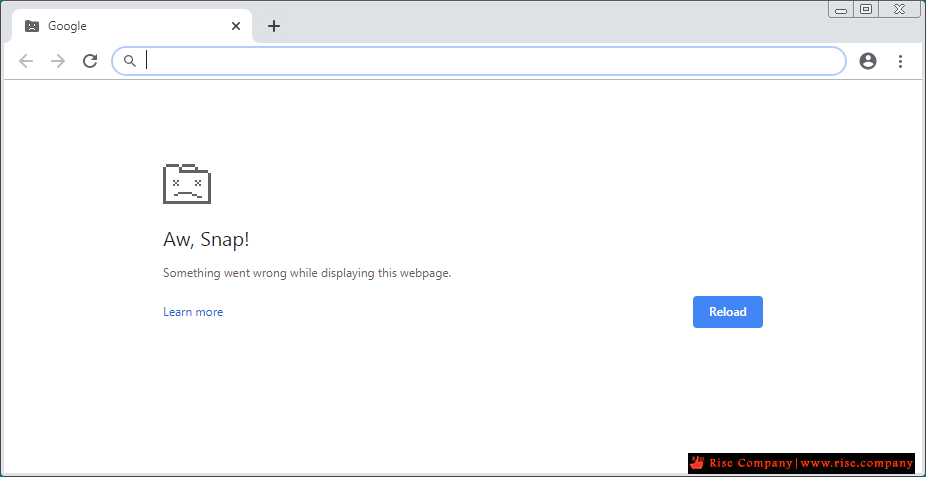
Google Chrome was updated to version 78 a few days ago, and some users experienced crashes instead of the promised features.
This crash occurs when the web browser boots on systems with an outdated version of Symantec Endpoint Protection (SEP).
If you see this behavior on a workstation or during a connection provided from your workstation, it may be due to a known incompatibility between Chrome and older versions of Symantec Endpoint Protection. You can contact your IT department for additional assistance and share the information below:
You must upgrade Symantec Endpoint Protection to version 14.2 or later. You can also disable the additional protection that causes this incompatibility by using Chrome’s RendererCodeIntegrityEnabled policy.
If you observe this behavior on a home computer, additional information will help our team investigate further. If you are able to do so, please respond to this thread and provide the name and version number of the anti-virus software you are using on your computer. Please note that the responses are public, so please do not provide any personal information.
Workaround from Symantec
For all other cases, a workaround is to add an application control exception for Google Chrome and Microsoft Edge Chromium executables (Chrome.exe and MSEdge.exe).
An alternative is to run Chrome with code integrity disabled, which can be done in two ways:
Chrome.exe –disable-features=RendererCodeIntegrity
or by setting a registry key to 0:
Key: HKLM\Software\Policies\Google\Chrome
Name: RendererCodeIntegrityEnabled
Type: DWORD (32-b
Symantec Endpoint Protection Update
Upgrade to Symantec Endpoint Protection 14.2 RU2 MP1 to resolve incompatibility with Chrome on Windows 10, version 1703 or later, and Windows Server 2019 creator update.
For the following operating systems, Symantec Endpoint Protection requires an update to provide code integrity support for application control :
- Windows 10 Anniversary Update, version 1607
- Windows 10 Enterprise 2016 LTSC
- Windows 2016 Server
- This update is intended to be included in a future version of the product. This document will be updated as soon as support is available.
ï»؟
If the PES cannot be upgraded or if the operating system is one of those listed above, the incompatibility can be circumvented by adding an application control exception for Chrome (Chrome.exe) and/or Microsoft Edge Chromium (MSEdge.exe).
Disabling the Chrome Renderer Code
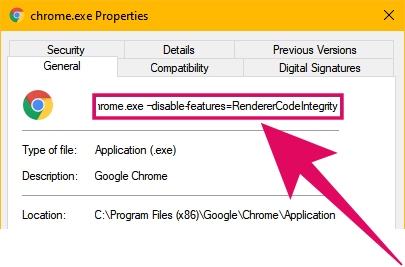
- Right-click the Google Chrome desktop shortcut and select Properties.
- Select the Shortcut tab.
- Then, type the following line in the Target text box, as shown directly below :
- -disable-features=RendererCodeIntegrity
- Select the Apply option.
- Click the OK button.
Edit the Registry
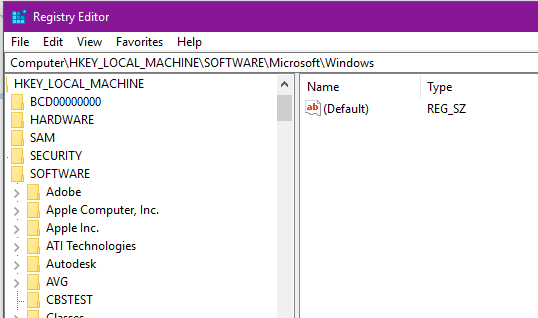
- Press the Windows key + the shortcut key R, which opens Run.
- Type “regedit” in the “Open” field and press the Enter key to open the Registry Editor.
- Access this registry key: HKLM > Software > Policies > Google Chrome.
- Double-click the RENDERCodeIntegrity WORD on the right side of the window.
- Change its value to 0 in the “Edit Dword” window.
- Click the OK option.
Conclusion
Users of Microsoft Edge Chromium are also affected, but the chromium-based Edge version has not been officially released, so there are virtually no users in the real world who are affected by this issue.
https://community.broadcom.com/syman...c-1371eb5f55ba
------------------------------------------------------------------------
شركة رايز للهندسة و التكنولوجيا Rise Company for Engineering & Technology
------------------------------------------------------------------------
Web Hosting | Web Designing | E-Marketing
رقم # 1 فى خدمات الشركات Business Services
استضافة مواقع Web Hosting - عمل ايميل شركة Business Emails
تصميم موقع شركة Web Design - تسويق الكترونى على جوجل Google Adwords
www.rise.company | www.rise.company/emails
ملحوظة : جميع خدماتنا مخصصة للشركات فقط وغير متاحة للافراد
وليس لنا اى منتجات او صيانة نهائيا! يرجى الانتباه الى ذلك.

 رد مع اقتباس
المواضيع المتشابهه
-
حل مشكلة Google Play / youtube not working وظهور no internet connection offline
بواسطة Rise Company في المنتدى رايز للجوالات Rise Phonesمشاركات: 0آخر مشاركة: 02-10-2020, 02:30 -
حل مشكلة مصتفح جوجل كروم Fix SSL Connection Error on Chrome
بواسطة Rise Company في المنتدى قسم الاي تي IT مشاكل و حلولمشاركات: 0آخر مشاركة: 01-04-2020, 20:04 -
انتى فايروس سيمانتك إندبوينت للويندوز سيرفر Symantec Endpoint windows server
بواسطة Rise Company في المنتدى قسم الويندوز سيرفر Windows Serverمشاركات: 0آخر مشاركة: 11-08-2018, 13:26 -
حل Solved جميع مشاكل عدم عمل خرائط جوجل google maps api key not working
بواسطة Rise Company في المنتدى رايز للويب Rise Webمشاركات: 0آخر مشاركة: 25-10-2017, 03:08 -
شرح اخذ باك اب كامل لمتصفح Google Chrome + Bookmarks
بواسطة Rise Company في المنتدى رايز للكمبيوتر Rise Computerمشاركات: 0آخر مشاركة: 01-03-2017, 23:57

المفضلات