


السي بانال WHM/CPanel تفعيل SMTP Restrictions للحماية من السبام
How to Prevent Email AbuseHow Do I Setup SMTP Restrictions?
SMTP Restrictions (WHM) versus SMTP_BLOCK (CSF)
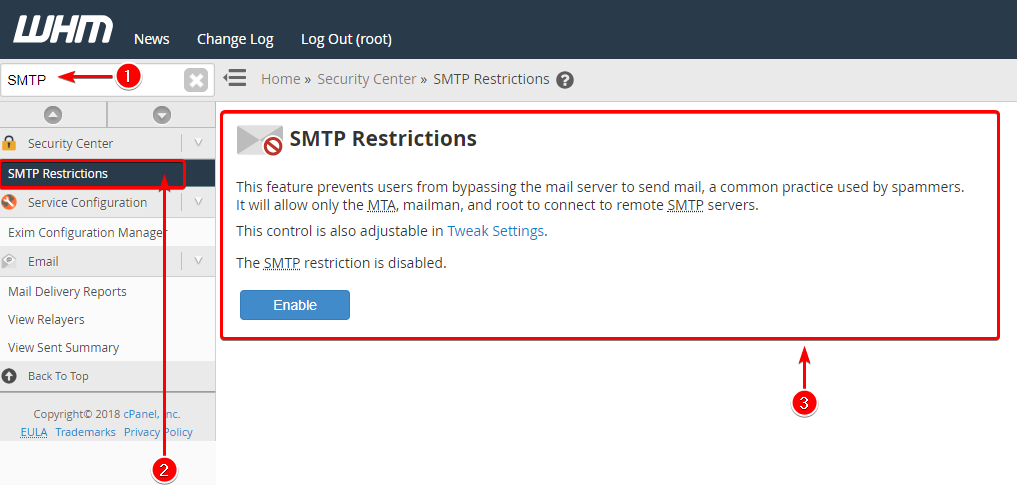
You can setup SMTP Restrictions by logging into WHM, searching for “SMTP” (1),
selecting SMTP Restrictions under Security Center (2) and reviewing SMTP Restrictions (3)
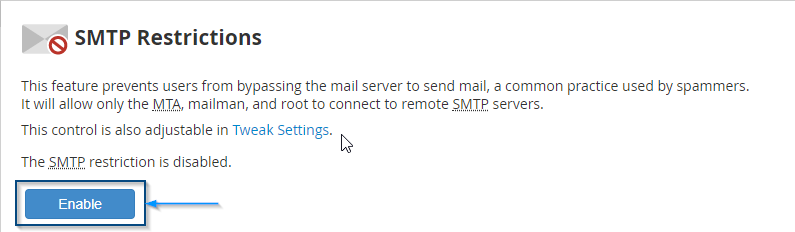
Inside the interface, click the Enable button to start the service
SMTP Restrictions is a feature in WHM that stops users from bypassing the mail server to send mail. This service is useful because bypassing mail servers is a common practice of spammers. By setting up restrictions you’ll only receive mail from root connections, Mailman mailing list software and mail transport agent (MTA) to remote SMTP servers.
Selecting Tweak Settings will take you into WHM >> Tweak Settings where you can also adjust SMTP settings like:
- Restrict outgoing SMTP to root, exim, and mailman
- Allow users to relay mail if they use an IP address through which someone has validated an IMAP or POP3 login within the last hour (Pop-before-SMTP)
- Add X-PopBeforeSMTP header for mail sent via POP-before-SMTP
----------------------------------------------------------------
لماذا يجب تعطيل SMTP Restrictions جعله Disable ؟
----------------------------------------------------------------
يجب تعطيله لان هناك نفس الميزة تعمل داخل CSF وهى تعطلهCheck SMTP Restrictions
This option in WHM will not function when running csf. You should disable WHM > Security Center > SMTP Restrictions and use the csf configuration option SMTP_BLOCK instead
المرجع:
https://documentation.cpanel.net/dis...nt+Email+Abuse
https://docs.cpanel.net/whm/security...-restrictions/
https://forums.cpanel.net/resources/...block-csf.603/
+ إنشاء موضوع جديد
النتائج 1 إلى 1 من 1
مشاهدة المواضيع
-
03-04-2021, 01:02 #1Status
- Offline

- تاريخ التسجيل
- Apr 2014
- الدولة
- Egypt
- المشاركات
- 4,703
 Engineering and Technology
- معدل تقييم المستوى
- 10
 السي بانال WHM/CPanel تفعيل SMTP Restrictions للحماية من السبام المرسل nobody
------------------------------------------------------------------------
السي بانال WHM/CPanel تفعيل SMTP Restrictions للحماية من السبام المرسل nobody
------------------------------------------------------------------------
شركة رايز للهندسة و التكنولوجيا Rise Company for Engineering & Technology
------------------------------------------------------------------------
Web Hosting | Web Designing | E-Marketing
رقم # 1 فى خدمات الشركات Business Services
استضافة مواقع Web Hosting - عمل ايميل شركة Business Emails
تصميم موقع شركة Web Design - تسويق الكترونى على جوجل Google Adwords
www.rise.company | www.rise.company/emails
ملحوظة : جميع خدماتنا مخصصة للشركات فقط وغير متاحة للافراد
وليس لنا اى منتجات او صيانة نهائيا! يرجى الانتباه الى ذلك.


 رد مع اقتباس
المواضيع المتشابهه
-
السي بانال CPanel تثبيت install ImageMagick
بواسطة Rise Company في المنتدى رايز للاستضافة Rise Hostمشاركات: 4آخر مشاركة: 10-02-2021, 19:51 -
سي بانيل cPanel | شرح تفعيل السبام فلتر Spam Filters وضبط Spam Score
بواسطة Rise Company في المنتدى قسم الايميلات Emailsمشاركات: 0آخر مشاركة: 24-01-2021, 11:19 -
السي بانال CPanel شرح تفعيل النود Node.js App و Application Manager
بواسطة Rise Company في المنتدى رايز للاستضافة Rise Hostمشاركات: 0آخر مشاركة: 22-06-2020, 20:26 -
شرح تعطيل indexes للحماية فى السي بانل Whm / Cpanel
بواسطة Rise Company في المنتدى قسم حماية Whm / Cpanelمشاركات: 0آخر مشاركة: 23-05-2020, 22:29 -
شرج تفعيل DMARC فى السى بنل cPanel
بواسطة Rise Company في المنتدى قسم الايميلات Emailsمشاركات: 0آخر مشاركة: 04-04-2018, 22:21

المفضلات