

ايزفيز EZVIZ برنامج استوديو Studio الاعدادات المتقدمة Advanced Setting
How to visit the “Advanced Setting” of EZVIZ Studio?
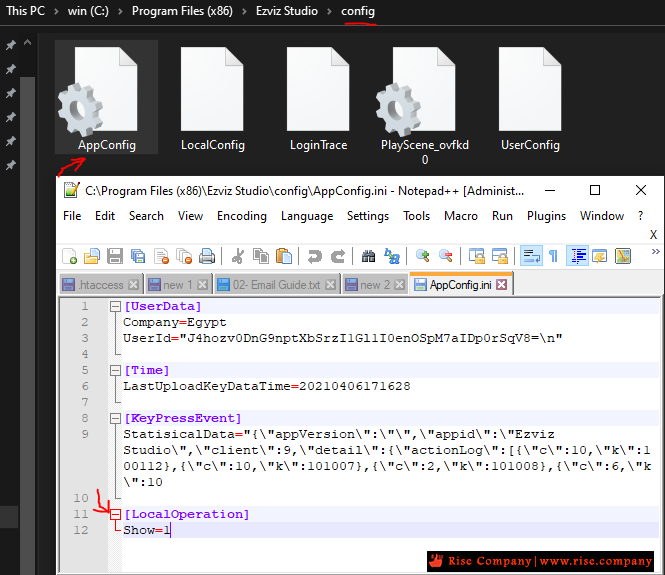
1) Go to the root directory of EZVIZ Studio in your PC and find the folder named “config”.
2) Copy the file named “AppConfig.ini” in the folder of “config” to desktop. Open “AppConfig.ini” in desktop
3) Add the following command which highlighted in yellow in “AppConfig.ini” and save before exiting.
4) Copy the “AppConfig.ini” file in desktop to folder of “config” and overlay the old one. Refresh the device page in EZVIZ Studio or reopen the Studio, then you will see the “Advanced”.كود HTML:[LocalOperation] Show=1
5) If you want to hide the “Advanced” setting, please change the command “Show=1” to “Show=0”, then reopen the EZVIZ studio.
المرجع:
https://m-support.ezvizlife.com/faq/...1sWV_at3jZriAs
+ إنشاء موضوع جديد
النتائج 1 إلى 1 من 1
-
07-04-2021, 00:07 #1Status
- Offline

- تاريخ التسجيل
- Apr 2014
- الدولة
- Egypt
- المشاركات
- 4,703
 Engineering and Technology
- معدل تقييم المستوى
- 10
 ايزفيز استوديو Ezviz Studio الاعدادات المتقدمة للبرنامج Advanced Setting
------------------------------------------------------------------------
ايزفيز استوديو Ezviz Studio الاعدادات المتقدمة للبرنامج Advanced Setting
------------------------------------------------------------------------
شركة رايز للهندسة و التكنولوجيا Rise Company for Engineering & Technology
------------------------------------------------------------------------
Web Hosting | Web Designing | E-Marketing
رقم # 1 فى خدمات الشركات Business Services
استضافة مواقع Web Hosting - عمل ايميل شركة Business Emails
تصميم موقع شركة Web Design - تسويق الكترونى على جوجل Google Adwords
www.rise.company | www.rise.company/emails
ملحوظة : جميع خدماتنا مخصصة للشركات فقط وغير متاحة للافراد
وليس لنا اى منتجات او صيانة نهائيا! يرجى الانتباه الى ذلك.

 رد مع اقتباس
المواضيع المتشابهه
-
ايزفيز EZVIZ حل مشكلة ezviz studio network exception. web page loading failed
بواسطة Rise Company في المنتدى قسم كاميرات المراقبةمشاركات: 0آخر مشاركة: 07-04-2021, 01:06 -
ايزفيز استوديو Ezviz Studio برنامج على الكمبيوتر لمشاهدة الكاميرات
بواسطة Rise Company في المنتدى قسم كاميرات المراقبةمشاركات: 0آخر مشاركة: 07-04-2021, 00:23 -
كاميرا مراقبة ايزفيز EZVIZ الفرق بين TY1 960P vs TY2 1080P
بواسطة Rise Company في المنتدى قسم كاميرات المراقبةمشاركات: 0آخر مشاركة: 03-04-2021, 23:40 -
كاميرا مراقبة ايزفيز EZVIZ - الفرق بين اصدار C6N vs C6CN المتحركة 2020
بواسطة Rise Company في المنتدى قسم كاميرات المراقبةمشاركات: 0آخر مشاركة: 03-04-2021, 23:32 -
كاميرا مراقبة ايزفيز ezviz c1c اي بي | ميموري كارد | صغيرة الحجم
بواسطة Rise Company في المنتدى قسم كاميرات المراقبةمشاركات: 0آخر مشاركة: 04-10-2019, 15:28

المفضلات