


السي بانال WHM/CPanel غلق disable ONLY_FULL_GROUP_BY in MySQL
Remove ONLY_FULL_GROUP_BY in WHM/cPanel
Incompatible with sql_mode=only_full_group_by [Fix]
If your domain is on a cPanel (Shared Hosting), then you need to contact your hosting provider to update the same.Shared Hosting If you are on a shared hosting, you will not be able to change the sql_mode at the environment level.
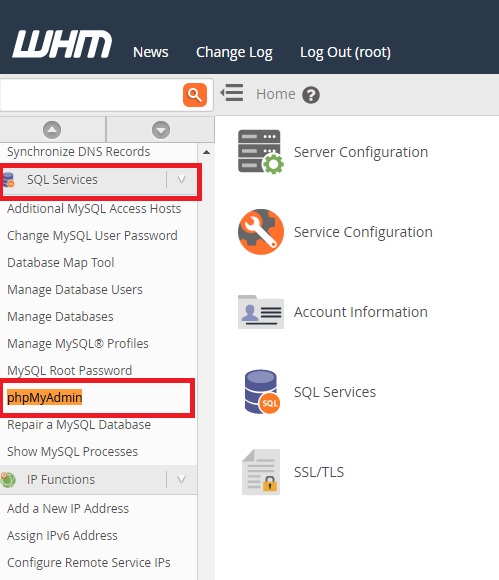
If you have access to WHM, then access PHPMyAdmin under SQL Services from WHM as shown below:
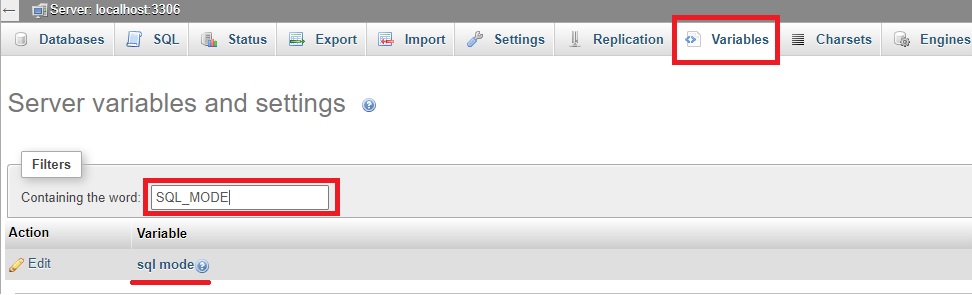
Click on Variables from the menu and search for SQL_MODE
Click on edit button and change remove ONLY_FULL_GROUP_BY. Once edited, click on save.
That’s it!
ملحوظة هامة :
فى الغالب هتجد لديك
ولن تجد ONLY_FULL_GROUP_BY وبالتالى لا يوجد شىء تريد عمله لتعطيله فهو معطل فى الاصل.كود:STRICT_TRANS_TABLES,ERROR_FOR_DIVISION_BY_ZERO,NO_AUTO_CREATE_USER,NO_ENGINE_SUBSTITUTION
------------------------------------------------------------------
طريقة اخري
Remove ONLY_FULL_GROUP_BY in my.cnf file
If you have access to MySQL configuration file my.cnf, open the file:
and add the below line to the end of the file:كود:# vim /etc/mysql/my.cnf
[mysqld]
sql_mode = "STRICT_TRANS_TABLES,NO_ZERO_IN_DATE,NO_ZERO_DATE, ERROR_FOR_DIVISION_BY_ZERO,NO_AUTO_CREATE_USER,NO_ ENGINE_SUBSTITUTION"
Restart the MySQL service:
---------------------------------------------------------------------------------------------------
Question
How do I disable ONLY_FULL_GROUP_BY in MySQL?
Answer
To disable ONLY_FULL_GROUP_BY in MySQL, you will need to remove ONLY_FULL_GROUP_BY from the sql-mode setting by using the MySQL configuration file /etc/my.cnf. This file can only be modified via SSH as the root user or WHM >> Terminal. ONLY_FULL_GROUP_BY can not be disabled for a single account or database.
You may follow these steps to disable ONLY_FULL_GROUP_BY:
1. Log into your server via SSH as the root user or navigate to WHM >> Terminal.
2. Run the following command to determine which sql_mode options are enabled and copy the output:
Example output (Do not copy the output shown below as it may contain options that are incompatible with your version of MySQL):كود:mysql -sse "SELECT @@GLOBAL.sql_mode;"
3. Open the /etc/my.cnf file using any command-line text editor you prefer (ex: vi, vim, nano, or other).كود:ONLY_FULL_GROUP_BY,STRICT_TRANS_TABLES,NO_ZERO_IN_DATE,NO_ZERO_DATE,ERROR_FOR_DIVISION_BY_ZERO,NO_AUTO_CREATE_USER,NO_ENGINE_SUBSTITUTION
Examples: (Also see: How to edit a file on command-line)
4. Add sql-mode= to the bottom of the [mysqld] section, followed by the output you copied in step 2, and remove ONLY_FULL_GROUP_BY.كود:vi /etc/my.cnf vim /etc/my.cnf nano /etc/my.cnf
Example (Do not copy the sql-mode line shown below as it may contain options that are incompatible with your version of MySQL):
5. Save and close the file.كود:sql-mode=STRICT_TRANS_TABLES,NO_ZERO_IN_DATE,NO_ZERO_DATE,ERROR_FOR_DIVISION_BY_ZERO,NO_AUTO_CREATE_USER,NO_ENGINE_SUBSTITUTION
6. Restart MySQL to load the change by running the following script:
7. Run the following command to confirm ONLY_FULL_GROUP_BY was removed from the enabled sql_mode options:كود:/scripts/restartsrv_mysql
You may also find our article on How to change the SQL mode in MySQL or MariaDB helpful for more information.كود:mysql -sse "SELECT @@GLOBAL.sql_mode;
المرجع:
https://techglimpse.com/ncompatible-...full_group_by/
https://support.cpanel.net/hc/en-us/...s/360050089274
+ إنشاء موضوع جديد
النتائج 1 إلى 1 من 1
العرض المتطور
-
07-04-2021, 16:03 #1Status
- Offline

- تاريخ التسجيل
- Apr 2014
- الدولة
- Egypt
- المشاركات
- 4,703
 Engineering and Technology
- معدل تقييم المستوى
- 10
 السي بانال WHM/CPanel غلق disable ONLY_FULL_GROUP_BY in MySQL
------------------------------------------------------------------------
السي بانال WHM/CPanel غلق disable ONLY_FULL_GROUP_BY in MySQL
------------------------------------------------------------------------
شركة رايز للهندسة و التكنولوجيا Rise Company for Engineering & Technology
------------------------------------------------------------------------
Web Hosting | Web Designing | E-Marketing
رقم # 1 فى خدمات الشركات Business Services
استضافة مواقع Web Hosting - عمل ايميل شركة Business Emails
تصميم موقع شركة Web Design - تسويق الكترونى على جوجل Google Adwords
www.rise.company | www.rise.company/emails
ملحوظة : جميع خدماتنا مخصصة للشركات فقط وغير متاحة للافراد
وليس لنا اى منتجات او صيانة نهائيا! يرجى الانتباه الى ذلك.


 رد مع اقتباس
المواضيع المتشابهه
-
السي بانال CPanel تثبيت install ImageMagick
بواسطة Rise Company في المنتدى رايز للاستضافة Rise Hostمشاركات: 4آخر مشاركة: 10-02-2021, 19:51 -
السي بانال CPanel حل مشكلة امتلاء مساحة WHM Swap Used 100%
بواسطة Rise Company في المنتدى رايز للاستضافة Rise Hostمشاركات: 0آخر مشاركة: 10-01-2021, 22:47 -
السي بانال CPanel امر اخذ باك اب حالي للسيرفر How to run a manual whm backup
بواسطة Rise Company في المنتدى رايز للاستضافة Rise Hostمشاركات: 0آخر مشاركة: 30-10-2020, 00:51 -
السي بانال CPanel خاصية cpu and concurrent connection usage
بواسطة Rise Company في المنتدى رايز للاستضافة Rise Hostمشاركات: 0آخر مشاركة: 23-06-2020, 21:45 -
كاش وول السي بانل Cpanel CacheWall شرح تعطيلها Disable
بواسطة Rise Company في المنتدى قسم حماية Whm / Cpanelمشاركات: 0آخر مشاركة: 18-03-2019, 07:07

المفضلات