


ووردبريس WordPress حل مشكلة Missing temporary folder عند رفع صورة
wp Missing a temporary folder - How to Fix "Missing a Temporary Folder" Error in WordPress
ما الذي يسبب الخطأ "Missing a Temporary Folder" في ووردبريس؟
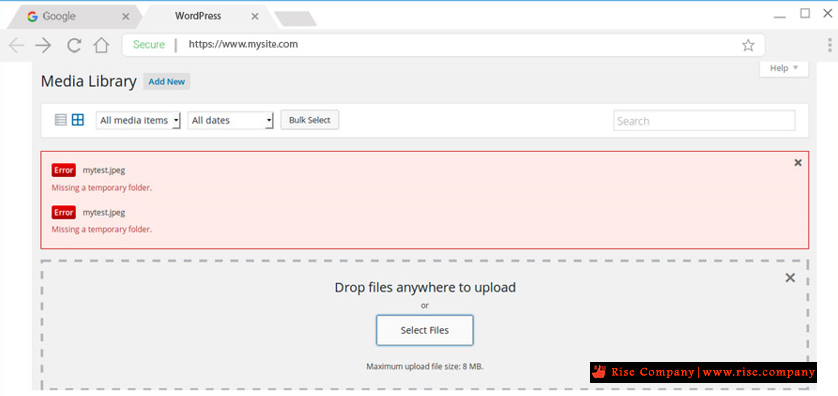
المشكلة :
هذا الخطأ يجعل من المستحيل تحميل الصور أو تحديث السمات والإضافات أو تحديث ووردبريس WordPress .
ما الذي يسبب الخطأ "Missing a Temporary Folder" في ووردبريس؟
يحدث هذا الخطأ بسبب إعدادات PHP غير الصحيحة في بيئة استضافة ووردبريس WordPress الخاصة بك . هناك إعداد PHP محدد يحدد مجلدًا مؤقتًا لتستخدمه تطبيقات مثل ووردبريس WordPress لتخزين البيانات مؤقتًا قبل حفظها في الموقع المطلوب.
يحتاج ووردبريس WordPress إلى الوصول إلى هذا المجلد المؤقت عند تحميل صورة أو تثبيت أو تحديث سمة أو مكون إضافي أو تحديث WordPress .
إذا لم يتم تحديد موقع هذا المجلد في تكوين PHP لخادمك ، فلن يتمكن ووردبريس WordPress من القيام بأي من هذه الأشياء وسيظهر لك الخطأ "Missing a Temporary Folder".
The Missing temporary folder error in WordPress makes it impossible to upload images, add plugins, update themes, or update the WordPress core. If you encounter this error with your WordPress site, these steps will help you fix it.
What causes the Missing Temporary Folder error?
The “Missing temporary folder” error might appear on your WordPress site if you’ve set up incorrect PHP settings. A specific PHP setting makes it possible to define a temporary folder that stores temporary app data of apps. This data is stored in the temporary folder before being saved to the desired location.
When you upload an image, install or update a plugin or the WordPress core, the temporary folder needs to be accessed by WordPress.
If your server’s PHP configuration does not define the location of this folder, then WordPress is unable to access it and generates the “Missing temporary folder” error.
Now that you know the reason behind the Missing temporary folder error, follow these steps to fix it.
حل المشكلة :
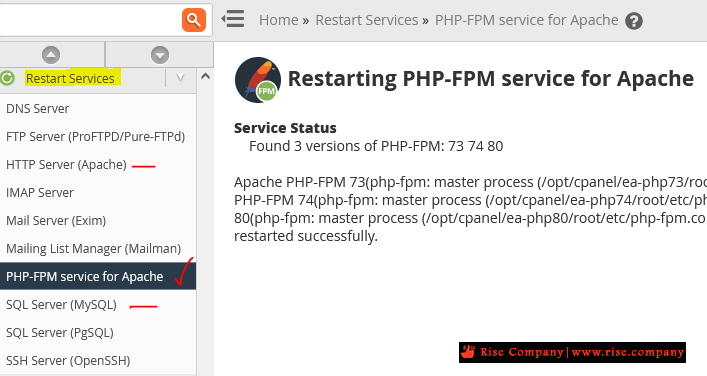
المشكلة ليس علاقة بك ولكن بالسيرفر, لذلك داخل whm قم بعمل restart للخدمات كما فى الصورة
ملحوظة :
هناك شروحات توضح لك عمل مجلد temp ووضع كود فى wpconfig
لن تعمل معك فى الغالب فالمشكلة ليست صلاحية ولكن خلل فى php
المرجع:
https://hostpapasupport.com/how-to-f...-in-wordpress/
+ إنشاء موضوع جديد
النتائج 1 إلى 1 من 1
مشاهدة المواضيع
-
26-10-2021, 02:35 #1Status
- Offline

- تاريخ التسجيل
- Apr 2014
- الدولة
- Egypt
- المشاركات
- 4,703
 Engineering and Technology
- معدل تقييم المستوى
- 10
 ووردبريس WordPress حل مشكلة Missing temporary folder عند رفع صورة يعمل 100 %
------------------------------------------------------------------------
ووردبريس WordPress حل مشكلة Missing temporary folder عند رفع صورة يعمل 100 %
------------------------------------------------------------------------
شركة رايز للهندسة و التكنولوجيا Rise Company for Engineering & Technology
------------------------------------------------------------------------
Web Hosting | Web Designing | E-Marketing
رقم # 1 فى خدمات الشركات Business Services
استضافة مواقع Web Hosting - عمل ايميل شركة Business Emails
تصميم موقع شركة Web Design - تسويق الكترونى على جوجل Google Adwords
www.rise.company | www.rise.company/emails
ملحوظة : جميع خدماتنا مخصصة للشركات فقط وغير متاحة للافراد
وليس لنا اى منتجات او صيانة نهائيا! يرجى الانتباه الى ذلك.

 رد مع اقتباس
المواضيع المتشابهه
-
ووردبريس WordPress اليمينتور Elementor لا يعمل رغم تعطيل جميع plugins
بواسطة Rise Company في المنتدى قسم ووردبريس WordPressمشاركات: 0آخر مشاركة: 03-07-2021, 02:40 -
ووردبريس WordPress ووكومرس WooCommerce مشكلة Add To Cart لا يعمل
بواسطة Rise Company في المنتدى قسم ووردبريس WordPressمشاركات: 0آخر مشاركة: 04-05-2021, 05:23 -
ووردبريس Wordpress حل مشكلة Site Kit encountered an error يعمل 100 %
بواسطة Rise Company في المنتدى قسم ووردبريس WordPressمشاركات: 0آخر مشاركة: 09-04-2020, 07:44 -
ووردبريس Wordpress حل مشكلة Wordpress here has been a critical error on your website
بواسطة Rise Company في المنتدى قسم ووردبريس WordPressمشاركات: 0آخر مشاركة: 08-04-2020, 12:14 -
ووردبريس Wordpress حل مشكلة Your PHP installation appears to be missing the MySQL
بواسطة Rise Company في المنتدى قسم ووردبريس WordPressمشاركات: 0آخر مشاركة: 31-03-2020, 17:27

المفضلات