

سكريبت Whmcs كيفية اضافة ايقونات الاعلام / الدول language flags
How to add country flags? - how to change flag? - to change language flags on v8
How to use icons in WHMCS to select the language in client area
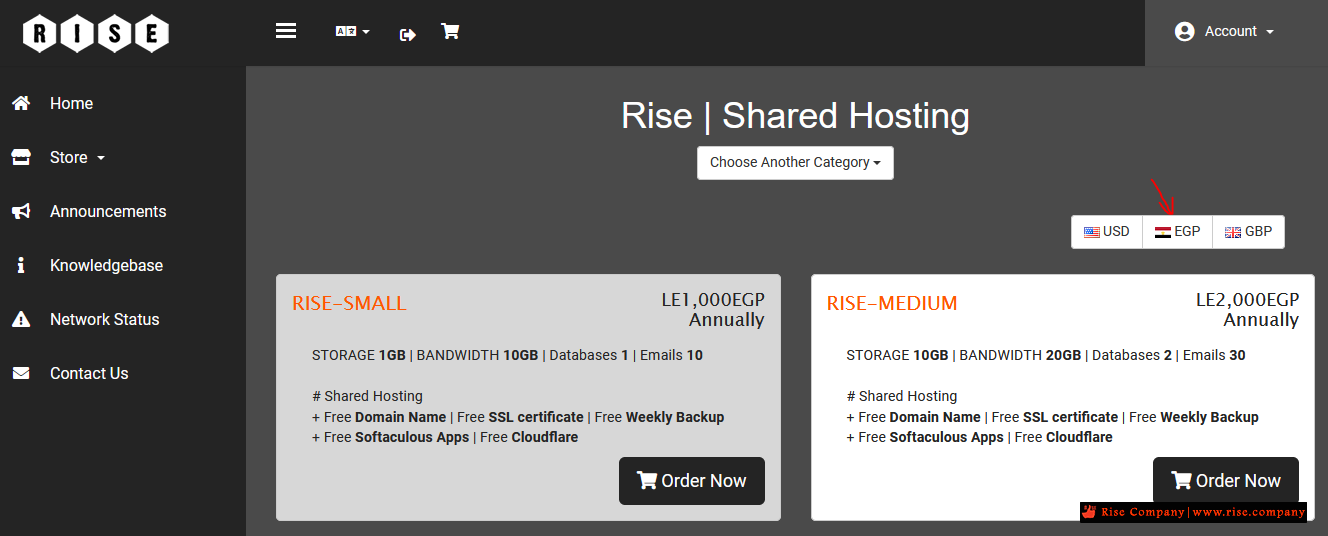
WHMCS has flags for the following currencies as standard; AUD, CAD, EUR, GBP, INR, JPY, USD and ZAR. If any of these currencies are configured, a flag will appear on the shopping cart for new signups to select as shown above.
In this example I will be adding Chinese Yuan (CNY) and modifying the Modern template,
but you can also follow this same technique with the Slider template.
على سبيل المثال : الصين او وضع مصر
Next we need to copy the order form template to give us one we can customize.So to add flags for more currencies, first obtain or create a flag image measuring 16px by 11px and then upload it to the whmcs/assets/img/flags directory.
So duplicate the /templates/orderforms/modern directory and name it whatever you like,
for this example I will call it 'moderncustom'.
{elseif $curr.code eq "EUR"}euكود:Open /templates/orderforms/moderncustom/products.tpl and look for line 26:
{elseif $curr.code eq "GBP"}gb
{elseif $curr.code eq "INR"}in
{elseif $curr.code eq "JPY"}jp
{elseif $curr.code eq "USD"}us
{elseif $curr.code eq "ZAR"}za
{else}na{/if}.png" border="0" alt="" /> {$curr.code}
Replace it with:
{elseif $curr.code eq "EUR"}eu
{elseif $curr.code eq "GBP"}gb
{elseif $curr.code eq "INR"}in
{elseif $curr.code eq "JPY"}jp
{elseif $curr.code eq "USD"}us
{elseif $curr.code eq "ZAR"}za
{elseif $curr.code eq "EGP"}eg
{else}na{/if}.png" border="0" alt="" /> {$curr.code}
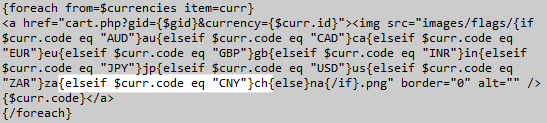
Where my flag image is called ch.png. I've highlighted the code added in the screenshot below.
The end result is a block of code on line 26 which looks like:
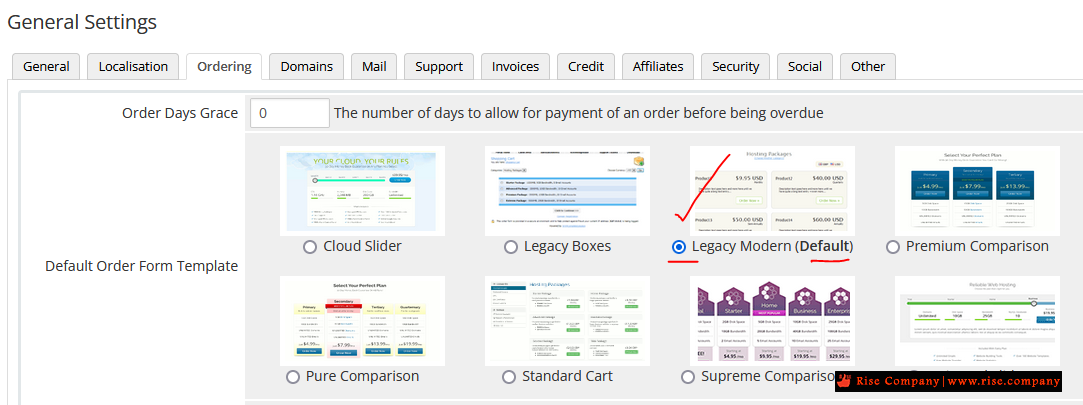
افتح هذا المسار اذى كان legacy modern هو الافتراضى لك
and made the exact same modification to line 47 of this file too.كود:whmcs/templates/orderforms/legacy_modern/products.tpl
Now upload the two templates files we just edited. Login to your WHMCS admin area to
select the moderncustom order form template from the Setup > General Settings > Ordering tab and you're done!
A flag image will now be displayed to visitors on the order form next to the CNY currency option.
It would just be a case of adjusting the "CNY" variable and "ch" filename in order to add as many different flags as desired.
الخلاصة :
0- اذهب الى مسار الاعلام وضع لوجو علم دولتك
1- شاهد داخل اعدادات whmcs اسم order template الافتراضى
2- اذهب الى مسار order template وعدل ملف باسم products.tpl
3- داخل هذا الملف ابحث مثلا us شوف الكود الخاص بها وكرره ولكن مع تغيير القيم
4- ضع الصورة فى المسار whmcs/assets/img/flags
ملحوظة :
هتجد الكود الذى هيتطلب تعديله مرتين داخل ملف products.tpl
المرجع:
http://3.12.123.82/96174/whmcs-insig...currency-flags
https://whmcs.community/topic/305858...e-flags-on-v8/
https://whmcs.community/topic/168593...o-change-flag/
https://domainregister.international...ient-area.html
+ إنشاء موضوع جديد
النتائج 1 إلى 2 من 2
-
20-11-2021, 22:32 #1Status
- Offline

- تاريخ التسجيل
- Apr 2014
- الدولة
- Egypt
- المشاركات
- 4,703
 Engineering and Technology
- معدل تقييم المستوى
- 10
 سكريبت Whmcs كيفية اضافة ايقونات الاعلام / الدول language flags
------------------------------------------------------------------------
سكريبت Whmcs كيفية اضافة ايقونات الاعلام / الدول language flags
------------------------------------------------------------------------
شركة رايز للهندسة و التكنولوجيا Rise Company for Engineering & Technology
------------------------------------------------------------------------
Web Hosting | Web Designing | E-Marketing
رقم # 1 فى خدمات الشركات Business Services
استضافة مواقع Web Hosting - عمل ايميل شركة Business Emails
تصميم موقع شركة Web Design - تسويق الكترونى على جوجل Google Adwords
www.rise.company | www.rise.company/emails
ملحوظة : جميع خدماتنا مخصصة للشركات فقط وغير متاحة للافراد
وليس لنا اى منتجات او صيانة نهائيا! يرجى الانتباه الى ذلك.
-
11-04-2023, 23:51 #2Status
- Offline
- تاريخ التسجيل
- Apr 2014
- الدولة
- Egypt
- المشاركات
- 4,703
Engineering and Technology
- معدل تقييم المستوى
- 10
رد: سكريبت Whmcs كيفية اضافة ايقونات الاعلام / الدول language flags
هذا هو الكود
{elseif $curr.code eq "SAR"}sa
يبدا بـ else وينتهى sa وهو اسم الصورة
----------------------------------------
هذا هو كود الدول الاساسية مع مصر و اشهر دول الخليج
كود:<img src="{$BASE_PATH_IMG}/flags/{if $curr.code eq "AUD"}au{elseif $curr.code eq "CAD"}ca{elseif $curr.code eq "EUR"}eu{elseif $curr.code eq "GBP"}gb{elseif $curr.code eq "INR"}in{elseif $curr.code eq "JPY"}jp{elseif $curr.code eq "USD"}us{elseif $curr.code eq "EGP"}eg{elseif $curr.code eq "SAR"}sa{elseif $curr.code eq "QAR"}qa{elseif $curr.code eq "AED"}ae{else}na{/if}.png" border="0" alt="" />------------------------------------------------------------------------
شركة رايز للهندسة و التكنولوجيا Rise Company for Engineering & Technology
------------------------------------------------------------------------
Web Hosting | Web Designing | E-Marketing
رقم # 1 فى خدمات الشركات Business Services
استضافة مواقع Web Hosting - عمل ايميل شركة Business Emails
تصميم موقع شركة Web Design - تسويق الكترونى على جوجل Google Adwords
www.rise.company | www.rise.company/emails
ملحوظة : جميع خدماتنا مخصصة للشركات فقط وغير متاحة للافراد
وليس لنا اى منتجات او صيانة نهائيا! يرجى الانتباه الى ذلك.


 رد مع اقتباس
المواضيع المتشابهه
-
سكريبت Whmcs كيفية وضع العمله فى الرابط Currency in a link
بواسطة Rise Company في المنتدى قسم ادارة الاستضافة Whmcsمشاركات: 0آخر مشاركة: 20-11-2021, 22:06 -
سكريبت Whmcs كيفية اظهار / اخفاء / تغيير رابط الصفحة الرئيسية home button
بواسطة Rise Company في المنتدى قسم ادارة الاستضافة Whmcsمشاركات: 0آخر مشاركة: 05-11-2020, 16:40 -
سكريبت Whmcs اضافة / حذف / تعديل اللغات من قائمة languages
بواسطة Rise Company في المنتدى قسم ادارة الاستضافة Whmcsمشاركات: 0آخر مشاركة: 20-09-2019, 23:46 -
السيو Seo فى سكريبت Whmcs - أفضل اضافة مجانية لعمل سيو لصفحات الموقع
بواسطة Rise Company في المنتدى قسم ادارة الاستضافة Whmcsمشاركات: 0آخر مشاركة: 04-05-2018, 01:12 -
شرح تغيير اتجاه تمبلت whmcs ليدعم RTL داخل TPL المعرب WHMCS Arabic Language
بواسطة Rise Company في المنتدى قسم ادارة الاستضافة Whmcsمشاركات: 0آخر مشاركة: 16-04-2018, 00:20

المفضلات