


كلاود فلير CloudFlare حل مشكلة Restoring visitors IP with mod_remoteip
How to enable mod_remoteip - Restoring visitors IP with mod_remoteip
cpanel mod_remoteip - CloudFlare IPs still shown in netstat after mod_remoteip is enabled
WHMCS: Troubleshooting Server IP Address Appearing in Client Logs
Sometimes you'll have traffic come from another source such as Cloudflare, another proxy source, or a dedicated firewall. Apache offers mod_remoteip which will allow you to restore the original visitor address.
Apache's mod_remoteip allows Apache to extract the visitor IP from requests received from proxies and load balancers. This enables your website and logs to know the actual visitor IP, rather than the connection showing the proxy or load balancer's IP. This guide will cover how to install and configure mod_remoteip.
--------------------------------------------------
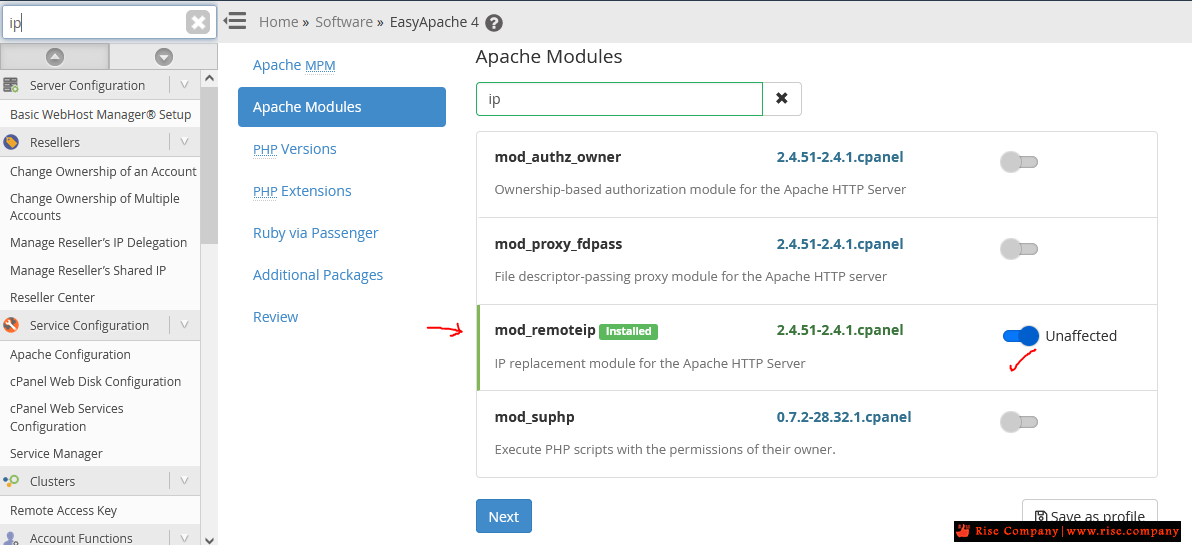
1- قم بتثبيت من داخل whm من المسار Home »Software »EasyApache 4
--------------------------------------------------
او من الامر
--------------------------------------------------كود:yum install ea-apache24-mod_remoteip
2- وضع RemoteIPHeader التى تعرف الايبيهات للزوار
--------------------------------------------------
هناك طريقتين اختر الاسهل لك
الطريقة الاولى
RemoteIPHeader should be replaced with the header used to pass the visitor IP from the proxy or load balancer. Typically,
this will be one of the following. Note that Nginx with Reverse Proxy (ea-nginx) uses the X-Forwarded-For header.
- X-Forwarded-For
- X-Client-IP
- X-Cluster-Client-IP
- CF-Connecting-IP
هناك 4 انواع كما فى الاعلى ظاهر , اختر واحد منهم
اما Nginx هو الاول X-Forwarded-For
الكلاود فلير هو الاخير CF-Connecting-IP
هناك ملفين يمكنك الاختيار اى واحد منهم لوضع القيم المطلوبة
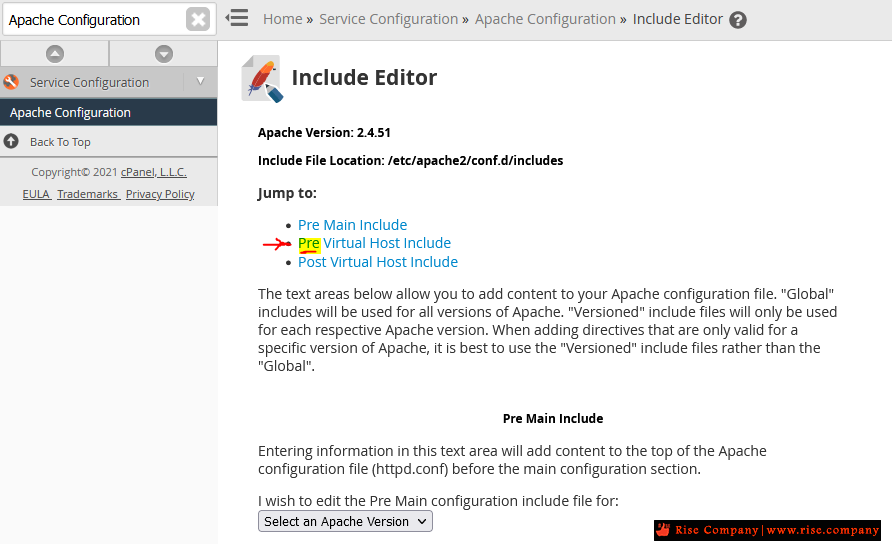
من خلال whm من المسار
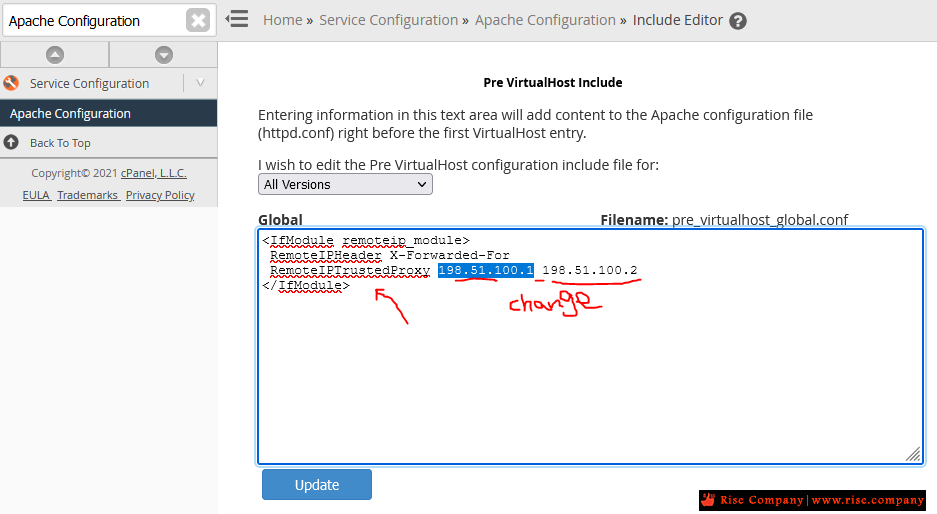
Home »Service Configuration »Apache Configuration »Include Editor
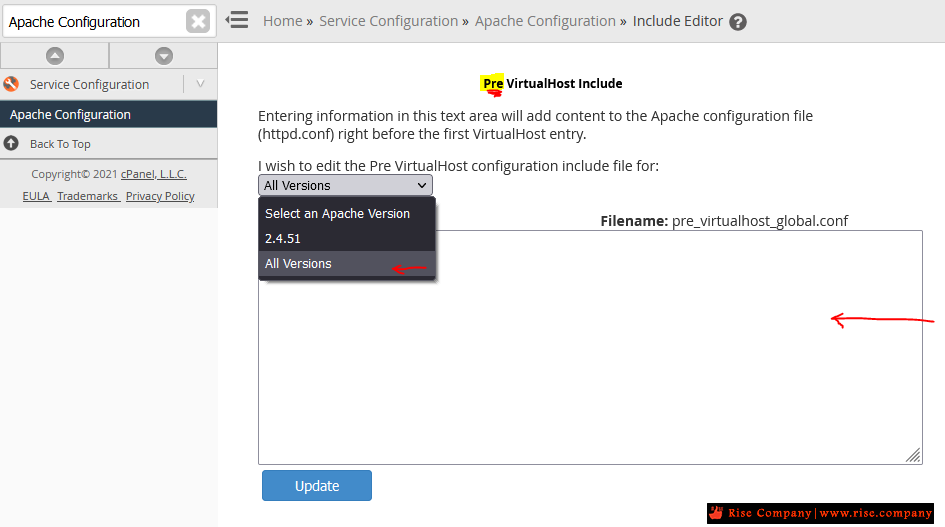
هذا الملف pre فاضى بداخله كانه custom مخصص لك
(select all versions), and insert this code:
الكود يختلف اما nginx او كلاود فلير cloudflare
ضع المناسب لك
من خلال هذا الامر يمكنك ايضا عمل ذلككود:<IfModule !mod_remoteip.c> LoadModule remoteip_module modules/mod_remoteip.so </IfModule> <IfModule mod_remoteip.c> # CloudFlare Header RemoteIPHeader CF-Connecting-IP # Trusted Proxy List # note - using RemoteIPTrustedProxy instead of RemoteIPInternalProxy # note - RemoteIPTrustedProxy does NOT trust Header provided private intranet addresses (local and LAN addresses) # note - RemoteIPInternalProxy is a security risk when using an external Proxy # CloudFlare IPv4 Address Ranges RemoteIPTrustedProxy 173.245.48.0/20 RemoteIPTrustedProxy 103.21.244.0/22 RemoteIPTrustedProxy 103.22.200.0/22 RemoteIPTrustedProxy 103.31.4.0/22 RemoteIPTrustedProxy 141.101.64.0/18 RemoteIPTrustedProxy 108.162.192.0/18 RemoteIPTrustedProxy 190.93.240.0/20 RemoteIPTrustedProxy 188.114.96.0/20 RemoteIPTrustedProxy 197.234.240.0/22 RemoteIPTrustedProxy 198.41.128.0/17 RemoteIPTrustedProxy 162.158.0.0/15 RemoteIPTrustedProxy 104.16.0.0/12 RemoteIPTrustedProxy 172.64.0.0/13 RemoteIPTrustedProxy 131.0.72.0/22 # CloudFlare IPv6 Address Ranges RemoteIPTrustedProxy 2400:cb00::/32 RemoteIPTrustedProxy 2606:4700::/32 RemoteIPTrustedProxy 2803:f800::/32 RemoteIPTrustedProxy 2405:b500::/32 RemoteIPTrustedProxy 2405:8100::/32 RemoteIPTrustedProxy 2a06:98c0::/29 RemoteIPTrustedProxy 2c0f:f248::/32 </IfModule>
كود:nano /etc/apache2/conf.d/includes/pre_virtualhost_global.conf
الطريقة الثانية
ننصح بها سهلة
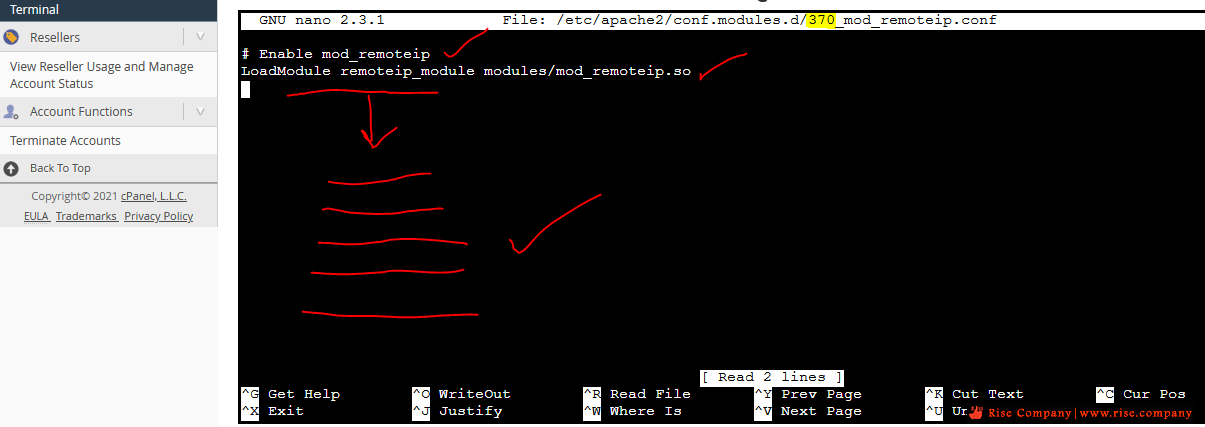
وضع كود Header و IP فى ملف اخر داخل mod_remoteip.conf
الرقم بالاحمر 370 رقم قد يختلف من سيرفر الى اخر مثلا : 360كود:nano /etc/apache2/conf.modules.d/370_mod_remoteip.conf
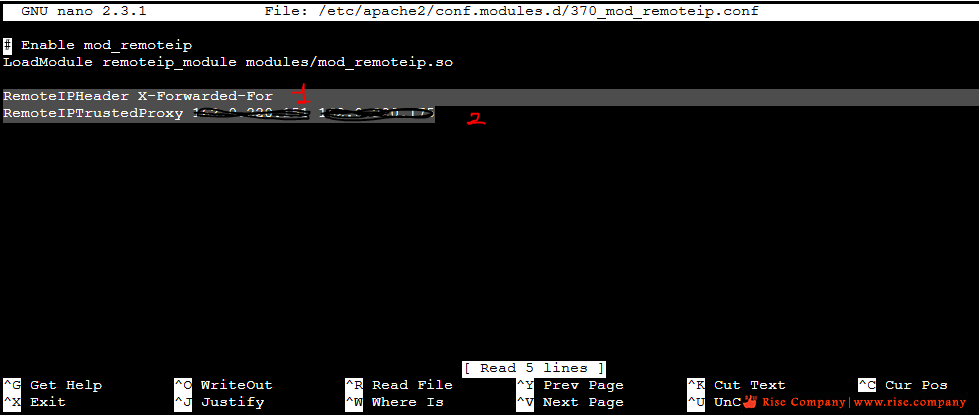
عند فتح الملف هيكون به سطرين اسفله ضع الكود المطلوب
هنا يتم وضع اي بي السيرفر ns1 و ns2 والفاصل بينهم مسافة spaceكود:RemoteIPHeader X-Forwarded-For RemoteIPTrustedProxy 140.90.30.111 140.90.30.222
--------------------------------------------------
3- اظهار الاى بى فى ملفات اللوج Log
--------------------------------------------------
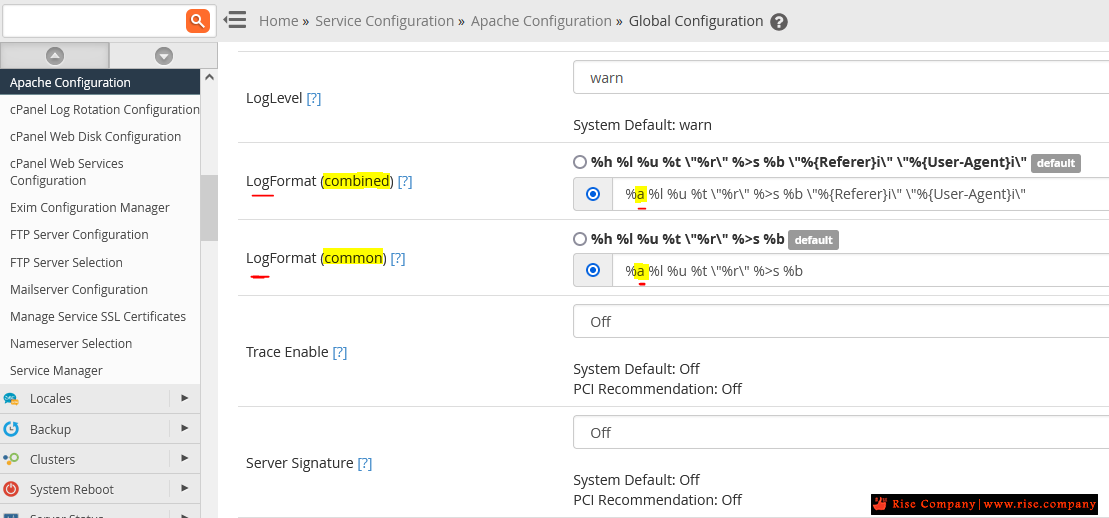
هناك نوعين من Log الاول هو combined و الاخر comon اذهب الى المسار
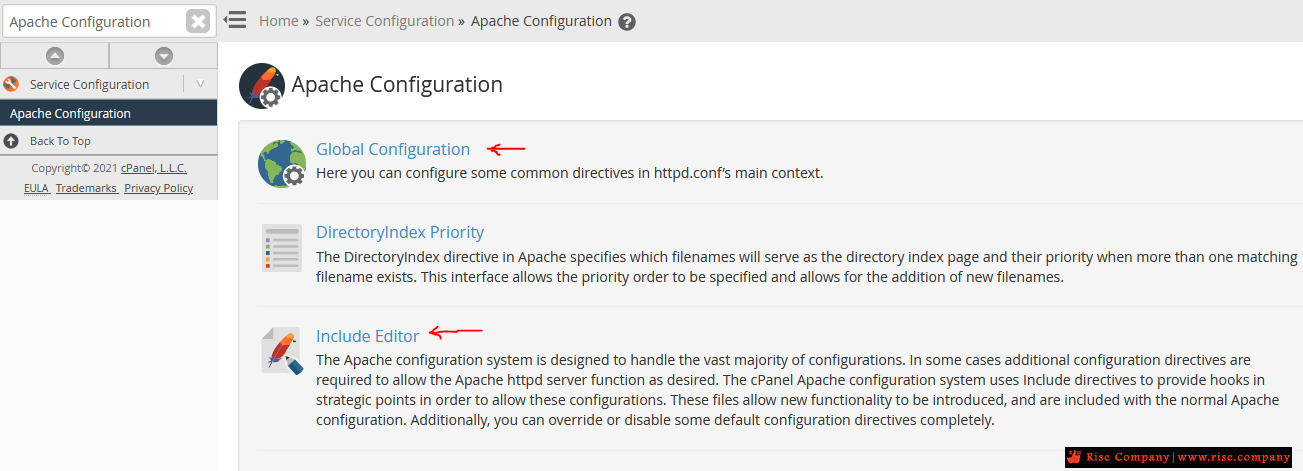
Home » Service Configuration » Apache Configuration » Global Configuration
وقم بازالة حرف h وضع مكانها حرف a
And modify both of the LogFormat (combined, and common) by replace the "h" with an
"a".
من
الىكود:LogFormat "%h %l %u %t \"%r\" %>s %b \"%{Referer}i\" \"%{User-Agent}i\"" combined LogFormat "%h %l %u %t \"%r\" %>s %b" common
This format captures the header with the %h field which is the proxy address in our example.كود:LogFormat "%a %l %u %t \"%r\" %>s %b \"%{Referer}i\" \"%{User-Agent}i\"" combined LogFormat "%a %l %u %t \"%r\" %>s %b" common
Because we want the originating client IP address instead of the remote IP being logged, we replace this with an %a.
Save and restart Apache and that should handle this.
--------------------------------------------------
Test the configuration.
Run the following command to check the Apache configuration. Any errors will need to be resolved before proceeding.
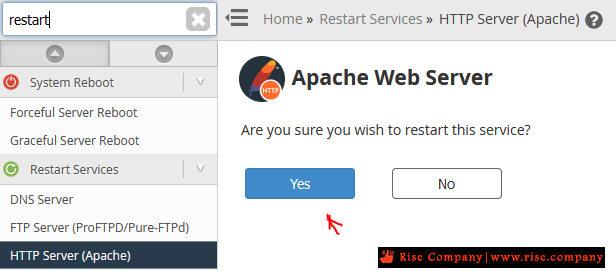
Restart Apache with the following command.كود:apachectl -t
المرجع:كود:/scripts/restartsrv_httpd
https://support.cpanel.net/hc/en-us/...h-mod-remoteip
https://support.cpanel.net/hc/en-us/...e-mod-remoteip
https://httpd.apache.org/docs/2.4/mo...g.html#formats
https://forums.cpanel.net/threads/vi...dflare.594027/
https://www.ucartz.com/clients/index...on-cPanel.html
https://support.cloudflare.com/hc/en...5XWe97z77b3XZV
https://serverok.in/install-mod_remo...-cpanel-server
https://forums.cpanel.net/threads/he...method.667129/
https://www.vpsblocks.com.au/support...der-cloudflare
https://support.cpanel.net/hc/en-us/...eip-is-enabled
https://devanswers.co/get-real-clien...re-apache-php/
https://help.whmcs.com/m/troubleshoo...in-client-logs
+ إنشاء موضوع جديد
النتائج 1 إلى 2 من 2
مشاهدة المواضيع
-
21-12-2021, 09:19 #1Status
- Offline

- تاريخ التسجيل
- Apr 2014
- الدولة
- Egypt
- المشاركات
- 4,703
 Engineering and Technology
- معدل تقييم المستوى
- 10
 كلاود فلير CloudFlare حل مشكلة Restoring visitors IP with mod_remoteip
------------------------------------------------------------------------
كلاود فلير CloudFlare حل مشكلة Restoring visitors IP with mod_remoteip
------------------------------------------------------------------------
شركة رايز للهندسة و التكنولوجيا Rise Company for Engineering & Technology
------------------------------------------------------------------------
Web Hosting | Web Designing | E-Marketing
رقم # 1 فى خدمات الشركات Business Services
استضافة مواقع Web Hosting - عمل ايميل شركة Business Emails
تصميم موقع شركة Web Design - تسويق الكترونى على جوجل Google Adwords
www.rise.company | www.rise.company/emails
ملحوظة : جميع خدماتنا مخصصة للشركات فقط وغير متاحة للافراد
وليس لنا اى منتجات او صيانة نهائيا! يرجى الانتباه الى ذلك.

 رد مع اقتباس
المواضيع المتشابهه
-
كلاود فلير CloudFlare حل مشكلة الفيدويهات MP4 لا تعمل على IPhone / IOS
بواسطة Rise Company في المنتدى قسم الكلاود فلير CloudFlareمشاركات: 0آخر مشاركة: 02-12-2021, 16:14 -
كلاود فلير CloudFlare حل مشكلة avoid SPF failures, reaching the DNS lookup limit
بواسطة Rise Company في المنتدى قسم الكلاود فلير CloudFlareمشاركات: 0آخر مشاركة: 01-12-2021, 21:12 -
كلاود فلير CloudFlare الفرق بين cloudflare js challenge vs Google captcha
بواسطة Rise Company في المنتدى قسم الكلاود فلير CloudFlareمشاركات: 0آخر مشاركة: 08-10-2021, 19:43 -
سكريبت Whmcs حل مشكلة AUTO LOGOUT عند تفعيل كلاود فلير CloudFlare
بواسطة Rise Company في المنتدى قسم ادارة الاستضافة Whmcsمشاركات: 0آخر مشاركة: 21-12-2020, 02:03 -
كلاود فلير CloudFlare تثبيت بديل mod_cloudflare وهو mod_remoteip لاظهار ip الحقيقي
بواسطة Rise Company في المنتدى قسم الكلاود فلير CloudFlareمشاركات: 0آخر مشاركة: 16-12-2020, 00:46

المفضلات