


فيسبوك Facebook كيفية الغاء التعليقات Disable page Comments
How To Turn Off Comments On Facebook Post - How To Disable Comments on a Facebook Page
لا يوجد طريقة رسمية لالغاء التعليقات من الفيسبوك ولكن الفيسبوك يقدم بدائل تعطى نفس النتيجة
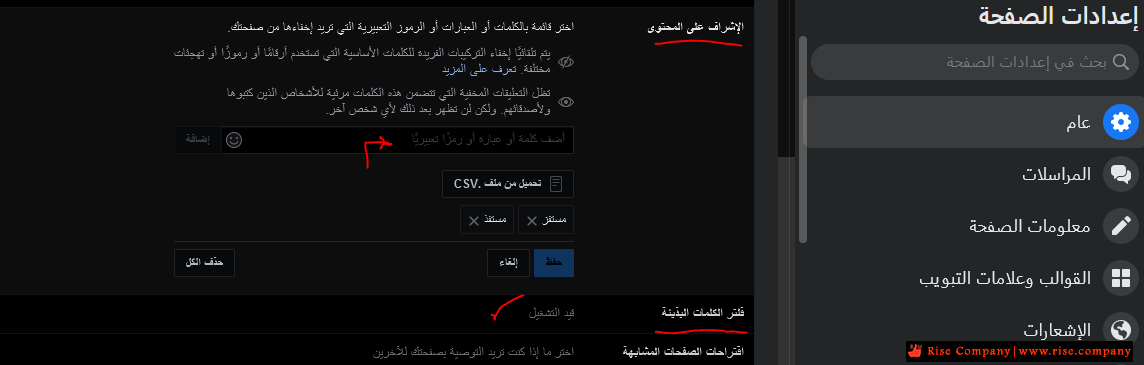
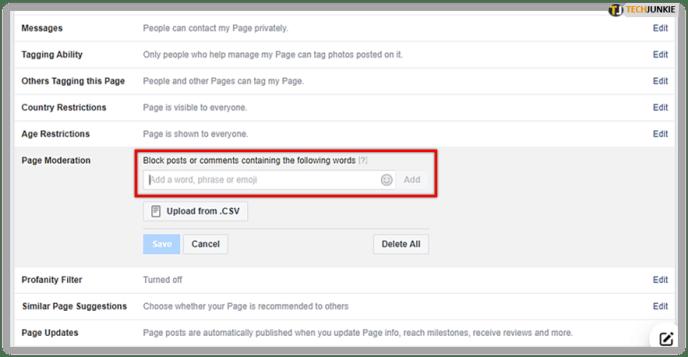
فى الصورة فى الاعلى تجد فلتر الكلمات البذيئة (غير مفعل) بشكل افتراضى !!
لذلك قم بتفعيله وهيفلتر الكثير من الكلمات المسيئة ولكن ماذا عن حظر اى تعليق ؟
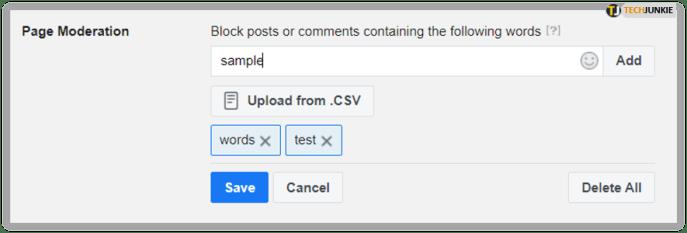
يوجد اختيار الاشراف على المحتوي قم بوضع اى عدد من الكلمات و الحروف المستخدمة فى الكلام
اى ان ضع كلمات تستخدم فى جميع العبارات لكى تحظر اى عبارة وبالتالى التعليقات جميعها هتتوقف
وهى طريقة سليمة و صحيحة 100 %
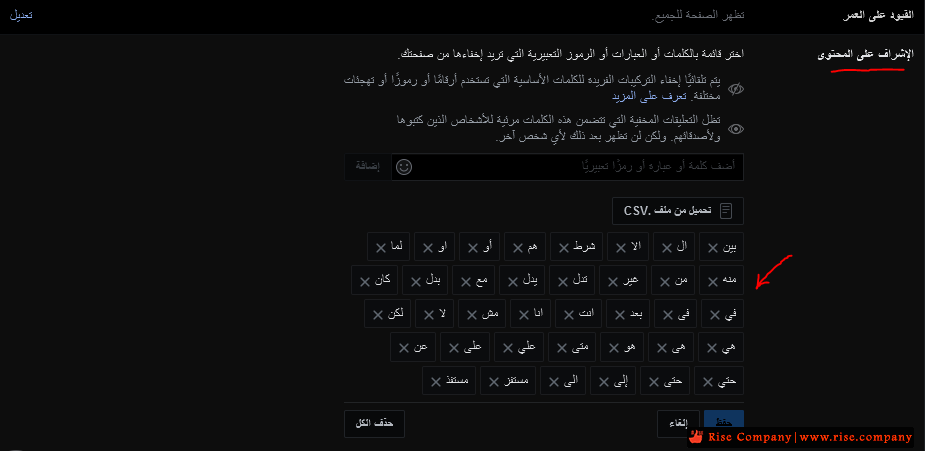
مثلا : ضع حروف الجر فى , من , الى , عن, على, ...
* مرفق ايضا فى المرفقاتبين ال
الا
شرط
هم
أو
او
لما
منه
من
غير
تدل
يدل
مع
بدل
كان
في
فى
بعد
انت
انا
مش
لا
لكن
هي
هى
هو
متى
علي
على
عن
حتي
حتى
إلى
الى
مستفز
مستفذ
والميزه هذه هتجعل التعليقات لا تظهر الا لصاحبها فقط !!!
واى زائر لن يشاهد تعليقه ابدا .
Turn Off Comments On Facebook Post Using Facebook Moderation
Using the Facebook moderation tool, you can get rid of a majority of such comments. Head over to your Facebook Page settings > General > Page Moderation. Now add common symbols such as "." and words like "to," "you," etc., to the forbidden keyword list in your Facebook page administration.
P.S. It will turn off commenting for all such comments on all your Facebook posts and ads altogether.
But if you only want to turn off comments on a few posts & ads while continuing engagement on your other content, the following method will work for you.
----------------------------------------------------
How to Use the Filter
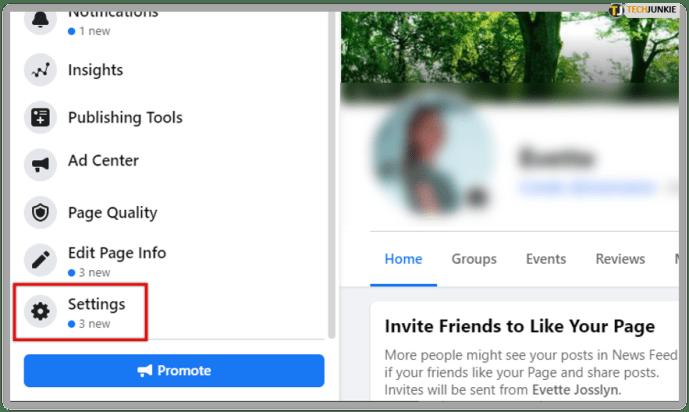
1. Settings
From your Facebook page, you have to locate the page Settings.
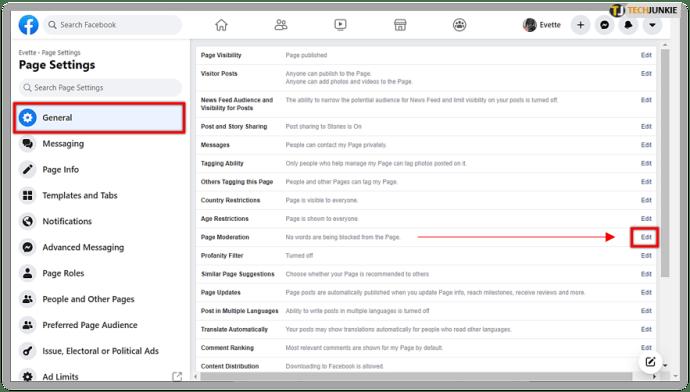
2. Page moderation
From there you go to the General tab. You then locate the section titled Page Moderation. Click on the Edit link.
3. Keyword List
A box will appear which should already contain some banned words. If it doesn’t, that’s ok. You’ll be adding your own soon.
This is where you can start adding words to the forbidden list. You can type them in or you can upload a .txt file that contains words you want to hide.
Advantages and Disadvantages
The advantage of using the filter to disable comments is that you can keep your page clean and non-controversial.
The downside is that this disables almost all incoming comments if you have a big list of keywords. You can’t disable comments for specific posts only. You’ll have to read comments one after another to decide which ones you want to show.
Another minor downside is that the filter doesn’t work for Facebook groups or personal profile pages.
المرجع:
https://www.alphr.com/disable-comments-facebook-page/
https://statusbrew.com/insights/turn...facebook-post/
+ إنشاء موضوع جديد
النتائج 1 إلى 1 من 1
مشاهدة المواضيع
-
05-01-2022, 19:12 #1Status
- Offline

- تاريخ التسجيل
- Apr 2014
- الدولة
- Egypt
- المشاركات
- 4,703
 Engineering and Technology
- معدل تقييم المستوى
- 10
 فيسبوك Facebook كيفية الغاء التعليقات Disable page Comments
------------------------------------------------------------------------
فيسبوك Facebook كيفية الغاء التعليقات Disable page Comments
------------------------------------------------------------------------
شركة رايز للهندسة و التكنولوجيا Rise Company for Engineering & Technology
------------------------------------------------------------------------
Web Hosting | Web Designing | E-Marketing
رقم # 1 فى خدمات الشركات Business Services
استضافة مواقع Web Hosting - عمل ايميل شركة Business Emails
تصميم موقع شركة Web Design - تسويق الكترونى على جوجل Google Adwords
www.rise.company | www.rise.company/emails
ملحوظة : جميع خدماتنا مخصصة للشركات فقط وغير متاحة للافراد
وليس لنا اى منتجات او صيانة نهائيا! يرجى الانتباه الى ذلك.

 رد مع اقتباس
المواضيع المتشابهه
-
تحميل تطبيق فيسبوك Facebook 2022
بواسطة رايات مصر في المنتدى رايز الإعلانات التجارية Rise Advertiseمشاركات: 0آخر مشاركة: 25-10-2021, 16:48 -
فيسبوك Facebook حل مشكلة فقدان الادمن للصفحة facebook page admin died
بواسطة Rise Company في المنتدى قسم فيسبوك Facebookمشاركات: 0آخر مشاركة: 22-10-2021, 06:34 -
فيسبوك facebook التسويق باستهداف جمهور المنافسين Audience Insights
بواسطة Rise Company في المنتدى قسم فيسبوك Facebookمشاركات: 0آخر مشاركة: 23-11-2020, 00:41 -
شرح الغاء التقييم من على صفحة الفيس disable facebook page review
بواسطة Rise Company في المنتدى قسم فيسبوك Facebookمشاركات: 0آخر مشاركة: 02-04-2020, 15:49 -
جعل الفيسبوك يظهر الكومنتات الحديثة facebook show newest vs Most Relevant comments
بواسطة Rise Company في المنتدى قسم فيسبوك Facebookمشاركات: 0آخر مشاركة: 19-02-2019, 23:11

المفضلات