


حل مشكلة لا يمكن انشاء ايميل Error: Failed to lock and read from file /passwd”
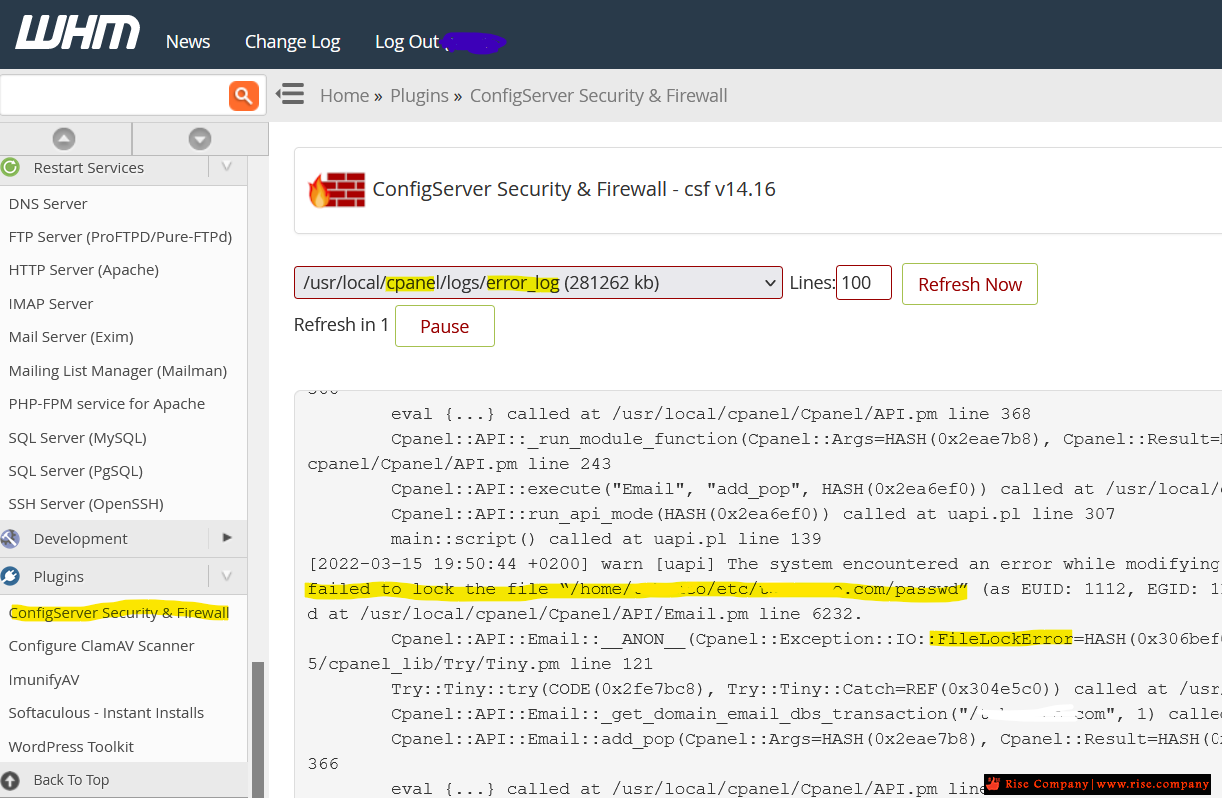
Failed to chown “/home/****/etc/****/passwd” to group “mail”:
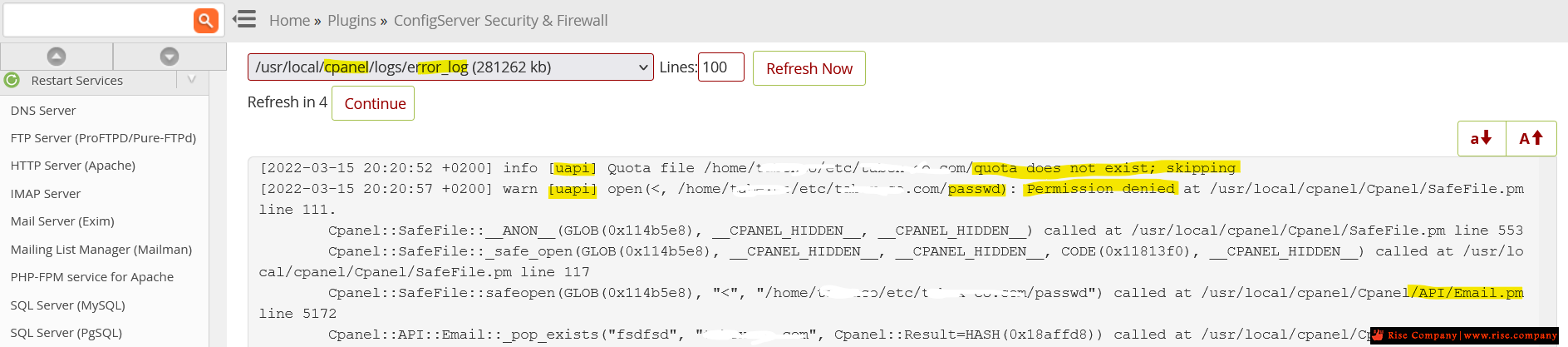
Error: Failed to lock and read from file “/passwd”: “Permission denied”
Operation not permitted at /usr/local/cpanel/Cpanel/Email/Perms/User.pm
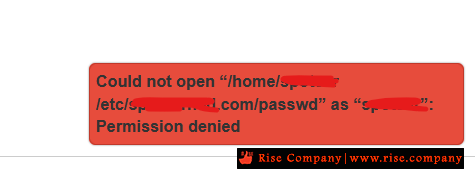
Could not open “/home/yoursite/etc/yoursite.com/passwd” as “yoursite”: Permission denied
How to fix Error You do not have permission to access - quota does not exist; skipping
Error: Failed to lock and read from file - following error: Permission denied
[uapi] Quota file does not exist; skipping - The system failed to lock the file
Script to Fix Account Permissions - can't create any emails of any of my clients
خطا عند انشاء الايميلات Failed to chown “passwd” to group “mail
/etc/passwd file corrupted
-----------------------------------------------------
المشكلة :
-----------------------------------------------------
Error: Failed to lock and read from file “****/passwd”: “Permission denied”. (XID 6tr2bu) The system failed to lock the file “******/passwd” (as EUID: 1112, EGID: 1114 1114) because of the following error: Permission denied
-----------------------------------------------------
حل المشكلة :
-----------------------------------------------------
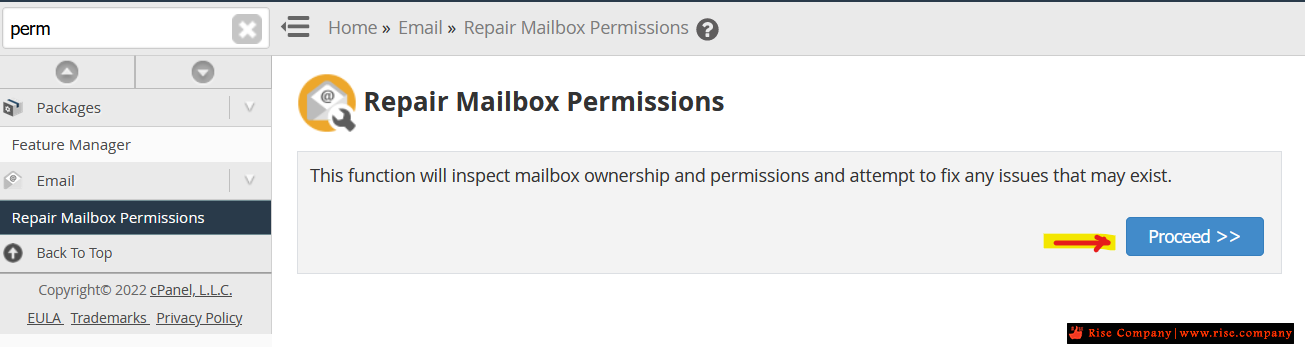
عند عمل repair للايميلات Repair Mailbox Permissions Rebuild Mail Databases and Fix Permissions
هيظهر لك خطا Failed to chown ومكتوب بجانبه مسار الملف الى به الخطا لليوزر المحدد
عند الذهاب الى هذا الملف ومحاوله فتحه هيظهر لك خطا فى الصلاحية
Failed to chown “/home/clientsite/etc/clientsite.com/passwd” to group “mail”: Operation not permitted at /usr/local/cpanel/Cpanel/Email/Perms/User.pm line 308
كل ما عليك فعله هو حذف هذا الملف وهيتولد واحد جديد تلقائيا ولكن ملف سليم بدون مشكلة فى الصلاحياتCould not open “/home/yoursite/etc/yoursite.com/passwd” as “yoursite”: Permission denied
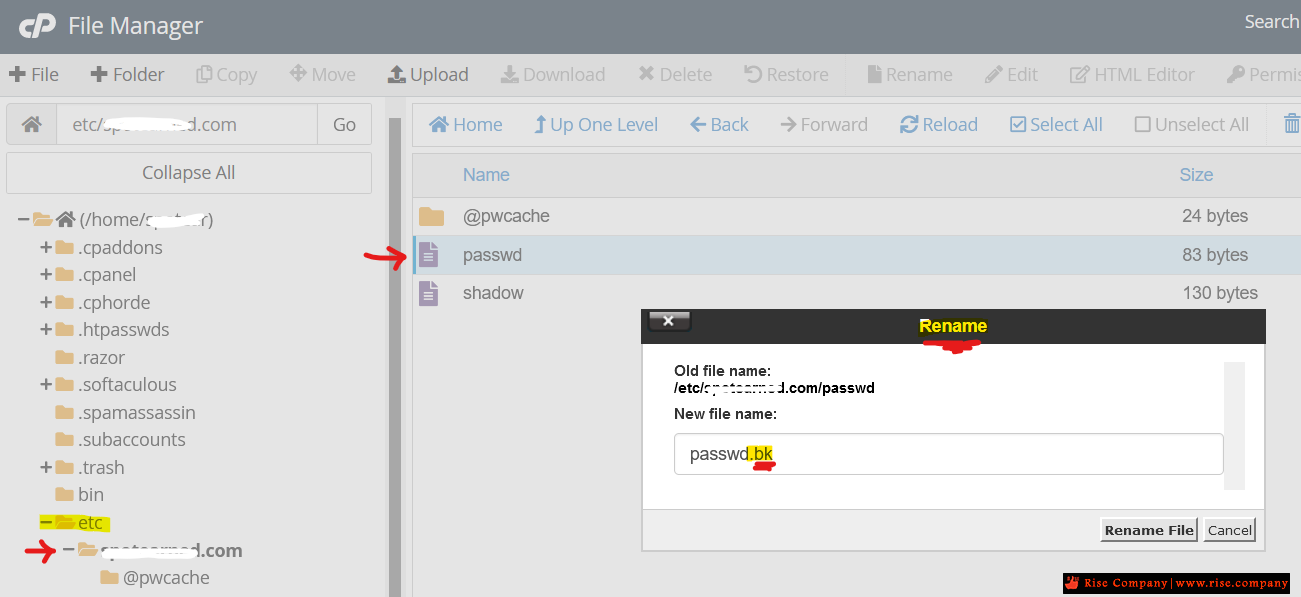
والافضل عمل rename له بوضع .bk فى نهايته كما فى الصورة
ثم اذهب وعمل ايميل جديد وهتجد ان المشكلة تم حلها 100 %
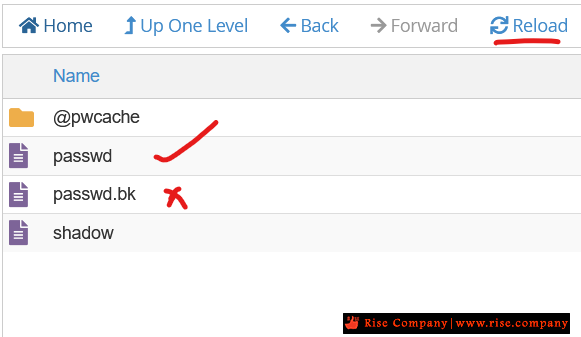
ارجع لنفس المسار وهتجد ان ملف جديد تم انشاءه تلقائيا بعد انشاء الايميل الجديد
للمزيد من التفاصيل عن الملف من هنا
https://www.cyberciti.biz/faq/unders...d-file-format/
/etc/passwd file no need to worries as its not having password, the /etc/passwd file
having user name uid,gid and home dir information, the password is stored in the /etc/shadow and its in encrypted format
ملف passwd file لا يحتوى على باسورد ولكن information فقط
لن يحدث شىء للايميلات و لا الباسورد لن يحدث لها شىء ايضا
والباسوردات موجودة فى ملف shadow مشفرة .
الخلاصة :
حذف ملف passwd file امن تماما ولن تواجهك اى مشكلة اطلاقا
شاهد من هناملحوظة :
تم تجربة هذه الطريقة وهى تعمل 100 %
تم تجربة العشرات من الحلول جميعها فشل !!!
فلا تحاول وتضيع وقتك بدون فائدة .
وتكد انه لا يوجد مشكلة فى المساحة هام جدا !
السي بانيل Cpanel | حل مشاكل تغيير اسم Domain و USER و Home Directory
مرجع:
https://www.cyberciti.biz/faq/unders...d-file-format/
https://security.stackexchange.com/q...osting-account
https://docs.cpanel.net/knowledge-ba...eation-errors/
https://docs.cpanel.net/knowledge-ba...est-practices/
https://www.quora.com/Can-my-hosting...Panel-password
https://linuxize.com/post/etc-passwd-file/
+ إنشاء موضوع جديد
النتائج 1 إلى 2 من 2
العرض المتطور
-
15-03-2022, 21:20 #1Status
- Offline

- تاريخ التسجيل
- Apr 2014
- الدولة
- Egypt
- المشاركات
- 4,703
 Engineering and Technology
- معدل تقييم المستوى
- 10
 السي بانيل Cpanel | حل مشكلة Error: Failed to lock and read from file /passwd”
------------------------------------------------------------------------
السي بانيل Cpanel | حل مشكلة Error: Failed to lock and read from file /passwd”
------------------------------------------------------------------------
شركة رايز للهندسة و التكنولوجيا Rise Company for Engineering & Technology
------------------------------------------------------------------------
Web Hosting | Web Designing | E-Marketing
رقم # 1 فى خدمات الشركات Business Services
استضافة مواقع Web Hosting - عمل ايميل شركة Business Emails
تصميم موقع شركة Web Design - تسويق الكترونى على جوجل Google Adwords
www.rise.company | www.rise.company/emails
ملحوظة : جميع خدماتنا مخصصة للشركات فقط وغير متاحة للافراد
وليس لنا اى منتجات او صيانة نهائيا! يرجى الانتباه الى ذلك.
-
15-03-2022, 22:25 #2Status
- Offline
- تاريخ التسجيل
- Apr 2014
- الدولة
- Egypt
- المشاركات
- 4,703
Engineering and Technology
- معدل تقييم المستوى
- 10
رد: السي بانيل Cpanel | حل مشكلة Error: Failed to lock and read from file /passwd”
Understanding /etc/passwd File Format
Can you explain /etc/passwd file format for Linux and Unix-like operating systems?
The /etc/passwd file stores essential information required during login. In other words, it stores user account information. The /etc/passwd is a plain text file. It contains a list of the system’s accounts, giving for each account some useful information like user ID, group ID, home directory, shell, and more. The /etc/passwd file should have general read permission as many command utilities use it to map user IDs to user names. However, write access to the /etc/passwd must only limit for the superuser/root account.
Tutorial details Difficulty level Easy Root privileges No Requirements Linux terminal OS compatibility *BSD • Linux • Unix • WSL Est. reading time 4 minutes
Understanding /etc/passwd file fields
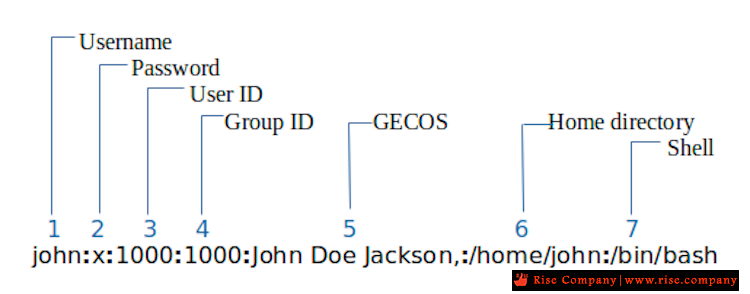
The /etc/passwd contains one entry per line for each user (user account) of the system. All fields are separated by a colon (:) symbol. Total of seven fields as follows. Generally, /etc/passwd file entry looks as follows:

(Fig.01: /etc/passwd file format – click to enlarge) /etc/passwd file format
From the above image:
- Username: It is used when user logs in. It should be between 1 and 32 characters in length.
- Password: An x character indicates that encrypted password is stored in /etc/shadow file. Please note that you need to use the passwd command to computes the hash of a password typed at the CLI or to store/update the hash of the password in /etc/shadow file.
- User ID (UID): Each user must be assigned a user ID (UID). UID 0 (zero) is reserved for root and UIDs 1-99 are reserved for other predefined accounts. Further UID 100-999 are reserved by system for administrative and system accounts/groups.
- Group ID (GID): The primary group ID (stored in /etc/group file)
- User ID Info (GECOS): The comment field. It allow you to add extra information about the users such as user’s full name, phone number etc. This field use by finger command.
- Home directory: The absolute path to the directory the user will be in when they log in. If this directory does not exists then users directory becomes /
- Command/shell: The absolute path of a command or shell (/bin/bash). Typically, this is a shell. Please note that it does not have to be a shell. For example, sysadmin can use the nologin shell, which acts as a replacement shell for the user accounts. If shell set to /sbin/nologin and the user tries to log in to the Linux system directly, the /sbin/nologin shell closes the connection.
I hope you understood /etc/passwd file format to keep track of every registered user that has access to a system. Therefore, knowing the structure is essential for security reasons.
------------------------------------------------------------------------
شركة رايز للهندسة و التكنولوجيا Rise Company for Engineering & Technology
------------------------------------------------------------------------
Web Hosting | Web Designing | E-Marketing
رقم # 1 فى خدمات الشركات Business Services
استضافة مواقع Web Hosting - عمل ايميل شركة Business Emails
تصميم موقع شركة Web Design - تسويق الكترونى على جوجل Google Adwords
www.rise.company | www.rise.company/emails
ملحوظة : جميع خدماتنا مخصصة للشركات فقط وغير متاحة للافراد
وليس لنا اى منتجات او صيانة نهائيا! يرجى الانتباه الى ذلك.


 رد مع اقتباس
المواضيع المتشابهه
-
السي بانيل Cpanel | حل مشكلة تاخر / بطء لوحة التحكم cpanel لدومين محدد فقط
بواسطة Rise Company في المنتدى رايز للاستضافة Rise Hostمشاركات: 0آخر مشاركة: 14-03-2022, 17:36 -
السي بانيل Cpanel | حل مشكلة Partial Backups - home backup failed network error
بواسطة Rise Company في المنتدى رايز للاستضافة Rise Hostمشاركات: 0آخر مشاركة: 21-12-2021, 19:59 -
إنجن إكس Nginx هل يمكن تفعيلها ؟ بجانب أباتشي Apache فى السي بانيل Cpanel
بواسطة Rise Company في المنتدى رايز للاستضافة Rise Hostمشاركات: 0آخر مشاركة: 08-12-2021, 23:34 -
السي بانيل Cpanel | حل مشكلة بطئ Delay / Slow فتح السي بانيل cPanel® is connecting
بواسطة Rise Company في المنتدى رايز للاستضافة Rise Hostمشاركات: 0آخر مشاركة: 03-12-2021, 04:35 -
السي بانيل Cpanel | حل مشكلة ايميل واحد Database Error Connection Failed- RoundCube
بواسطة Rise Company في المنتدى قسم الايميلات Emailsمشاركات: 0آخر مشاركة: 28-11-2021, 17:41

المفضلات