


Understanding /etc/passwd File Format
Can you explain /etc/passwd file format for Linux and Unix-like operating systems?
The /etc/passwd file stores essential information required during login. In other words, it stores user account information. The /etc/passwd is a plain text file. It contains a list of the system’s accounts, giving for each account some useful information like user ID, group ID, home directory, shell, and more. The /etc/passwd file should have general read permission as many command utilities use it to map user IDs to user names. However, write access to the /etc/passwd must only limit for the superuser/root account.
Tutorial details Difficulty level Easy Root privileges No Requirements Linux terminal OS compatibility *BSD • Linux • Unix • WSL Est. reading time 4 minutes
Understanding /etc/passwd file fields
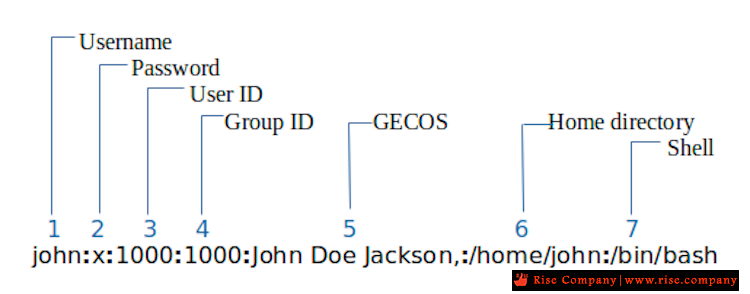
The /etc/passwd contains one entry per line for each user (user account) of the system. All fields are separated by a colon (:) symbol. Total of seven fields as follows. Generally, /etc/passwd file entry looks as follows:
(Fig.01: /etc/passwd file format – click to enlarge) /etc/passwd file format
From the above image:
- Username: It is used when user logs in. It should be between 1 and 32 characters in length.
- Password: An x character indicates that encrypted password is stored in /etc/shadow file. Please note that you need to use the passwd command to computes the hash of a password typed at the CLI or to store/update the hash of the password in /etc/shadow file.
- User ID (UID): Each user must be assigned a user ID (UID). UID 0 (zero) is reserved for root and UIDs 1-99 are reserved for other predefined accounts. Further UID 100-999 are reserved by system for administrative and system accounts/groups.
- Group ID (GID): The primary group ID (stored in /etc/group file)
- User ID Info (GECOS): The comment field. It allow you to add extra information about the users such as user’s full name, phone number etc. This field use by finger command.
- Home directory: The absolute path to the directory the user will be in when they log in. If this directory does not exists then users directory becomes /
- Command/shell: The absolute path of a command or shell (/bin/bash). Typically, this is a shell. Please note that it does not have to be a shell. For example, sysadmin can use the nologin shell, which acts as a replacement shell for the user accounts. If shell set to /sbin/nologin and the user tries to log in to the Linux system directly, the /sbin/nologin shell closes the connection.
I hope you understood /etc/passwd file format to keep track of every registered user that has access to a system. Therefore, knowing the structure is essential for security reasons.
+ إنشاء موضوع جديد
النتائج 1 إلى 2 من 2
العرض المتطور
-
15-03-2022, 22:25 #1Status
- Offline

- تاريخ التسجيل
- Apr 2014
- الدولة
- Egypt
- المشاركات
- 4,703
 Engineering and Technology
- معدل تقييم المستوى
- 10
 رد: السي بانيل Cpanel | حل مشكلة Error: Failed to lock and read from file /passwd”
------------------------------------------------------------------------
رد: السي بانيل Cpanel | حل مشكلة Error: Failed to lock and read from file /passwd”
------------------------------------------------------------------------
شركة رايز للهندسة و التكنولوجيا Rise Company for Engineering & Technology
------------------------------------------------------------------------
Web Hosting | Web Designing | E-Marketing
رقم # 1 فى خدمات الشركات Business Services
استضافة مواقع Web Hosting - عمل ايميل شركة Business Emails
تصميم موقع شركة Web Design - تسويق الكترونى على جوجل Google Adwords
www.rise.company | www.rise.company/emails
ملحوظة : جميع خدماتنا مخصصة للشركات فقط وغير متاحة للافراد
وليس لنا اى منتجات او صيانة نهائيا! يرجى الانتباه الى ذلك.


 رد مع اقتباس
المواضيع المتشابهه
-
السي بانيل Cpanel | حل مشكلة تاخر / بطء لوحة التحكم cpanel لدومين محدد فقط
بواسطة Rise Company في المنتدى رايز للاستضافة Rise Hostمشاركات: 0آخر مشاركة: 14-03-2022, 17:36 -
السي بانيل Cpanel | حل مشكلة Partial Backups - home backup failed network error
بواسطة Rise Company في المنتدى رايز للاستضافة Rise Hostمشاركات: 0آخر مشاركة: 21-12-2021, 19:59 -
إنجن إكس Nginx هل يمكن تفعيلها ؟ بجانب أباتشي Apache فى السي بانيل Cpanel
بواسطة Rise Company في المنتدى رايز للاستضافة Rise Hostمشاركات: 0آخر مشاركة: 08-12-2021, 23:34 -
السي بانيل Cpanel | حل مشكلة بطئ Delay / Slow فتح السي بانيل cPanel® is connecting
بواسطة Rise Company في المنتدى رايز للاستضافة Rise Hostمشاركات: 0آخر مشاركة: 03-12-2021, 04:35 -
السي بانيل Cpanel | حل مشكلة ايميل واحد Database Error Connection Failed- RoundCube
بواسطة Rise Company في المنتدى قسم الايميلات Emailsمشاركات: 0آخر مشاركة: 28-11-2021, 17:41

المفضلات