

الكيبورد Keyboard اختصارات العملات Shortcuts for Currency Symbols
There are more than 200 countries in the world and most of them uses their own currency system. It is a very common need to type the currency symbols indicating price in financial documents like order and quotation documents. However, Windows and Mac keyboard offers dollar symbol as a default key in English keyboard layout. You may also find Euro € and British Pound £ symbols on European keyboard layouts. Regardless of your keyboard layout, here we will provide alt code keyboard shortcuts for inserting popular currency symbols.
In our earlier article, we have provided more than 600 alt key shortcuts for inserting various categories of symbols. We also offer alt code eBook for offline reference.
Alt Code Shortcuts for Currency Symbols
Currency symbols are part of the Unicode point range from 20A0 to 20CF. However, there are few unassigned codes in this range. Below is the complete list of alt code shortcuts for inserting currency symbols on your documents. Note that the browser display may vary from the actual display on Word, Excel and PowerPoint documents.
Currency Symbol Currency Name Windows Shortcut Mac Shortcut $ Dollar Symbol Shift + 4 Shift + 4 € Euro Symbol Alt + Ctrl + E Option + Shift + 2 $ Dollar Symbol Alt + 0036 Option + 0024 € Euro Symbol Alt + 0128 Option + 20AC ƒ Dutch Florin Alt + 0131 Option + 0192 ¢ Cent Sign Alt + 0162 Option + 00A2 £ British Pound Alt + 0163 Option + 00A3 ¤ General Currency Alt + 0164 Option + 00A4 ¥ Japanese Yen Alt + 0165 Option + 00A5 ㍐ Square Yuan Alt + 13136 Option + 3350 ֏ Armenian Dram Sign Alt + 1423 Option + 058F ؋ Afghani Sign Alt + 1547 Option + 060B ৲ Bengali Rupee Mark Alt + 2546 Option + 09F2 ৳ Bengali Rupee Sign Alt + 2547 Option + 09F3 ૱ Gujarati Rupee Sign Alt + 2801 Option + 0AF1 ௹ Tamil Rupee Sign Alt + 3065 Option + 0BF9 ฿ Thai Baht Alt + 3647 Option + 0E3F 원 Korean Won Alt + 50896 Option + C6D0 ៛ Khmer Symbol Riel Alt + 6107 Option + 17DB ﷼ Saudi Arabiya Rial Alt + 65020 Option + FDFC ﹩ Small Dollar Symbol Alt + 65129 Option + FE69 $ Fullwidth Dollar Sign Alt + 65284 Option + FF04 ¢ Fullwidth Cent Alt + 65504 Option + FFE0 £ Fullwidth Pound Sign Alt + 65505 Option + FFE1 ₠ Old Euro Currency Alt + 8352 Option + 20A0 ₡ Colon Symbol Alt + 8353 Option + 20A1 ₢ Cruzeiro Symbol Alt + 8354 Option + 20A2 ₣ French Franc Alt + 8355 Option + 20A3 ₤ Lira Symbol Alt + 8356 Option + 20A4 ₥ Mill Sign Alt + 8357 Option + 20A5 ₦ Nigerian Naira Alt + 8358 Option + 20A6 ₧ Spanish Peseta Alt + 8359 Option + 20A7 ₨ Old Indian Rupee Alt + 8360 Option + 20A8 ₩ South Korean Won Alt + 8361 Option + 20A9 ₪ Israeli New Sheqel Alt + 8362 Option + 20AA ₫ Vietnamese Dong Alt + 8363 Option + 20AB € Euro Symbol Alt + 8364 Option + 20AC ₭ Laos Kip Alt + 8365 Option + 20AD ₮ Mongolian Tugrik Alt + 8366 Option + 20AE ₯ Greece Drachma Alt + 8367 Option + 20AF ₰ German Penny Sign Alt + 8368 Option + 20B0 ₱ Philippine Peso Alt + 8369 Option + 20B1 ₲ Paraguayan Guarani Alt + 8370 Option + 20B2 ₳ Argentine Austral Alt + 8371 Option + 20B3 ₴ Ukrainian Hryvnia Alt + 8372 Option + 20B4 ₵ Ghana Cedi Alt + 8373 Option + 20B5 ₶ Old Livre Tournois Sign Alt + 8374 Option + 20B6 ₷ Esperanto Spesmilo Alt + 8375 Option + 20B7 ₸ Tenge Sign Alt + 8376 Option + 20B8 ₹ Indian Rupee Symbol Alt + 8377 Option + 20B9 ₺ Turkish Lira Alt + 8378 Option + 20BA ₻ Nordic Mark Alt + 8379 Option + 20BB ₼ Azerbaijan Manat Alt + 8380 Option + 20BC ₽ Russian Ruble Alt + 8381 Option + 20BD ₾ Georgia Lari Alt + 8382 Option + 20BE ₿ Bitcoin Symbol Alt + 8383 Option + 20BF
How to Type Currency Symbols?
There are many ways to insert currency symbols in Microsoft Office and Apple iWork documents:
- Alt + code method with decimal values
- Using Unicode hexadecimal values with Alt + X combination
- Option + code with Unicode Hex Input method on Mac
- Using escape strings on HTML, CSS and JavaScript documents
Using Alt + Codes on Windows
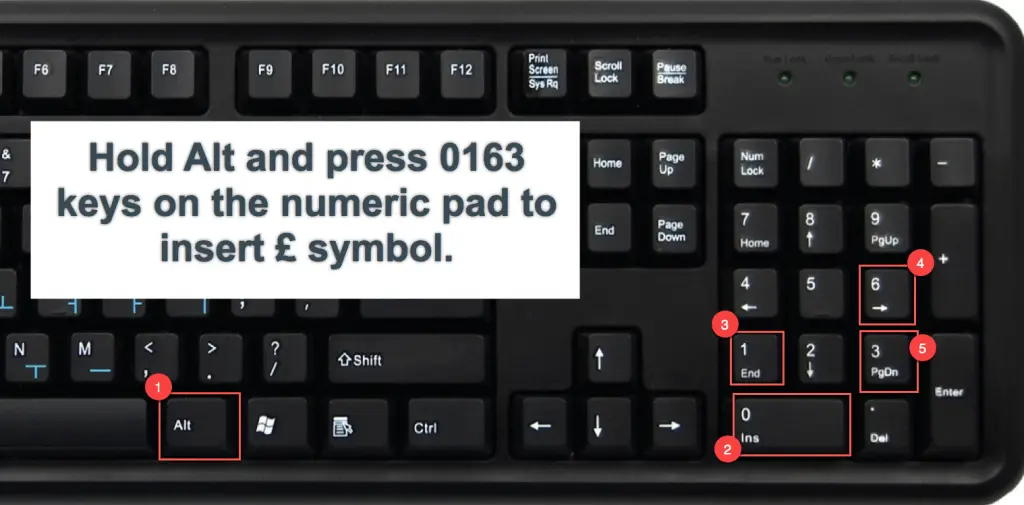
Hold one of the Alt keys located either side of the space bar and then continuously press the code. For example, pressing
and then keys on the numeric pad will produce the British Pound symbol .
This method works only on the Windows based computers having a keyboard with separate numeric pad. Also, it may work on some Microsoft Office applications like Excel.
Related: Online currency converter tool to get latest exchange rate value.
Using Alt + X Unicode Method for Word
You can use the hexadecimal Unicode value to insert symbols in Word documents. Enter the Unicode hexadecimal value of the symbol and then press one of the
keys along with key. But this method will only work on Microsoft Word.
For example, pressing
keys and then press with keys will produce Euro currency symbol .
Inserting Currency Symbols on Mac
On Mac documents like Pages and Keynote, first change the input method to Unicode Hex Input. Then press, option key and the hexadecimal codes in the second column of the above table to type the symbols. For example, Option + 0E3F will produce the Thai Baht symbol like ฿. All four digit hexadecimal codes will work in this method.
Inserting Currency Emoji
In addition to the above list of currency symbols, there are many currency related emoji available in Unicode like bank, ATM, credit card, etc,. You can insert these emoji on documents and chat conversation using emoji keyboard in Windows 10 and Mac.
Currency Related Emoji Emoji Name Windows Shortcut Word Shortcut 💲 Heavy Dollar Sign Alt + 128178 1F4B2 Alt + X 🏦 Bank Alt + 127974 1F3E6 Alt + X 🏧 ATM Sign Alt + 127975 1F3E7 Alt + X 💯 Hundred Points Alt + 128175 1F4AF Alt + X 💰 Money Bag Alt + 128176 1F4B0 Alt + X 💱 Currency Exchange Alt + 128177 1F4B1 Alt + X 💳 Credit Card Alt + 128179 1F4B3 Alt + X 💴 Yen Banknote Alt + 128180 1F4B4 Alt + X 💵 Dollar Banknote Alt + 128181 1F4B5 Alt + X 💶 Euro Banknote Alt + 128182 1F4B6 Alt + X 💷 Pound Banknote Alt + 128183 1F4B7 Alt + X 💸 Money with Wings Alt + 128184 1F4B8 Alt + X 💹 Chart Increasing with Yen Alt + 128185 1F4B9 Alt + X 🪙 Coin Alt + 129689 1FA99 Alt + X 🧾 Receipt Alt + 129534 1F9FE Alt + X
Insert Currency Emoji in Windows 10
- Press “Win + ;” keys to open emoji keyboard.
- Search for the symbol or type the name to filter the result.
- When you find the required symbol, click to insert on your document.
Currency Emoji in Windows 10
The good part is you can still use alt codes to insert these currency emoji in Windows 10 PC. For example, alt + 128181 will produce banknote with dollar sign emoji like 💵. Similarly, you can use alt + x shortcuts on Microsoft Word documents.
Similar to currency emoji, you can insert any currency symbol using the same emoji keyboard. After opening emoji keyboard panel, click on “Symbols” icon and then “Currency Symbols” icon. You can find all available currency symbols and click on any symbol to insert on your document.
Insert Currency Emoji in Mac
- Press “Control + Command + Space bar” to open Character Viewer app.
- You can find all currency symbols under “Currency Symbol” category.
- Double click to insert the symbol anywhere on your documents.
- You can also use the search box to find other emoji related currency symbols like hundred point symbol 💯.
Inserting Currency Symbols in HTML and CSS
Inserting special symbols in HTML document is different that of Word document. Basically you can use the same “Alt + Code” with minor modification. Below is an example of inserting Indian Rupee sign in HTML and you can refer the separate article for the complete list of HTML special characters.
- Alt code for Indian Rupee symbol ₹: Alt 8377
- HTML code Indian Rupee symbol ₹: &# 8377;
You can change the code in the above examples to insert any currency symbols on your HTML document. Similarly, on CSS and JavaScript documents, use the hexadecimal codes like \20BE and \u20BE respectively.
Font Variations and Size
You can adjust the font size and color of the currency symbols on your documents like other text content. This will give an opportunity to decorate the symbols as you like. Below are some of the examples with variations for Cent, Won and Ruble symbols.
¢
₩
₽
Cheatsheet for Currency Symbols
Download the cheatsheet for all alt code shortcuts for currency symbols, if you want to keep the shortcuts for offline reference. Below are some of the most popular currency symbol images that you can copy and paste.
المرجع:
https://www.webnots.com/alt-code-sho...rency-symbols/
+ إنشاء موضوع جديد
النتائج 1 إلى 1 من 1
-
06-04-2022, 20:13 #1Status
- Offline

- تاريخ التسجيل
- Apr 2014
- الدولة
- Egypt
- المشاركات
- 4,703
 Engineering and Technology
- معدل تقييم المستوى
- 10
 الكيبورد Keyboard اختصارات العملات Shortcuts for Currency Symbols
------------------------------------------------------------------------
الكيبورد Keyboard اختصارات العملات Shortcuts for Currency Symbols
------------------------------------------------------------------------
شركة رايز للهندسة و التكنولوجيا Rise Company for Engineering & Technology
------------------------------------------------------------------------
Web Hosting | Web Designing | E-Marketing
رقم # 1 فى خدمات الشركات Business Services
استضافة مواقع Web Hosting - عمل ايميل شركة Business Emails
تصميم موقع شركة Web Design - تسويق الكترونى على جوجل Google Adwords
www.rise.company | www.rise.company/emails
ملحوظة : جميع خدماتنا مخصصة للشركات فقط وغير متاحة للافراد
وليس لنا اى منتجات او صيانة نهائيا! يرجى الانتباه الى ذلك.


 رد مع اقتباس
المواضيع المتشابهه
-
سكريبت Whmcs كيفية وضع العمله فى الرابط Currency in a link
بواسطة Rise Company في المنتدى قسم ادارة الاستضافة Whmcsمشاركات: 0آخر مشاركة: 20-11-2021, 22:06 -
اختصارات التشكيل فى الكيبورد كاملة - رموز / علامات التجويد على الكيبورد Keyboard
بواسطة Rise Company في المنتدى قسم الدين الاسلامىمشاركات: 0آخر مشاركة: 02-06-2021, 09:14 -
ويندوز سيرفر Window Server اضافة / ازالة لجميع اليوزر All Users' Desktop shortcuts
بواسطة Rise Company في المنتدى قسم الويندوز سيرفر Windows Serverمشاركات: 0آخر مشاركة: 22-10-2020, 00:16 -
حل مشكلة الكيبورد لا يعمل فى البايوس Keyboard doesn't work in bios
بواسطة Rise Company في المنتدى قسم الاي تي IT مشاكل و حلولمشاركات: 0آخر مشاركة: 14-10-2020, 20:37 -
اختصارات الكيبورد
بواسطة big master في المنتدى رايز للكمبيوتر Rise Computerمشاركات: 0آخر مشاركة: 13-03-2010, 21:12

المفضلات