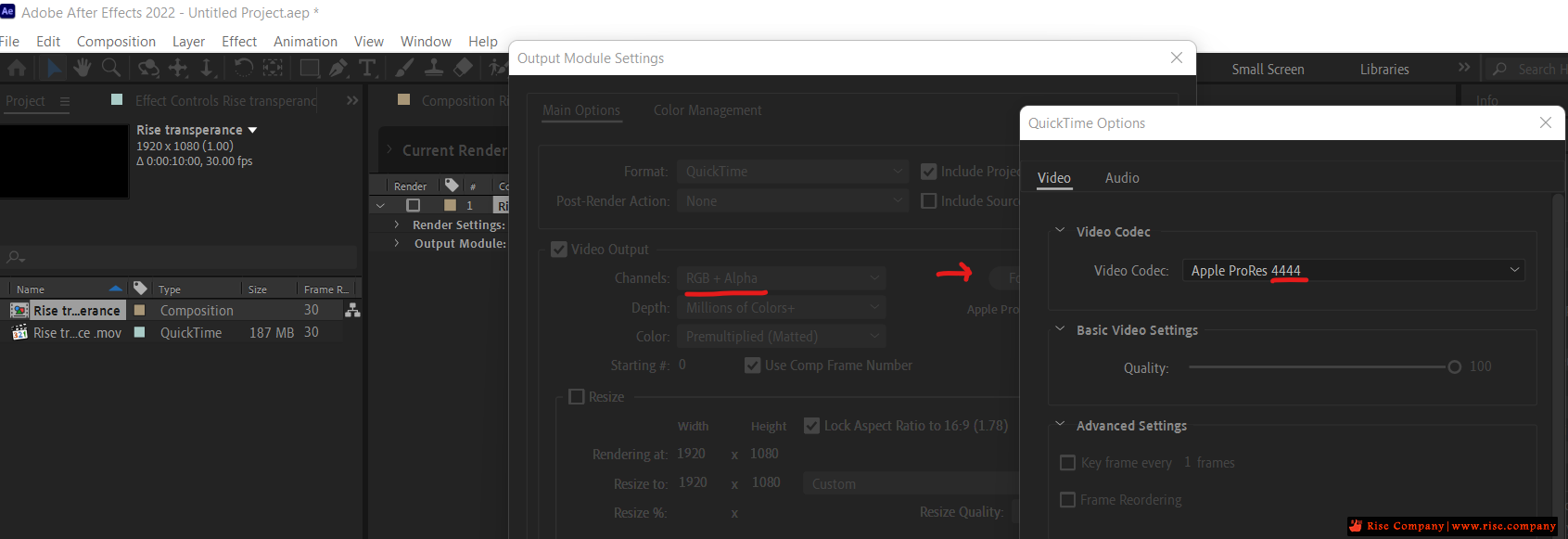
أدوبي أفتر إفكتس Adobe After Effects مشكلة RGB + Alpha doesn't show
المشكلة :
لجعل فيديو بدون خلفية يجب تحويله الى RGB + Alpha
ولكن هذا الاختيار لا يعمل !
حل المشكلة :
اضغط على format options وختر قيمة 4444 بدل 442
وهتجد فى الحال ان RGB + Alpha مفعل يمكن اختياره.
In Image 1 you have the output format set as Quicktime ProRes 422. Quicktime ProRes 422 doesn't support alpha channels. That's why its greyed out.
I'm assuming that after you switch the output format to AIFF, you then switch back to a format that does support alpha channels, such as Quicktime ProRes 4444.
المرجع:
https://cloudconvert.com/mov-to-mp4
https://community.adobe.com/t5/after.../td-p/12567424


-
 أدوبي أفتر إفكتس Adobe After Effects مشكلة RGB + Alpha doesn't show
------------------------------------------------------------------------
أدوبي أفتر إفكتس Adobe After Effects مشكلة RGB + Alpha doesn't show
------------------------------------------------------------------------
شركة رايز للهندسة و التكنولوجيا Rise Company for Engineering & Technology
------------------------------------------------------------------------
Web Hosting | Web Designing | E-Marketing
رقم # 1 فى خدمات الشركات Business Services
استضافة مواقع Web Hosting - عمل ايميل شركة Business Emails
تصميم موقع شركة Web Design - تسويق الكترونى على جوجل Google Adwords
www.rise.company | www.rise.company/emails
ملحوظة : جميع خدماتنا مخصصة للشركات فقط وغير متاحة للافراد
وليس لنا اى منتجات او صيانة نهائيا! يرجى الانتباه الى ذلك.