


فايروول CSF Firewall سماح Allow Domains Having Dynamic IP
​How to whitelist a hostname in ConfigServer Security and Firewall installed (CSF)
If your server has ConfigServer Security and Firewall installed (CSF), then you may find it necessaryto whitelist a hostname as opposed to an IP address.
CSF has a file specifically for allowing hostnames called "csf.dyndns". Fully Qualified Domain Names (FQDN) are checked at a configurable interval of seconds, to poll for a change in the IP address. If the IP address has changed iptables will be updated!
الطريقة من خلال WHM :
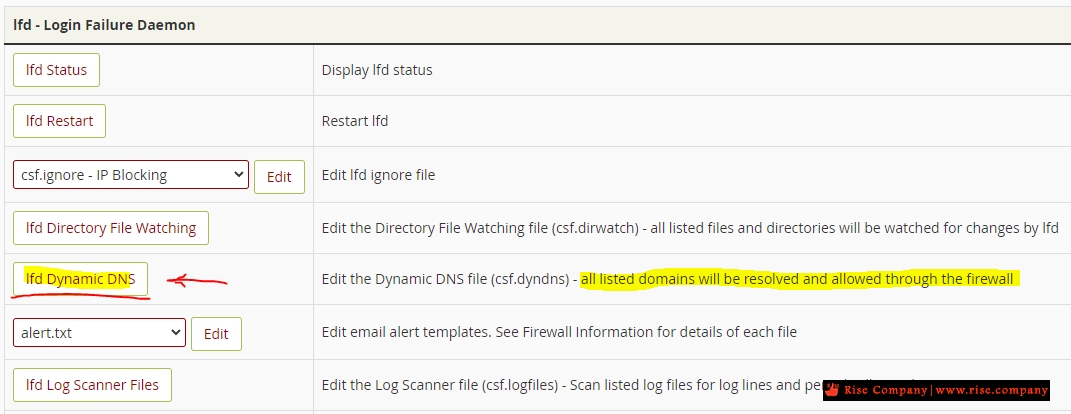
افتح لوحة firewall ثم انزل الى lfd - Login Failure Daemon
وادخل على lfd Dynamic DNS وهى خاصية تقوم بعمل Allow دائما
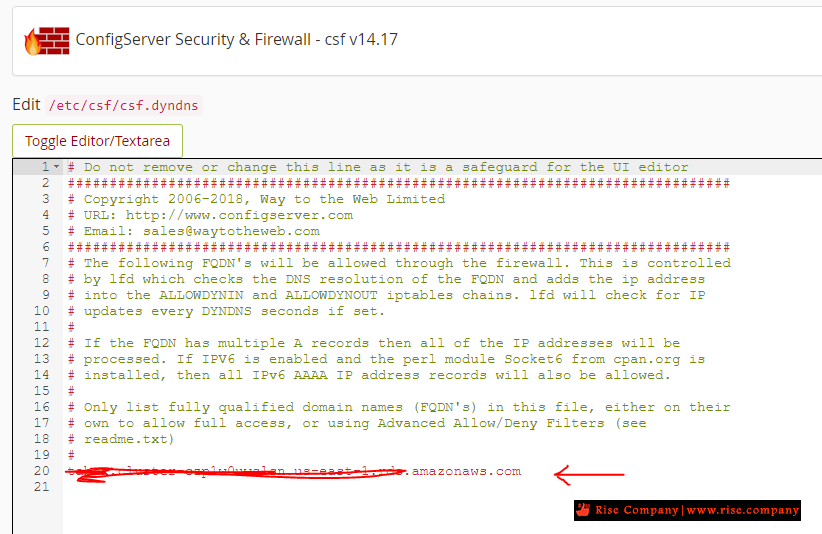
داخل lfd Dynamic DNS ادخل بعد # رابط الموقع / الهوست فى كل سطر
هنا تم وضع رابط من امازون aws ليس له اي بي ثابت.
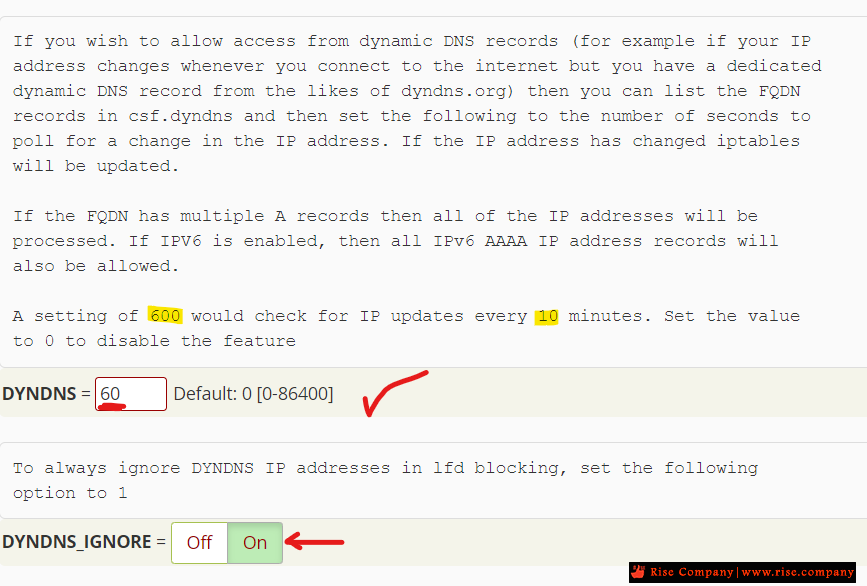
ثم داخل عدادات الفايروول settings
وضع قيمة 300 امام DYDNS وهى هتعمل تحديث للاي بي كل 5 دقائق
---------------------------------------
طريقة اخري من خلال Terminal
---------------------------------------
To whitelist a hostname:
1) SSH to the server
2) Open the file "/etc/csf/csf.dyndns" and add the hostname.
3) Open the file "/etc/csf/csf.conf" and set DYNDNS = "300" (which would check for IP updates every 5 minutes).
Note: If you want the activity of the IP also ignored, setDYNDNS_IGNORE = "on"
4) Restart the firewall
That's it. The hostnames in csf.dyndns will automatically be allowed and the rules will refresh every 5 minutes.
شاهد ايضا
السي بانال WHM/CPANEL بديل الاستاتيك اي بي DYNAMIC DNS (DDNS)
المرجع:
https://help.serversaustralia.com.au...-installed-CSF
https://www.plothost.com/kb/whitelist-hostnames-csf/
https://forum.directadmin.com/thread...stnames.64114/
+ إنشاء موضوع جديد
النتائج 1 إلى 1 من 1
مشاهدة المواضيع
-
02-01-2023, 15:25 #1Status
- Offline

- تاريخ التسجيل
- Apr 2014
- الدولة
- Egypt
- المشاركات
- 4,703
 Engineering and Technology
- معدل تقييم المستوى
- 10
 فايروول CSF Firewall سماح Allow Domains Having Dynamic IP
------------------------------------------------------------------------
فايروول CSF Firewall سماح Allow Domains Having Dynamic IP
------------------------------------------------------------------------
شركة رايز للهندسة و التكنولوجيا Rise Company for Engineering & Technology
------------------------------------------------------------------------
Web Hosting | Web Designing | E-Marketing
رقم # 1 فى خدمات الشركات Business Services
استضافة مواقع Web Hosting - عمل ايميل شركة Business Emails
تصميم موقع شركة Web Design - تسويق الكترونى على جوجل Google Adwords
www.rise.company | www.rise.company/emails
ملحوظة : جميع خدماتنا مخصصة للشركات فقط وغير متاحة للافراد
وليس لنا اى منتجات او صيانة نهائيا! يرجى الانتباه الى ذلك.

 رد مع اقتباس
المواضيع المتشابهه
-
الفرق بين فايروول فورتي جيت FortiGate Firewall و فايروول سوفوس Sophos Firewall
بواسطة Rise Company في المنتدى رايز للسكيورتي Rise Securityمشاركات: 0آخر مشاركة: 23-06-2021, 01:39 -
فايروول فورتي جيت FortiGate Firewall في بي ان VPN سماح / حظر الدول Geo IP
بواسطة Rise Company في المنتدى قسم فايروول Fortigateمشاركات: 0آخر مشاركة: 19-04-2020, 03:40 -
فايروول هاردوير Hardware Firewall || فايروول سوفتوير Software Firewall
بواسطة Rise Company في المنتدى رايز للسكيورتي Rise Securityمشاركات: 0آخر مشاركة: 15-09-2019, 23:11 -
فايروول فورتي جيت FortiGate Firewall توصيل جهازين فايروول مع بعض High Availability
بواسطة Rise Company في المنتدى قسم فايروول Fortigateمشاركات: 0آخر مشاركة: 23-07-2019, 22:45 -
كورس فايروول فورتي جيت Fortigate Firewall حلقة 2 عن The History of Firewall Security
بواسطة Rise Company في المنتدى قسم فايروول Fortigateمشاركات: 0آخر مشاركة: 26-05-2019, 02:17

المفضلات