


سكريبت Whmcs حل مشكلة فواتير الدومين domain invoices not generated
Domain invoices are not being generated
Domain Invoice Generation
المشكلة :
الاستضافة دائما تصدر فاتورة invoice ولكن لا يصدر للدومين invoice نهائيا سواء free ام لا
سبب المشكلة :
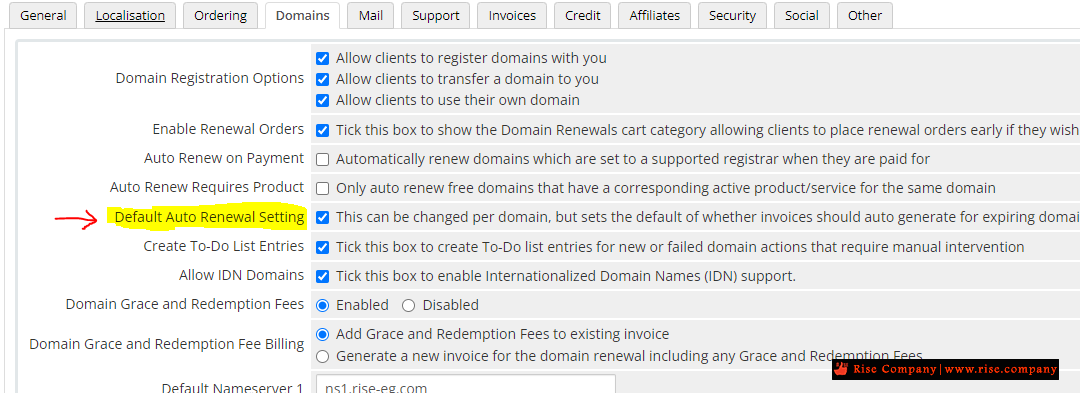
ان اختيار Auto Renew غير مفعل وهذا يعنى ان الدفع مرة واحدة وليس renewable
على الرغم انك تقوم بالتجديد manual الا انDisable Auto Renew يعنى ان الدفع onetime
حل المشكلة :
-----------------------------------------------
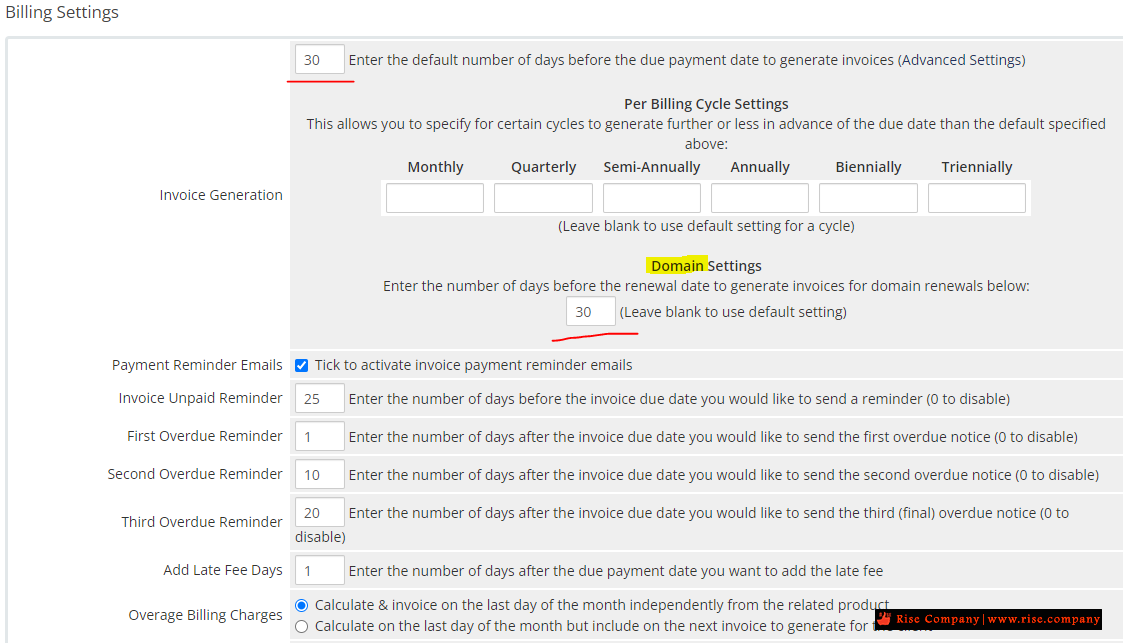
A domain record will not automatically generate a renewal invoice if Next Due Date is further in the future than the number of days you specified in the Invoice Generation setting:
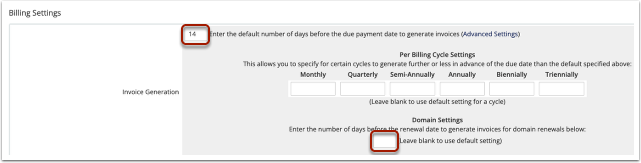
1. Go to Configuration > System Settings > Automation Settings.
2. Find the Invoice Generation value:
3. Go to Domains > Domain Registrations.
4. Search for and click on the domain.
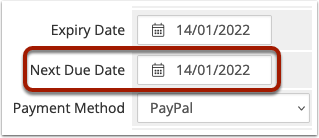
5. Find the Next Due Date value and check whether it is further in the future than the Invoice Generation value specifies.
For example, if today's date is 1st Jan 2022:
Next Due Date: 14th Jan 2022
Invoice Generation: 14
= Invoice will generate today.
Next Due Date: 15th Jan 2022
Invoice Generation: 14
= Invoice not generated today.
If the invoice is not yet due for automatic renewal, you can renew the domain early via the Client Area shopping cart or in the client's Summary tab.
المرجع:
https://help.whmcs.com/m/troubleshoo...ice-generation
https://whmcs.community/topic/297196...ing-generated/
https://docs.whmcs.com/Invoicing_Iss..._Not_Invoicing
+ إنشاء موضوع جديد
النتائج 1 إلى 1 من 1
مشاهدة المواضيع
-
31-01-2023, 11:58 #1Status
- Offline

- تاريخ التسجيل
- Apr 2014
- الدولة
- Egypt
- المشاركات
- 4,703
 Engineering and Technology
- معدل تقييم المستوى
- 10
 سكريبت Whmcs حل مشكلة فواتير الدومين domain invoices not generated
------------------------------------------------------------------------
سكريبت Whmcs حل مشكلة فواتير الدومين domain invoices not generated
------------------------------------------------------------------------
شركة رايز للهندسة و التكنولوجيا Rise Company for Engineering & Technology
------------------------------------------------------------------------
Web Hosting | Web Designing | E-Marketing
رقم # 1 فى خدمات الشركات Business Services
استضافة مواقع Web Hosting - عمل ايميل شركة Business Emails
تصميم موقع شركة Web Design - تسويق الكترونى على جوجل Google Adwords
www.rise.company | www.rise.company/emails
ملحوظة : جميع خدماتنا مخصصة للشركات فقط وغير متاحة للافراد
وليس لنا اى منتجات او صيانة نهائيا! يرجى الانتباه الى ذلك.

 رد مع اقتباس
المواضيع المتشابهه
-
سكريبت Whmcs حل مشكلة Error: Invalid TLD/Registration Period Supplied for Domain
بواسطة Rise Company في المنتدى قسم ادارة الاستضافة Whmcsمشاركات: 0آخر مشاركة: 24-12-2022, 22:36 -
سكريبت Whmcs حل مشكلة WHMCS server status, uptime and server load, not available
بواسطة Rise Company في المنتدى قسم ادارة الاستضافة Whmcsمشاركات: 0آخر مشاركة: 04-10-2021, 10:30 -
سكريبت Whmcs مشكلة php8 مع ioncube غير متاح whmcs no ioncube for php 8
بواسطة Rise Company في المنتدى قسم ادارة الاستضافة Whmcsمشاركات: 0آخر مشاركة: 12-08-2021, 21:04 -
سكريبت Whmcs حل مشكلة ايميلات تذكير للدومين لا تعمل free domain reminder not working
بواسطة Rise Company في المنتدى قسم ادارة الاستضافة Whmcsمشاركات: 0آخر مشاركة: 27-01-2021, 10:22 -
سكريبت Whmcs حل مشكلة whmcs bridge error code of 302 / 200
بواسطة Rise Company في المنتدى قسم ادارة الاستضافة Whmcsمشاركات: 0آخر مشاركة: 02-11-2020, 01:34

المفضلات