


الاندرويد Android / الاي فون iPhone مزامنة Caldav/Carddav - Calendar & Contacts
Android Device Calendar/CalDav Setup
ما الفرق بين Caldav/Carddav ؟
كلمة Carddav تعني contacts
كلمة Caldav تعني calendar
-----------------------------------
1- اعدادت Caldav / calendar على الاندرويد Android
-----------------------------------
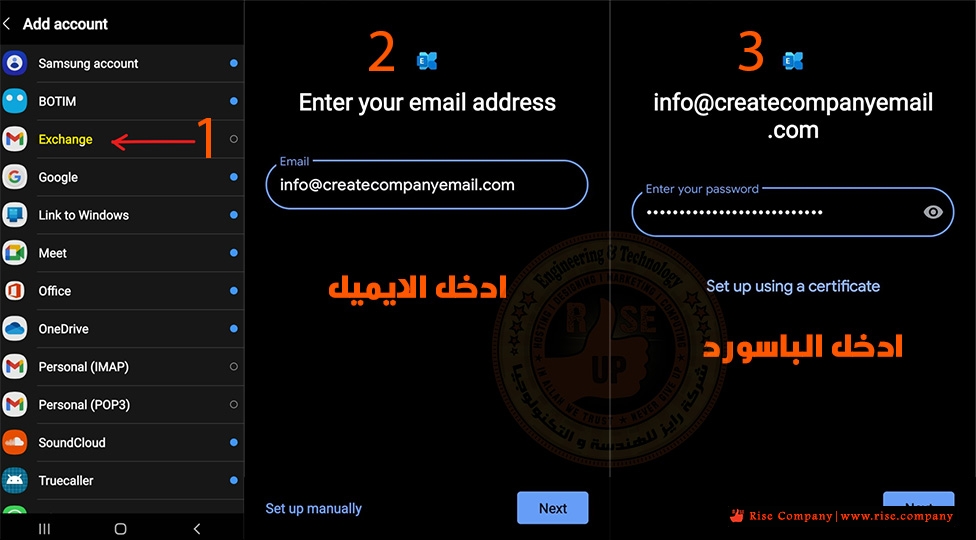
افتح اعدادت الهاتف - ثم اضافة حساب - ثم اختار exchange وهى التابعة الى جوجل
ثم اضف الايميل و الباسورد الذى تريد ربطه بالتقوييم
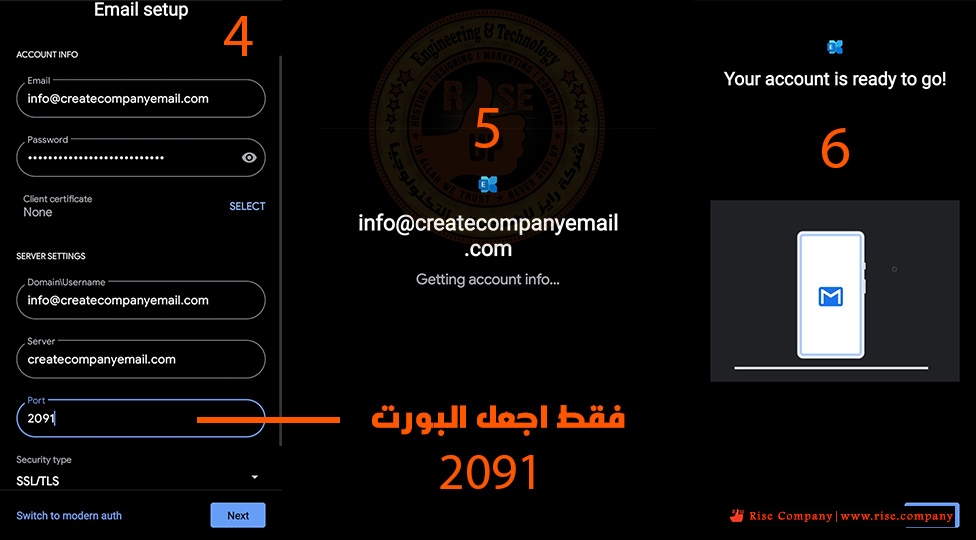
هيظهر لك اعدادت تمت تلقائيا جميعها صحيح عدا البورت port
قم بتغييره من 433 الى 2091 دون تعديل اى شىء اخرنهائيا
هام:
اذا عدلت اى شىء قبل تغيير البورت يجب الخروج ثم الدخول مرة اخري
حيث لن يعمل معك بسبب تذكره للبورت القديم.
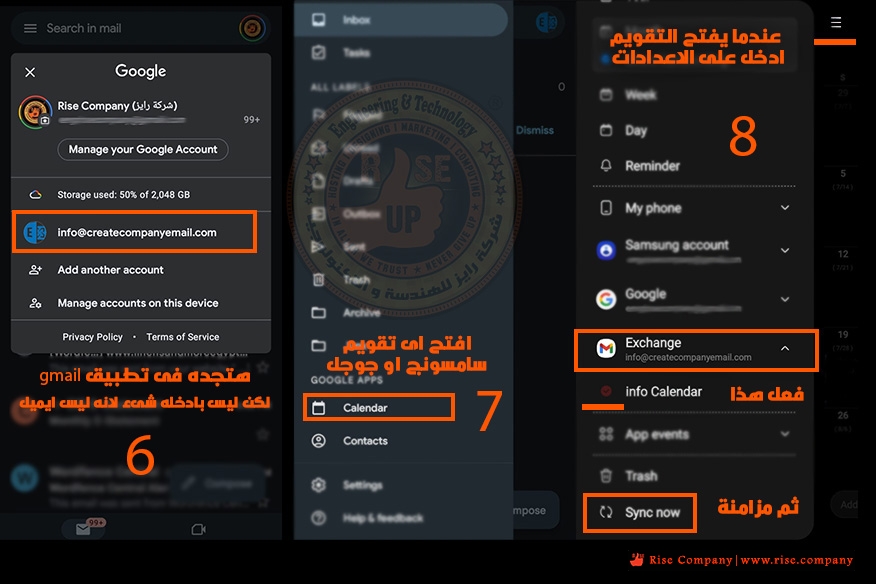
بعد التثبيت بنجاح , ماذا افعل ؟ اين اجد التقويم ؟
هتجد ان الايميل المضاف داخل تطبيق gmail لكن لا فائدة منه هذا ربط فقط
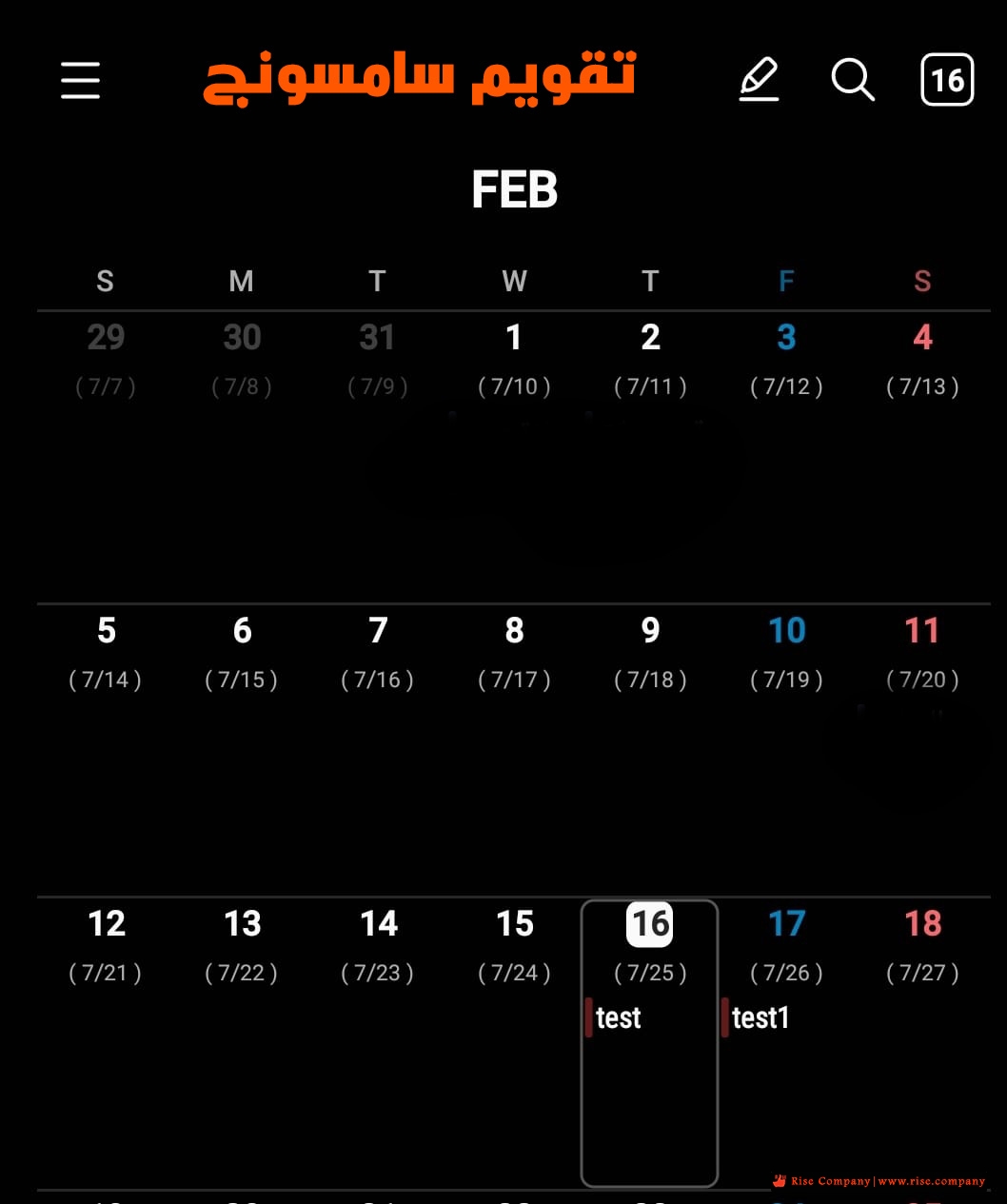
كل ما عليك فعله هو فتح تقويم calendar الخاص بسامسونج فهو مثبت على جميع الاجهزة
ثم اضغط على 3 شرط التى تصل الى الاعدادت وهتجد بداخلها ان التقويم يعرض
اى ايميل مربوط به فعل الخاص بك ثم اعمل sync فى الاسفل
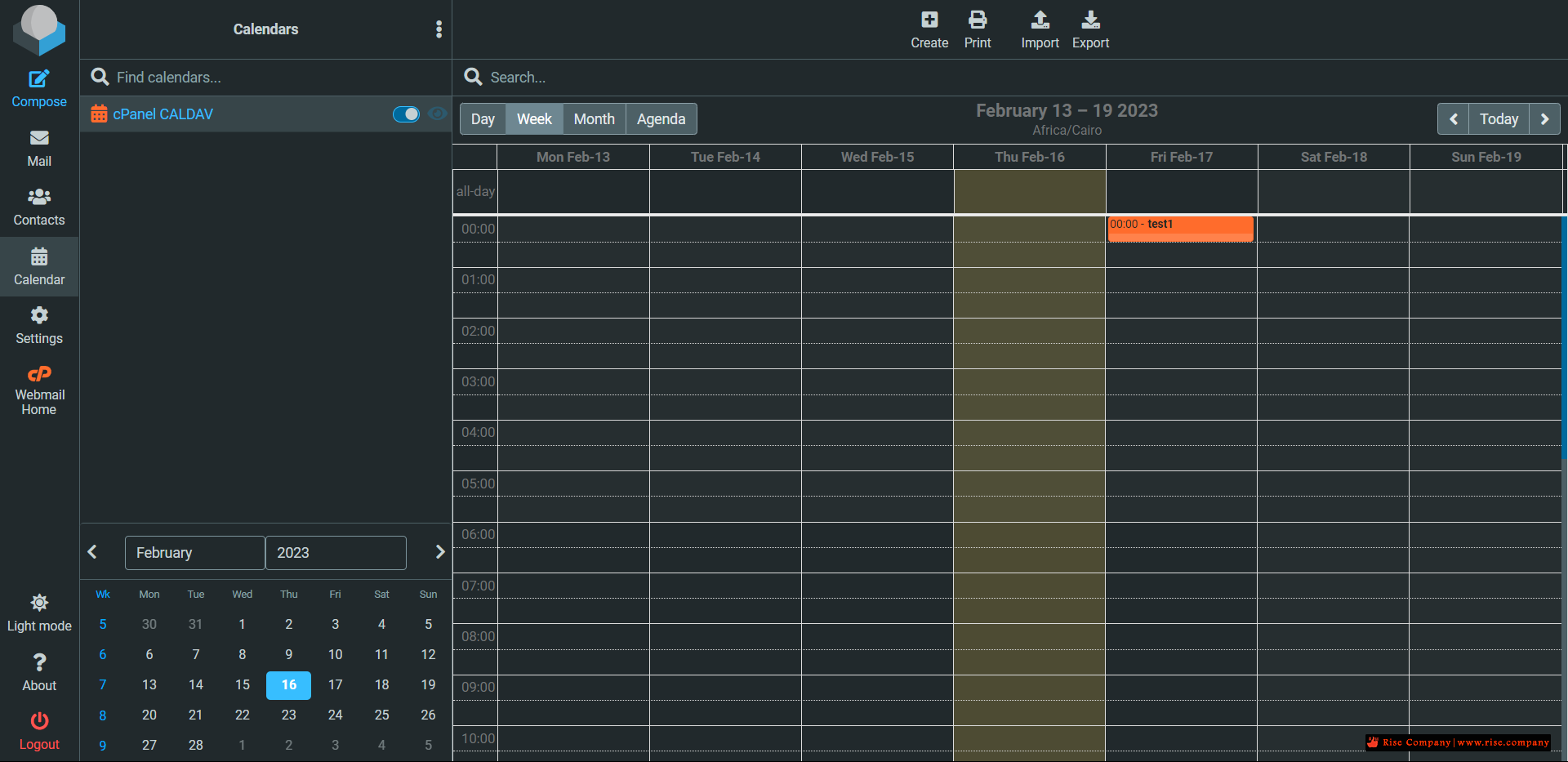
من داخل الويب ميل ثم الضغط على الحقل المطلوب عمل event به
ثم تم ادخال test1 فى يوم 16 من خلال الكمبيوتر
هنا على الهاتف الاندرويد من تطبيق سامسونج الخاص بالتقويم
يظهرالحدث test1 الذى تم انشاءه من الويبميل
ملحوظة :
لابد من استخدام exchange اى تطبيق اخر مثل onecalendar لن يعمل معه
-----------------------------------
2- اعدادت Carddav / contacts على الاندرويد Android
-----------------------------------
-----------------------------------
Here we use the application called
CardDAV Sync
which allows to set up contacts synchronization easily as well.
1. Launch the application and tap
CardDAV
option:
2. In the next window you will need to indicate the server information:
Server Name or URL
: dav.privateemail.com
Use SSL
: should be checked
Username
: full Namecheap Private Email email address
Password
: the password for this email address
Once all the settings are configured, click on
Next
button:
3. Choose
Contacts
option to synchronize all your Namecheap Private Email contacts.
Once done, simply tap
Finish
to complete the configuration of your CardDAV account:
3- اعدادت Caldav / Cardav على الاي فون iPhone
-----------------------------------
Connecting cPanel Calendar and Contacts to iOS and iPadOS®
iOS and iPadOS have excellent CalDAV and CardDAV account support, and it is straightforward to integrate your contacts and calendars with the platform’s native apps.
First, open the Settings app on your iPhone or iPad. Select Passwords & Accounts, and then Add Account.
Choose Other at the bottom of the page, and then Add CardDAV Account for contacts or Add CalDAV Account for calendars.
Finally, enter the server and authentication details, as we discussed above. cPanel uses port 2080 for CalDAV and CardDAV, so be sure the URL ends in a port number, like so:
example.com:2080
شاهد ايضا
شرح تفعيل calendar and contact applications فى Cpanel
برنامج الاوتلوك Outlook | عمل Contacts Sync و shared address book و CardDAV
المرجع:
https://docs.cpanel.net/knowledge-ba...-and-contacts/
https://blog.cpanel.com/using-caldav...cts-in-cpanel/
https://www.namecheap.com/support/kn...av-on-android/
https://support.kerioconnect.gfi.com...nts-in-Android
https://www.onecalendar.nl/
+ إنشاء موضوع جديد
النتائج 1 إلى 3 من 3
العرض المتطور
-
16-02-2023, 13:20 #1Status
- Offline

- تاريخ التسجيل
- Apr 2014
- الدولة
- Egypt
- المشاركات
- 4,701
 Engineering and Technology
- معدل تقييم المستوى
- 10
 الاندرويد Android / الاي فون iPhone مزامنة Caldav/Carddav - Calendar & Contacts
------------------------------------------------------------------------
الاندرويد Android / الاي فون iPhone مزامنة Caldav/Carddav - Calendar & Contacts
------------------------------------------------------------------------
شركة رايز للهندسة و التكنولوجيا Rise Company for Engineering & Technology
------------------------------------------------------------------------
Web Hosting | Web Designing | E-Marketing
رقم # 1 فى خدمات الشركات Business Services
استضافة مواقع Web Hosting - عمل ايميل شركة Business Emails
تصميم موقع شركة Web Design - تسويق الكترونى على جوجل Google Adwords
www.rise.company | www.rise.company/emails
ملحوظة : جميع خدماتنا مخصصة للشركات فقط وغير متاحة للافراد
وليس لنا اى منتجات او صيانة نهائيا! يرجى الانتباه الى ذلك.
-
16-02-2023, 13:27 #2Status
- Offline
- تاريخ التسجيل
- Apr 2014
- الدولة
- Egypt
- المشاركات
- 4,701
Engineering and Technology
- معدل تقييم المستوى
- 10
رد: الاندرويد Android / الاي فون iPhone مزامنة Caldav/Carddav - Calendar & Contacts
Using CalDAV Calendars and CardDAV Contacts in cPanel
In our increasingly busy world, we’d be lost without email, calendar, and contacts apps to communicate, collaborate, and manage our time. Unfortunately, getting all these apps to work with each other can be a frustrating challenge. There are so many incompatible platforms that we often struggle to make our calendar and contact hosting services talk to our preferred devices and applications.
That’s why, in addition to web and email hosting features, cPanel & WHM includes sophisticated calendar and contacts hosting, which users can connect to applications on their computers and mobile devices via the widely supported CalDAV and CardDAV protocols.
In this article, we’re going to show you how to add your cPanel calendars and contacts to apps on iOS®, macOS®, your Android™ devices, other operating systems, and the Roundcube® email client, which is built into cPanel.
Setting Up CalDAV Calendars in cPanel
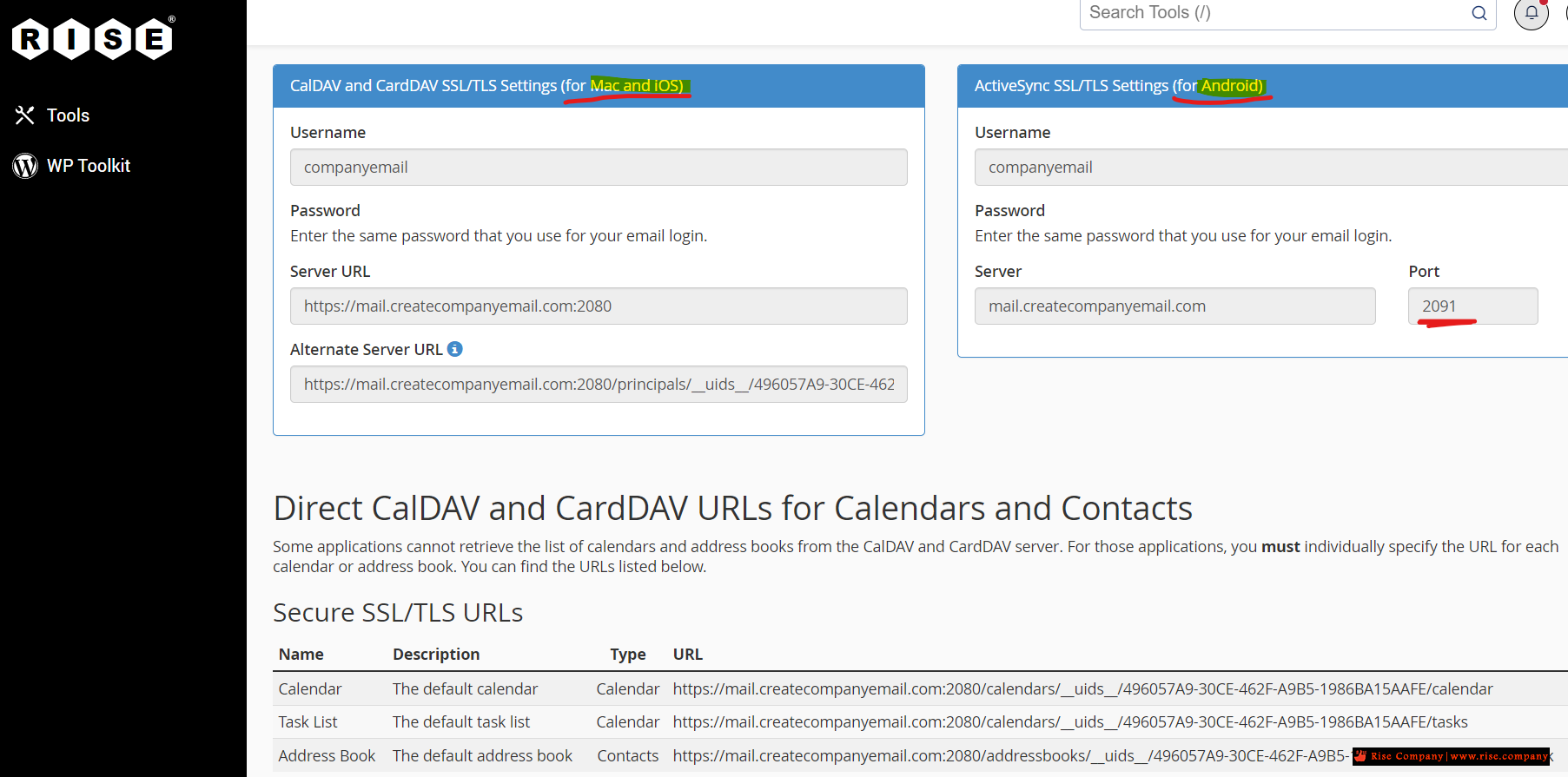
The information you need to share data with your devices is on the Calendars and Contacts page, which you can find inthe Email section of the main page.
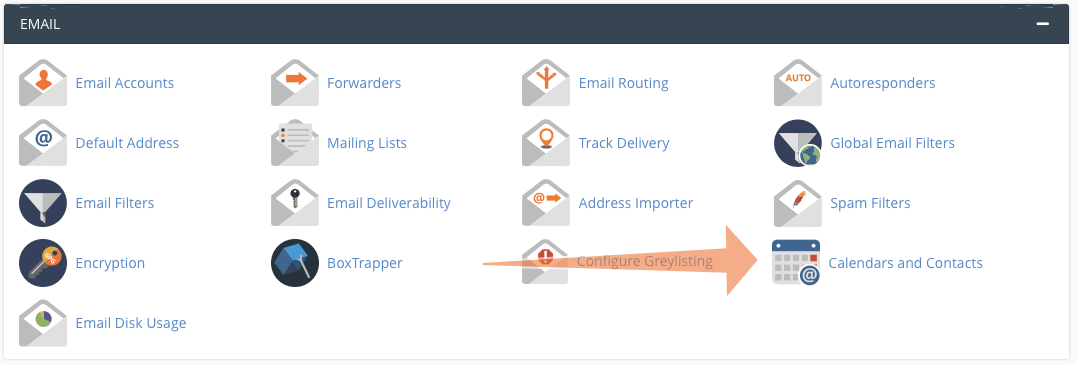 Here we have provided the following information:
- Username
- Server URL
- Alternate server URL
You will also need to provide a password. When an app or operating system asks for one, enter your cPanel or webmail login password.
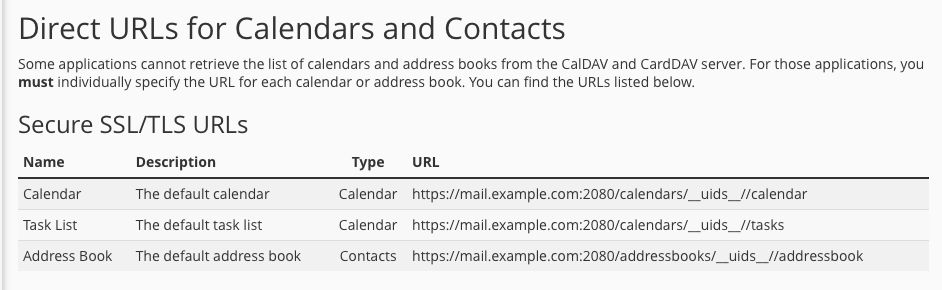
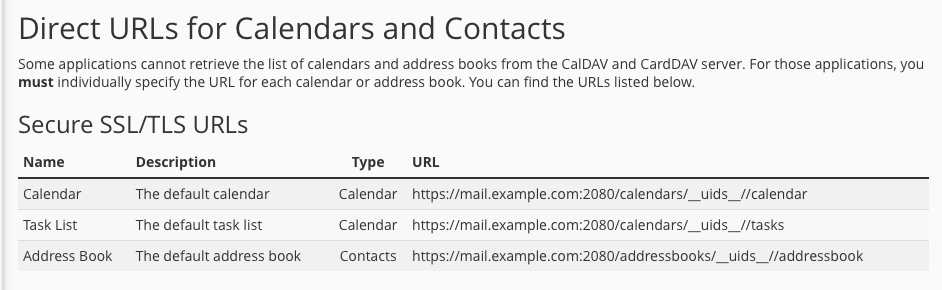
Some applications have limited support for retrieving CalDAV and CardDAV account information from the server. In that case, you need a direct URL, which is displayed at the bottom of the Calendars and Contacts page.
 How to Set Up Calendar Delegation in cPanel
You may sometimes need to let another user view or manage your calendars. For example, you might want a manager or assistant to add and edit events. In cPanel, this is called “delegation,” and you can configure delegates on the Calendar Delegation page.
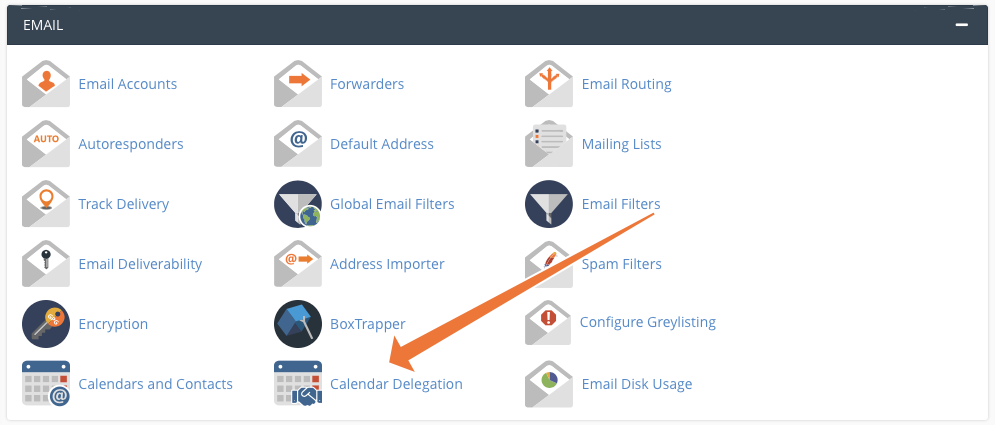 Select a calendar owner and delegate in the dropdown menus. Check the Allow Editing box if you want to give the user editing privileges. You can only delegate to people with an email account on the server, so you need at least two accounts for this to work.
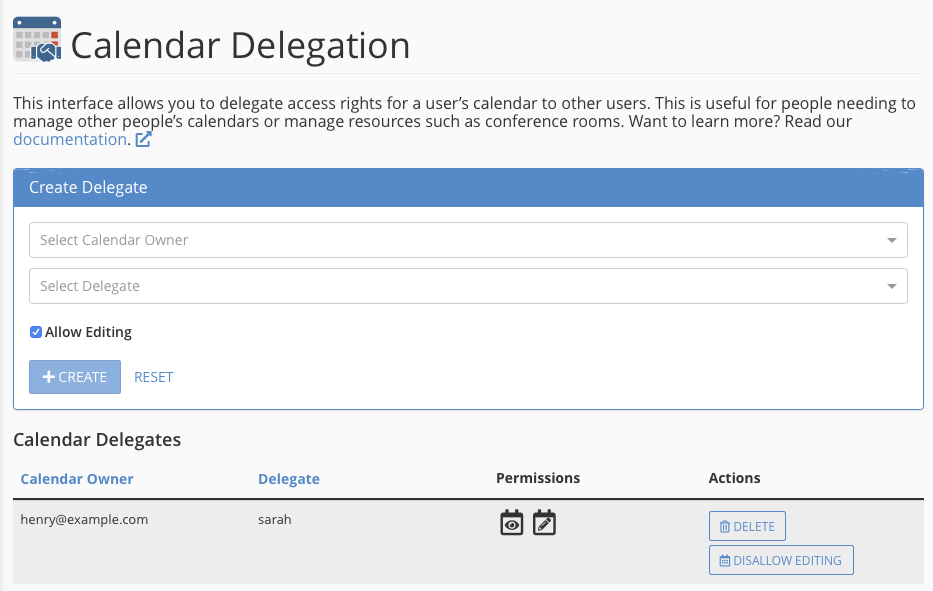 Delegation is only available if your hosting provider has installed the Calendar and Contacts Server plugin in WHM. If the plugin is not installed, you won’t see the delegation menu item.
Connecting cPanel Calendar and Contacts to iOS and iPadOS®
iOS and iPadOS have excellent CalDAV and CardDAV account support, and it is straightforward to integrate your contacts and calendars with the platform’s native apps.
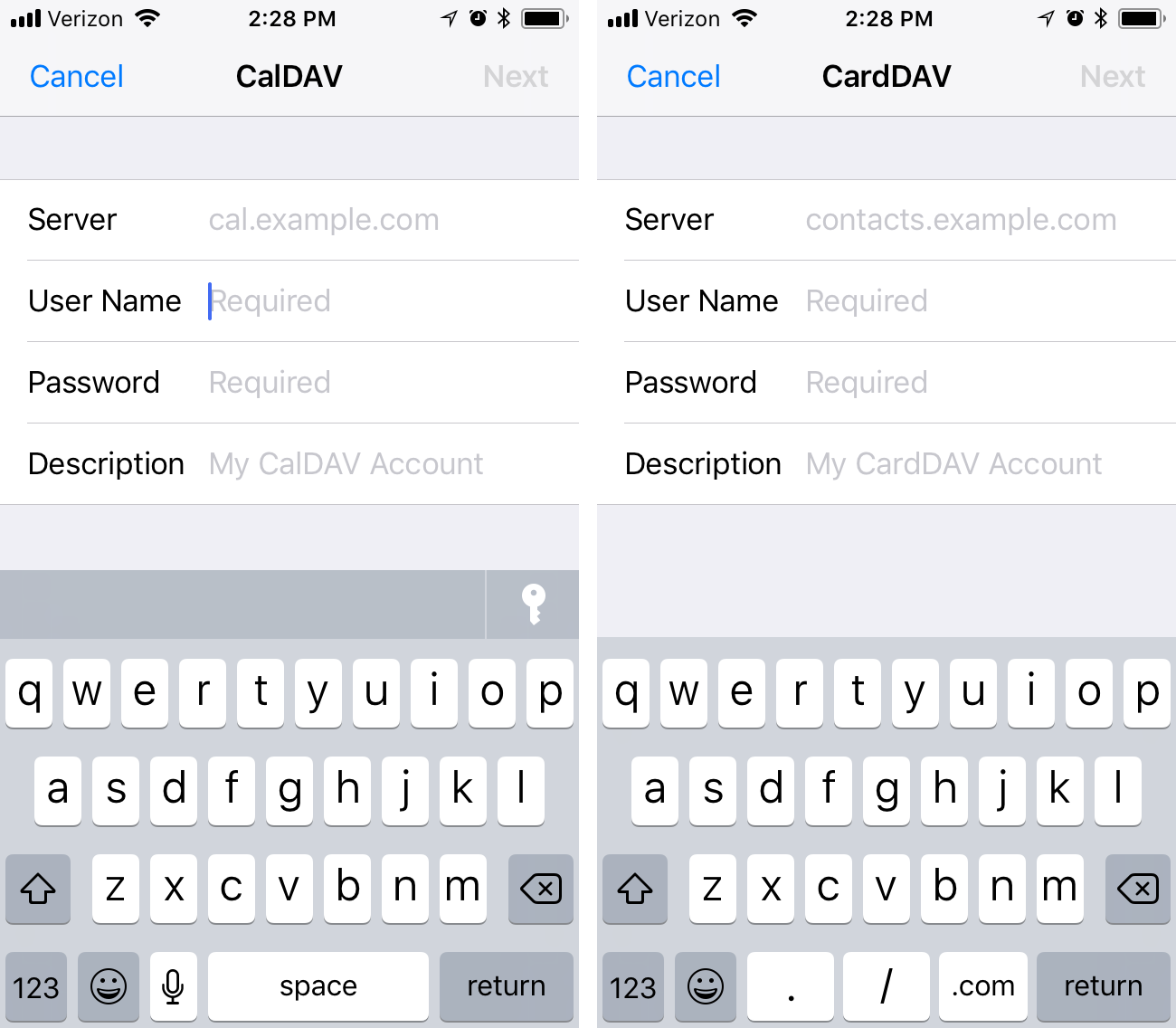
First, open the Settings app on your iPhone or iPad. Select Passwords & Accounts, and then Add Account.
Choose Other at the bottom of the page, and then Add CardDAV Account for contacts or Add CalDAV Account for calendars.
Finally, enter the server and authentication details, as we discussed above. cPanel uses port 2080 for CalDAV and CardDAV, so be sure the URL ends in a port number, like so:
example.com:2080
 Connecting cPanel Calendar and Contacts to MacOS
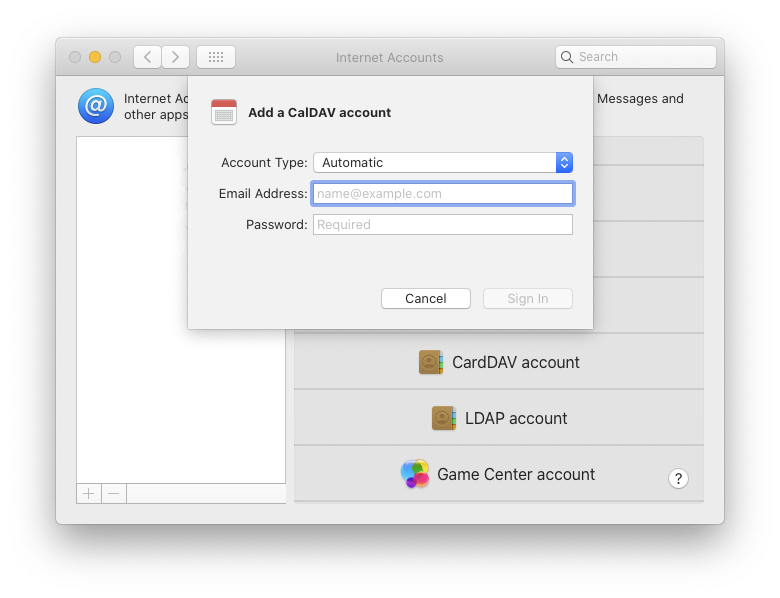
It is similarly straightforward to synchronize with a Mac. Open the System Preferences app, which you will find in the Apple menu on the menu bar. Then, select the Internet Accounts icon.
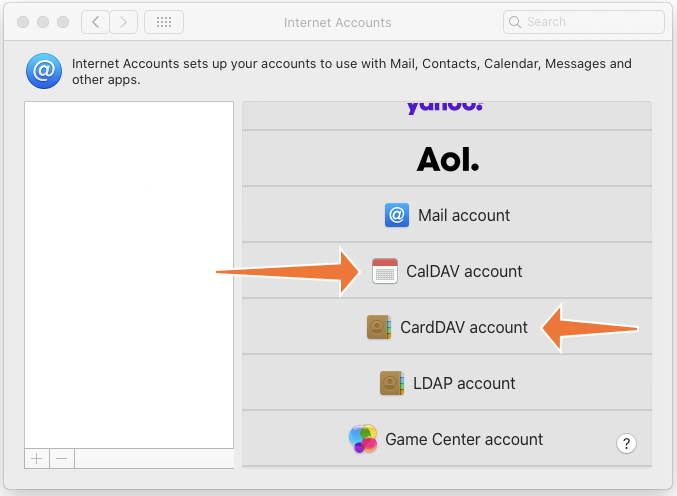
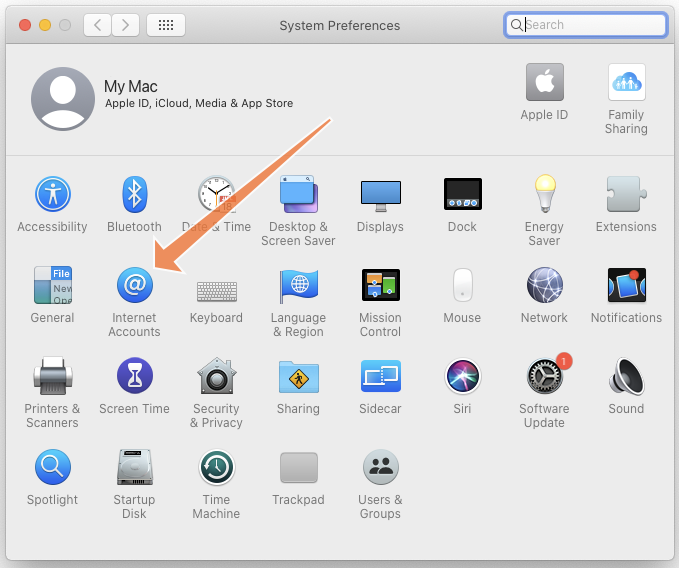 Click Add Other Account at the bottom of the menu and then Add CardDAV or Add CalDAV.
 Ensure that the Account Type is set to “automatic” and enter your email address and password in the appropriate fields. Click sign-in and macOS will connect to the server.
 Connecting cPanel Calendar and Contacts to Android and Other Operating Systems
There are many operating systems and hundreds of apps out there with varying levels of CalDAV and CardDAV support. We can’t test them all, but most should work if you give them the correct server and authentication details.
You might need to experiment with your app or OS, but the following should help you out.
- Username: This will be your account username or your webmail user in the format: username or [email protected].
- Server: The URL of your server. If the app supports autodiscovery, the server’s URL is sufficient. If it does not, you will need to provide a direct URL.
- Password: This is your cPanel or webmail account password.
If the app isn’t playing ball, you may be able to find app-specific instructions on Google or on the official cPanel forum.
Setting Up cPanel Calendar and Contacts with Roundcube 1.4 Desktop
cPanel integrates the open-source Roundcube webmail client, which provides an excellent user experience for email and calendar management. Roundcube supports CalDAV, and you can connect it in the same way as other applications.
Roundcube uses the direct URLs available at the bottom of the Calendars and Contacts page. Before you begin, identify the calendar you want to add to Roundcube and copy its direct URL.
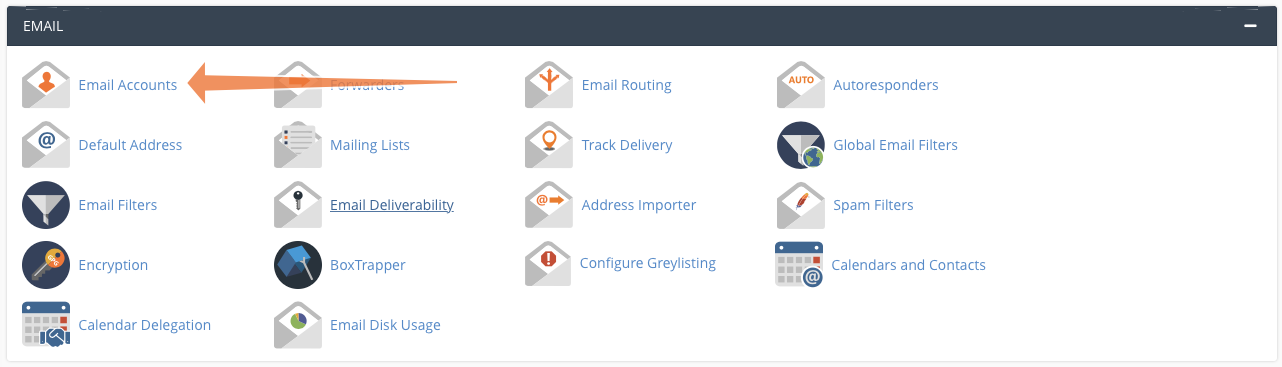
 To add a calendar to Roundcube, first open Email Accounts.
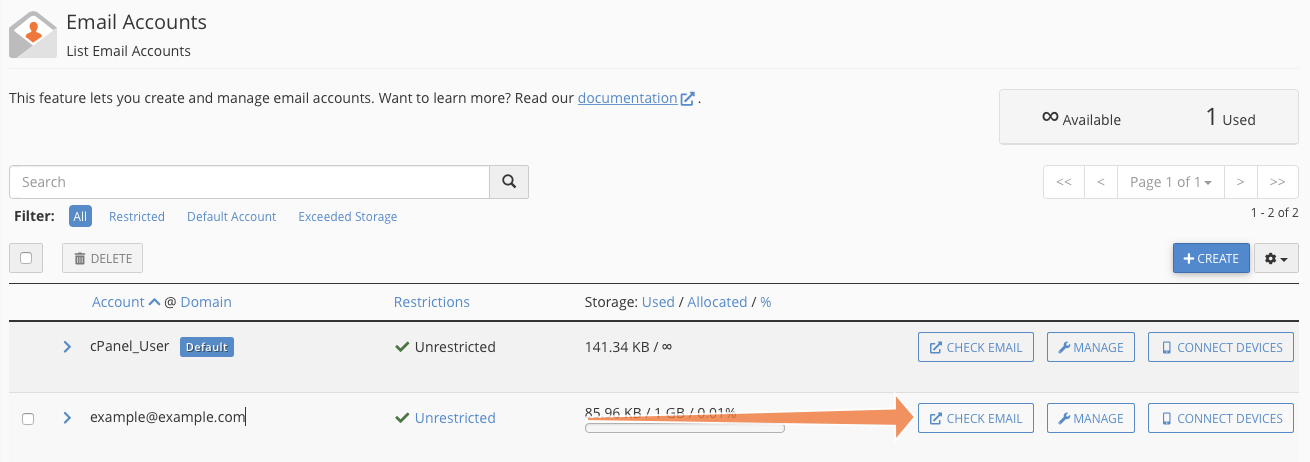
 Select Check Email to open the Webmail interface.
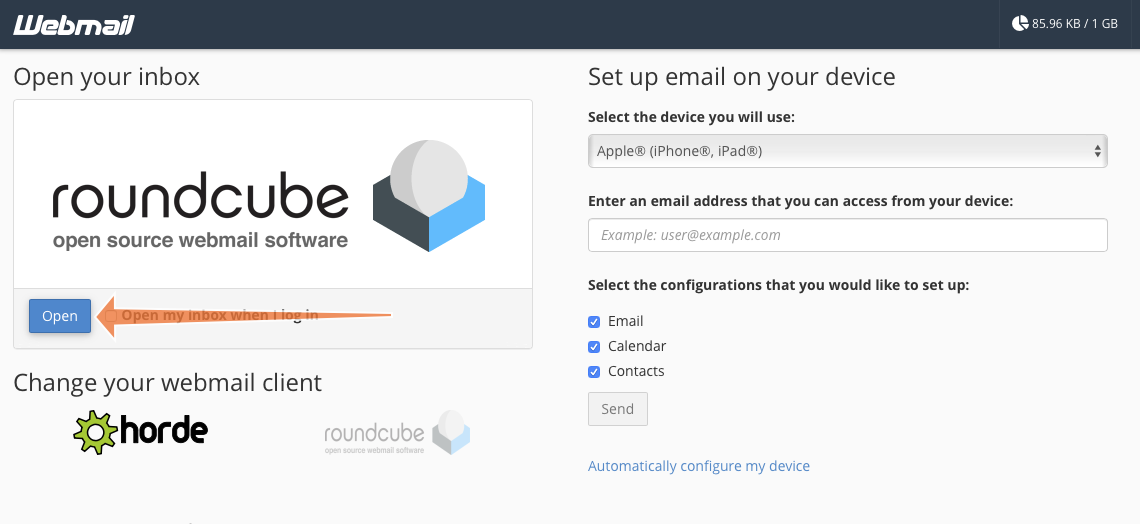
 Click Open to open Roundcube in a new tab.
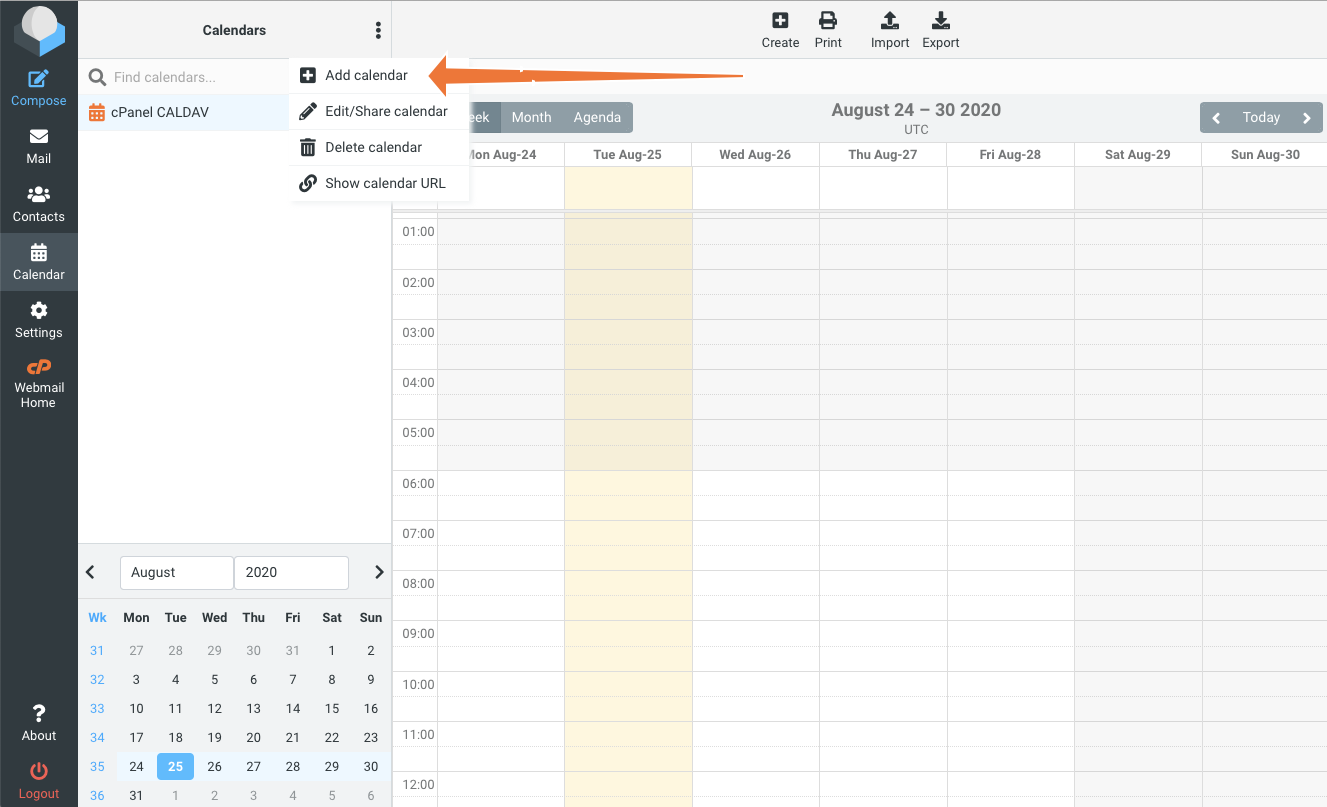
 In Roundcube, select the Calendar tab on the left, and then Add Calendar from the overflow (â‹®) menu.
 Fill in the Name field with a name that is meaningful to you and paste the direct URL you copied earlier into the CalDAV URL field. In the Authentication section, add your webmail account username and password.
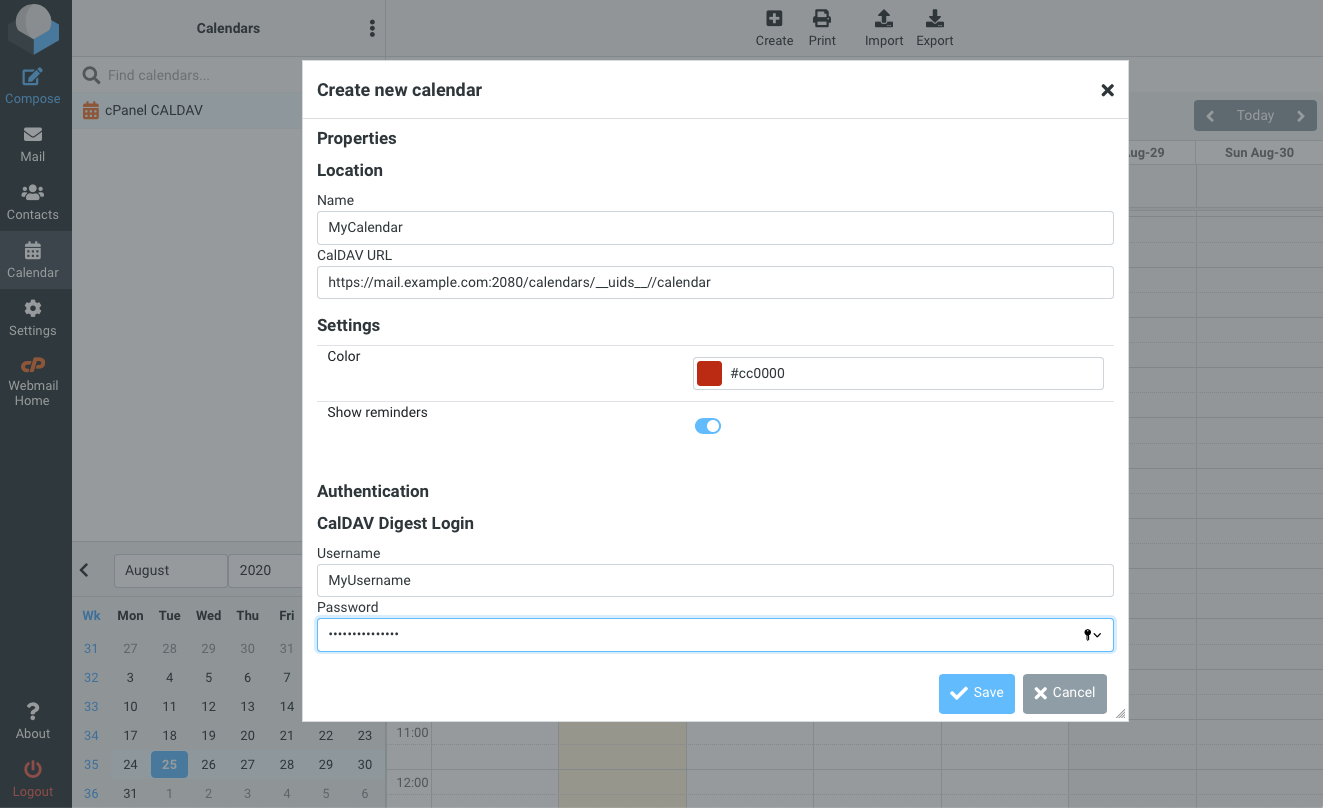 Click Save and the new calendar will be added to Roundcube and synchronized.
cPanel & WHM includes robust and sophisticated mail, contact, and calendar hosting that clients can access from any device that supports the ubiquitous IMAP, CalDAV, and CardDAV protocols. Because cPanel also integrates a powerful and intuitive email and calendar client with Roundcube, hosting businesses benefit from the ability to offer a complete business communications solution competitive with popular cloud email services.
------------------------------------------------------------------------
شركة رايز للهندسة و التكنولوجيا Rise Company for Engineering & Technology
------------------------------------------------------------------------
Web Hosting | Web Designing | E-Marketing
رقم # 1 فى خدمات الشركات Business Services
استضافة مواقع Web Hosting - عمل ايميل شركة Business Emails
تصميم موقع شركة Web Design - تسويق الكترونى على جوجل Google Adwords
www.rise.company | www.rise.company/emails
ملحوظة : جميع خدماتنا مخصصة للشركات فقط وغير متاحة للافراد
وليس لنا اى منتجات او صيانة نهائيا! يرجى الانتباه الى ذلك.
-
16-02-2023, 16:37 #3Status
- Offline
- تاريخ التسجيل
- Apr 2014
- الدولة
- Egypt
- المشاركات
- 4,701
Engineering and Technology
- معدل تقييم المستوى
- 10
رد: الاندرويد Android / الاي فون iPhone مزامنة Caldav/Carddav - Calendar & Contacts
The CalDAV and CardDAV Calendar and Contacts configuration can be achieved using 3rd-party applications, such asOne Calendar,CardDAV sync free, orDAVx5.
Below are the guidelines covering the CalDAV account setup in the application called OneCalendar, which is very easy to use.
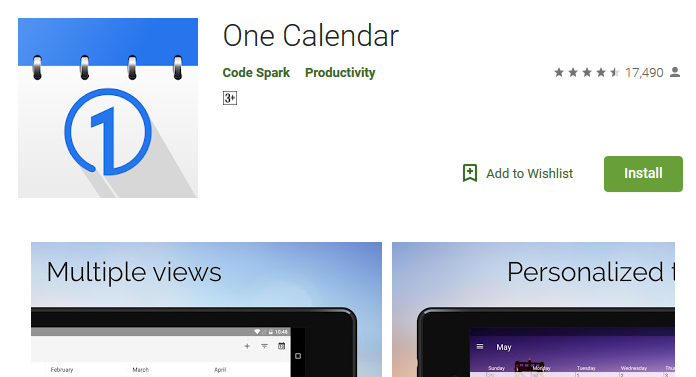
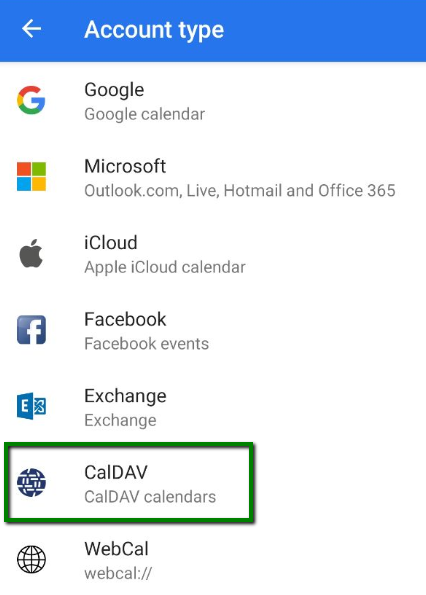
1. Once launched, choose the preferred theme. After this you will be able to choose theAccount type. Click on theCalDavoption:
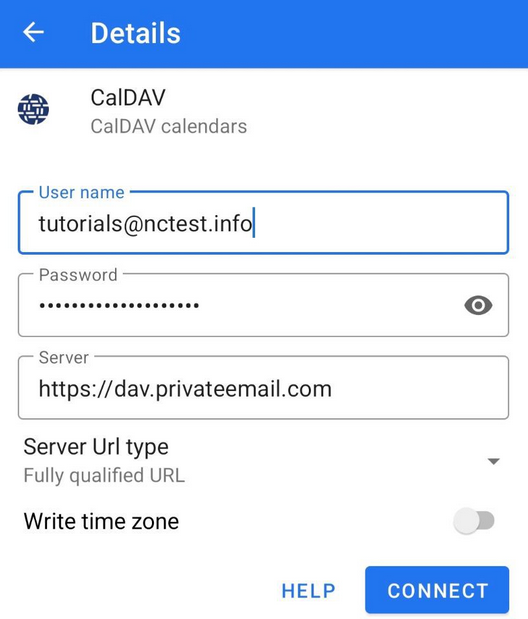
2. In the next window, choose fill in the information as follows:
https://dav.privateemail.com
- full Namecheap Private Email email address
- the password for this email address
Then clickConnectto start synchronization:
3. Tap on theCalendarcheckbox > clickDoneto finish the configuration of your CalDAV account:
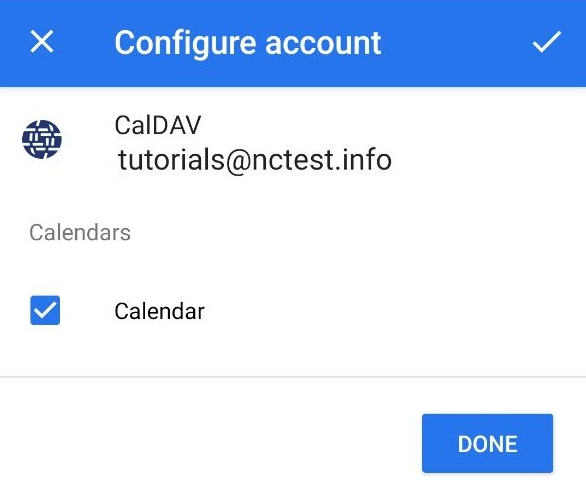
If everything is configured properly, the synchronization will start automatically.
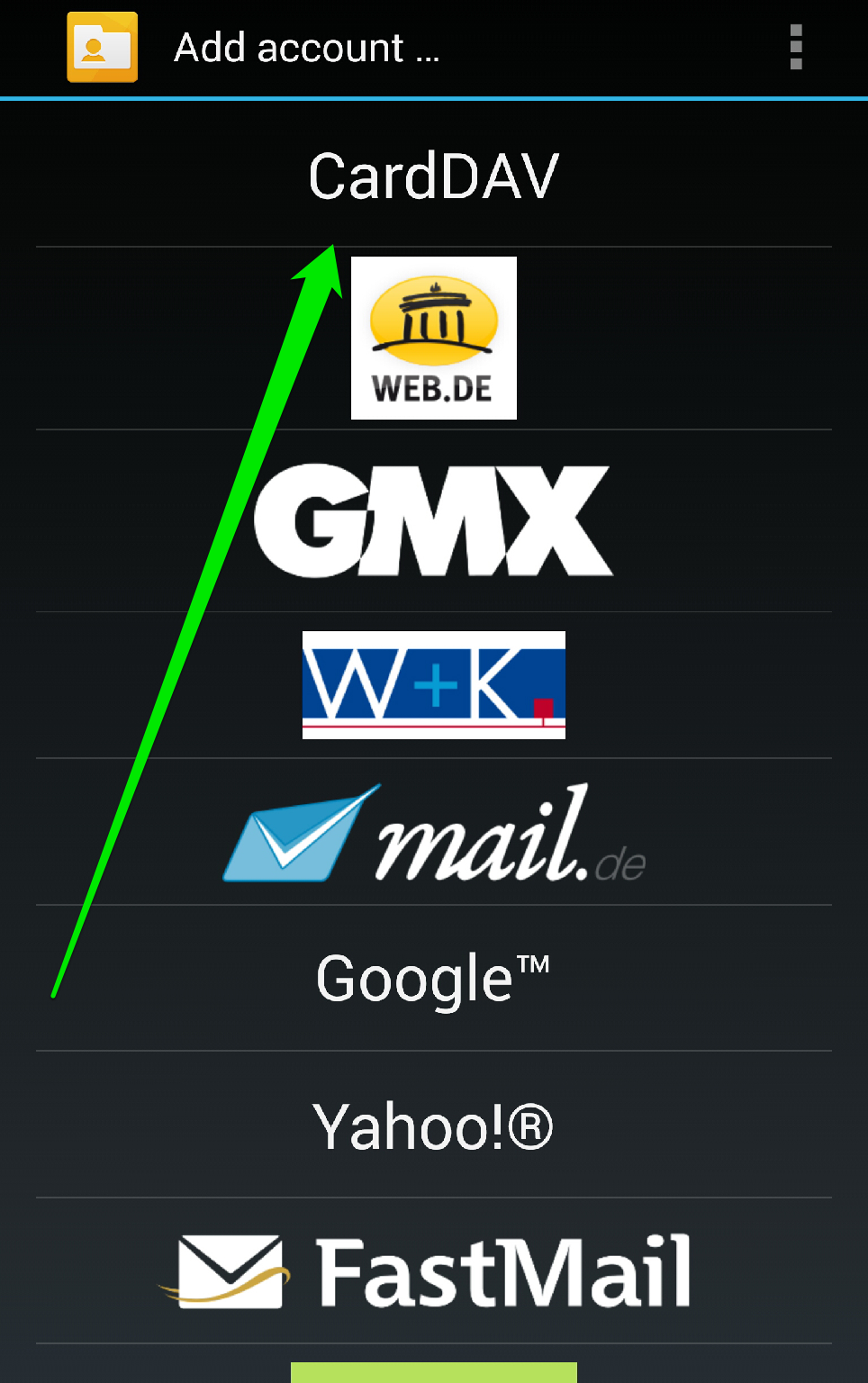
Here we use the application calledCardDAV Syncwhich allows to set up contacts synchronization easily as well.
1. Launch the application and tapCardDAVoption:
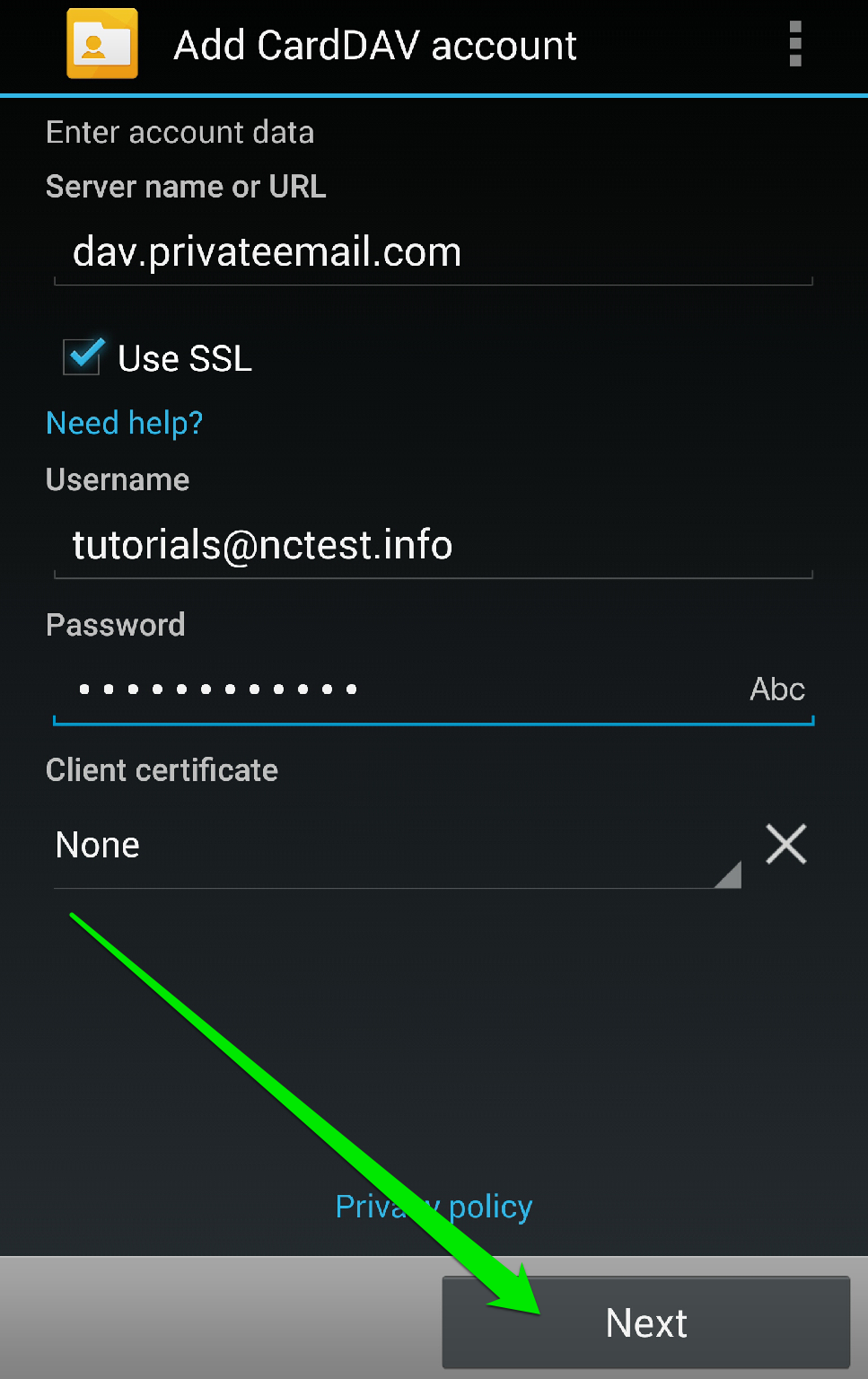
2. In the next window you will need to indicate the server information:
Server Name or URL: dav.privateemail.com
Use SSL: should be checked
Username: full Namecheap Private Email email address
Password: the password for this email address
Once all the settings are configured, click onNextbutton:
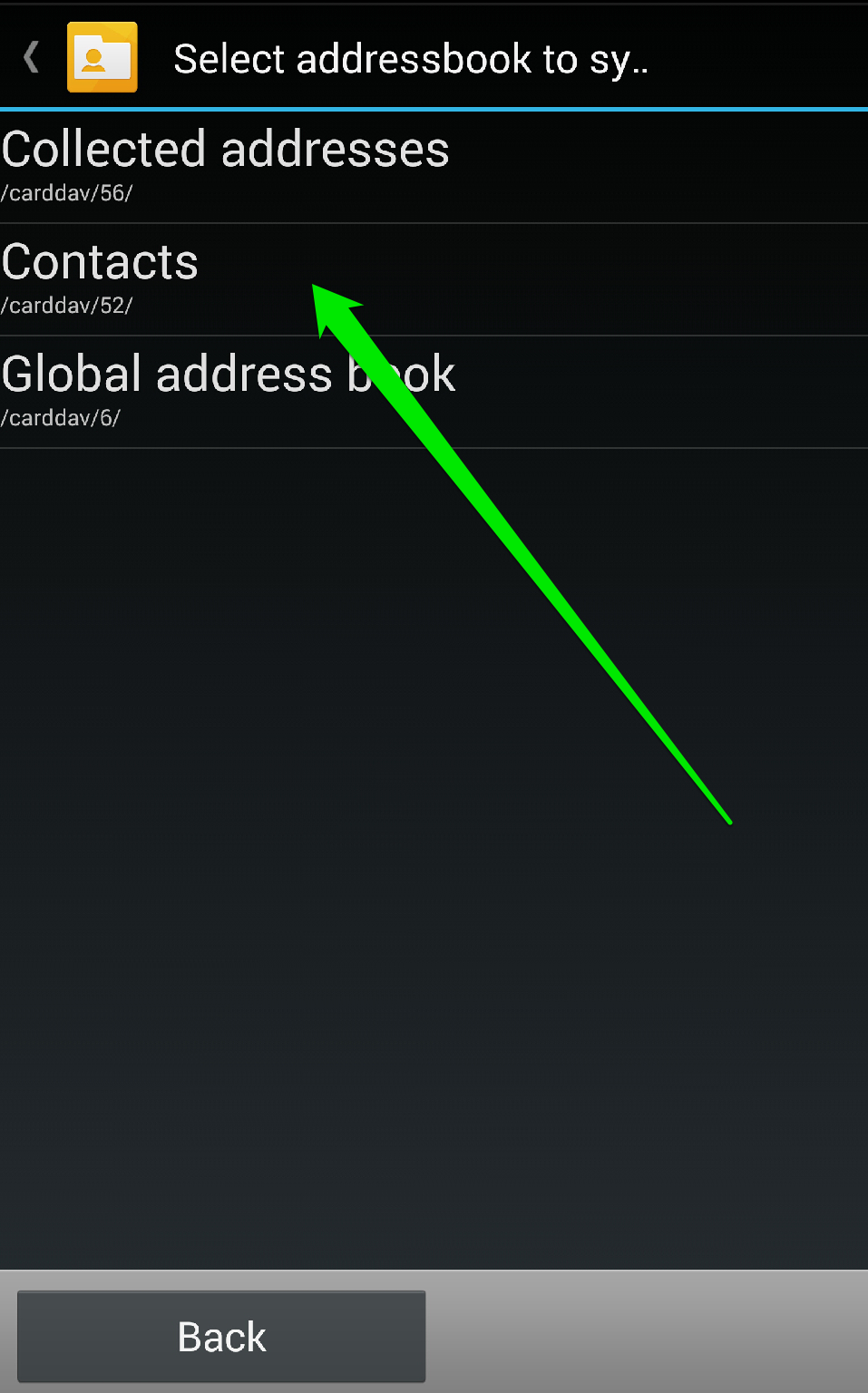
3. ChooseContactsoption to synchronize all your Namecheap Private Email contacts.
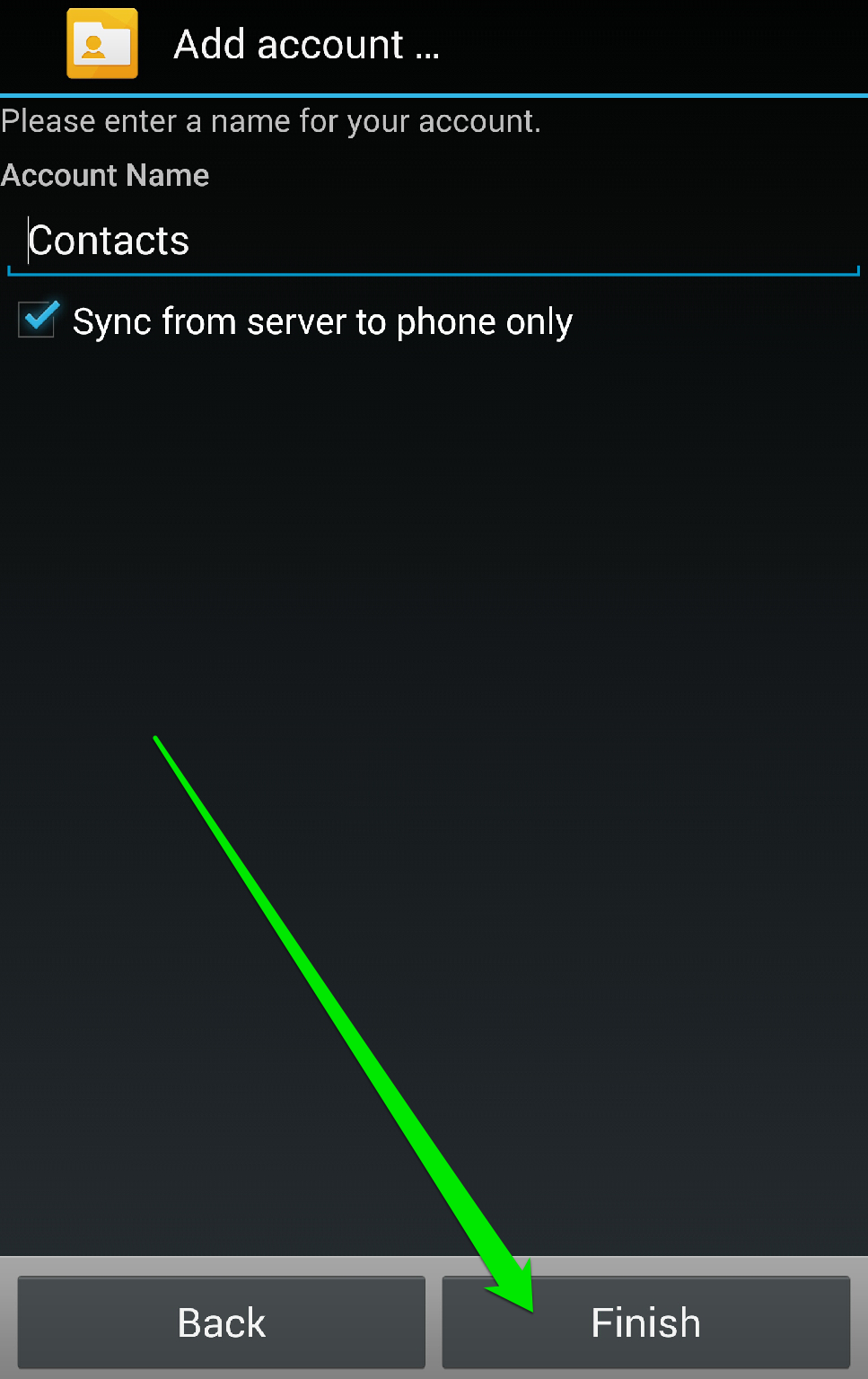
Once done, simply tapFinishto complete the configuration of your CardDAV account:
 ------------------------------------------------------------------------
شركة رايز للهندسة و التكنولوجيا Rise Company for Engineering & Technology
------------------------------------------------------------------------
Web Hosting | Web Designing | E-Marketing
رقم # 1 فى خدمات الشركات Business Services
استضافة مواقع Web Hosting - عمل ايميل شركة Business Emails
تصميم موقع شركة Web Design - تسويق الكترونى على جوجل Google Adwords
www.rise.company | www.rise.company/emails
ملحوظة : جميع خدماتنا مخصصة للشركات فقط وغير متاحة للافراد
وليس لنا اى منتجات او صيانة نهائيا! يرجى الانتباه الى ذلك.

 رد مع اقتباس
المواضيع المتشابهه
-
أفضل تطبيقات Apps خاصة بالقران الكريم Quran على الاندرويد Android
بواسطة Rise Company في المنتدى رايز الإعلانات التجارية Rise Advertiseمشاركات: 0آخر مشاركة: 30-11-2019, 03:10 -
أندرويد Android مزامنة الصور لجهات الاتصال sync contacts photos جديد 2019
بواسطة Rise Company في المنتدى رايز للجوالات Rise Phonesمشاركات: 0آخر مشاركة: 09-09-2019, 02:13 -
تحويل الارقام من الاي فون الى الاندرويد convert iphone to android Gmail csv
بواسطة Rise Company في المنتدى رايز للجوالات Rise Phonesمشاركات: 0آخر مشاركة: 05-09-2019, 15:34 -
مقوي الشبكة Signal Booster قياس اشارة الارسال فى الاي فون iPhone dBm
بواسطة Rise Company في المنتدى قسم مقوي الشبكةمشاركات: 0آخر مشاركة: 03-09-2019, 23:11 -
خاصية نطق اسم المتصل فى الاى فون iphone announce calls
بواسطة Rise Company في المنتدى رايز للجوالات Rise Phonesمشاركات: 0آخر مشاركة: 08-04-2018, 17:01

المفضلات