


حل مشكلة The site ahead contains harmful programs
​The site ahead contains harmful programs Attackers onsite.com might attempt to trick you into installing programs that harm your browsing experience (for example, by changing your homepage or showing extra ads on sites you visit).
You can Verify the Status of Your Website in Google’s safe browsing analysis tool. All you need to do is add your site’s domain name as the query parameter to the URL like this:
https://www.google.com/safebrowsing/...YourDomain.com
Checking Your Site in the Google Search Console
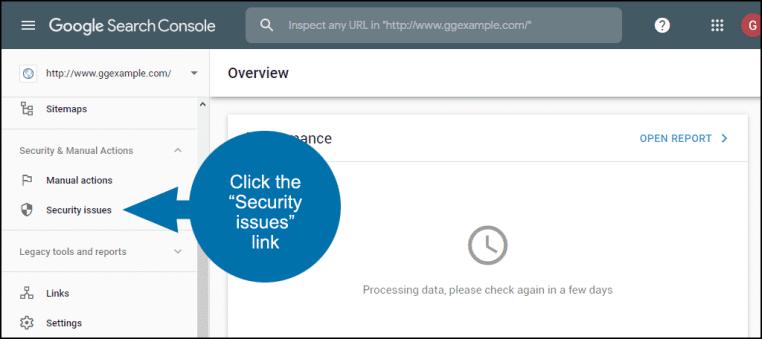
Go to > “Security issues” link in the Google Search Console. Here you can check with Google to see what the problem is .
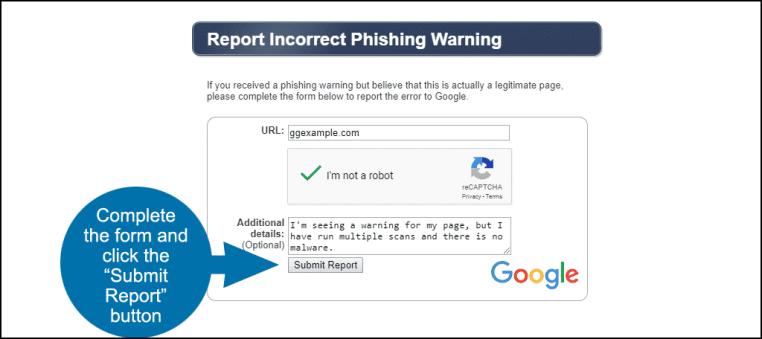
Yo can file a report for an incorrect phishing warning in case there is no issue shown there. Goto Google’s “Report Incorrect Phishing Warning” page. Complete the form and click the “Submit Report” button.
To remove the ‘site ahead contains harmful programs’ message, you have to submit your site for review.
But before you do so, you need to sign up or log in to Google Search Console. Verify ownership of your website. We’ve entailed the detailed process of verification in this article – Did Your Website Get Blacklisted by Google?
Once done, you can request a review to remove the Site Ahead Contains Harmful Programs warning in Google Chrome.
- Log in to Search Console and access Security Issues Report.
- Select ‘Request a Review’.
- Fill in the information required on what steps you took to remove the malware and secure your WordPress website.
- Submit your request.
Your review request will be processed between a day to several weeks. You will receive a response in your Messages in Search Console or Google Webmaster account.
Once Google determines that your website is clean, the warning will be removed within 72 hours.
حل المشكلة :
اذا كنت مالك سيرفر افتح whm ثم اعمل scan من خلال ImunifyAV
ثم يمكنك عمل upgrade لباقة ازالة الفيروسات وبعد ازالة الفيروسات
هتتحاسب على الشهر او عدد الايام المتبقية من الشهر
اذا تريد ازالة الفيروسات مانيوال manual
تحقق من تقرير الملفات التى بها تجسس وخذ باك اب
1- احذف ملفات الووردبريس عدا upload + themes + plugins
ثم اعد رفع ملفات الووردبريس الجديدة.
2- احذف اى ملف يقابلك به malware اذا كان داخل plugins او themes فامرها ساهل اعد تثبيت ملفاتها
او افتح الملفات واحذف الكود الغريب الذى بداخله وهذا صعب قليلا.
3- اضف بلوجن إضافة حماية ووردبريس الكل في واحد
واضبط اعداداتها منها غير prefix قاعدة البيانات ثم permissions ثم فعل اهم الاعدادات
4- غير باسورد cpanel + database + wp
5- اذهب الى search console الخاص بجوجل وقدم طلب بازالة الحظر على الموقعك
وان موقعك امن وتم ازالة الفيروسات به وانتظر 72 ساعة.
المرجع:
https://secure.wphackedhelp.com/blog...mful-programs/
+ إنشاء موضوع جديد
النتائج 1 إلى 1 من 1
العرض المتطور
-
18-05-2023, 13:39 #1Status
- Offline

- تاريخ التسجيل
- Apr 2014
- الدولة
- Egypt
- المشاركات
- 4,703
 Engineering and Technology
- معدل تقييم المستوى
- 10
 حل مشكلة فيروسات تجسس فى ملفات الموقع The site ahead contains harmful programs
------------------------------------------------------------------------
حل مشكلة فيروسات تجسس فى ملفات الموقع The site ahead contains harmful programs
------------------------------------------------------------------------
شركة رايز للهندسة و التكنولوجيا Rise Company for Engineering & Technology
------------------------------------------------------------------------
Web Hosting | Web Designing | E-Marketing
رقم # 1 فى خدمات الشركات Business Services
استضافة مواقع Web Hosting - عمل ايميل شركة Business Emails
تصميم موقع شركة Web Design - تسويق الكترونى على جوجل Google Adwords
www.rise.company | www.rise.company/emails
ملحوظة : جميع خدماتنا مخصصة للشركات فقط وغير متاحة للافراد
وليس لنا اى منتجات او صيانة نهائيا! يرجى الانتباه الى ذلك.


 رد مع اقتباس
المواضيع المتشابهه
-
ووردبريس WordPress حل مشكلة Your site cannot be found by search engines
بواسطة Rise Company في المنتدى قسم ووردبريس WordPressمشاركات: 0آخر مشاركة: 14-12-2021, 01:04 -
حل مشكلة Fix WHMCS Site error: The ionCube PHP Loader Needs To Be Installed
بواسطة Rise Company في المنتدى قسم ادارة الاستضافة Whmcsمشاركات: 0آخر مشاركة: 31-10-2020, 01:20 -
ووردبريس Wordpress حل مشكلة Site Kit encountered an error يعمل 100 %
بواسطة Rise Company في المنتدى قسم ووردبريس WordPressمشاركات: 0آخر مشاركة: 09-04-2020, 07:44 -
فايروول فورتي جيت FortiGate Firewall الفى بى ان Site-to-Site IPsec VPN
بواسطة Rise Company في المنتدى قسم فايروول Fortigateمشاركات: 0آخر مشاركة: 02-08-2019, 14:00 -
حل مشكلة ERR_ CONNECTION_ R EFUSED و this site cannot be reached
بواسطة Rise Company في المنتدى رايز للاستضافة Rise Hostمشاركات: 0آخر مشاركة: 18-06-2018, 22:30

المفضلات