

فايروول فورتي جيت FortiGate Firewall فقدان recover lost Administrator FortiToken
حل مشكلة فقدان الدخول على لوحة تحكم الفايروول بسبب فقدان الفورتي توكن
backup and restore FortiToken - Resetting a lost Fortigate admin password
Troubleshooting Tip: Admin user lost FortiToken / Token is not working
HELP! Fortitoken issues - Disable Fortitoken on a Fortigate Firewall
Deactivating a FortiToken - Resetting a lost admin password
Resetting FortiToken for 2FA - Lost Access to Firewall
Lost fortitoken account - Reset Lost Admin Password - FortiGate version v6
المشكلة :
عند فقدان الهاتف يفقد معها fortitoken ولا يمكن ان يعمل على هاتفين لاسباب امنية
والحل الوحيد عمل transfer من خلال التطبيق اذا لم يفقد الهاتف
حيث لا يوجد باك اب اطلاقا له ! ولا يمكن عمل restore
Be very carful if you change phone ( iPhone) No backup of FortiToken app- token possible and no way to get back in. Since you can’t get back in you have to format the device LOCALY.. support can’t do anything about it. I had the previous phone and tried to restore it without results. 2FA is a double swords if you are not very careful. Solution? Have 2FA on 2 different user-device OR make sure you disable it before changing phones. No for Fortinet it would be good practice to allow back up for tokens somewhere…
--------------------------
Recovering lost Administrator FortiTokens
If an Administrator loses their FortiToken or the FortiToken is not working, they will not be able to log into the admin console through the GUI or the CLI. If there is another Administrator that can log into the device, they may be able to reset the two-factor settings configured for the first Administrator, or create a new Admin user for them.
Note that a super_admin user will be able to edit other admin user settings, but a prof_admin user will not be able to edit super_admin settings.In the case where there are no other administrators configured, the only option is to flash format the device and reload a backup config file. You must have console access to the device in order to format and flash the device. It is recommended to be physically on site to perform this operation.
The process of resetting an Admin user password using the
maintainer account cannot be used to reset or disable two-factor authentication.
Before formatting the device, verify that you have a backup config file. You may or may not have the latest config file backed up, though you should consider using a backed up config file, and reconfigure the rest of the recent changes manually. Otherwise, you may need to configure your device starting from the default factory settings.
To recover lost Administrator FortiTokens:
If you have a backed up config file:
Open the config file and search for the specific admin user. For representational purposes we will use Test in our example.
# edit "Test"
set accprofile "super_admin"
set vdom "root"
set two-factor fortitoken
set fortitoken "FTKXXXXXXXXXX"
set email-to "[email protected]"
set password ENC SH2BsE7VSvHKynpoY1nOupdfaefe/n+JaPrCMPFADY2U5kLUPnZwuitOpNz35YI=
next
end
Once you find the settings for the Test user, delete the fortitoken-related settings:
# edit "Test"
set accprofile "super_admin"
set vdom "root"
set password ENC SH2BsE7VSvHKynpoY1nOupdfaefe/n+JaPrCMPFADY2U5kLUPnZwuitOpNz35YI=
next
end
Format the boot device during a maintenance window and reload the firmware image using instructions in the Formatting and loading FortiGate firmware image using TFTP KB article.
Once the reload is complete, log into the admin console from the GUI using the default admin user credentials, and go to Configuration > Restore from the top right corner to reload your config file created in Step 1 above.
Once the FortiGate reboots and your configuration is restored, you can log in with your admin user credentials.
حل المشكلة :
هذا الحل ننصح به ويعمل 100% فى منتهى السهولة
لا تتعب نفسك فى حلول اخرى , نحن جربنا كل ما يمكن عمله !
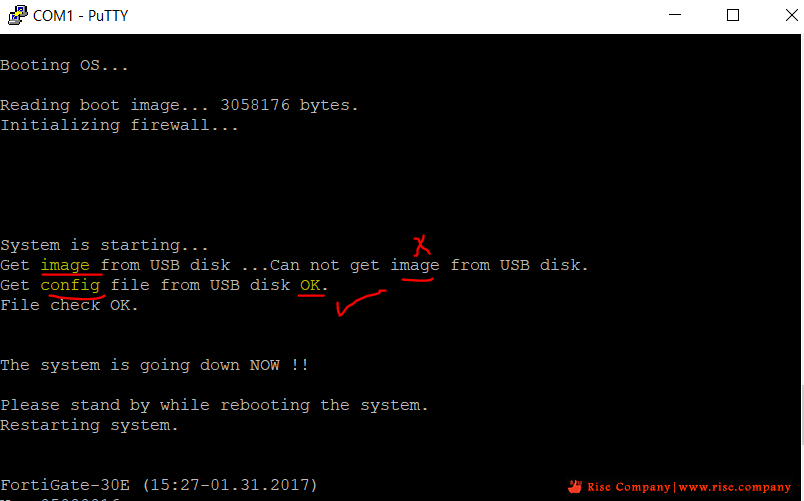
اعمل اعادة ضبط مصنع او ريستور للـ firmware image او Config File
من المفترض ان يكون لديك ملف config باك اب على جهازك
اعمل له edit هتجد مكتوب من وسط السطور اوامر خاصة بالفورتى توكن احذفها
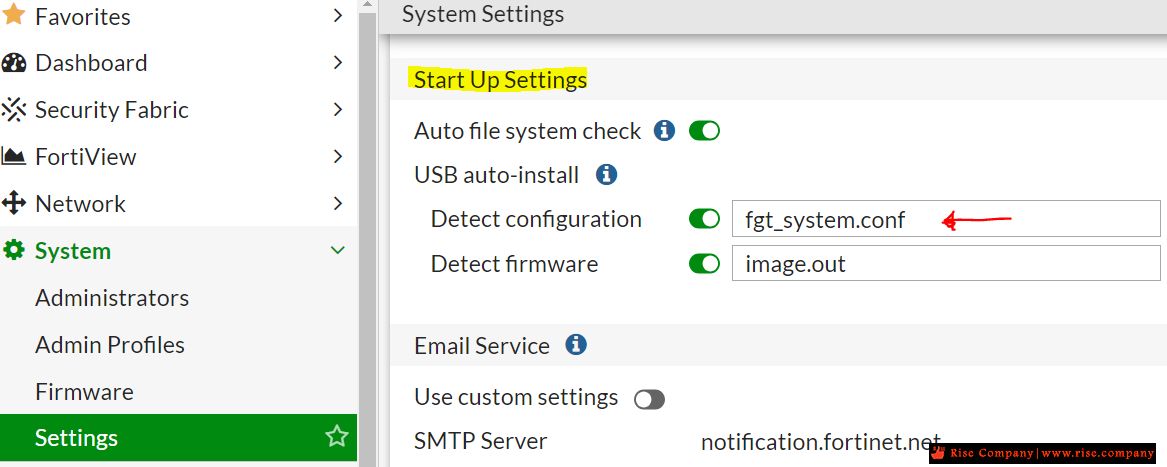
ثم اعمل rename للملف الى fgt_system.conf غير ذلك لن يعمل وهيعمل Fail
ثم ضع الملف فى فلاشة usb بنظام fat32 وضعها فى جهاز الفايروول واعمل ريستارت.
حلول اخري قد تساعدك
يمكنك مراقبة نظام تشغيل الفايروول وكذلك الدخول عليه Login
دون الحاجة الى Fortitoken فى حالة استخدام user نظام maintainer
من خلال الدخول على الشيل اذا كان مفعل
البديل الدخول من خلال Serial من console port
ولكن يجب ان تعمل ريستارت اولا ومسموح لك الدخول خلال اول 60 ثانية فقط
بيتم ادخال user باسم
maintainer
وبيتم ادخال باسورد بهذا الشكل
bcpbFGT30E10564567887
* الازرق هو سيريال نامبر الفايروول
ملحوظات هامة :
*هذه الطريقة فى الدخول لن تفيدك الا فى تغيير باسورد الادمن
لن تفيدك فى الغاء fortitoken ولا فى انشاء ادمن جديد
هذا اليوزر لا يملك صلاحيات لعمل ذلك.
كذلك تم الغاء user الـ maintainer فى الاصدارات 7 وليس 6
* شركة فورتى جيت سيئة جدا جدا فى الدعم الفنى لن يساعدوك اطلاقا
اذا كان license expired ونشك اذا كان active ان يساعدوك ايضا
مع فورتى جيت يجب ان تعتمد على نفسك !
المرجع:
https://www.reddit.com/r/fortinet/co...ainer_account/
https://www.reddit.com/r/fortinet/co...oken_be_aware/
https://docs.fortinet.com/document/f...-and-diagnosis
https://docs.fortinet.com/document/f...a-mobile-phone
https://www.doitfixit.com/blog/2013/...dmin-password/
https://www.reddit.com/r/fortinet/co...re_fortitoken/
https://community.fortinet.com/t5/Fo...ot/ta-p/193487
https://community.fortinet.com/t5/Su...ues/m-p/214053
+ إنشاء موضوع جديد
النتائج 1 إلى 2 من 2
-
19-07-2023, 01:50 #1Status
- Offline

- تاريخ التسجيل
- Apr 2014
- الدولة
- Egypt
- المشاركات
- 4,703
 Engineering and Technology
- معدل تقييم المستوى
- 10
 فايروول فورتي جيت FortiGate Firewall فقدان recover lost Administrator FortiToken
------------------------------------------------------------------------
فايروول فورتي جيت FortiGate Firewall فقدان recover lost Administrator FortiToken
------------------------------------------------------------------------
شركة رايز للهندسة و التكنولوجيا Rise Company for Engineering & Technology
------------------------------------------------------------------------
Web Hosting | Web Designing | E-Marketing
رقم # 1 فى خدمات الشركات Business Services
استضافة مواقع Web Hosting - عمل ايميل شركة Business Emails
تصميم موقع شركة Web Design - تسويق الكترونى على جوجل Google Adwords
www.rise.company | www.rise.company/emails
ملحوظة : جميع خدماتنا مخصصة للشركات فقط وغير متاحة للافراد
وليس لنا اى منتجات او صيانة نهائيا! يرجى الانتباه الى ذلك.
-
12-08-2023, 14:19 #2Status
- Offline
- تاريخ التسجيل
- Apr 2014
- الدولة
- Egypt
- المشاركات
- 4,703
Engineering and Technology
- معدل تقييم المستوى
- 10
رد: فايروول فورتي جيت FortiGate Firewall فقدان recover lost Administrator FortiToken
Download the config and edit the settings that you want to change and save the file on a USB key named fgt_system.conf. Put the usb stick in the Fortigate and reboot it. It should pull the config off of the USB and overwrite the one you have on the FGT if you haven’t disabled the option.------------------------------------------------------------------------
شركة رايز للهندسة و التكنولوجيا Rise Company for Engineering & Technology
------------------------------------------------------------------------
Web Hosting | Web Designing | E-Marketing
رقم # 1 فى خدمات الشركات Business Services
استضافة مواقع Web Hosting - عمل ايميل شركة Business Emails
تصميم موقع شركة Web Design - تسويق الكترونى على جوجل Google Adwords
www.rise.company | www.rise.company/emails
ملحوظة : جميع خدماتنا مخصصة للشركات فقط وغير متاحة للافراد
وليس لنا اى منتجات او صيانة نهائيا! يرجى الانتباه الى ذلك.


 رد مع اقتباس
المواضيع المتشابهه
-
الفرق بين فايروول فورتي جيت FortiGate Firewall و فايروول سوفوس Sophos Firewall
بواسطة Rise Company في المنتدى رايز للسكيورتي Rise Securityمشاركات: 0آخر مشاركة: 23-06-2021, 01:39 -
فايروول فورتي جيت FortiGate Firewall التحقق FortiToken - Two-factor authentication
بواسطة Rise Company في المنتدى قسم فايروول Fortigateمشاركات: 0آخر مشاركة: 19-04-2020, 06:57 -
فايروول فورتي جيت FortiGate Firewall توصيل جهازين فايروول مع بعض High Availability
بواسطة Rise Company في المنتدى قسم فايروول Fortigateمشاركات: 0آخر مشاركة: 23-07-2019, 22:45 -
كورس فايروول فورتي جيت Fortigate Firewall حلقة 3 عن Firewall Technologies
بواسطة Rise Company في المنتدى قسم فايروول Fortigateمشاركات: 0آخر مشاركة: 26-05-2019, 02:20 -
كورس فايروول فورتي جيت Fortigate Firewall حلقة 2 عن The History of Firewall Security
بواسطة Rise Company في المنتدى قسم فايروول Fortigateمشاركات: 0آخر مشاركة: 26-05-2019, 02:17


المفضلات