


ووردبريس wordpress اضافة الترجمة WPML كيفية select page as translate page
Assign a page manually as translated version of the page
How can I link already translated pages?
خطوات ربط صفحة بصفحة اخري مترجمة على WPML :
انت لديك موقع عربي وتريد ترجمة الصفحات بداخله English
وقمت Manual بعمل صفحات عربي وصفحات اخري مطابقة مترجمة English
المطلوب ربطها ببعض بحيث تعرف الصفحة AR ان هذه هى الصفحة المقابله لها EN
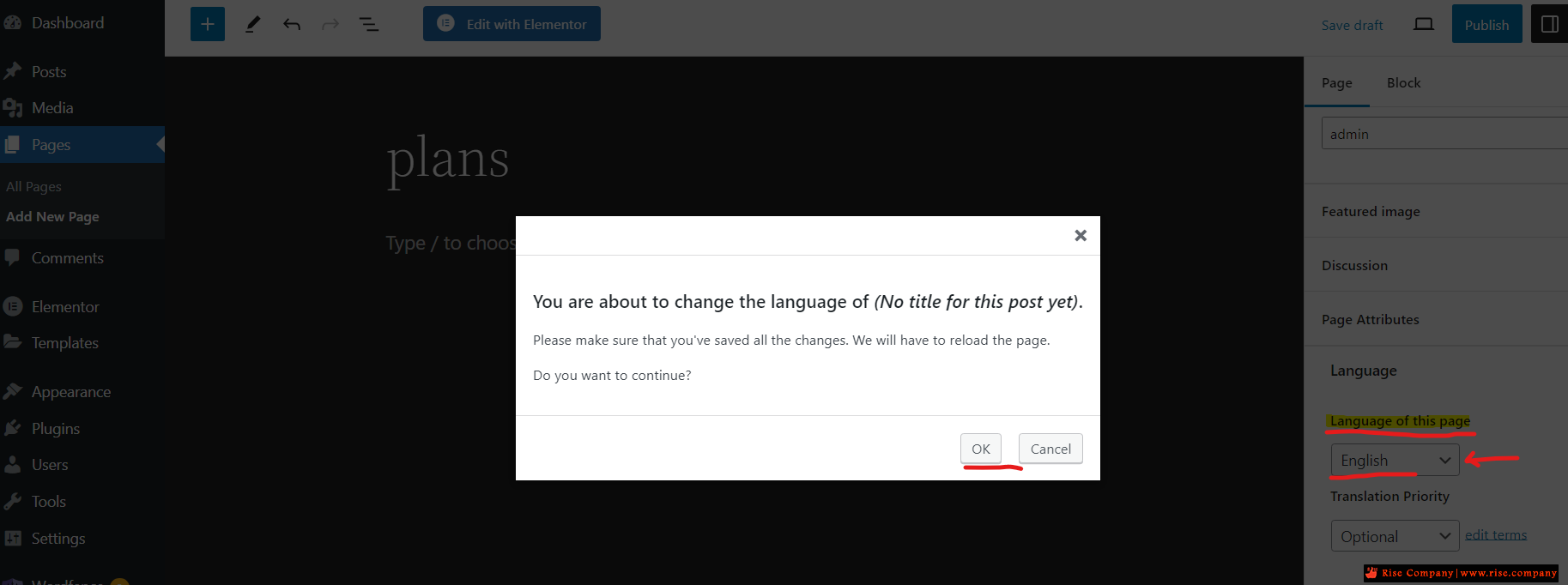
اثناء تثبيت wpml هيسئلك حدد لغة الموقع الاساسية ثم حدد اللغة التى تريد الموقع ان يترجم بها, فمثلا: هتحدد ان لغة الموقع عربي وهيترجم الى الانجليزية, فبالتالى الموقع هيعرف جميع الصفحات الموقع على انها كلها لغة عربية بغض النظر عن المكتوب بداخلها هل هو انجليزي ام صيني ام فرنسي لن يفرق معه حيث انه لا يتصفح المحتوى ويحدد اللغة تلقائيا بل هيضع علامة علم AR امام جميع الصفحات وهنا انت Manual يجب ان تذهب الى الصفحات المكتوبة بالانجليزية وتغير العلم الى EN لكى تعرف WPML ان هذه الصفحة باللغة EN وليس AR .
ثم بعد ذلك الصفحة هتعمل Refresh من نفسها وهيظهر اختيار Connect with Translations
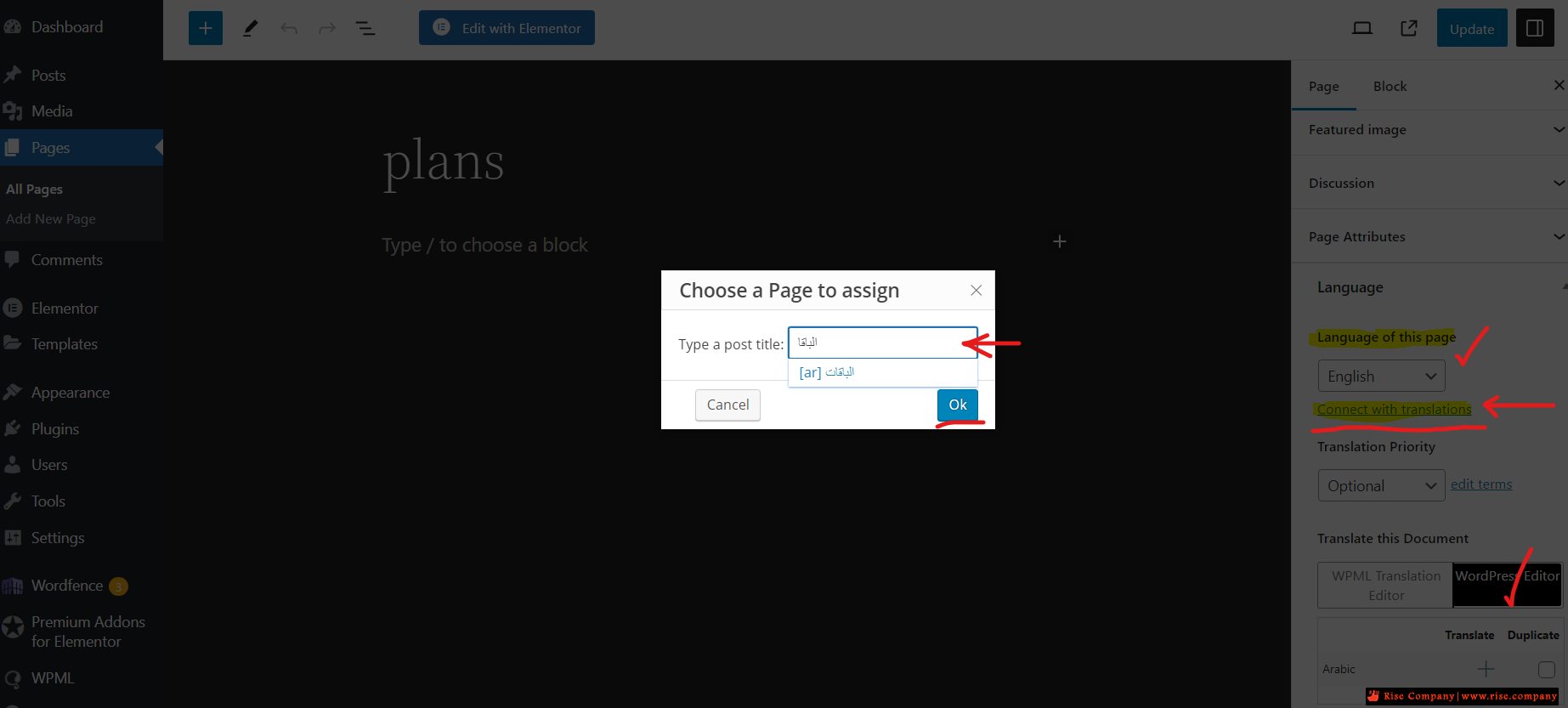
هنا هيتم الضغط عليها ثم بمجرد كتابة اول حرفين من اسم الصفحة هتظهر معك لكى تختارها
وبالتالى هيكون هكذا تم ربط صفحة EN-plans مع AR-باقات كما هو موضح فى الصورة.
----------------------------------------------------------
You can link a page that is a translation of another page using the Connect with translations feature.I used auto translation on my site but it didn't translate a lot of the content by itself. So I manually translate it using elementor, but it just reverts to the original language by itself after a refresh. Because of that, I duplicated the page on native language and translated everything myself. What I can't do is I'm unable to assign that page as the English version of my homepage.
Here are the detailed steps:
- Open the translated version of a page for editing.
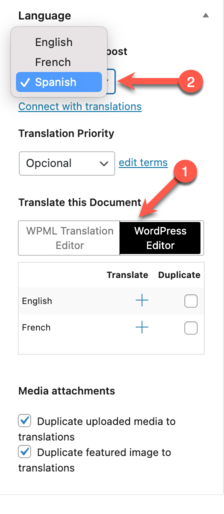
- In the right sidebar, expand the Language tab and select to translate the document with the WordPress Editor. Set the correct language of the page. Click OK in the dialog pop-up that appears. The page will reload.
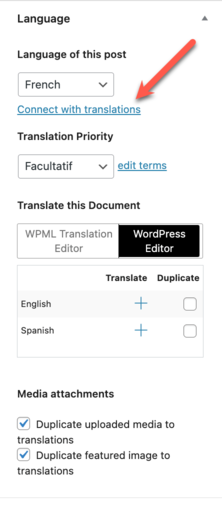
- Click on Connect with translations in the Language box.
- Search for the page you want to link, then select it and click Ok.
- Another dialog appears. If you want to change the page’s original language, select Make [Language] the original language for this page.
- Click the Assign button.
المرجع:
https://wpml.org/faq/how-to-link-alr...nslated-pages/
https://wpml.org/forums/topic/assign...n-of-the-page/
+ إنشاء موضوع جديد
النتائج 1 إلى 1 من 1
مشاهدة المواضيع
-
28-11-2023, 05:39 #1Status
- Offline

- تاريخ التسجيل
- Apr 2014
- الدولة
- Egypt
- المشاركات
- 4,703
 Engineering and Technology
- معدل تقييم المستوى
- 10
 ووردبريس wordpress اضافة الترجمة WPML كيفية select page as translate page
------------------------------------------------------------------------
ووردبريس wordpress اضافة الترجمة WPML كيفية select page as translate page
------------------------------------------------------------------------
شركة رايز للهندسة و التكنولوجيا Rise Company for Engineering & Technology
------------------------------------------------------------------------
Web Hosting | Web Designing | E-Marketing
رقم # 1 فى خدمات الشركات Business Services
استضافة مواقع Web Hosting - عمل ايميل شركة Business Emails
تصميم موقع شركة Web Design - تسويق الكترونى على جوجل Google Adwords
www.rise.company | www.rise.company/emails
ملحوظة : جميع خدماتنا مخصصة للشركات فقط وغير متاحة للافراد
وليس لنا اى منتجات او صيانة نهائيا! يرجى الانتباه الى ذلك.


 رد مع اقتباس
المواضيع المتشابهه
-
ووردبريس إليمنتور wordpress elementor شرح page attributes
بواسطة Rise Company في المنتدى قسم ووردبريس WordPressمشاركات: 0آخر مشاركة: 13-05-2020, 01:31 -
ووردبريس Wordpress كيفية وضع Custom CSS لكل صفحة Post/Page specific custom CSS
بواسطة Rise Company في المنتدى قسم ووردبريس WordPressمشاركات: 0آخر مشاركة: 13-05-2020, 00:49 -
ووردبريس Wordpress اضافة WPML حل مشكلة Translate texts in admin screens site
بواسطة Rise Company في المنتدى قسم ووردبريس WordPressمشاركات: 0آخر مشاركة: 29-02-2020, 23:25 -
ووردبريس Wordpress اضافة تعريب المواقع WPML البدء فى الترجمة Translation Management,
بواسطة Rise Company في المنتدى قسم ووردبريس WordPressمشاركات: 0آخر مشاركة: 16-11-2019, 03:02 -
ووردبريس wordpress ترقية اضافة update WPBakery Page Builder فى التمبلت
بواسطة Rise Company في المنتدى قسم ووردبريس WordPressمشاركات: 0آخر مشاركة: 01-11-2019, 08:41

المفضلات