


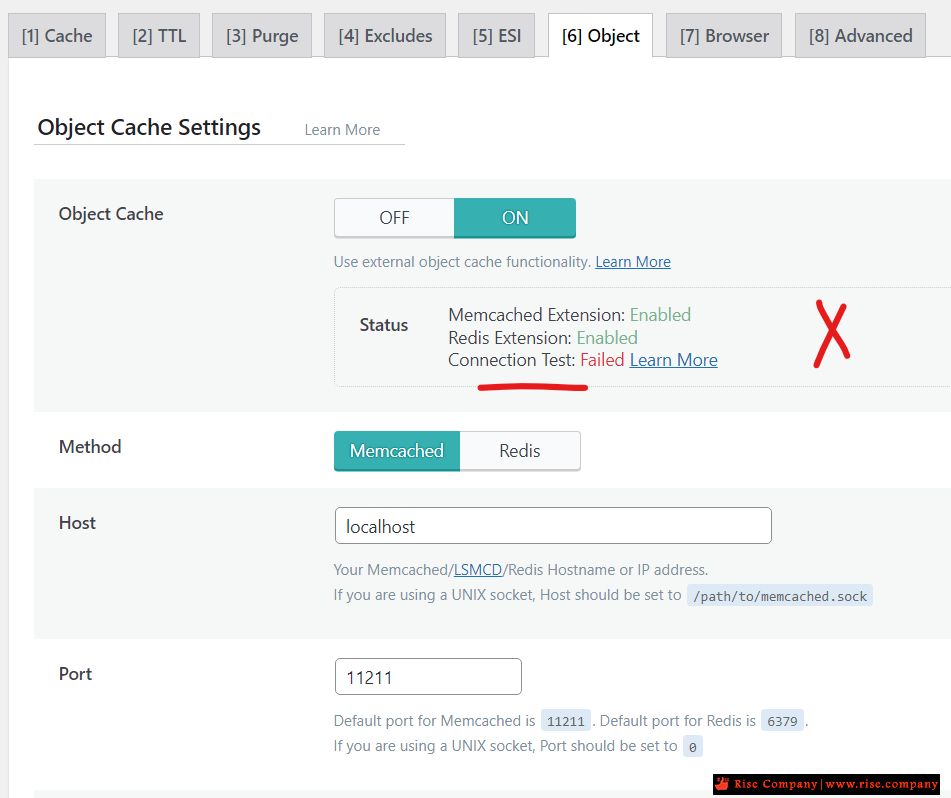
لايت سبيد سيرفر LightSpeed Server حل مشكلة Object Cache Status Connection Test Failed
My open litespeed object cache connection test failed
cpanel litespeed install memcache - litespeed and memcache
Can LiteSpeed Memcached be installed on cPanel servers?
memcached or Redis in cpanel with LiteSpeed web server what's best with LiteSpeed ?
How to Install PHP Redis on a cPanel Server?
المشكلة :
يظهر خطا Connection Test Failed سواء كنت مختار Memcached او Redis
حيث ان كلاهما يجب ان يكون مثبت على مستوى السيرفر اما من easyapache او Module Installers
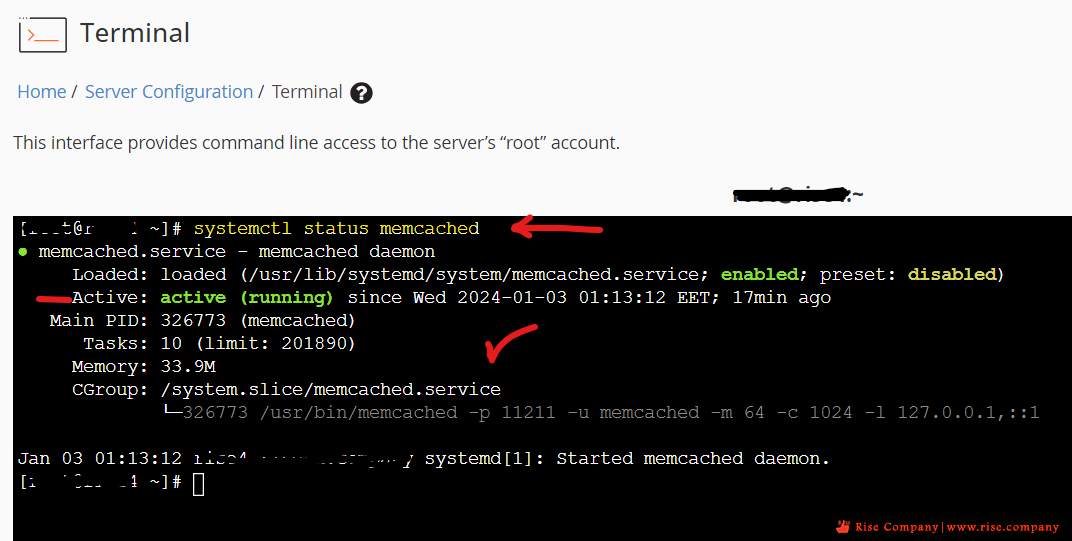
ولكى تعرف memcached انه مثبت ام لا
اذا كان memcached مثبت هيظهر هكذاكود:systemctl status memcached
اذا كان memcached غير مثبت هيظهر هكذا
--------------------------------------------------
حل المشكلة : تثبيت Memcached
--------------------------------------------------
ادخل الامر التالى على server terminal
ثمكود:yum install memcached
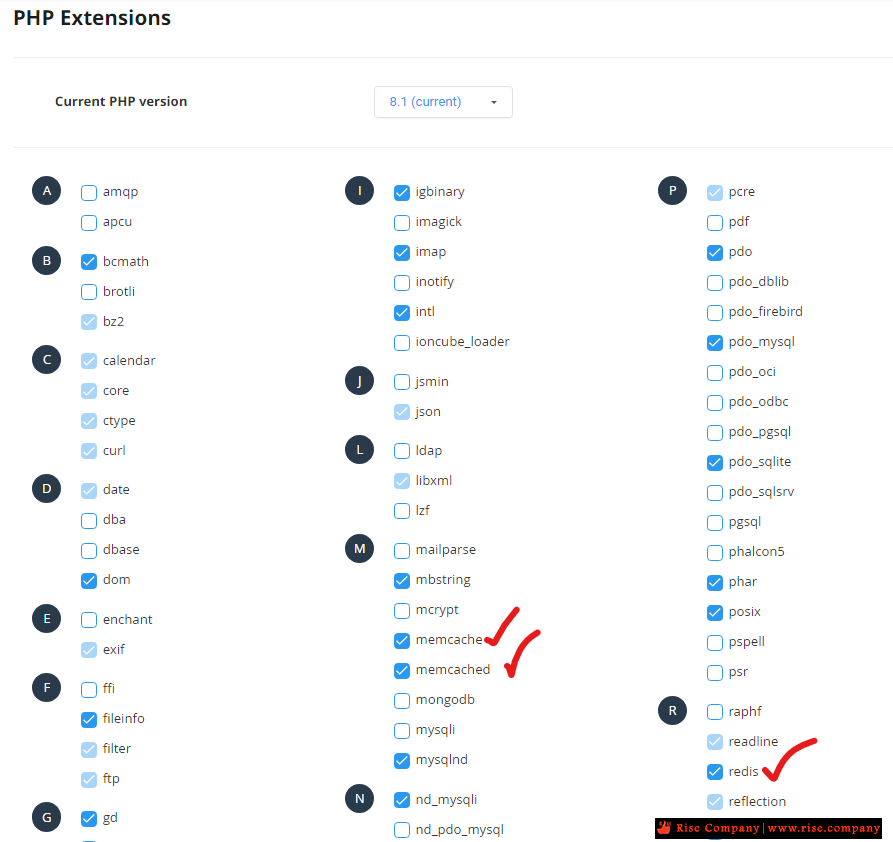
ثم اذا كان السيرفر الخاص بك هو كلاود لينكس ادخل على php selectorكود:systemctl start memcached systemctl enable memcached systemctl status memcached
ثم فعل memcached وهم اثنين مرتبطين مع بعضهم البعض
memcached + memcache
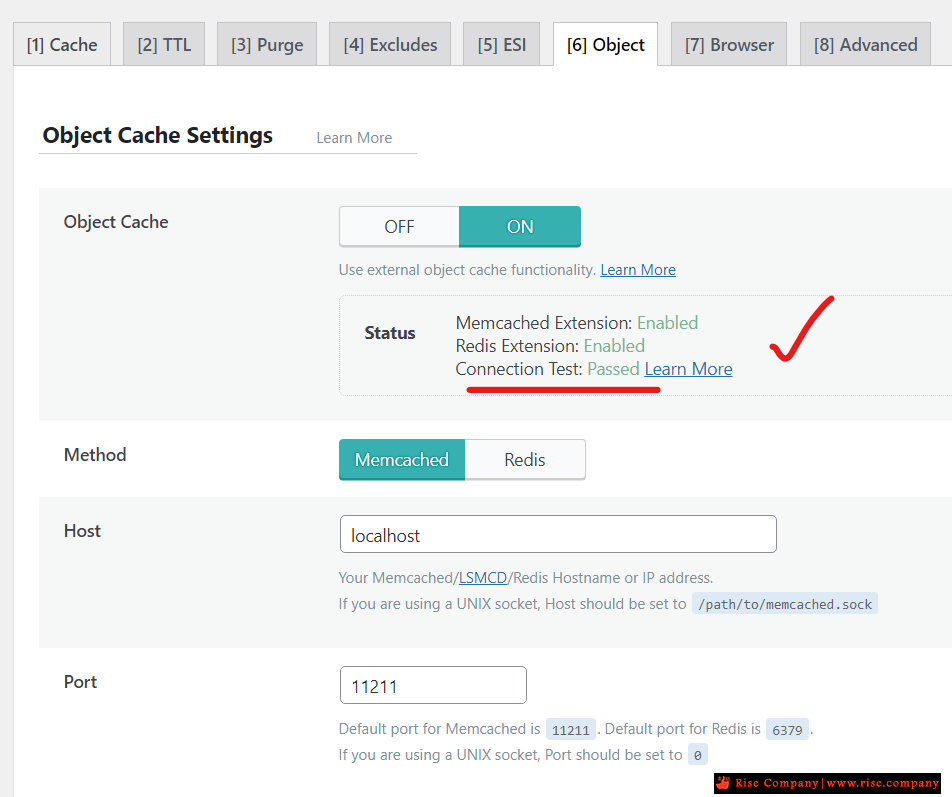
ثم اذا كان السيرفر الخاص بك لايت سبيد LiteSpeed Server
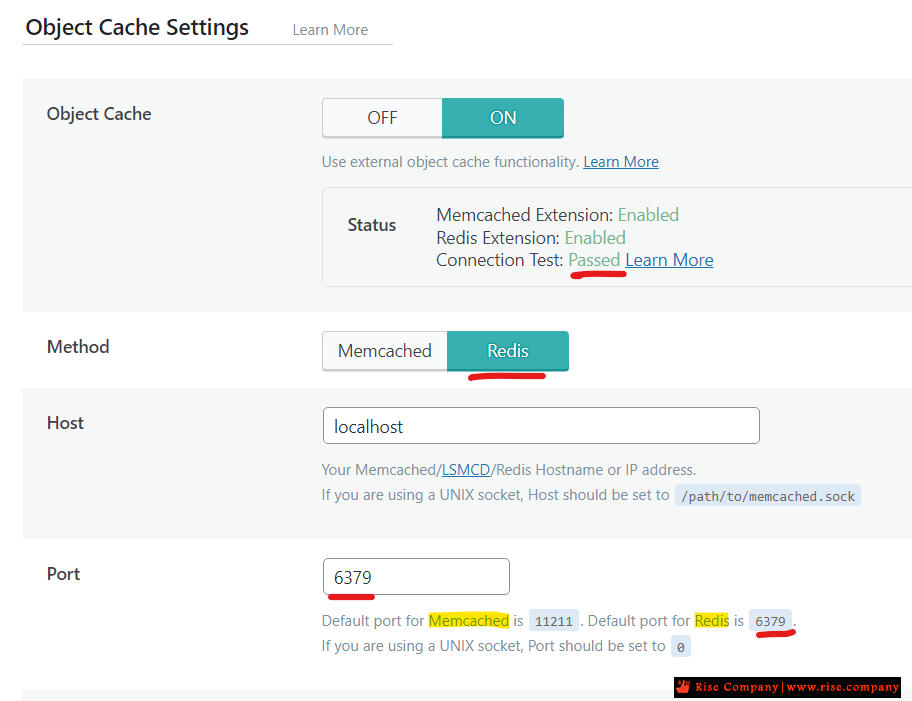
ولديك ووردبريس مثبت عليه بلوجن LiteSpeed Cache
يجب ان تجد ان مل شىء Enabled و Passed
--------------------------------------------------
حل المشكلة : تثبيت Redis
--------------------------------------------------
تثبيت Install Redis + PHP Redis
ادخل هذا الامر فى terminal لتثبيت Redis
ثم ادخل هذا الامر لتشغيل Redis والتحقق يعمل ام لاكود:yum install epel-release yum install redis -y
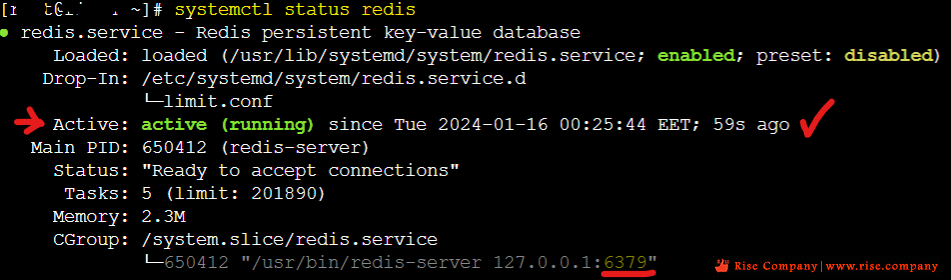
هيظهر لك نتيجة التثبيتكود:systemctl start redis systemctl enable redis systemctl status redis
The latest command should give you a confirmation of that Redis is running.
مثل هذا
It also returns the port being used (here 6379) which you may need for your application.redis.service - Redis persistent key-value database
Loaded: loaded (/usr/lib/systemd/system/redis.service; enabled; vendor preset: disabled)
Drop-In: /etc/systemd/system/redis.service.d
└─limit.conf
Active: active (running) since Sat 2020-06-24 15:21:55 GMT +1; 40s ago
Main PID: 2157 (redis-server)
CGroup: /system.slice/redis.service
└─2157 /usr/bin/redis-server 127.0.0.1:6379
It also returns the port being used (here 6379) which you may need for your application.
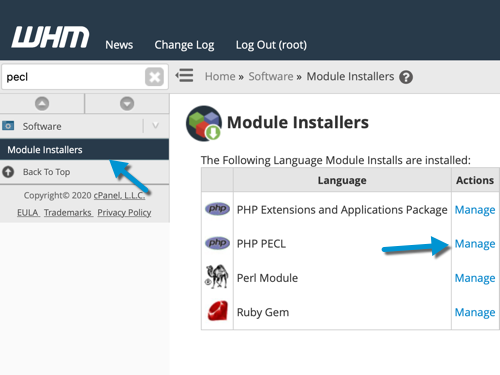
Login to WHM and search in the WHM sidebar for Module Installers.
Click on it and then click on Manage PHP PECL.
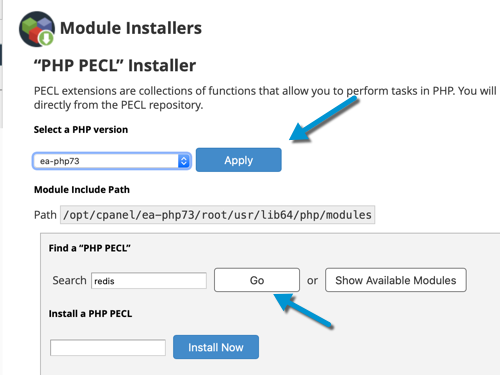
At the next stage, select the PHP version you would like to install Redis For and inside the Module Search type Redis and click on Go
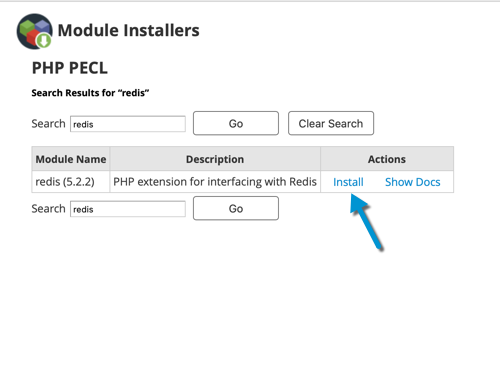
Finally, in the search result click on Install and after a few seconds, it should be completed.
That's it, you have now enabled a Redis Cache on your server.
اذهب الان الى تطبيق Litespeed cache ثم فعل Redis وانتبه لا بد من اختيار Port الصحيح
حيث ان port ال Memcached هو 11211 اما Redis هو 6379
المرجع:
https://www.litespeedtech.com/suppor...tall-memcached
https://community.cyberpanel.net/t/m...failed/37723/6
https://apps.cpanel.net/threads/memc...espeed.685125/
https://my.maxer.com/knowledgebase/2...-Selector.html
----------------
https://docs.cpanel.net/ea4/containe...ia-containers/
https://www.milesweb.in/hosting-faqs...cpanel-server/
https://www.host-stage.net/client-ar...-7-Server.html
https://supporthost.in/install-redis...cpanel-server/
+ إنشاء موضوع جديد
النتائج 1 إلى 1 من 1
العرض المتطور
-
03-01-2024, 01:41 #1Status
- Offline

- تاريخ التسجيل
- Apr 2014
- الدولة
- Egypt
- المشاركات
- 4,703
 Engineering and Technology
- معدل تقييم المستوى
- 10
 لايت سبيد سيرفر LiteSpeed Server حل مشكلة Object Cache Status Connection Test Failed
------------------------------------------------------------------------
لايت سبيد سيرفر LiteSpeed Server حل مشكلة Object Cache Status Connection Test Failed
------------------------------------------------------------------------
شركة رايز للهندسة و التكنولوجيا Rise Company for Engineering & Technology
------------------------------------------------------------------------
Web Hosting | Web Designing | E-Marketing
رقم # 1 فى خدمات الشركات Business Services
استضافة مواقع Web Hosting - عمل ايميل شركة Business Emails
تصميم موقع شركة Web Design - تسويق الكترونى على جوجل Google Adwords
www.rise.company | www.rise.company/emails
ملحوظة : جميع خدماتنا مخصصة للشركات فقط وغير متاحة للافراد
وليس لنا اى منتجات او صيانة نهائيا! يرجى الانتباه الى ذلك.


 رد مع اقتباس
المواضيع المتشابهه
-
كلاود لينكس Cloud Linux + لايت سبيد سيرفر lite speed server و PHP Handlers
بواسطة Rise Company في المنتدى قسم الكلاود لينكس CloudLinuxمشاركات: 0آخر مشاركة: 16-01-2024, 20:50 -
فايروول CSF Firewall لايت سبيد سيرفر litespeed Server السماح بايبيهات quic.cloud
بواسطة Rise Company في المنتدى قسم فايروول CSFمشاركات: 0آخر مشاركة: 16-01-2024, 17:24 -
ووردبريس wordpress شرح بلوجن لايت سبيد كاش LiteSpeed Cache لتسريع المواقع 100%
بواسطة Rise Company في المنتدى قسم ووردبريس WordPressمشاركات: 0آخر مشاركة: 03-01-2024, 01:52 -
سيرفر ديل Dell Power Edge ايدراك Idrac حل مشكلة connection failed
بواسطة Rise Company في المنتدى قسم الشبكاتمشاركات: 1آخر مشاركة: 18-03-2023, 17:16 -
ويندوز سيرفر Windows Server حل مشكلة تاخير الدخول RDP Initial Connection slow
بواسطة Rise Company في المنتدى قسم الويندوز سيرفر Windows Serverمشاركات: 0آخر مشاركة: 10-11-2021, 09:52

المفضلات