

السي بانال WHM/cPanel منع ارسال الايميل المخترق من سيرفر اخر soft fail vs hard fail
ما الفرق بين علامة ~ وهى Spf Soft fail وعلامة - Spf Hard Fail
What is the difference between an SPF "hard fail" and "soft fail"?
How to setup SPF record on entire server for all domains?
how do I add this SPF record for all accounts, existing and new
SPF RECORDS (VPS & DEDICATED)
~all specifies how hosts should regard servers that are not on the list.
There are a few modifies you can use here:
- - all "Hard Fail" means reject all mail that isn't on the allowed list.
- ~ all "Soft fail" means accept mail not on the allowed list, but treat it with more scrutiny.
- ? all "Neutral" means accept all mail; there isn't a policy for servers not on the list.
ما الفرق بين علامة ~ وهى Soft fail وعلامة - hard fail فى SPF
What is the difference between an SPF "hard fail" and "soft fail"?
الافتراضى فى SPF هو ان كل الايميلات داخل Email Deliver
بتكون على علامة ~ وهى Soft fail وعلامة - hard fail
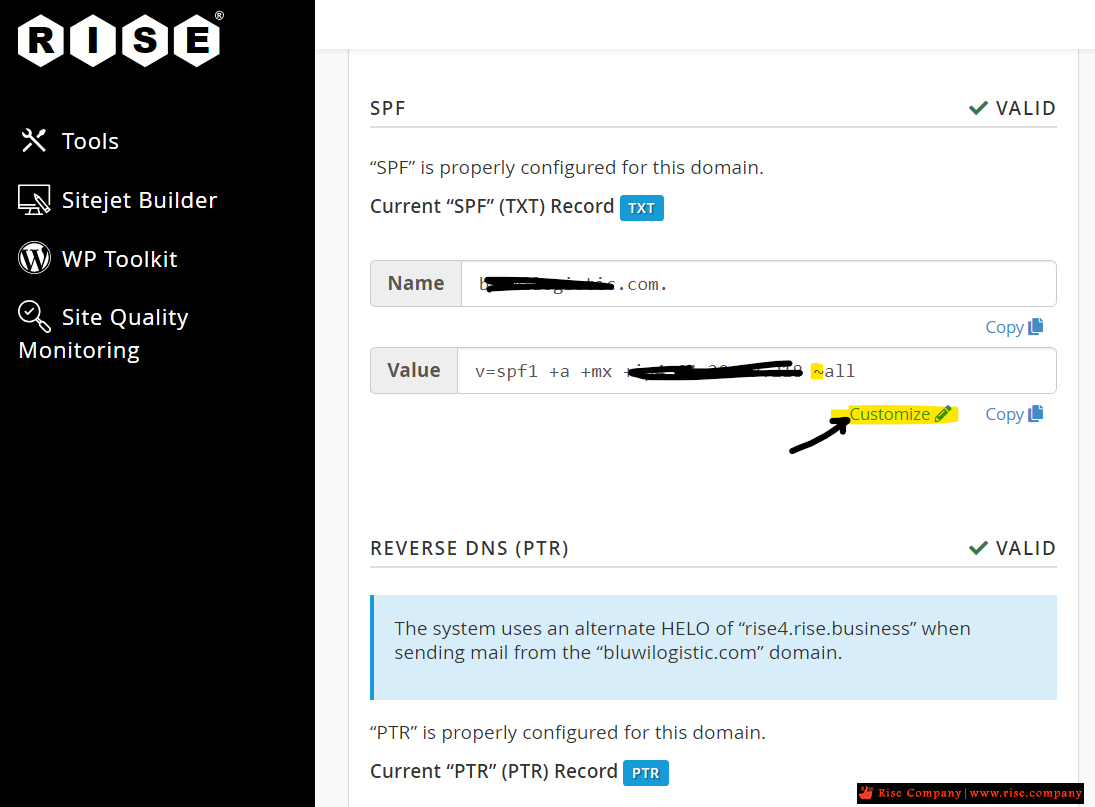
علامة ~ وهى Soft fail
تجعل الايميل يخرج من سيرفر اخر غير الاساسى ويصل للجهة الاخر
لكن يكون مكتوب بجانب ان SPF فشل فى التحقق لذلك قد يصل الايميل الى السبام.
By default, the system recommends the ~all entry. This entry instructs servers to accept mail from unmatched hosts, but warn that unauthorized hosts might have sent the messages.
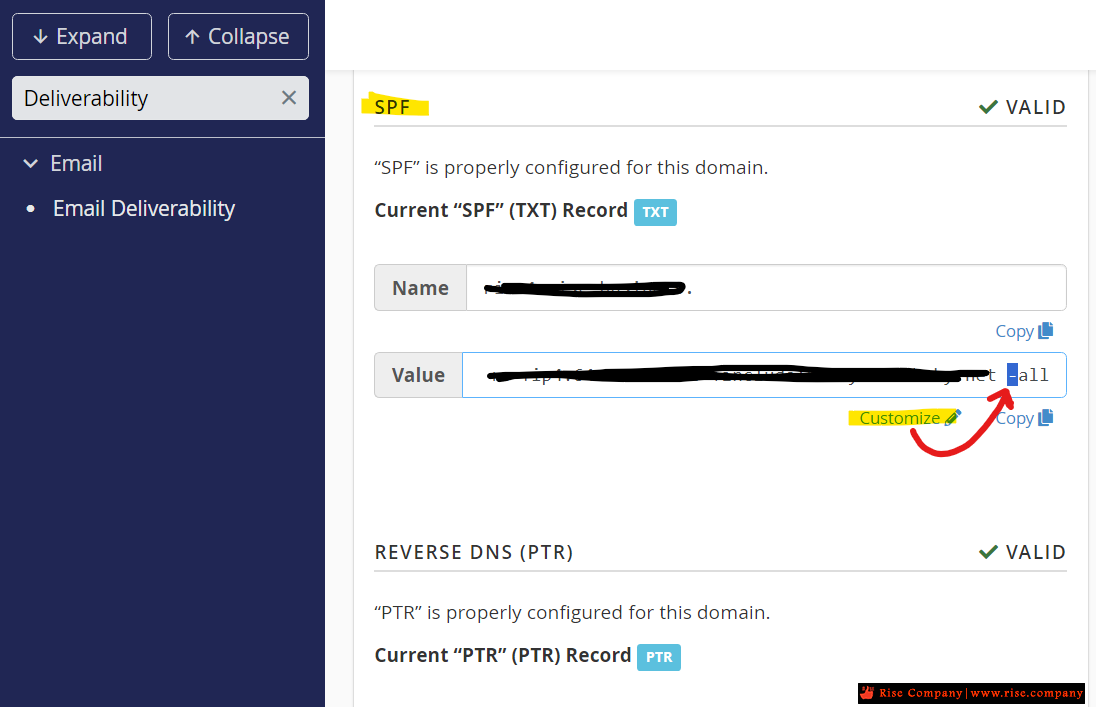
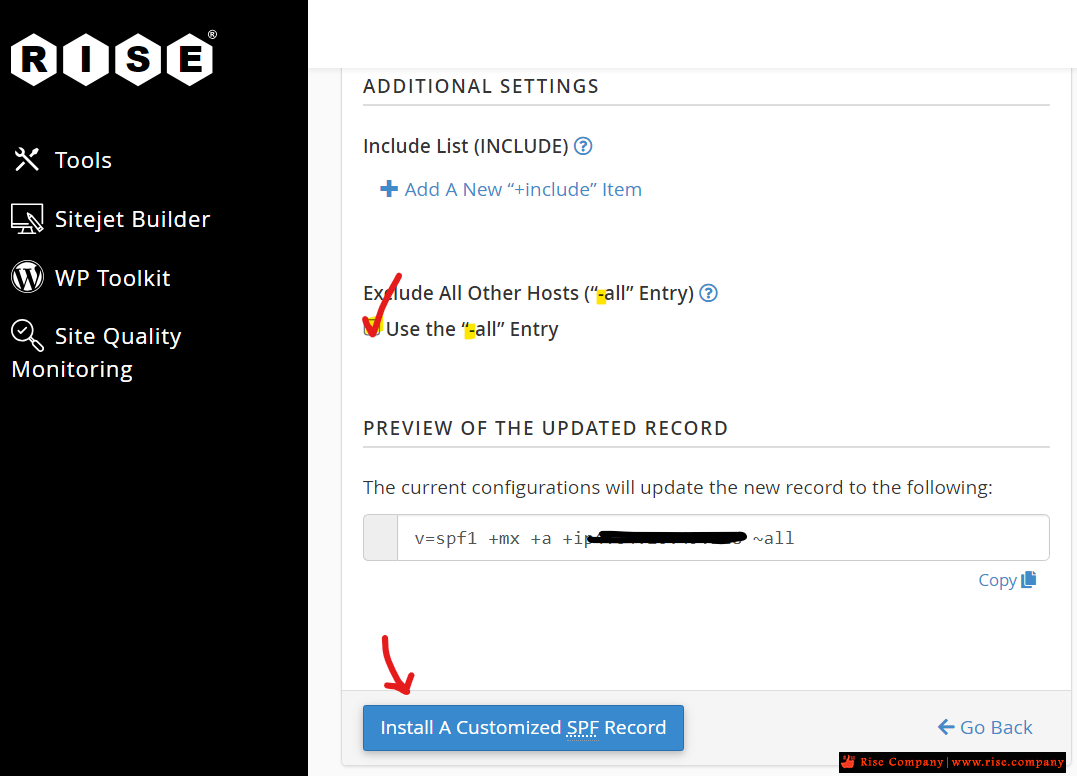
علامة - hard fail
تجعل الايميل لا يخرج من سيرفر اخر غير الاساسى ولا يصل للجهة الاخر
ومفيد لو هكر اخترق الايميل لا يتسطع ارسال SMTP من سيرفر اخر تحميل اسم ايميلاتك
If you enable the Exclude All Other Hosts ("-all" Entry) setting, the SPF feature causes hosts that you do not define to fail.
A hard fail will cause the recipient mail server to reject any messages sent from any location not specified in the SPF record. A soft fail permits the recipient mail server to accept messages sent from any location not specified in the SPF record. Some email services will mark messages that soft fail the SPF check as suspicious or spam. SPF records should only be configured with soft fail while changes to the SPF record are being tested.
SPF examples
A hard fail is designed by - all (hyphen) at the end of the SPF record.
A soft fail is designed by ~ all (tilde) at the end of the SPF record.كود:v=spf1 +a +mx +ip4 203.0.113.2 -all
تفعيل اس بي اف SPF علامة - بنظام Hard Failكود:v=spf1 +a +mx +ip4 203.0.113.2 ~all
التحقق من وضع SPF هل هو Hard Fail ام Soft Fail
Verifying if the SPF record is working
The quickest way to test if major mail providers are accepting your new SPF record is by sending a test email and reviewing the email headers.
من داخل Cpanel او Whm هتجد Email Deliverability
كيف التحقق من قيمة SPF ؟
The mail provider used for this test is Gmail.
You can find instructions on viewing email headers for a Gmail account here:
Google's View your email's full headers
Once obtaining a copy of the email headers for the test email, you can find the "Authentication-Results" by scrolling down through the headers. This section will house the results of the SPF Record currently in use by the domain. You'll want this value to be a "pass" and not "fail":

Should the value return "fail", then you may want to revisit the record and adjust the value once more. cPanel's Email Deliverability interface offers a recommended SPF record if you're unsure of how to compose this record.
شاهد ايضا
شرح SFP و DKIM و كيفية التحقق من عملها PASS
شرح تفعيل SFP و DKIM فى WHM و CPANEL مع التحقق من عملها PASS
المرجع:
https://support.cpanel.net/hc/en-us/...-and-soft-fail
https://support.cpanel.net/hc/en-us/...ds-are-working
https://docs.cpanel.net/cpanel/email...257.1696885008
https://support.cpanel.net/hc/en-us/...or-all-domains
https://copyprogramming.com/howto/ho...-record-in-whm
+ إنشاء موضوع جديد
النتائج 1 إلى 1 من 1
-
29-01-2024, 03:22 #1Status
- Offline

- تاريخ التسجيل
- Apr 2014
- الدولة
- Egypt
- المشاركات
- 4,703
 Engineering and Technology
- معدل تقييم المستوى
- 10
 السي بانال WHM/cPanel منع ارسال الايميل المخترق من سيرفر اخر soft fail vs hard fail
------------------------------------------------------------------------
السي بانال WHM/cPanel منع ارسال الايميل المخترق من سيرفر اخر soft fail vs hard fail
------------------------------------------------------------------------
شركة رايز للهندسة و التكنولوجيا Rise Company for Engineering & Technology
------------------------------------------------------------------------
Web Hosting | Web Designing | E-Marketing
رقم # 1 فى خدمات الشركات Business Services
استضافة مواقع Web Hosting - عمل ايميل شركة Business Emails
تصميم موقع شركة Web Design - تسويق الكترونى على جوجل Google Adwords
www.rise.company | www.rise.company/emails
ملحوظة : جميع خدماتنا مخصصة للشركات فقط وغير متاحة للافراد
وليس لنا اى منتجات او صيانة نهائيا! يرجى الانتباه الى ذلك.

 رد مع اقتباس
المواضيع المتشابهه
-
السي بانال WHM/cPanel تغيير اي بي ارسال الايميلات Change Outgoing Email IP
بواسطة Rise Company في المنتدى قسم الايميلات Emailsمشاركات: 1آخر مشاركة: 08-07-2025, 00:38 -
السي بانال cPanel جوجل ورك سبيس Google Workspace اعدادات الايميل MX record values
بواسطة Rise Company في المنتدى قسم الايميلات Emailsمشاركات: 0آخر مشاركة: 15-06-2023, 21:10 -
السي بانال WHM/CPanel حل مشكلة فشل تحقق مرسل الايميل Sender verify failed
بواسطة Rise Company في المنتدى قسم الايميلات Emailsمشاركات: 1آخر مشاركة: 25-10-2021, 18:59 -
السي بانال CPanel ارسال ايميل الى جميع الايميلات mailing list
بواسطة Rise Company في المنتدى قسم الايميلات Emailsمشاركات: 1آخر مشاركة: 29-03-2021, 17:43 -
عمل Seize للتحويل بين DC و Additional فى Fail ويندوز سيرفر windows server 2016
بواسطة Rise Company في المنتدى قسم الويندوز سيرفر Windows Serverمشاركات: 0آخر مشاركة: 04-08-2018, 02:54

المفضلات