

شركة Interserver تفعيل relay.mailbaby.net فى SPF include hosts for all domains
حل مشكلة عدم وصول ايميلات Interserver الى الهوت ميل Hotmail
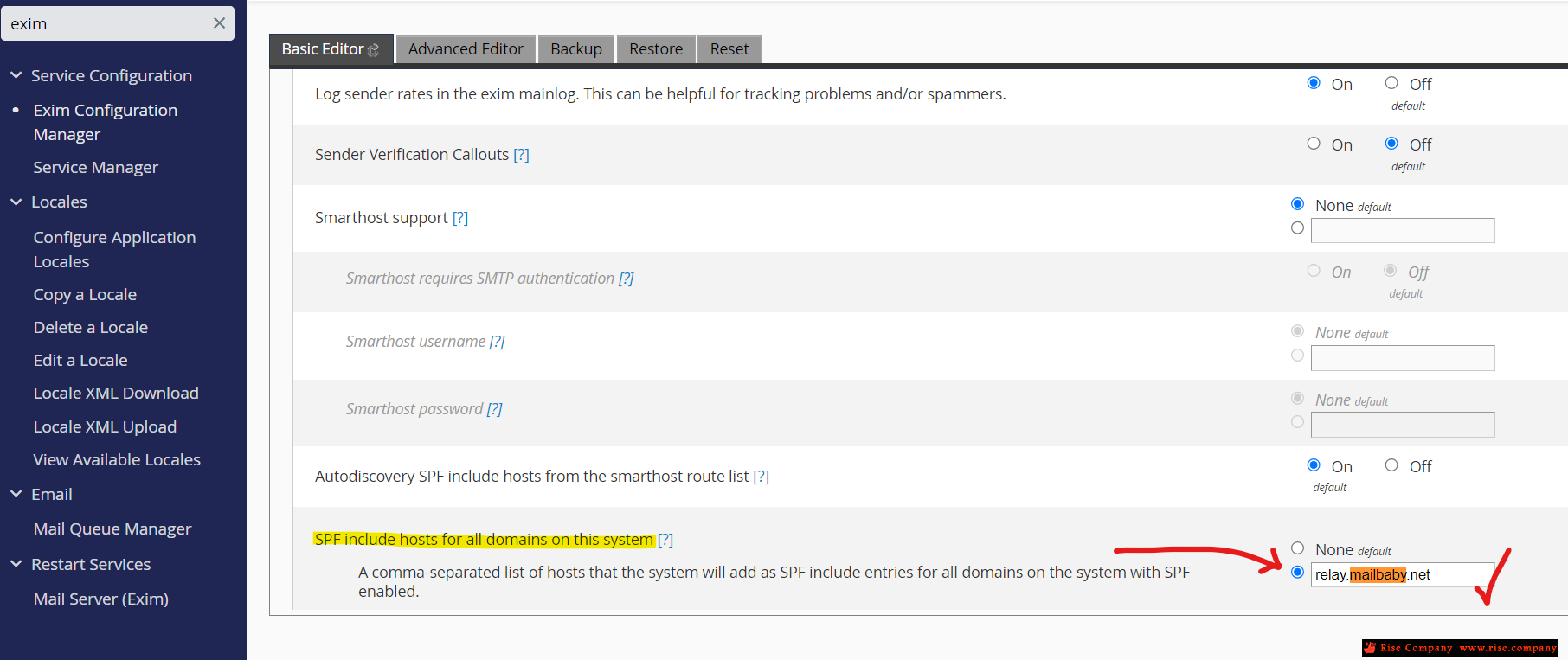
SPF include hosts for all domains on this system
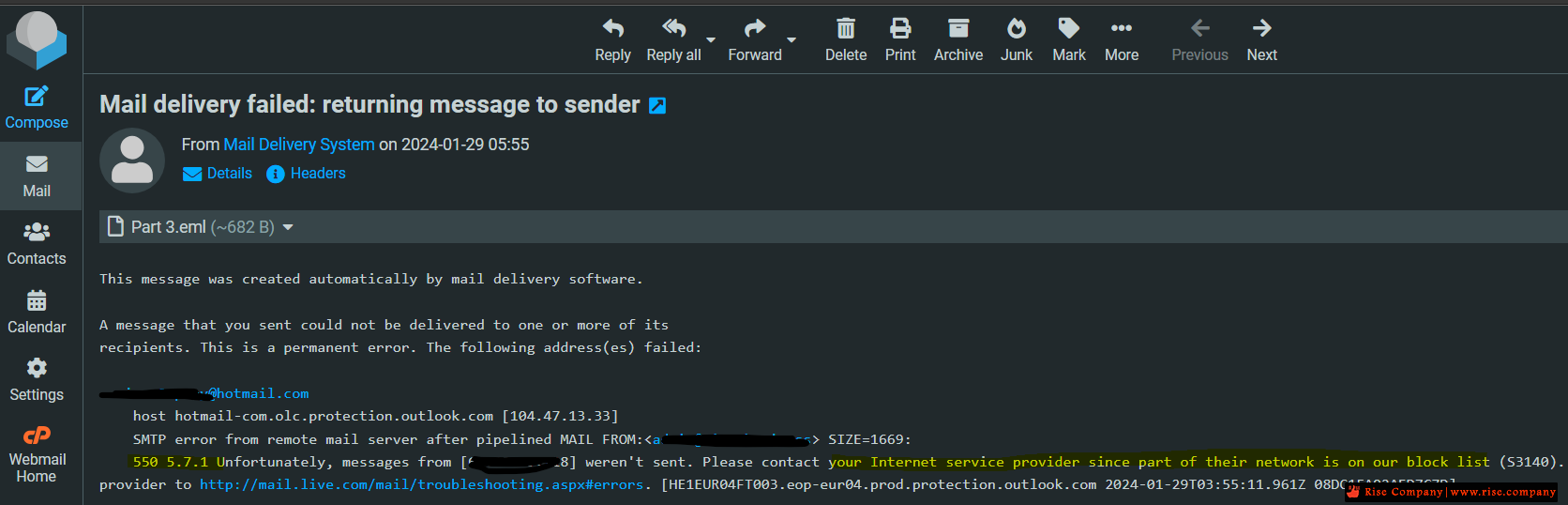
550 5.7.1 Unfortunately, messages from weren't sent. Please contact your Internet service provider since part of their network is on our block list (S3140)How to Remove My IP from Hotmail / Outlook - hotmail delist ip - Delist IP - Delist IP - Delist you Microsoft IP address
WHM/cPanel Mail Server / SMTP Mailer / Relayer
المشكلة :
عند ارسال ايميل الى الهوت ميل لا يصل
ويظهر Mail delivery failed: returning message to sender
550 5.7.1 Unfortunately, messages from weren't sent. Please contact your Internet service provider since part of their network is on our block list (S3140)
على الرغم ان كل شىء سليم ولا يوجد حظر من RBL ولا يوجد حظر من Hotmail !
حل المشكلة :
سيرفرات Interserver اعتمدت ارسال الايميلات من خلال Relay
والذى يجب وضعه داخل Exim فى Mail فى حقل
SPF include hosts for all domains on this system
A comma-separated list of hosts that the system will add as SPF include entries for all domains on the system with SPF enabled.
خطوة رقم 1
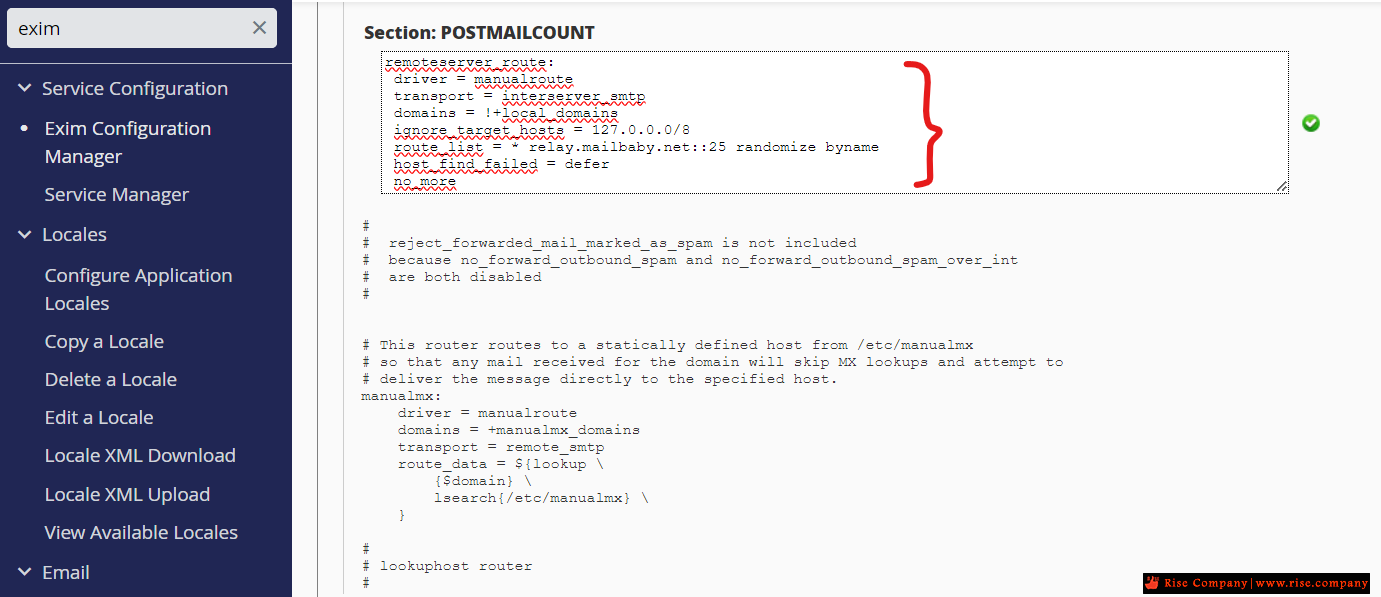
ثم لا بد من خطوة رقم 2
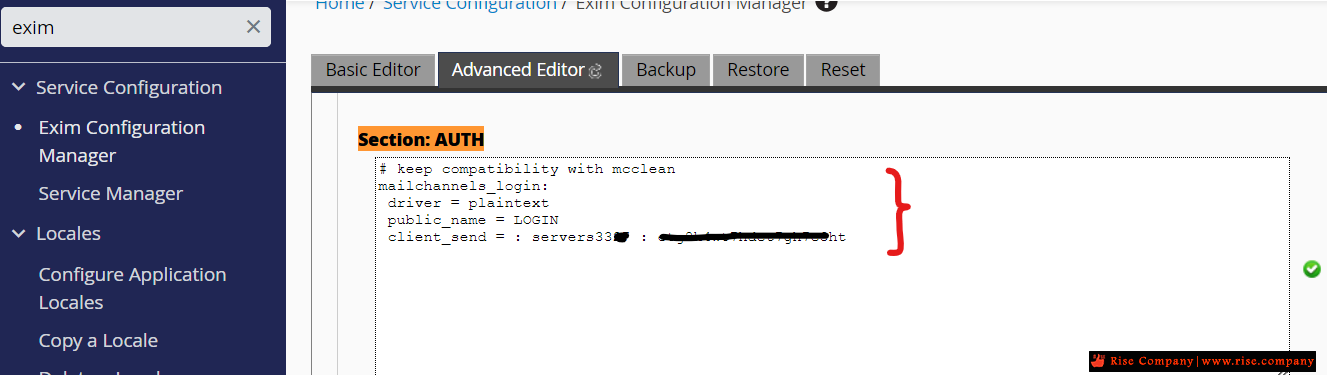
ثم لابد من خطوة رقم 3
هذا الحل معتمد من شركة Interserver ويعمل بشكل سليم 100%
كيف تعلم ان Relay يعمل الخاص بـ Interserver ؟
ارسل ايميل الى الجي ميل الخاص بك ثم شاهد Header
من المفترض ان لا تجد الاي بي الخاص بالسيرفر امامك !
نعم هتجد اى بى اخر غير اي بي السيرفر وهو اي بيهات الـ Relay
فالايميلات هترسل من خلال ايبيهات Interserver وليس Server IP
وهذا يفسر لماذا الاى بى الخاص بالسيرفر او الشبكة معمول له بلوك عند الهوتميل
فهو غير هام ! لانك لن تستخدمه ويجب ان تستخدم Relay
وهذا هو حل المشكلة
لمعرفة المزيد على Relay550 5.7.1 Unfortunately, messages from weren't sent. Please contact your Internet service provider since part of their network is on our block list (S3140)How to Remove My IP from Hotmail / Outlook - hotmail delist ip
Do your users’ emails disappear somewhere between your server and the recipient? They send emails, but the messages never reach their destination. Somewhere out there, in the wilds of the internet, a system beyond your control scrutinizes messages and thinks: Nope! Email delivery issues can be incredibly frustrating.
Messages that go missing in this way are collateral damage in the never-ending war against spam. Internet Service Providers (ISPs) and inbox providers want to stop spam before it gets to users, and they don’t mind if a few legitimate messages are caught in the cross-fire. Server administrators are expected to make sure emails sent from their server are above suspicion.
Relaying messages through a Smarthost is one of the most reliable ways to solve delivery issues. In this article, we’re going to look at how they work and how, with help from cPanel & WHM, you can easily set up a relay to send your email to a Smarthost.
First, let’s consider why the internet’s spam-fighting system might have a low opinion of messages sent from your server.
Factors That Affect Email Deliverability
In our recent article about configuring SpamAssassin with cPanel, we explored how the filter identifies incoming junk mail with language tests, message digests, and blocklists. ISPs use similar techniques, employing third-party blocklists and internal databases to assess the reputation of an IP address, the unique number that identifies a server on the internet.
If a server’s IP address gets a bad reputation, its emails are going nowhere, but how does an IP become notorious in the first place?
- A spammer used it in the past.
- It is part of a block of IP addresses associated with junk mail.
- The server has been compromised and used to send spam.
- A user sent messages to a list that includes a honeypot address.
It may be possible to re-establish an IP’s good reputation or have it removed from a blocklist, but it takes a long time and may not succeed. Plus, while IP reputation is the most important factor, it isn’t the only one. Domain reputation plays an increasing role, as do verification and authentication technologies such as SPF and DKIM.
What is a Smarthost?
A Smarthost is an email relay operated by a third party, which might be an ISP, a hosting provider, or a company that specializes in improving delivery rates. Hosts send messages to the relay, which sends them back out onto the internet.
How does that help you to deliver emails? Email relay providers are in the business of establishing and maintaining positive reputations for the IP addresses they control. ISPs and other organizations trust them not to send spam. Plus, they often filter traffic so harmful messages don’t go back out onto the internet.
When you send an email through a Smarthost, it looks as if it originated from their IP address. Because they have a good reputation, messages are much more likely to make it to their destination.
Some providers offer additional services, such as spam filtering and monitoring to let you know if users are abusing their accounts. If this sounds like the right solution for you and you have selected a provider, the next step is to configure your cPanel server to relay mail to the Smarthost.
What is an SMTP Relay?
You need to know a little about how email works to follow the configuration guide in the next section:
- A user creates a message in a Mail User Agent (MUA) such as Roundcube, which is integrated into cPanel.
- The MUA passes the message to a Mail Submission Agent (MSA), which hands it to a Mail Transfer Agent (MTA).
- Messages may travel through multiple MTAs before they finally reach the Mail Delivery Agent (MDA) and the recipient’s inbox.
We’re interested in the mail transfer agent, the software behind SMTP relays. SMTP is the Simple Mail Transfer Protocol, the “language” MTAs use to communicate with each other. They accept incoming email, queue it, and then send it to another MTA or a mail delivery agent.
Our goal is to relay email through a Smarthost, which is just a sophisticated MTA. To do so, we have to configure Exim, cPanel’s built-in MTA, to tell it how to authenticate and relay messages.
How To Configure a Smarthost SMTP Relay in cPanel
Before we begin, you will need some information from your Smarthost provider, including:
- The username and password of your account on the SMTP relay.
- The relay’s IP address or domain name, including the port.
To configure Exim, open WHM and navigate to the Exim Configuration Manager in the Service Configuration section of the sidebar menu.
Before you make any changes, be sure to back up the current Exim configuration in the Backup tab.
Select the Advanced Editor tab. Search for the text “begin authenticators.” Below the entries for Dovecot® is a text box, into which you should enter your authentication details.
If you are unsure what to enter here, consult your Smarthost provider’s documentation. The basic format is as follows, but it may differ depending on the provider’s system:
mySmartHost_login:
driver = plaintext
public_name = LOGIN
client_send = : Username : Password
Replace “mySmartHost,” “Username,” and ”Password” with your information.
Next, we need to tell Exim where to send outgoing email. Search for “POSTMAILCOUNT,” and you will see a text box.
In this section, we will tell Exim about the Smarthost and how to route mail to it. As before, the details you enter here depend on your provider, but the following is a basic template:
send_via_mySmartHost:
driver = manualroute
domains = !+local_domains
transport = remote_smtp
route_list = * smtp.example.com::25
These settings use the manualroute router to send all mail not addressed to local domains to port 25—the default SMTP port— on the server at “smtp.mysmarthost.com.” If you want to know more about the format of the route_list line, take a look at the Exim manualroute documentation.
It is also possible to enter the route configuration in the ROUTERSTART section instead of POSTMAILCOUNT, but doing so will stop some mail limits from working. We advise you to use POSTMAILCOUNT unless you have a good reason not to.
Finally, don’t forget to scroll to the bottom of the Exim Advanced Editor, where you’ll find the save button. Once you’ve done that, all email originating from your server is relayed through the Smarthost.
A Smarthost is the fastest and most reliable way to improve email delivery for your clients. With cPanel & WHM, it’s straightforward to send your outgoing mail through a reputable SMTP relay, ensuring they reach their destination without interference from spam filters and blocklists.
----------------------------------------
ما هى اعدادات mail.baby الموصى بها ؟
هنا
https://www.mail.baby/tips/cpanel/
* ملحوظة :
يجب ان يتم ذلك من خلال طلب من شركة Interserver لضبط الاعدادات
المرجع:
https://blog.cpanel.com/how-to-set-u...y-with-cpanel/
https://support.cpanel.net/hc/en-us/...Mailer-Relayer
https://www.mail.baby/tips/cpanel/
+ إنشاء موضوع جديد
النتائج 1 إلى 1 من 1
-
29-01-2024, 06:47 #1Status
- Offline

- تاريخ التسجيل
- Apr 2014
- الدولة
- Egypt
- المشاركات
- 4,703
 Engineering and Technology
- معدل تقييم المستوى
- 10
 شركة Interserver تفعيل relay.mailbaby.net فى SPF include hosts for all domains
------------------------------------------------------------------------
شركة Interserver تفعيل relay.mailbaby.net فى SPF include hosts for all domains
------------------------------------------------------------------------
شركة رايز للهندسة و التكنولوجيا Rise Company for Engineering & Technology
------------------------------------------------------------------------
Web Hosting | Web Designing | E-Marketing
رقم # 1 فى خدمات الشركات Business Services
استضافة مواقع Web Hosting - عمل ايميل شركة Business Emails
تصميم موقع شركة Web Design - تسويق الكترونى على جوجل Google Adwords
www.rise.company | www.rise.company/emails
ملحوظة : جميع خدماتنا مخصصة للشركات فقط وغير متاحة للافراد
وليس لنا اى منتجات او صيانة نهائيا! يرجى الانتباه الى ذلك.

 رد مع اقتباس
المواضيع المتشابهه
-
فايروول CSF Firewall حل مشكلة RELAY Alert / RELAY, Remote IP
بواسطة Rise Company في المنتدى قسم فايروول CSFمشاركات: 0آخر مشاركة: 11-10-2022, 14:21 -
السي بانال WHM/cPanel ما هو SMTP Relay / Open mail relay ؟
بواسطة Rise Company في المنتدى قسم الايميلات Emailsمشاركات: 0آخر مشاركة: 11-10-2022, 12:00 -
الدومينات Domains بالرموز Show domains as ASCII (relevant for IDNs)
بواسطة Rise Company في المنتدى قسم الدومينات Domainsمشاركات: 0آخر مشاركة: 22-01-2020, 15:38 -
شرح تفعيل و الغاء تفعيل نظام التحقق للسى بنل Cpanel two factor authentication
بواسطة Rise Company في المنتدى قسم حماية Whm / Cpanelمشاركات: 0آخر مشاركة: 08-04-2018, 12:59 -
شرح تفعيل و الغاء تفعيل نظام التحقق للسيرفر WHM two factor authentication
بواسطة Rise Company في المنتدى قسم حماية Whm / Cpanelمشاركات: 0آخر مشاركة: 08-04-2018, 12:37

المفضلات