


الاوتلوك Outlook حل مشكلة عدم وجود خاصية App password
unable to login in office 365 using imap
لن تجد خاصية App password بسبب ان 2 factor authentication معطل
لذلك لن تجد اختيار لتفعيل app password فلا حاجة له طالما انك تستخدم باسورد عادى
طيب لو فعلت 2fa وعملت app password هل ممكن يعمل imap بهذا الباسورد بدون مشكلة
حيث ان office365 يمنعك من تثبيت الايميل على اى برنامج بنظام Imap / pop
حيث انه يستخدم modern authentication من خلال login على موقعهم.
يعنى اذا فشلت فى ربط الايميل بنظام imap هذا ليس له علاقة بـ 2fa فلا تشغل بالك بهذه الخطوة.
we have observed that you disabled MFA, so if MFA is in disable status, you can simply configure account with user account password (normal password), no need to use app password. App password used when MFA is in enable status.
imap mail still doesn't work when using mfa setup and app password for my account.
----------------------------------------------------------
Create and delete app passwords using the Office 365 portal
If you use two-step verification with your work or school account and your Microsoft 365 apps, you can create and delete your app passwords using the Office 365 portal.
To create app passwords using the Office 365 portal
- Sign in to your work or school account, go to the My Account page, and select Security info.
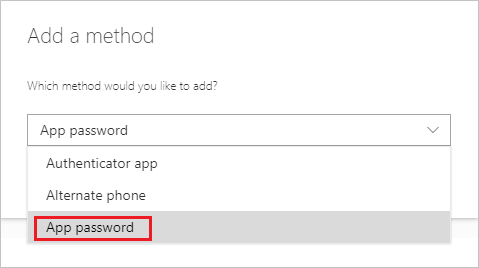
Select Add method, choose App password from the list, and then select Add.
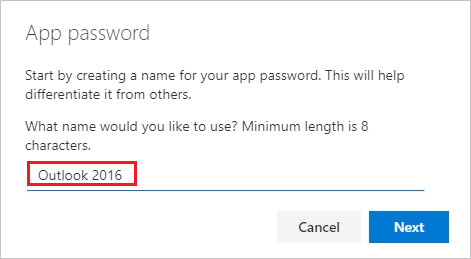
Enter a name for the app password, and then select Next.
- Copy the password from the App password page, and then select Done.
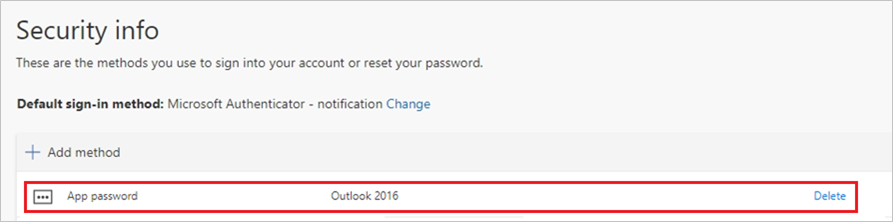
On the Security info page, make sure your app password is listed.
- Open the app you created the app password for (for example, Outlook 2016), and then paste the app password when asked for it. You should only have to do this once per app.
المرجع:
https://answers.microsoft.com/en-us/...9-08bef0d15cde
https://support.microsoft.com/en-us/...5-6d07799387e9
+ إنشاء موضوع جديد
النتائج 1 إلى 1 من 1
العرض المتطور
-
19-02-2024, 18:46 #1Status
- Offline

- تاريخ التسجيل
- Apr 2014
- الدولة
- Egypt
- المشاركات
- 4,703
 Engineering and Technology
- معدل تقييم المستوى
- 10
 الاوتلوك Outlook365 تفعيل App password وحل مشكلة عدم ظهورها فى Security
------------------------------------------------------------------------
الاوتلوك Outlook365 تفعيل App password وحل مشكلة عدم ظهورها فى Security
------------------------------------------------------------------------
شركة رايز للهندسة و التكنولوجيا Rise Company for Engineering & Technology
------------------------------------------------------------------------
Web Hosting | Web Designing | E-Marketing
رقم # 1 فى خدمات الشركات Business Services
استضافة مواقع Web Hosting - عمل ايميل شركة Business Emails
تصميم موقع شركة Web Design - تسويق الكترونى على جوجل Google Adwords
www.rise.company | www.rise.company/emails
ملحوظة : جميع خدماتنا مخصصة للشركات فقط وغير متاحة للافراد
وليس لنا اى منتجات او صيانة نهائيا! يرجى الانتباه الى ذلك.

 رد مع اقتباس
المواضيع المتشابهه
-
الاوتلوك Outlook365 شرح تعطيل Security defaults من Microsoft Entra ID
بواسطة Rise Company في المنتدى قسم الايميلات Emailsمشاركات: 0آخر مشاركة: 19-02-2024, 15:42 -
الاوتلوك Outlook365 شرح تفعيل Office 365 enable IMAP
بواسطة Rise Company في المنتدى قسم الايميلات Emailsمشاركات: 0آخر مشاركة: 13-02-2024, 22:35 -
سيرفر OVH تفعيل / تعطيل Security - Intel SGX (Software Guard Extensions)
بواسطة Rise Company في المنتدى رايز للاستضافة Rise Hostمشاركات: 0آخر مشاركة: 18-01-2024, 16:25 -
برنامج الاوتلوك Outlook | شرح الغاء تفعيل العمل دون اتصال Working Offline
بواسطة Rise Company في المنتدى قسم الايميلات Emailsمشاركات: 0آخر مشاركة: 24-01-2021, 11:24 -
سي بانيل cPanel | شرح تغيير باسورد لوحة تحكم الاستضافة Password & Security
بواسطة Rise Company في المنتدى رايز للاستضافة Rise Hostمشاركات: 0آخر مشاركة: 24-01-2021, 11:15

المفضلات