


السي بانال WHM/cPanel قياس سرعة السيرفر عبر Speedtest by Ookla
How to Test Internet Connection Speed in almalinux / cloudlinux
Installing Speedtest CLI in CentOS 8 Firstly we need to install repositories:
ادخل هذا الامر
After that, let's install speedtest:كود:curl -s https://packagecloud.io/install/repositories/ookla/speedtest-cli/script.rpm.sh | sudo bash
ثم ادخل امر
Internet connection speed test To run the test,كود:yum install speedtest
enter the following command and accept the license:
ثم ادخل امر
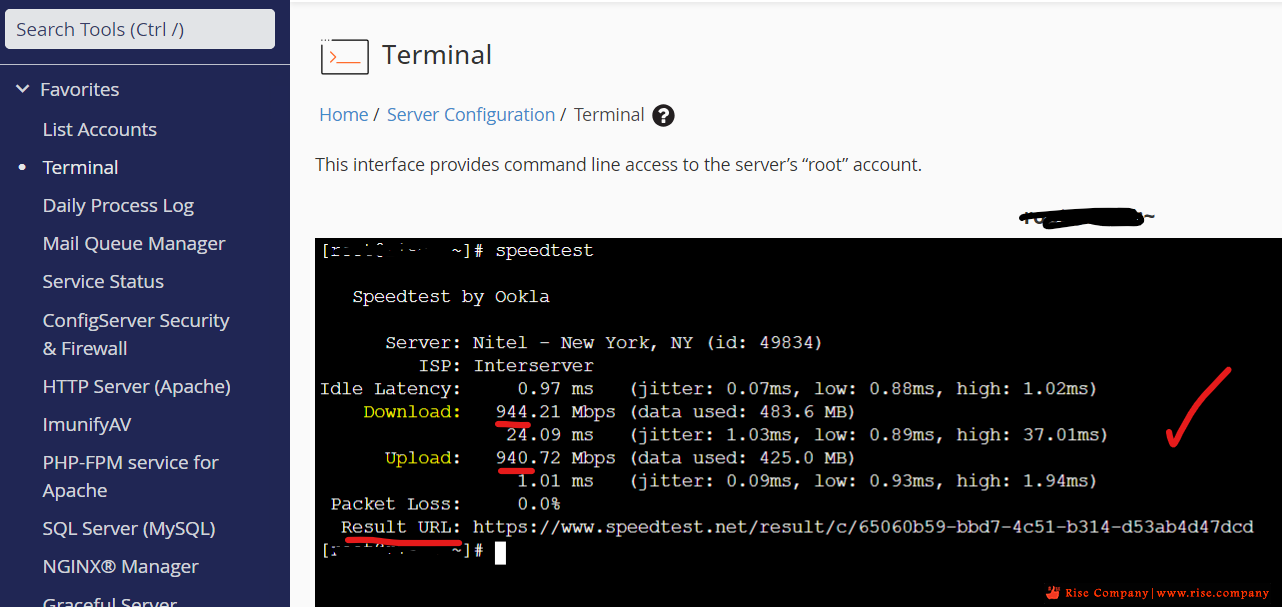
Result:كود:speedtest
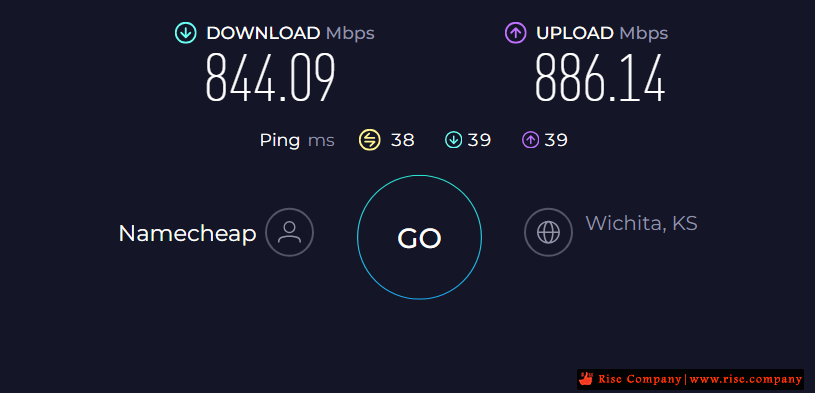
هيظهر مثل هذا
هنا تجد Latency المثالى 38
لكن نجد Download هو 39 و نجد Upload هو 39
هذا يعنى ان upload مضبوط و download مضبوط
لكن لا نعلم لماذا المثالى مرتفع عن السيرفر التالى ممكن يكون سبب ان هذا ابعد
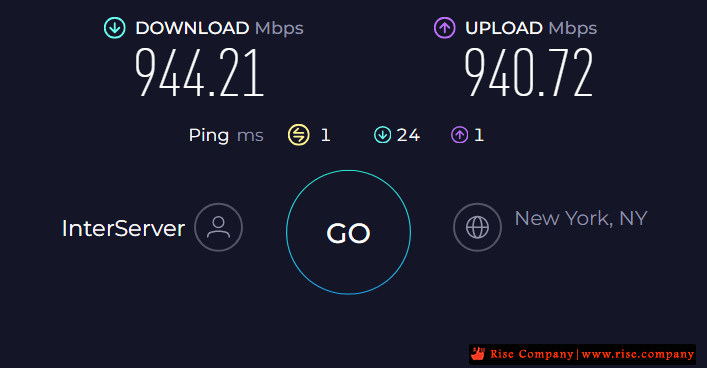
سيرفر اخر
هنا تجد Latency المثالى 1
لكن نجد Download هو 24 و نجد Upload هو 1
هذا يعنى ان upload مضبوط اما download مرتفع قليلا
والذى يظهر فى الصورة هو الشكل المثالى لسيرفر صحيح
الـ Latency هنا اسفل 1
What latency is and why it matters
Latency (sometimes called ping) measures how quickly your device gets a response after you’ve sent out a request. A low latency means the server is responding quickly to your request whereas a high latency means a slow response. An example of how this works in online gaming is when you ask your character to move — if your character moves almost immediately, you have a low latency, if there is a delay in your character completing that movement, you might have a high latency.
Latency has always mattered to online experience. However, it has often been difficult to tell the difference between a slow connection and a high latency as both can delay you from getting what you want from the internet. These days, many folks have faster connections but there’s still a disconnect between asking their device to perform an action online and having it complete that action. Which means poor latency is becoming more obvious as the internet gets faster and more devices are connected online.
-------------------------------------
Do you accept the license? [type YES to accept]: yes License acceptance recorded. Continuing.To see all available Speedtest CLI options, enter:Speedtest by OoklaServer: Server’s name and IDISP: Itglobalcom Bel LLCLatency: 1.32 ms (0.07 ms jitter)Download: 90.73 Mbps (data used: 109.7 MB)Upload: 92.45 Mbps (data used: 41.7 MB)Packet Loss: 0.0%Result URL: https://www.speedtest.net/result/c/605ca0ec-...
تم تطبيق هذه الاوامر على سيرفر WHM من خلال Terminalكود:speedtest -h
وعمل بدون اى مشاكل.
-------------------------------------
حل مشكلة Speedtest لا يعمل
[error] Error: [111] Connection refused [error] Error: [101] Network unreachable
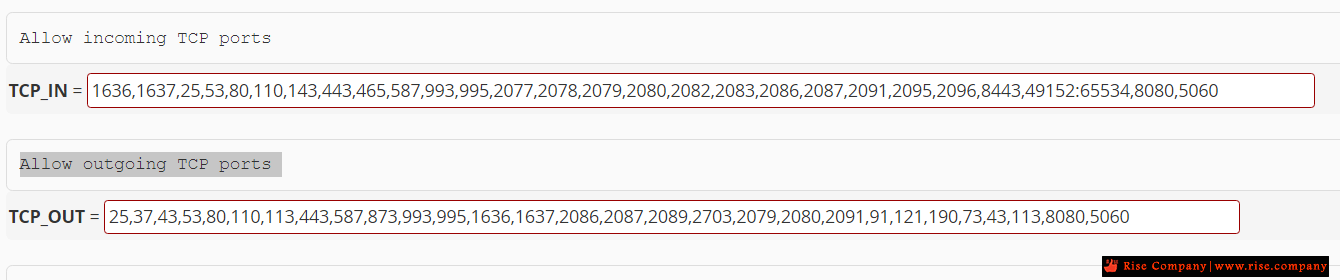
قم بتعطيل فايروول CSF
او ضع البورتات التالية فى
Allow incoming TCP ports / Allow outgoing TCP ports
جرب الان, اعمل اختبار وهيعمل معك.كود:,8080,5060
شاهد ايضا
امر SSH معرفة مواصفات السيرفر SERVER INFO | امر قياس سرعة السيرفر NETWORK SPEED TESTS
المرجع:
https://serverspace.io/support/help/...peed-centos-8/
https://phoenixnap.com/kb/linux-network-speed-test
https://support.ookla.com/hc/en-us/a...equired-to-Use
https://www.ookla.com/articles/intro...loaded-latency
+ إنشاء موضوع جديد
النتائج 1 إلى 1 من 1
العرض المتطور
-
04-03-2024, 00:48 #1Status
- Offline

- تاريخ التسجيل
- Apr 2014
- الدولة
- Egypt
- المشاركات
- 4,703
 Engineering and Technology
- معدل تقييم المستوى
- 10
 السي بانال WHM/cPanel قياس سرعة السيرفر عبر Speedtest by Ookla
------------------------------------------------------------------------
السي بانال WHM/cPanel قياس سرعة السيرفر عبر Speedtest by Ookla
------------------------------------------------------------------------
شركة رايز للهندسة و التكنولوجيا Rise Company for Engineering & Technology
------------------------------------------------------------------------
Web Hosting | Web Designing | E-Marketing
رقم # 1 فى خدمات الشركات Business Services
استضافة مواقع Web Hosting - عمل ايميل شركة Business Emails
تصميم موقع شركة Web Design - تسويق الكترونى على جوجل Google Adwords
www.rise.company | www.rise.company/emails
ملحوظة : جميع خدماتنا مخصصة للشركات فقط وغير متاحة للافراد
وليس لنا اى منتجات او صيانة نهائيا! يرجى الانتباه الى ذلك.

 رد مع اقتباس
المواضيع المتشابهه
-
امر SSH معرفة مواصفات السيرفر Server Info | امر قياس سرعة السيرفر Network Speed Tests
بواسطة Rise Company في المنتدى قسم الشل SSH / SFTPمشاركات: 0آخر مشاركة: 02-03-2024, 01:35 -
السي بانال WHM/cPanel توقف بعد ريستارت السيرفر cPanel not Starting / Lunching
بواسطة Rise Company في المنتدى قسم الشل SSH / SFTPمشاركات: 0آخر مشاركة: 11-02-2024, 02:35 -
السي بانال WHM/cPanel حل مشكلة اقلاع السيرفر لكن دون عمل WHM/cPanel
بواسطة Rise Company في المنتدى رايز للاستضافة Rise Hostمشاركات: 0آخر مشاركة: 07-10-2022, 21:20 -
السي بانال WHM/CPanel تراخيص السيرفر الجديدة cPanel Account Tiers Licenses
بواسطة Rise Company في المنتدى رايز للاستضافة Rise Hostمشاركات: 0آخر مشاركة: 07-06-2021, 23:19 -
السي بانال CPanel اخذ باك اب كامل خارج السيرفر whm backup to Amazon S3
بواسطة Rise Company في المنتدى رايز للاستضافة Rise Hostمشاركات: 0آخر مشاركة: 29-10-2020, 15:46


المفضلات