

حل مشكلة الاكسل MS Excel: Sharing Violation error
MS Excel: Sharing Violation Error When Saving Excel Workbook
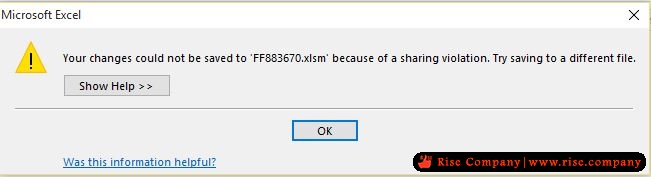
"Your changes could not be saved to 'FileName' because of a sharing violation" error message
Error "changes could not be saved ... because of a sharing violation"
الحل الاول :
تغيير اسم الفولدر او الدخول على properties الخاص بالهارد ثم
choose properties. Click the "advanced" button near the bottom. Uncheck the "allow indexing" box.
الحل الثانى :
اعطاء صلاحيات everyone مع الوراثة الداخليه فى advanced
Confirm the permissions for all users. Make sure all users have read, write and delete permission.
الحل الثالث :
1. Check if you have enabled the Protect and Share Workbook option in Excel. If yes, please turn off this option and check the result.
+ إنشاء موضوع جديد
النتائج 1 إلى 1 من 1
-
04-10-2018, 21:35 #1Status
- Offline

- تاريخ التسجيل
- Apr 2014
- الدولة
- Egypt
- المشاركات
- 4,703
 Engineering and Technology
- معدل تقييم المستوى
- 10
 حل مشكلة الاكسل MS Excel: Sharing Violation error
------------------------------------------------------------------------
حل مشكلة الاكسل MS Excel: Sharing Violation error
------------------------------------------------------------------------
شركة رايز للهندسة و التكنولوجيا Rise Company for Engineering & Technology
------------------------------------------------------------------------
Web Hosting | Web Designing | E-Marketing
رقم # 1 فى خدمات الشركات Business Services
استضافة مواقع Web Hosting - عمل ايميل شركة Business Emails
تصميم موقع شركة Web Design - تسويق الكترونى على جوجل Google Adwords
www.rise.company | www.rise.company/emails
ملحوظة : جميع خدماتنا مخصصة للشركات فقط وغير متاحة للافراد
وليس لنا اى منتجات او صيانة نهائيا! يرجى الانتباه الى ذلك.

 رد مع اقتباس
المواضيع المتشابهه
-
حل مشكلة An error occurred!Server Error: UID MOVE: Error in IMAP command UID MOVE:
بواسطة Rise Company في المنتدى قسم الايميلات Emailsمشاركات: 0آخر مشاركة: 10-05-2018, 16:31 -
شرح استرجاع Recover ملفات الوورد Word و الاكسل Excel التي لم تحفظ
بواسطة Rise Company في المنتدى رايز للكمبيوتر Rise Computerمشاركات: 0آخر مشاركة: 20-07-2017, 16:19 -
حل مشكلة error PHP Strict Standards
بواسطة Rise Company في المنتدى رايز للاستضافة Rise Hostمشاركات: 0آخر مشاركة: 05-12-2015, 04:22 -
حل مشكلة Fatal error: Allowed memory size of
بواسطة Eng Amr Adel في المنتدى رايز للويب Rise Webمشاركات: 1آخر مشاركة: 26-10-2013, 02:30 -
حل مشكلة : [SOLVED] (Error code: ssl_error_rx_record_too_long)
بواسطة Eng Amr Adel في المنتدى رايز للويب Rise Webمشاركات: 2آخر مشاركة: 12-03-2011, 16:01

المفضلات