


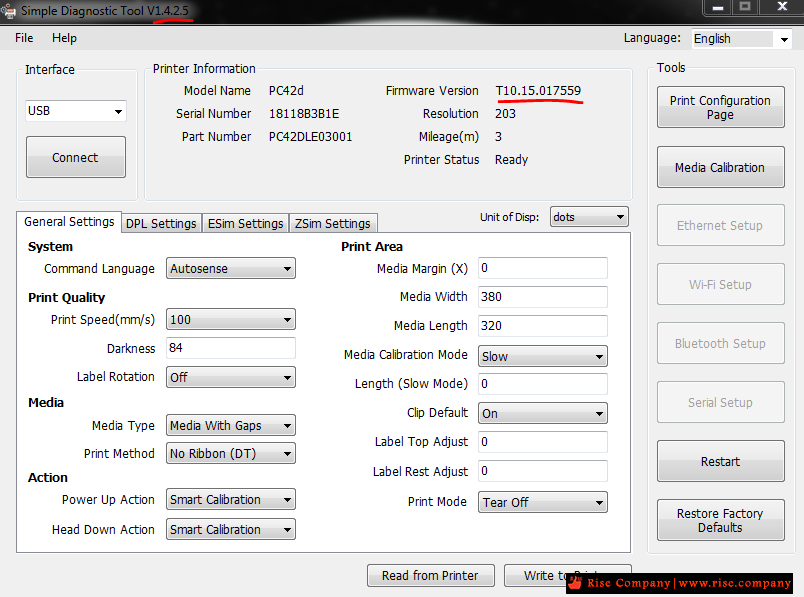
طابعة حرارية هانيويل Honeywell - PC42d Thermal Label Printer فريم وير Frimware v17
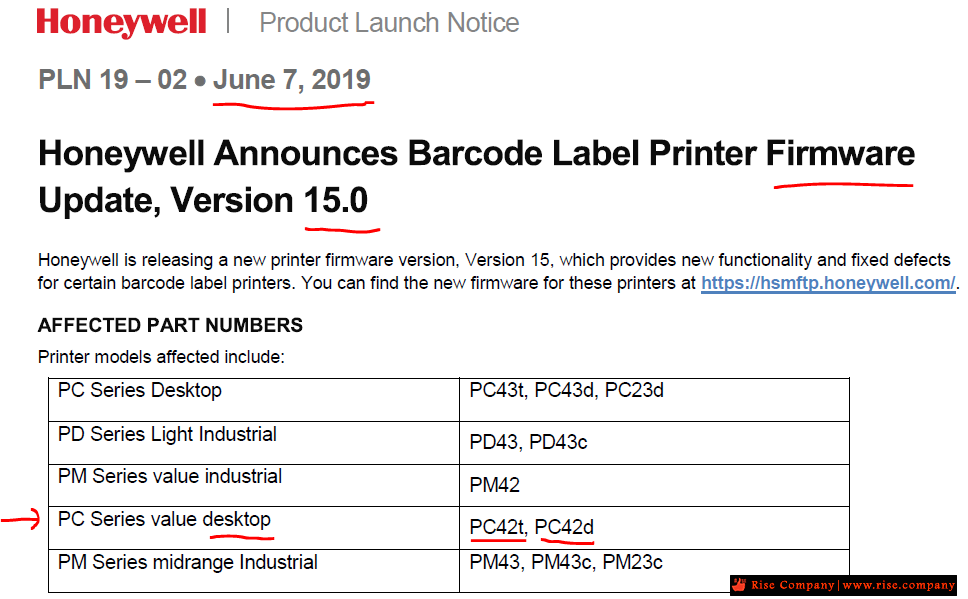
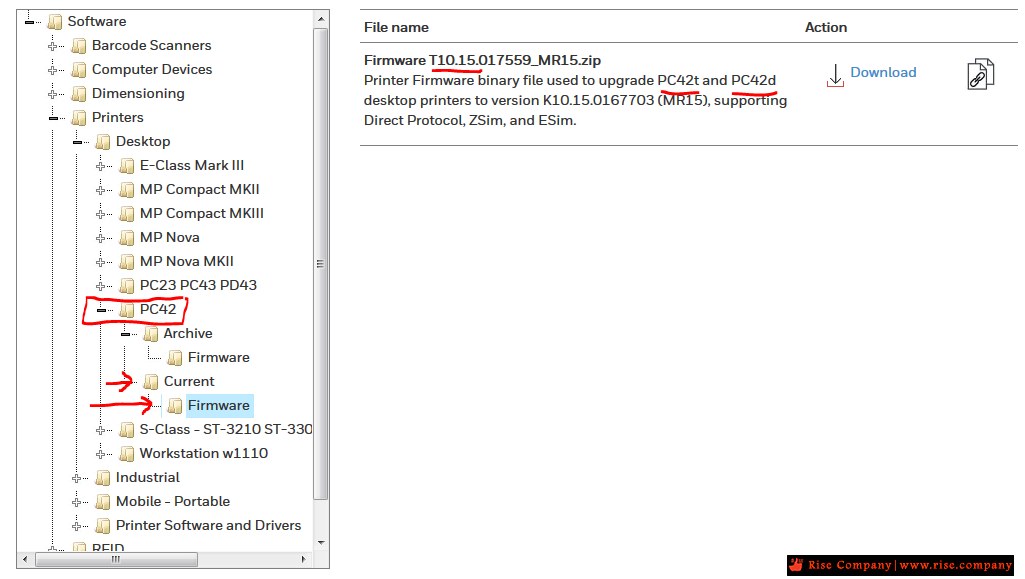
Printer Firmware version Firmware T10.15.017559_MR15.zip for PC42t and PC42d
Firmware T10.14.016554_MR14.4.zipفريم وير الطابعة الحرارية للملصقات هانيويل الامريكية pc42d
حل جميع مشاكل هانيويل الامريكية pc42d - حل مشكلة الطابعة هانيويل pc42d - تحديث - تطوير
فريم وير طابعة حرارية هانيويلFrimware Honeywell - PC42d Thermal Label Printer شهر 5 - 2021
-------------------------------------------------------------------
تحميل الفريم وير | اخر اصدار v17 بتاريخ 5-2021 من الشركة Honeywell
-------------------------------------------------------------------
فريم وير طابعة حرارية هانيويلFrimware Honeywell - PC42d Thermal Label Printer
Printer Firmware binary file used to upgrade PC42t and PC42d desktop printers to version K10.15.0167703 (MR15),
supporting Direct Protocol, ZSim, and ESim.
التحميل فى المرفقات
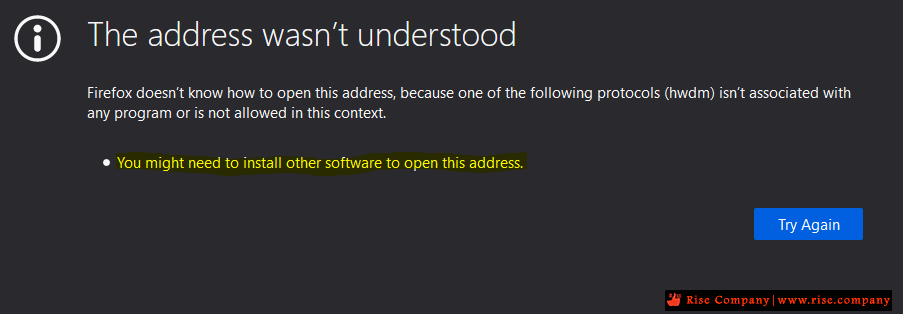
ملحوظة عند الضغط على تحميل لن يتحمل الملف وهيظهر خطا
والسبب !!
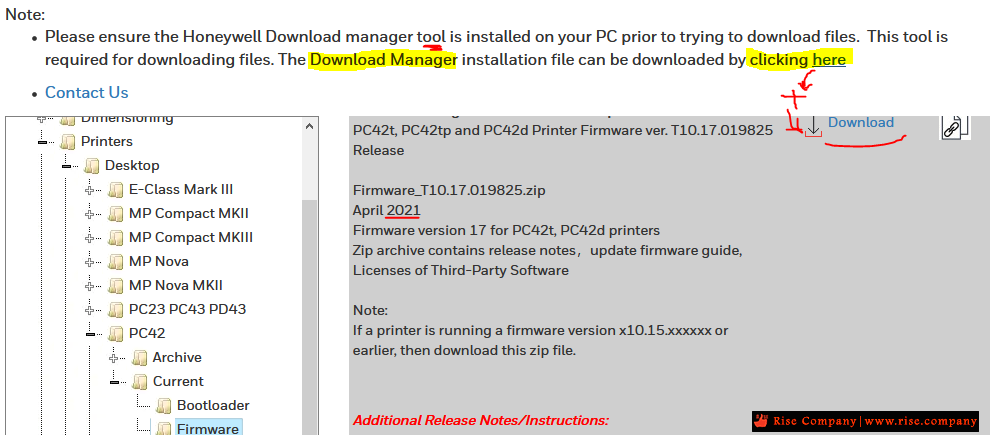
ان الشركة لها برنامج خاص Download Manager لتحميل الملفات يجب تثبيته اولا قبل تحميل Firmware
-------------------------------------------------------------------
خطوات تثبيت الفريم وير على الطابعة PC42d للترقية من v13 الى v15
-------------------------------------------------------------------
بعد تحميل الفريم وير يتم وضعه كما هو على فلاشة بنوع format fat32
ثم يتم غلق الطابعة ووضع الفلاشة ثم تشغيل الطابعة
هتجد فلاش باللون البرتقالي هيظل لمدة دقيقة تقريبا
بعدما يتحول الفلاش ويثبت الى اللون الاخضر قم بغلق الطابعة وازالة الفلاشة
وهتجد ان الترقية للفريم وير تمت بشكل سليم واصبح v15
الخطوات بالتفصيل :
Upgrade Firmware from a USB Storage Device
Use a USB storage device to upgrade the printer firmware
1 Make sure the USB storage device has a single partition and is
formatted as FAT16 or FAT32.
2 Download the printer firmware from the Honeywell website.
3 Copy the firmware upgrade file (typically a .bin format) to the root of a
USB storage device.
4 Turn off the printer.
5 Insert the USB storage device into one of the USB host ports.
6 Turn on the printer.
As the firmware upgrade file is loaded into the printer, the status LED
blinks orange. This process may take several minutes.
When the printer status LED turns solid green, the printer is ready to
use
المرجع:محلوظة : تم التحديث الى اصدار 17
Firmware_T10.17.019825.zip
April 2021
https://hsmftp.honeywell.com/
+ إنشاء موضوع جديد
النتائج 1 إلى 1 من 1
مشاهدة المواضيع
-
21-02-2020, 05:26 #1Status
- Offline

- تاريخ التسجيل
- Apr 2014
- الدولة
- Egypt
- المشاركات
- 4,703
 Engineering and Technology
- معدل تقييم المستوى
- 10
 طابعة هانيويل Honeywell - PC42d Printer فريم وير Frimware
------------------------------------------------------------------------
طابعة هانيويل Honeywell - PC42d Printer فريم وير Frimware
------------------------------------------------------------------------
شركة رايز للهندسة و التكنولوجيا Rise Company for Engineering & Technology
------------------------------------------------------------------------
Web Hosting | Web Designing | E-Marketing
رقم # 1 فى خدمات الشركات Business Services
استضافة مواقع Web Hosting - عمل ايميل شركة Business Emails
تصميم موقع شركة Web Design - تسويق الكترونى على جوجل Google Adwords
www.rise.company | www.rise.company/emails
ملحوظة : جميع خدماتنا مخصصة للشركات فقط وغير متاحة للافراد
وليس لنا اى منتجات او صيانة نهائيا! يرجى الانتباه الى ذلك.

 رد مع اقتباس
المواضيع المتشابهه
-
جميع الفريم وير Frimware للهيك فيجن Hik Vision خاص بـ DVR فقط
بواسطة Rise Company في المنتدى قسم كاميرات المراقبةمشاركات: 1آخر مشاركة: 30-03-2021, 23:23 -
طابعة هانيويل Honeywell - PC42d Printer التعريف Driver by Seagull | BarTender
بواسطة Rise Company في المنتدى قسم الطابعات وماكينات التصويرمشاركات: 0آخر مشاركة: 21-02-2020, 05:54 -
طابعة هانيويل Honeywell - PC42d Printer مشكلة طباعة 7 ليبل فاضي
بواسطة Rise Company في المنتدى قسم الطابعات وماكينات التصويرمشاركات: 0آخر مشاركة: 21-02-2020, 05:08 -
طابعة هانيويل Honeywell - PC42d Printer ليبل / ملصقات / باركود
بواسطة Rise Company في المنتدى قسم الطابعات وماكينات التصويرمشاركات: 0آخر مشاركة: 20-01-2020, 05:26 -
سينسور فل فريم vs سينسور كروب فريم , APS-H vs APS-C vs FF
بواسطة Rise Company في المنتدى قسم الفوتوغرافي Photographyمشاركات: 0آخر مشاركة: 25-05-2017, 13:32

المفضلات