

فيروس Virus ملفات Epicnet inc Cloudnet Virus و ملف C:/windows/rss
اختراق السيرفر من فيروس Epicnet inc Cloudnet Virus و ملف C:/windows/rss
Rootkits - Epicnet inc Cloudnet Virus. Help me delete it
How to uninstall Cloudnet from Windows 7/8/10
How to remove Cloudnet.exe CPU Miner (Virus Removal
Cloudnet Virus - Virus, Trojan, Spyware, and Malware
Cloudnet virus Removal Guide(Updated 2020)
Cannot uninstall Cloudnet- Removng CloudNet malware
Infected with CloudNet EpicNet Bitcoin Miner - Virus
How To Permanently Remove Cloudnet Virus
HELP! Rootkit and Cloudnet virus
-------------------------------------------------------
المشكلة :
-------------------------------------------------------
فيروس Epicnet inc Cloudnet لا يحذف على الرغم من استخدام الكثير من البرامج لحذفة
ولكن مع عمل ريستارت للكمبيوتر يجرع كما كان دون حذف, ناهيك عن انه يقوم
بحذف الانتى فايروس كامل, هل تصدق ؟ نعم فعلا, او غلقه او منع عمل اى اداء يعطل عمله
فلا تستغرب هذا الفيروس يستطيع اخذ جميع الباسوردات المخزنة بل جميع ملفاتك
بل عمل upload او Download وانت لا تشعر !!! هو اشبه بحرامي / سارق / جاسوس خفي !
ملحوظة :
هذه تجربة حقيقية على سيرفر شركة عند عميل لدينا,
مشكلة العميل هو وقف الانتى فايروس اكثر من مرة بدون سبب ثم
البرنامج الموجود كان Symantec قام بعمل له Disable اكثر من مره
وكذلك قام بوقف Smadav من خلال Allow Windows-Script & Office-Macro `(permanent)
و بعد تفعيل Smadav اكتشف البرنامج بان الهاكر قام برفع برامج تم العثور عليها فى Temp
تهدف جميعها اى معرفة باسوردات مختلفة, شاهد بنفسك تقرير Smad هنا :
واضح ان الهدف الاساسى هنا هو معرفة باسوردات المتصفحات + الشبكة + السيرفركود:=> Fine(Level 1) as : 1 Process -C:\Users\TEMP\Downloads\TRMSRV\User\BulletsPassView64.exe => Fine(Level 1) as : 1 Process -C:\Users\TEMP\Downloads\TRMSRV\User\netpass64.exe => Fine(Level 1) as : 1 Process -C:\Users\TEMP\Downloads\TRMSRV\User\PasswordFox64.exe => Fine(Level 1) as : 1 Process -C:\Users\TEMP\Downloads\TRMSRV\User\WirelessKeyView64.exe => Fine(Level 1) as : 1 Process -C:\Users\TEMP\Downloads\TRMSRV\User\ChromePass.exe => Fine(Level 1) as : 1 Process -C:\Users\TEMP\Downloads\TRMSRV\User\Dialupass.exe => Fine(Level 1) as : 1 Process -C:\Users\TEMP\Downloads\TRMSRV\User\empv.exe => Fine(Level 1) as : 1 Process -C:\Users\TEMP\Downloads\TRMSRV\User\iepv.exe => Fine(Level 1) as : 1 Process -C:\Users\TEMP\Downloads\TRMSRV\User\mailpv.exe => Fine(Level 1) as : 1 Process -C:\Users\TEMP\Downloads\TRMSRV\User\mspass.exe => Fine(Level 1) as : 1 Process -C:\Users\TEMP\Downloads\TRMSRV\User\NetRouteView.exe => Fine(Level 1) as : 1 Process -C:\Users\TEMP\Downloads\TRMSRV\User\OperaPassView.exe => Fine(Level 1) as : 1 Process -C:\Users\TEMP\Downloads\TRMSRV\User\PstPassword.exe => Fine(Level 1) as : 1 Process -C:\Users\TEMP\Downloads\TRMSRV\User\rdpv.exe => Fine(Level 1) as : 1 Process -C:\Users\TEMP\Downloads\TRMSRV\User\RouterPassView.exe => Fine(Level 1) as : 1 Process -C:\Users\TEMP\Downloads\TRMSRV\User\VNCPassView.exe => Fine(Level 1) as : 1 Process -C:\Users\TEMP\Downloads\TRMSRV\User\WebBrowserPassView.exe
عندما قمنا بتفعيل Smad مرة اخري ظنا منا انه كافي وبعد عمل اجراءات الحماية اللازمة
وجدنا ان الهاكر قام باخراج العميل من VPN و RDP ووضع نفسه مكان العميل بعد ان حذف Smadav تماما !!!
ومن هنا قمنا بمراجعة جميع ملفات النظام حتى عرفنا انه فايروس Epicnet inc Cloudnet Virus
لذلك جميع اجراءات الحماية مهما كانت وناكد مهما كانت لا تفيد مطلقا فى حالة الاصابة
حيث الحل الوحيد هو من خلال Safe Mode فقط وبالطبع انت لن تستطيع عمل اللازم
لتفادى الاصابة حيث ان الفايروس خفى بشكل احترافي, تخيل انه ياخذ اسم لنفس اسم النظام
اى تجد انه يبدل نفسه مكان services الويندوز وياخذ اسمها او مكانها.
كل ذلك كان فى وجود برنامج Symantec مع Smadav بالاضافة الى Firewall Fortigate
My computer currently infected with CloudNet EpicNet and malwarebytes detected it as Riskware.BitcoinMiner I try to delete them using malwarebytes but after every restart it will return if I scan them using Malwarebytes anyone can help please? i've tried using several anti malware program (on normal and safe mode) such as Malwarebytes, Adwcleaner, Spyhunter, and Eset Online Scanner but everytime i restart my pc, they just keep on going backthe uninstallation process of Cloudnet virus is not easier than any other malware removal. There is no particular application that can be removed from the machine manually, so the best option is anti-malware tools and system scans using those programs. Because malware can modify proxy settings, some users might have troubles when trying to remove Cloudnet.exe virus. Nevertheless, powerful security software should be able to perform the task in the Safe Mode.I had this EpicNet Inc Cloudnet Virus a month ago. I made a clean install of Windows last month and it was gone but lately I've seen the folder EpicNet Inc virus in my Appdata/Roaming and Appdata/Local folder again, as well as csrss folder inside temp containing folders ending in .exe but there isn't any certain .exe file I can delete manually.
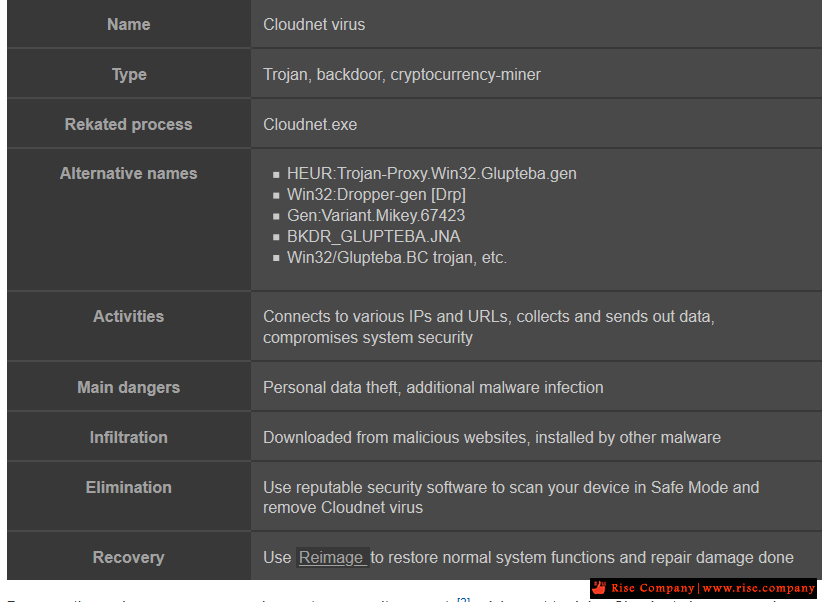
طريقة عمل فيروس Modus Operandi OF Cloudnet virus:
Once installed, Cloudnet virus starts modifying system settings to easily initiate its processes within background. Some of them are:
- Creating new path to the following location:”%Application Data%\EpicNet Inc\CloudNet\”;
- Add an executable file to the path: “%Application Data%\EpicNet Inc\CloudNet\cloudnet.exe”;
- Modifies Windows Registry keys and subkeys to ensure startup as the system boots;
- Downloads and uploads arbitrary files;
- Creates a “mutex” of its executable programs;
- Modify proxy settings and add new connection to communicate to its authors;
- Downloads and executes arbitrary files.
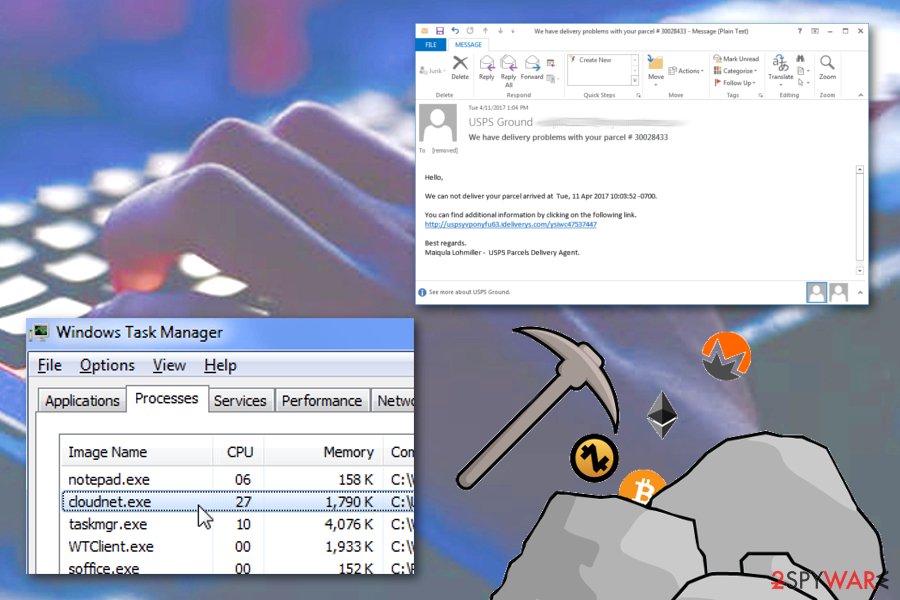
After the modifications are successfully done, Cloudnet virus initiates its activities on the target system. This trojan virus can be used for various purposes that can lead to frauds, data-stealing and running spam campaigns.
Once the system is infected with Cloudnet virus, it may carry out numerous tasks without the permission of users. Some of them are:
- Sending system related information(OS, memory, processor and threat version ) to remote servers.
- Steals all browsing and personal data and use them for illegal purposes.
- Connect the host machine to the hacker’s server and redirects users to malicious domains.
- Use the email address to spread spam mails attachments.
- Drop other harmful programs like crypto-miners (Jcecn.exe), spyware, ransomware and other threats.
As a results of the above activities, the the infected user can be a victim of identity frauds, monetary loss and so on. Although, it is hard to detect the presence of Cloudnet virus on the computer system. As it hides deeply inside the system and does various changes to the system settings.
Thus, if you have noticed any traces of Cloudnet virus on your computer like Cloudnet.exe processes taking huge CPU, fatal browser redirection or any unknown programs being installed, then you should run a scan immediately.
-------------------------------------------------------
حل المشكلة Cannot uninstall Cloudnet :
-------------------------------------------------------
او
طبعا الحل الامثل هو Windows System restore او حذف الويندوز كاملا ان استنطعت والا قم بالتالي
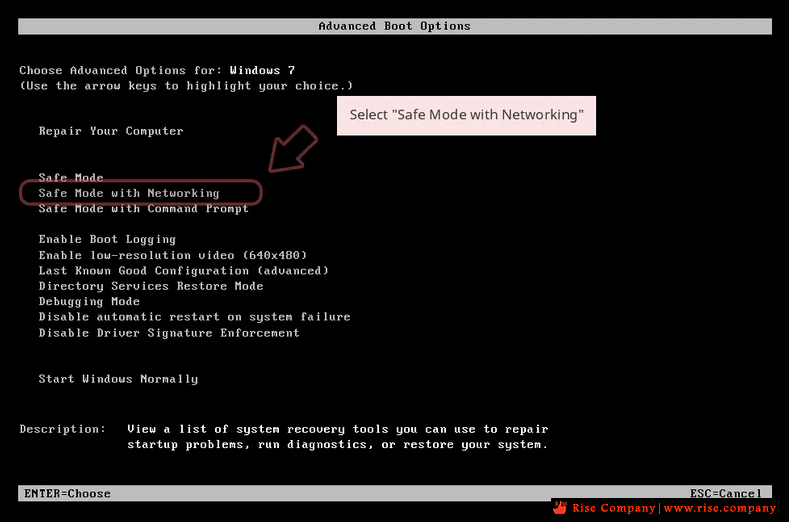
When your computer becomes active, start pressing F8 multiple times
until you see the Advanced Boot Options window
then Select Safe Mode with Networking from the list
لا بد ان تكون جميع محاولاتك داخل safe mode والا لن تجدى نفعا وناكد لازم برنامج ولا ينفع manual
Use Anti-Malware To Scan And Remove Cloudnet Virus (SpyHunter Recommended)”
لانه ليس مجرد ملف او اخر ولكن هناك سلسلة معقدة لن تستطيع العثور عليها الا ببرنامج
ونكرر لا بد فى مرحلة dos او safemode لان الفيروس بينشط اول start up بيتمyou need to delete the files, folders, Windows registry keys and registry values associated with CloudNet. These files, folders and registry elements are respectively listed in the Files, Folders, Registry Keys and Registry Values
قم بحذف جميع المتصفحات لديك اولا ثم استخدم البرامج
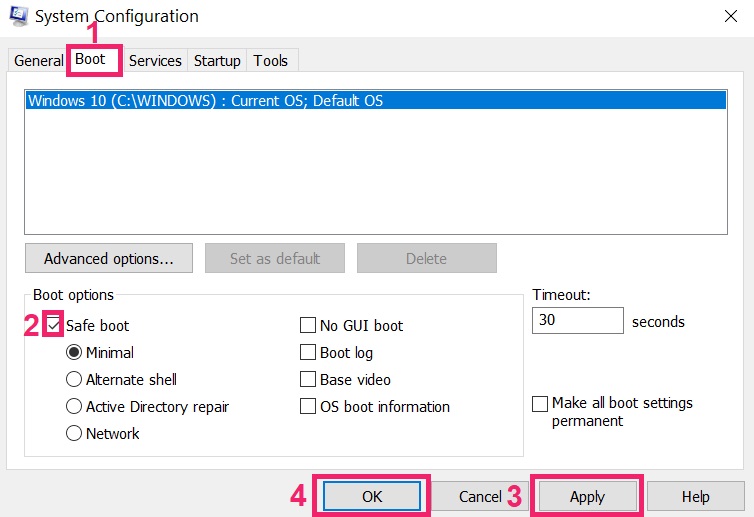
In some cases Cloudnet won’t uninstall and gives you message that “You do not have sufficient access to uninstall Cloudnet. Please, contact your system administrator” when you try to remove it from Control Panel or “Access denied” error when removing Cloudnet folder and files. This happens, because some process or service does not allow you to do it. In this case I will recommend you to use SpyHunter 4 or Malwarebytes AntiMalware or uninstall Cloudnet in Safe Mode. To boot in Safe Mode do the following:
Reboot your computer.
While it starts booting type F8 button.
This will open Advanced Boot Options menu.
Choose Safe Mode and wait until Windows loads.
Go to Control Panel > Uninstall a program and remove Cloudnet
-------------------------------------------------------
هل csrss.exe فيروس ام لا ؟
-------------------------------------------------------
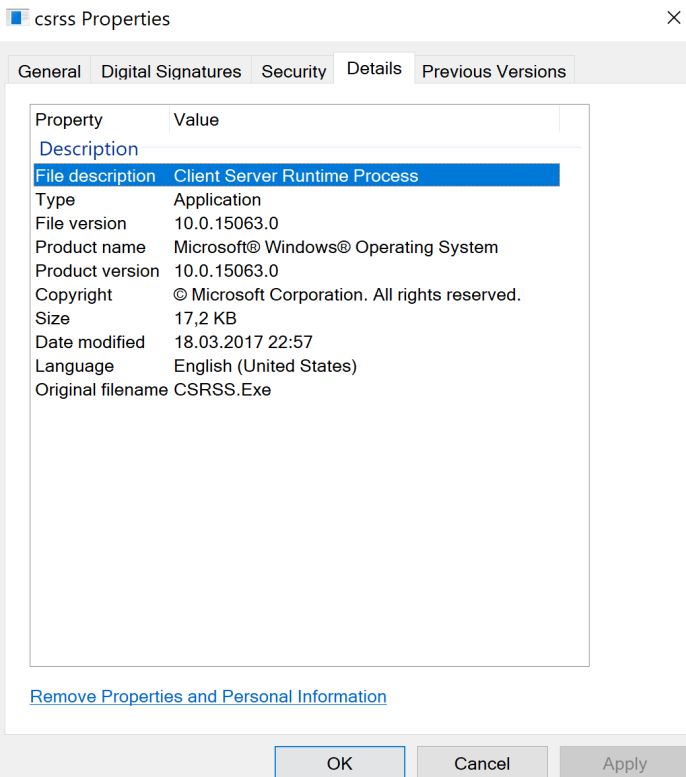
Csrss.exe is a safe Microsoft process which is need it to help managing the majority of the graphical instruction
sets under the Windows operating system. This file is located in the C:\Windows\System32/.
The Csrss.exe Microsoft Windows executable file is labeled as: Client Runtime Server Process.
Because Csrss.exe is used as a common system process, some malware often uses a process name of “Csrss.exe” to disguise itself. The original system file Csrss.exe is located in C:\Windows\System32 folder. Any file named “Csrss.exe” located in other folder can be considered as a malware.
There are numerous virus hoaxes that claim that csrss.exe is malware and should be removed to prevent damage to the system; these are false, as removing csrss.exe or killing the csrss.exe process will result in a Blue Screen of Death.
In addition, technical support scammers pretending to be Microsoft representatives are known to use csrss.exe as “proof” of a virus infection, and convince the user being scammed into purchasing their rogue security software to remove it.
How does the Csrss.exe malware behave?
Due to the generic nature of this infection, methods of installation may vary. The Csrss.exe infections may often install themselves by copying their executable to the Windows or Windows system folders, and then modifying the registry to run this file at each system start. Csrss.exe will often modify the following subkey in order to accomplish this:
HKEY_LOCAL_MACHINE\Software\Microsoft\Windows\Curr entVersion\Run
If your computer is infected with the Csrss.exe virus, this infection may contact a remote host for the following purposes:
- To report a new infection to its author
- To receive configuration or other data
- To download and execute arbitrary files (including updates or additional malware)
- To receive instruction from a remote attacker
- To upload data taken from the affected computer
How do I know if Csrss.exe is malicious or not?
Because Csrss.exe is a common process in the Task Manager, malware programs sometimes mask themselves by running under the same process name of Csrss.exe. Other times, a malware program may run, or inject, its service into an already running Csrss.exe process. In either case, this masking action can make it difficult to detect and remove these malware programs.
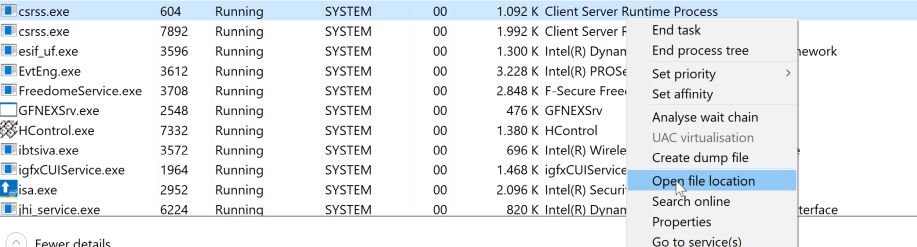
The easiest way to see if your computer is infected with malware running under the “Csrss.exe” name, is to open your Windows Task Manager by pressing CTRL + ALT + DEL on your keyboard,
the right-click on the Csrss.exe which you suspect is malware, and then click on “Open file location”
The Csrss.exe from Windows should be located in the C:\Windows\System32 folder.
Any file named “Csrss.exe” located in other folder can be considered as a malware.
فى الغالب الفيروس هيكون هنا فى C:\Windows\rss\csrss.exe
وهذا هو فيروس Rootkits مجموعة من أدوات البرامج التي تمكن المستخدم
غير المصرح له من التحكم في نظام الكمبيوتر دون أن يتم اكتشافه.
المرجع:
https://www.bleepingcomputer.com/for...-me-delete-it/
https://www.bleepingcomputer.com/for...bitcoin-miner/
https://unboxhow.com/cybersecurity/r...cloudnet-virus
https://win10supports.com/how-to-com...on-windows-10/
https://www.exterminate-it.com/malpedia/remove-cloudnethttps://sensorstechforum.com/cloudne...ner-remove-pc/
https://www.bleepingcomputer.com/for...in-rss-folder/
https://malwaretips.com/blogs/remove-csrss-exe/
https://answers.microsoft.com/en-us/...5-de56a0ec080a
+ إنشاء موضوع جديد
النتائج 1 إلى 2 من 2
-
15-04-2020, 18:23 #1Status
- Offline

- تاريخ التسجيل
- Apr 2014
- الدولة
- Egypt
- المشاركات
- 4,703
 Engineering and Technology
- معدل تقييم المستوى
- 10
 فيروس Virus ملفات Epicnet inc Cloudnet Virus و ملف C:/windows/rss
------------------------------------------------------------------------
فيروس Virus ملفات Epicnet inc Cloudnet Virus و ملف C:/windows/rss
------------------------------------------------------------------------
شركة رايز للهندسة و التكنولوجيا Rise Company for Engineering & Technology
------------------------------------------------------------------------
Web Hosting | Web Designing | E-Marketing
رقم # 1 فى خدمات الشركات Business Services
استضافة مواقع Web Hosting - عمل ايميل شركة Business Emails
تصميم موقع شركة Web Design - تسويق الكترونى على جوجل Google Adwords
www.rise.company | www.rise.company/emails
ملحوظة : جميع خدماتنا مخصصة للشركات فقط وغير متاحة للافراد
وليس لنا اى منتجات او صيانة نهائيا! يرجى الانتباه الى ذلك.
-
15-04-2020, 20:44 #2Status
- Offline
- تاريخ التسجيل
- Apr 2014
- الدولة
- Egypt
- المشاركات
- 4,703
Engineering and Technology
- معدل تقييم المستوى
- 10
رد: فيروس Virus ملفات Epicnet inc Cloudnet Virus و ملف C:/windows/rss
You have 2 ways to remove CLOUDNET.EXE:
1. Remove Automatically.
2. Remove Manually.
Why I recommend you to use an automatic way?
- You know only one virus name: "CLOUDNET.EXE", but usually you have infected by a bunch of viruses. The UnHackMe program detects this threat and all others.
- UnHackMe is quite fast! You need only 5 minutes to check your PC.
- UnHackMe uses the special features to remove hard in removal viruses. If you remove a virus manually, it can prevent deleting using a self-protecting module. If you even delete the virus, it may recreate himself by a stealthy module.
- UnHackMe is small and compatible with any antivirus.
- UnHackMe is fully free for 30-days!
Here’s how to remove CLOUDNET.EXE virus automatically:
STEP 1: Install UnHackMe (1 minute)
STEP 2: Scan for malware using UnHackMe (1 minute)
STEP 3: Remove CLOUDNET.EXE virus (3 minutes)
So it was much easier to fix such problem automatically, wasn't it? That is why I strongly advise you to use UnHackMe for remove CLOUDNET.EXE redirect or other unwanted software.
How to remove CLOUDNET.EXE manually:
STEP 1: Check all shortcuts of your browsers on your desktop, taskbar and in the Start menu. Right click on your shortcut and change it's properties. https://CLOUDNET.EXE
You can see CLOUDNET.EXE at the end of shortcut target (command line). Remove it and save changes. In addition, check this command line for fake browser's trick.
For example, if a shortcut points to Google Chrome, it must have the path:
C:\Program Files (x86)\Google\Chrome\Application\chrome.exe.
Fake browser may be: ...\Appdata\Roaming\HPReyos\ReyosStarter3.exe.
Also the file name may be: "chromium.exe" instead of chrome.exe.
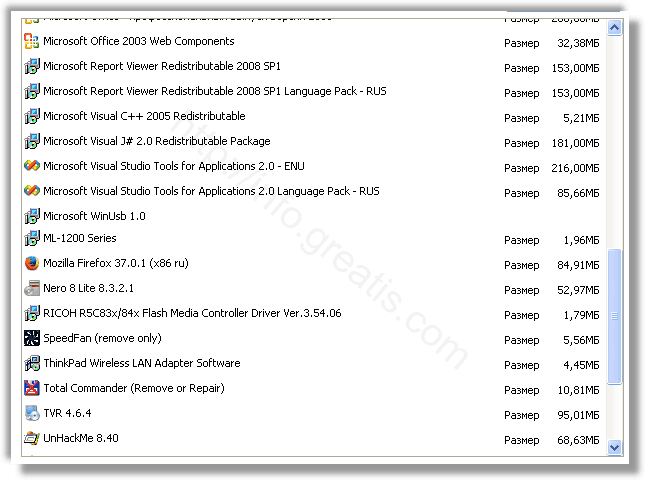
STEP 2: Investigate the list of installed programs and uninstall all unknown recently installed programs.
STEP 3: Open Task Manager and close all processes, related to CLOUDNET.EXE in their description. Discover the directories where such processes start. Search for random or strange file names.
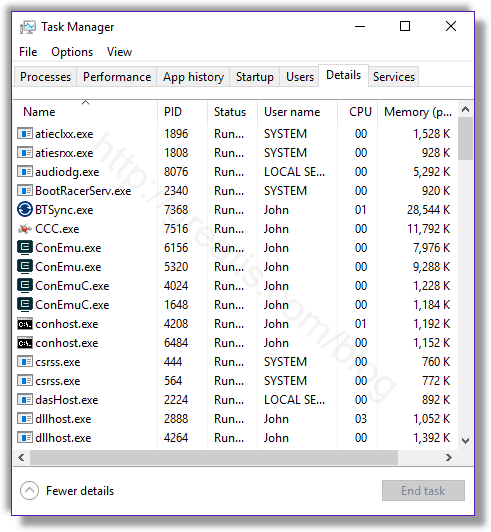
Remove CLOUDNET.EXE virus from running processes[/caption]
STEP 4: Inspect the Windows services. Press Win+R, type in: services.msc and press OK.
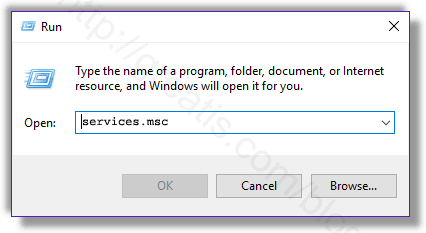
Remove CLOUDNET.EXE virus from Windows services[/caption]
Disable the services with random names or contains CLOUDNET.EXE in it's name or description.
STEP 5: After that press Win+R, type in: taskschd.msc and press OK to open Windows Task Scheduler.
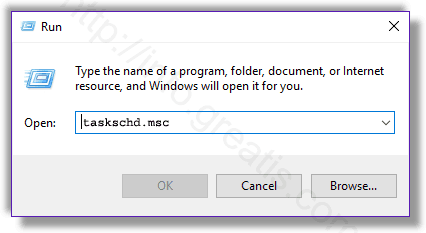
Delete any task related to CLOUDNET.EXE. Disable unknown tasks with random names.
STEP 6: Clear the Windows registry from CLOUDNET.EXE virus.
Press Win+R, type in: regedit.exe and press OK.
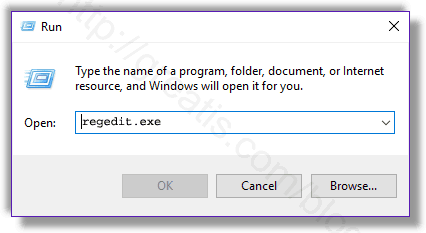
Remove CLOUDNET.EXE virus from Windows registry[/caption]
Find and delete all keys/values contains CLOUDNET.EXE.
STEP 7: Remove CLOUDNET.EXE from Google Chrome.
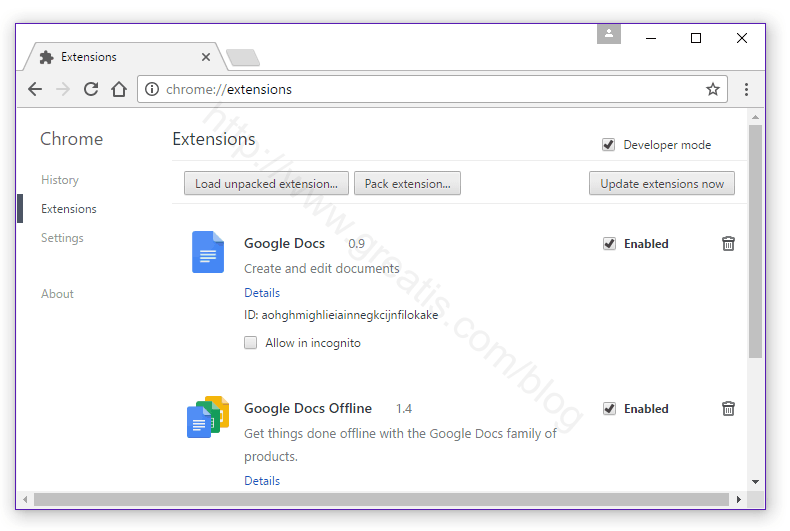
STEP 8: Remove CLOUDNET.EXE from Internet Explorer.
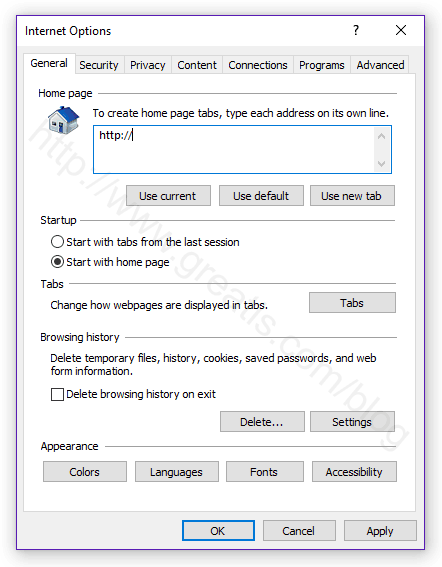
Set Internet Explorer Homepage[/caption]
STEP 9: Remove CLOUDNET.EXE from Mozilla Firefox.
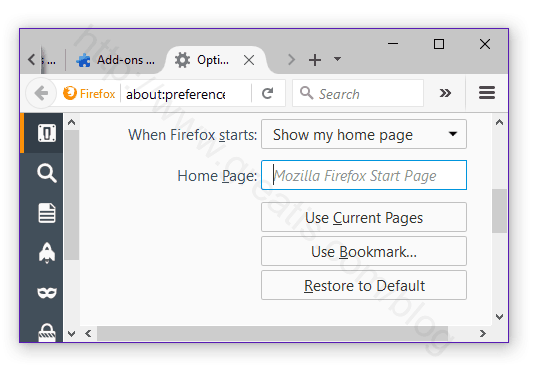
Change Firefox Home Page[/caption]
STEP 10: And at the end, clear your basket, temporal files, browser's cache.
But if you miss any of these steps and only one part of virus remains - it will come back again immediately or after reboot.
------------------------------------------------------------------------
شركة رايز للهندسة و التكنولوجيا Rise Company for Engineering & Technology
------------------------------------------------------------------------
Web Hosting | Web Designing | E-Marketing
رقم # 1 فى خدمات الشركات Business Services
استضافة مواقع Web Hosting - عمل ايميل شركة Business Emails
تصميم موقع شركة Web Design - تسويق الكترونى على جوجل Google Adwords
www.rise.company | www.rise.company/emails
ملحوظة : جميع خدماتنا مخصصة للشركات فقط وغير متاحة للافراد
وليس لنا اى منتجات او صيانة نهائيا! يرجى الانتباه الى ذلك.

المواضيع المتشابهه
-
فيروس Virus ؟ هل found.000 هو فيروس ام فولدر ؟ found.000 virus or folder
بواسطة Rise Company في المنتدى قسم الانتى فيروس Virusesمشاركات: 0آخر مشاركة: 15-04-2020, 18:14 -
احذر ! برنامج كلوفر تاب clover tabs من ejie.me بداخله فيروس Virus trojan
بواسطة Rise Company في المنتدى قسم الانتى فيروس Virusesمشاركات: 0آخر مشاركة: 15-04-2020, 07:56 -
فيروس الفدية Ransomware فيروس جيرو gero virus ازالة وفك التشفير Decrypt
بواسطة Rise Company في المنتدى قسم الانتى فيروس Virusesمشاركات: 0آخر مشاركة: 28-08-2019, 04:18 -
فيروس الفدية Ransomware فيروس ليتر Litar virus ازالة وفك التشفير Decrypt
بواسطة Rise Company في المنتدى قسم الانتى فيروس Virusesمشاركات: 0آخر مشاركة: 16-07-2019, 12:25 -
فيروس الفدية Ransomware فيروس وانا كراى WCRY Virus تقرير و وقاية شاملة
بواسطة Rise Company في المنتدى قسم الانتى فيروس Virusesمشاركات: 0آخر مشاركة: 14-05-2017, 15:34

المفضلات