


السي بانال WHM حل مشكلة امتلاء مساحة temp وتفعيل inode usage
How to check the Inode usage for an account in cPanel server?
Disk Usage Vs. Inodes Usage - How to display inode usage in cPanel
We can enable inode usage for cPanel through WHM
First Login to WHM Control Panel.
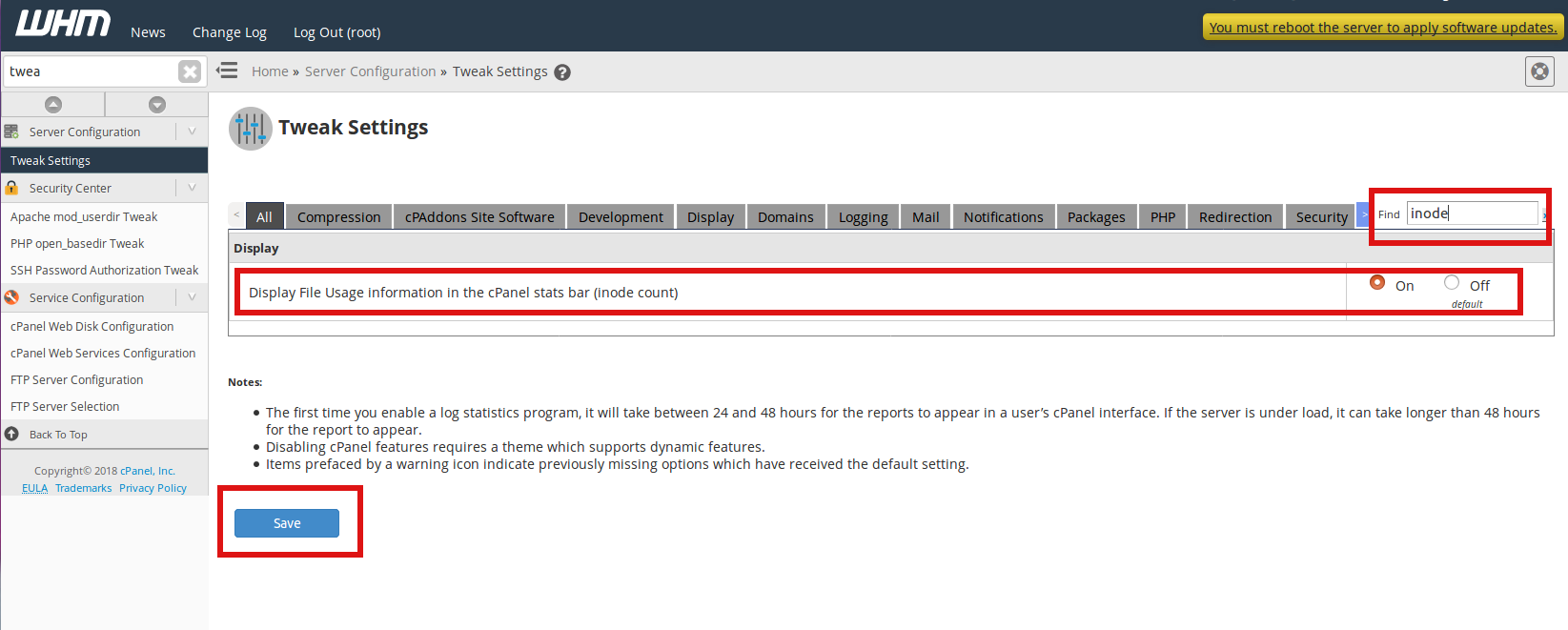
WHM >> Server Configuration >> Tweak Settings >>
Display File Usage information in the cPanel stats bar (inode count)
Search with term inode and click On button to enable inode count and click Save button.
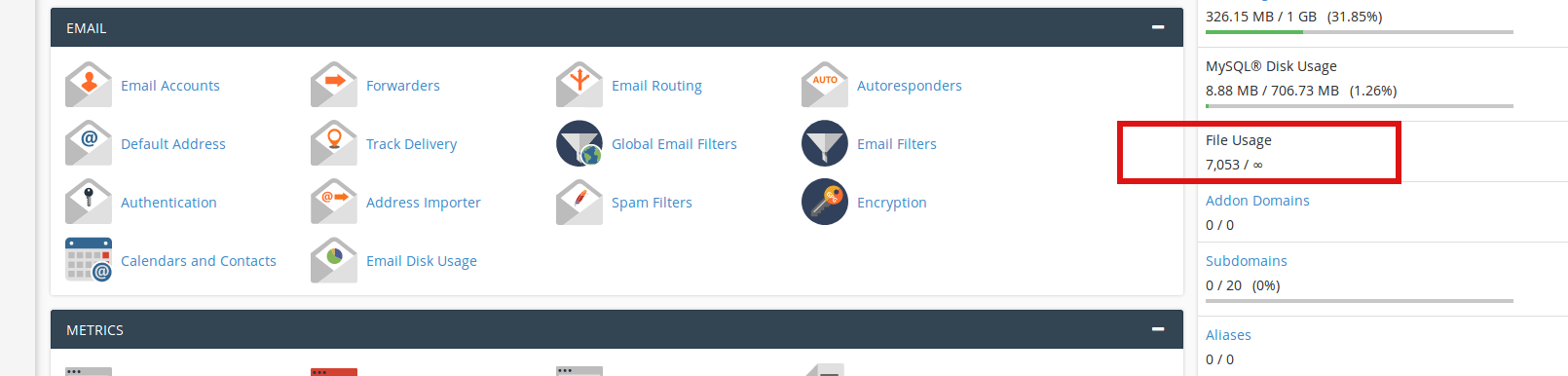
Now you can see the ‘File Usage’ stat as shown in the screenshot below which is the Inode usage of your account.
Every time a file is opened, the file’s inode is read by the kernel of the server.
The more files/folders you have, the more inodes you use. And the more inodes you use, the more system resources your account consumes.
First of all, let me briefly explain about Inode. Index Node (inode) is a basic concept in Linux/Unix. Index node/number (inode) is a data structure which contain the information about a file in your server/hosting account.
Inode save the information such as user and group ownerships, access mode (read, write, execute permissions) and file type.
Number of inodes indicates the number of files and folders in your account. Every file like a webpage, image file, an email, cache file etc will count as 1 inode.
100% Inode usage
If your account has reached/exceeded the Inode usage and you’re not sure about the reason for this. Don’t worry. Here’s the solution for this! If the account has reached the maximum inodes allocated for your account then it’ll affect your account, website and email performance.
You won’t be able to send/receive new emails, you won’t be able to upload a new file to your account. Hence it’ll affect the total performance of your account.
How to know what’s eating up the inodes?
If you have SSH access to your account the following commands will help you to understand the inode usage in your hosting account.
Check from SSH Login.
Check inodes usage
How to reduce Inode usage in your account?كود:df -i
Here’re some suggestions to reduce the inode usage in your account.
This will delete all files over 12 hours old. Next, we will configure your server to do this automatically.كود:/usr/sbin/tmpwatch -am 12 /tmp
1. Remove all unnecessary files and folders from your account.
Using FileManager you can remove unnecessary files/folders from your account.If you have the backups stored in your root directory, that is /home/user; you can download it to your local machine using FTP or FileManager.
2. Remove cache files
Certain CMS like Joomla will store lot of cached files which are used to improve the performance of your website. If there’re large amount of cache files, you can use the purge functionality to clear the cache folders. This can be done via administrator panel.
3. Archive your emails
Emails will also add inode to your account. If you’re storing all emails in the server which you think as important emails you can archive emails like emails which are older than 6 months and you can download it your local machine.
If you have enabled Default Address (catch all) for your account, you should regularly check the mailbox and clear all the unwanted emails. You need to delete all the unusing email accounts. Also you should check your email accounts and need to delete spam emails.
4. Other usage
If your account still uses large number of files you can take a look at the “Disk Usage” from cPanel.
cPanel >> Files >> Disk Space Usage
This will give you the information regarding the disk used by your account.
المرجع:
https://blog.hostonnet.com/how-to-di...sage-in-cpanel
https://www.crybit.com/inode-usage-f...-cpanel-server
https://manage.accuwebhosting.com/kn...mand-line.html
+ إنشاء موضوع جديد
النتائج 1 إلى 5 من 5
العرض المتطور
-
08-07-2021, 01:09 #1Status
- Offline

- تاريخ التسجيل
- Apr 2014
- الدولة
- Egypt
- المشاركات
- 4,703
 Engineering and Technology
- معدل تقييم المستوى
- 10
 السي بانال WHM حل مشكلة امتلاء مساحة temp وتفعيل inode usage
------------------------------------------------------------------------
السي بانال WHM حل مشكلة امتلاء مساحة temp وتفعيل inode usage
------------------------------------------------------------------------
شركة رايز للهندسة و التكنولوجيا Rise Company for Engineering & Technology
------------------------------------------------------------------------
Web Hosting | Web Designing | E-Marketing
رقم # 1 فى خدمات الشركات Business Services
استضافة مواقع Web Hosting - عمل ايميل شركة Business Emails
تصميم موقع شركة Web Design - تسويق الكترونى على جوجل Google Adwords
www.rise.company | www.rise.company/emails
ملحوظة : جميع خدماتنا مخصصة للشركات فقط وغير متاحة للافراد
وليس لنا اى منتجات او صيانة نهائيا! يرجى الانتباه الى ذلك.
-
28-07-2021, 23:09 #2Status
- Offline
- تاريخ التسجيل
- Apr 2014
- الدولة
- Egypt
- المشاركات
- 4,703
Engineering and Technology
- معدل تقييم المستوى
- 10
رد: السي بانال WHM حل مشكلة امتلاء مساحة temp وتفعيل inode usage
du -sh /var/lib/mysql/*------------------------------------------------------------------------
شركة رايز للهندسة و التكنولوجيا Rise Company for Engineering & Technology
------------------------------------------------------------------------
Web Hosting | Web Designing | E-Marketing
رقم # 1 فى خدمات الشركات Business Services
استضافة مواقع Web Hosting - عمل ايميل شركة Business Emails
تصميم موقع شركة Web Design - تسويق الكترونى على جوجل Google Adwords
www.rise.company | www.rise.company/emails
ملحوظة : جميع خدماتنا مخصصة للشركات فقط وغير متاحة للافراد
وليس لنا اى منتجات او صيانة نهائيا! يرجى الانتباه الى ذلك.
-
28-07-2021, 23:11 #3Status
- Offline
- تاريخ التسجيل
- Apr 2014
- الدولة
- Egypt
- المشاركات
- 4,703
Engineering and Technology
- معدل تقييم المستوى
- 10
رد: السي بانال WHM حل مشكلة امتلاء مساحة temp وتفعيل inode usage
du -sh /var/lib/*------------------------------------------------------------------------
شركة رايز للهندسة و التكنولوجيا Rise Company for Engineering & Technology
------------------------------------------------------------------------
Web Hosting | Web Designing | E-Marketing
رقم # 1 فى خدمات الشركات Business Services
استضافة مواقع Web Hosting - عمل ايميل شركة Business Emails
تصميم موقع شركة Web Design - تسويق الكترونى على جوجل Google Adwords
www.rise.company | www.rise.company/emails
ملحوظة : جميع خدماتنا مخصصة للشركات فقط وغير متاحة للافراد
وليس لنا اى منتجات او صيانة نهائيا! يرجى الانتباه الى ذلك.
-
28-07-2021, 23:11 #4Status
- Offline
- تاريخ التسجيل
- Apr 2014
- الدولة
- Egypt
- المشاركات
- 4,703
Engineering and Technology
- معدل تقييم المستوى
- 10
رد: السي بانال WHM حل مشكلة امتلاء مساحة temp وتفعيل inode usage
du -sh /var/lib/*For find top 5 folder by usage:
du -Sh | sort -rh | head -5
For find top 5 files
du -hs * | sort -rh | head -5------------------------------------------------------------------------
شركة رايز للهندسة و التكنولوجيا Rise Company for Engineering & Technology
------------------------------------------------------------------------
Web Hosting | Web Designing | E-Marketing
رقم # 1 فى خدمات الشركات Business Services
استضافة مواقع Web Hosting - عمل ايميل شركة Business Emails
تصميم موقع شركة Web Design - تسويق الكترونى على جوجل Google Adwords
www.rise.company | www.rise.company/emails
ملحوظة : جميع خدماتنا مخصصة للشركات فقط وغير متاحة للافراد
وليس لنا اى منتجات او صيانة نهائيا! يرجى الانتباه الى ذلك.
-
28-07-2021, 23:28 #5Status
- Offline
- تاريخ التسجيل
- Apr 2014
- الدولة
- Egypt
- المشاركات
- 4,703
Engineering and Technology
- معدل تقييم المستوى
- 10
رد: السي بانال WHM حل مشكلة امتلاء مساحة temp وتفعيل inode usage
#cd /
#du -sh *
#df -h------------------------------------------------------------------------
شركة رايز للهندسة و التكنولوجيا Rise Company for Engineering & Technology
------------------------------------------------------------------------
Web Hosting | Web Designing | E-Marketing
رقم # 1 فى خدمات الشركات Business Services
استضافة مواقع Web Hosting - عمل ايميل شركة Business Emails
تصميم موقع شركة Web Design - تسويق الكترونى على جوجل Google Adwords
www.rise.company | www.rise.company/emails
ملحوظة : جميع خدماتنا مخصصة للشركات فقط وغير متاحة للافراد
وليس لنا اى منتجات او صيانة نهائيا! يرجى الانتباه الى ذلك.

 رد مع اقتباس
المواضيع المتشابهه
-
السي بانال WHM/CPanel حل مشكلة امتلاء tmp folder 100% full - رسالة DISKCRITICAL
بواسطة Rise Company في المنتدى رايز للاستضافة Rise Hostمشاركات: 0آخر مشاركة: 29-06-2021, 03:51 -
السي بانال CPanel حل مشكلة امتلاء مساحة WHM Swap Used 100%
بواسطة Rise Company في المنتدى رايز للاستضافة Rise Hostمشاركات: 0آخر مشاركة: 10-01-2021, 22:47 -
السي بانال CPanel حل مشكلة امتلاء البوت boot partition is nearly 98% full
بواسطة Rise Company في المنتدى رايز للاستضافة Rise Hostمشاركات: 0آخر مشاركة: 08-07-2020, 01:35 -
السي بانال CPanel خاصية cpu and concurrent connection usage
بواسطة Rise Company في المنتدى رايز للاستضافة Rise Hostمشاركات: 0آخر مشاركة: 23-06-2020, 21:45 -
حل مشكلة امتلاء مساحة السيرفر و فحص جميع الملفات Server Disk Usage full
بواسطة Rise Company في المنتدى قسم الشل SSH / SFTPمشاركات: 1آخر مشاركة: 09-01-2018, 06:26

المفضلات