

السي بانال WHM/CPanel كرون Cron تفريغ تلقائى clean /tmp
DISKCRITICAL files Mount Point “/var/tmp” Disk usage warning
cpanel /tmp” reached “critical” status - whm server has full inodes
How to clean /tmp on Centos/cPanel server?
Open SSH to your server, if SSH will not connect due to disk space full in tmp,
reboot your server in cloud server manager then try again.
Once connected run the following command.
Once tmpwatch is installed run command.كود:yum install tmpwatch -y
This will delete all files over 12 hours old. Next, we will configure your server to do this automatically.كود:/usr/sbin/tmpwatch -am 12 /tmp
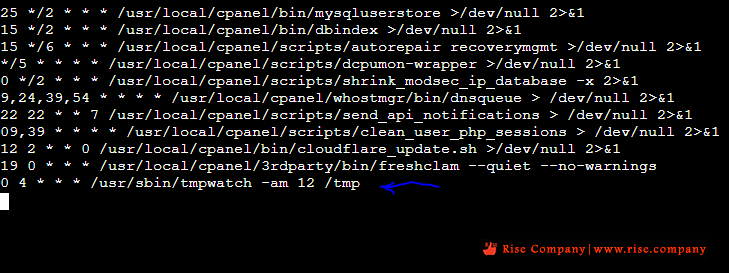
Go to the very bottom and paste.كود:EDITOR=nano crontab -e
كود:0 4 * * * /usr/sbin/tmpwatch -am 12 /tmp
Then press Control+X (on PC) or Command+x (on Mac) you will get confirmation do you want to save.
Type Y for yes, and press enter.
The Location for the crontab for root, /var/spool/cron so you can add the line by using CSE.
You can remove the session file using the following command.
The filesystem “/var/tmp” mounted at “/var/tmp” reached “warn” status because you currently use 84.29% of its available blocks.كود:# cd /tmp # rm -rf sess_*
---------------------------------------------------
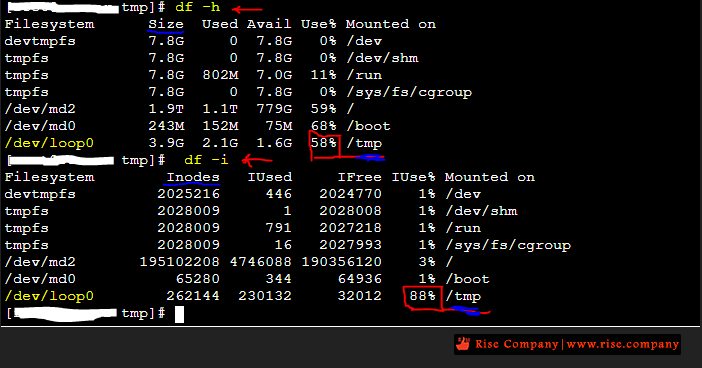
للتحقق من المساحة
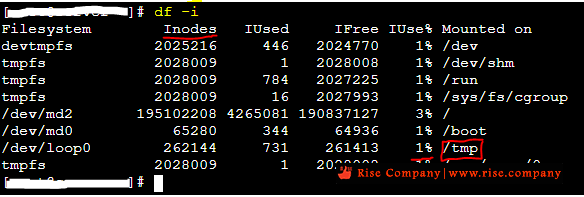
للتحقق من المساحة فى tmp للـ inodes او size الاساسي
كود:df -iشاهد ايضاكود:df -h
كود مشاهدة الكرون cron في السي بانل Whm / Cpanel CSF Firewall
السي بانال WHM حل مشكلة امتلاء مساحة temp وتفعيل inode usage
السي بانال WHM/CPanel حل مشكلة امتلاء tmp folder 100% full - رسالة DISKCRITICAL
المرجع:
https://www.ucartz.com/clients/index...el-server.html
+ إنشاء موضوع جديد
النتائج 1 إلى 1 من 1
-
29-07-2021, 01:32 #1Status
- Offline

- تاريخ التسجيل
- Apr 2014
- الدولة
- Egypt
- المشاركات
- 4,703
 Engineering and Technology
- معدل تقييم المستوى
- 10
 السي بانال WHM/CPanel كرون Cron تفريغ تلقائى clean /tmp
------------------------------------------------------------------------
السي بانال WHM/CPanel كرون Cron تفريغ تلقائى clean /tmp
------------------------------------------------------------------------
شركة رايز للهندسة و التكنولوجيا Rise Company for Engineering & Technology
------------------------------------------------------------------------
Web Hosting | Web Designing | E-Marketing
رقم # 1 فى خدمات الشركات Business Services
استضافة مواقع Web Hosting - عمل ايميل شركة Business Emails
تصميم موقع شركة Web Design - تسويق الكترونى على جوجل Google Adwords
www.rise.company | www.rise.company/emails
ملحوظة : جميع خدماتنا مخصصة للشركات فقط وغير متاحة للافراد
وليس لنا اى منتجات او صيانة نهائيا! يرجى الانتباه الى ذلك.

 رد مع اقتباس
المواضيع المتشابهه
-
كود مشاهدة الكرون cron في السي بانل Whm / Cpanel CSF Firewall
بواسطة Rise Company في المنتدى قسم فايروول CSFمشاركات: 1آخر مشاركة: 19-07-2021, 16:45 -
السي بانال WHM/CPanel تراخيص السيرفر الجديدة cPanel Account Tiers Licenses
بواسطة Rise Company في المنتدى رايز للاستضافة Rise Hostمشاركات: 0آخر مشاركة: 07-06-2021, 23:19 -
السي بانال WHM/CPanel الاستايل الزجاجي الجديد cpanel glass theme
بواسطة Rise Company في المنتدى رايز للاستضافة Rise Hostمشاركات: 0آخر مشاركة: 15-05-2021, 06:22 -
السي بانال WHM/CPanel غلق disable ONLY_FULL_GROUP_BY in MySQL
بواسطة Rise Company في المنتدى قسم قواعد البيانات DataBaseمشاركات: 0آخر مشاركة: 07-04-2021, 16:03 -
السي بانال CPanel تحديد وقت اخذ الباك اب التلقائي whm set backup time من Cron
بواسطة Rise Company في المنتدى رايز للاستضافة Rise Hostمشاركات: 0آخر مشاركة: 01-01-2021, 01:55

المفضلات